The Most Useful Maps are Here
- By
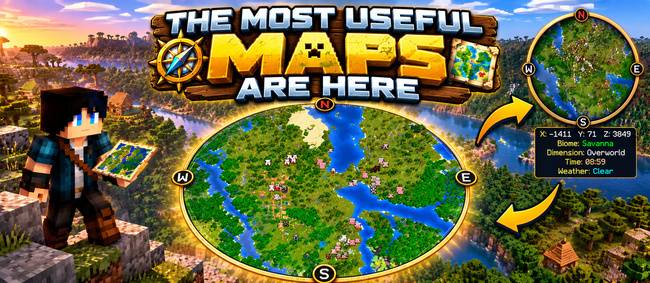
A round, turning minimap with your coordinates, biome, time and weather, plus one key that swaps it for a huge Large Map, solid or see-through, so you can walk with the map open.
AndyMFAMinecraft | The Most Useful...
Create a server, get 25% off your first month

The Most Useful Maps are Here
A clean, simple map mod with one big difference: press a key and a huge map appears over your screen. Have it solid, or transparent so you can keep walking and still see where you are going.
No menus full of settings. Just a great minimap and a Large Map, ready to go.
🧭 The Minimap
A round map tucked into the top-right corner.
- Turns with you, like a sat-nav. The N, E, S and W markers travel round the ring as you turn.
- A small crosshair marks exactly where you are standing.
- Sharp and detailed. One pixel per block, with colours taken from the real block textures. It even matches your resource pack. Grass, leaves and water are tinted for each biome, and hills are gently shaded.
- Handy info underneath, in small text:
- X Y Z coordinates
- Biome
- Dimension
- Time (with a little Bed time! reminder when you can sleep)
- Weather (Clear, Rain, Snow or Thunderstorm)
🗺️ The Large Map
Press J and the minimap is swapped for a big, zoomed-out map in the middle of your screen, about 480 blocks across.
Keep pressing J will alternate between three views:
- Minimap
- Large Map: a solid map for a proper look around
- Transparent Large Map: mostly see-through and fading softly at the edges, so you can walk, ride or fly with the map open and still see the world through it. Don't get over-confident though, you still might fall in a hole!
Both Large Maps turn with you too, with a faint N showing where north is.
🐄 Mobs on the Map
Mobs, animals and other players near you show on the map as little heads, cut from their own textures:
- Cows, pigs, sheep, zombies, creepers, skeletons, villagers, endermen and dozens more
- Horses, donkeys and mules show as a little horse head with ears, in their own coat colour
- Fish (cod, salmon, tropical fish and pufferfish) show as little fish
- Hostile mobs have a thin red edge, so trouble stands out
- Other players show their own skin face
- Everything glides smoothly across the map as you and they move
⛏️ Caves and the Nether
When you go underground, into a cave, ravine or mine, both maps switch to showing the level you are on: the floor of the space around you, not the ground far above. When you come back up, the surface returns. In the Nether, the map always shows the level you are on.
✨ Potion Effects
While the map is on, your effect icons (Speed, Poison and so on) move to a neat column halfway down the right-hand side of the screen, so they are never hidden behind the map.
🌀 Works with Teleportals are Here
If you also have my mod Teleportals are Here, every teleportal shows on both maps as a glowing diamond in that portal's own colour. It appears the moment someone places one. On the minimap, portals out of view sit on the rim pointing the way. On the Large Map, each one shows its name and distance.
⌨️ Keys
| Key | What it does |
|---|---|
| J | Minimap → Large Map → Transparent Large Map → Minimap |
| H | Map on / off |
You can change both keys in Options → Controls → Key Binds. The mod remembers your choice for next time.
💻 Good to Know
- Client side only. It is not needed on servers, and you can join servers that don't have it.
- Light on performance. It only uses a tiny slice of each game tick to read the world, so the game stays smooth.
(C) Many Fun Adventures · Made by AndyMFA
The Most Useful Maps are Here Team