Xenara: Nexus UI
- By
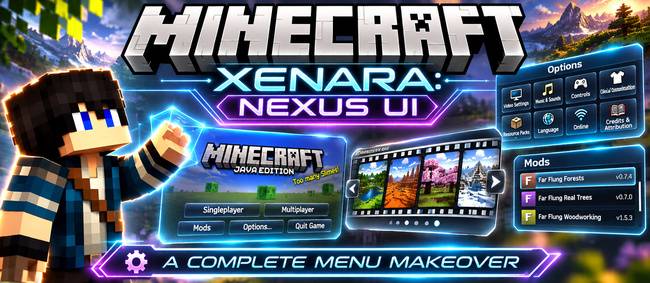
A complete menu makeover: a huge MINECRAFT logo over a fading slideshow of your own worlds, a film-reel world picker, and sleek glass-style Options, Mods and settings pages.
Xenara: Nexus UI
Give Minecraft's menus the makeover they deserve.
Xenara: Nexus UI restyles the whole menu side of Minecraft: the title screen, world selection, Options, the Mods list and the settings pages. It's all done in one clean see-through glass style. Every button still does exactly what it did before; it just looks a lot better doing it.
✨ The Title Screen
- A huge MINECRAFT logo across the middle of the screen
- A living slideshow background: beautiful pictures that slowly zoom and cross-fade into each other
- Your own worlds as the backdrop: while you play, the mod quietly takes scenic shots (no hand, no HUD) and adds them to the slideshow
- Click to jump straight in: the world name shown on each picture is clickable and loads that world (or joins that server) instantly
- Sleek glass buttons with a soft gold glow when you hover
- Version info tidied away, small and centred above the menu
- Add your own backgrounds by dropping pictures into the
backgroundsfolder
🎞️ World Reel: a Better Select World Screen
The plain world list becomes a film reel of full-size world pictures. Roll left and right with the arrows, mouse wheel or arrow keys, and see each world's name, last-played date and game mode in big bold text. Pictures update automatically as you play.
⚙️ Options, Reimagined
- The Options screen becomes a set of picture tiles: Video Settings, Music & Sounds, Controls, Skin Customisation, Resource Packs, Language and more
- Quick settings (FOV, difficulty) sit in their own strip at the top
- Every settings page restyled to match: Video, Sound, Controls, Key Binds, Chat, Accessibility, Resource Packs, Language, Telemetry, Credits & Attribution and more
🧩 A Nicer Mods Screen
- Mod cards with logos, a search box and filters
- A detailed info panel for each mod, with description, authors, licence and links
- Configure button still works, so each mod's own settings open as normal
🌍 Everything Else Matches Too
- Create New World (all its tabs), Game Rules and Experiments
- Multiplayer, Add/Edit Server, Direct Connect and the multiplayer warning screen
- Loading, saving and confirmation screens
- Embeddium / Sodium and Oculus / Iris settings pages
📦 Versions
| Minecraft | Loader |
|---|---|
| 1.20.1 | Forge, Fabric |
| 1.21.1 | NeoForge, Fabric |
| 26.3 | NeoForge, Fabric |
- Mod Menu is optional: with it, the restyled Mods screen replaces Mod Menu's list, and Configure opens each mod's settings.
- Realms: the Realms button is hidden on 1.20.1 and 1.21.1, and shown on 26.3.
- Client-side only. Install it on your own game; servers don't need it.
🔧 Settings
Everything can be switched on or off in config/xenaranexusui/settings.properties:
- the slideshow and its timings
- scenic shots
- World Reel
- the Mods, Options and settings-page restyles
- picture names
- the Realms button
Made by AndyMFA. Check out my other mods on my CurseForge profile.
(C) Many Fun Adventures
Xenara: Nexus UI Team