Sol's Indicator (Damage, Health, Custom Boss Bar HUD, and more!)
- By
A lightweight mod that gives you real-time visual feedback on every hit you land. Know exactly how much damage you're dealing, with razor-sharp accuracy right as it happens.
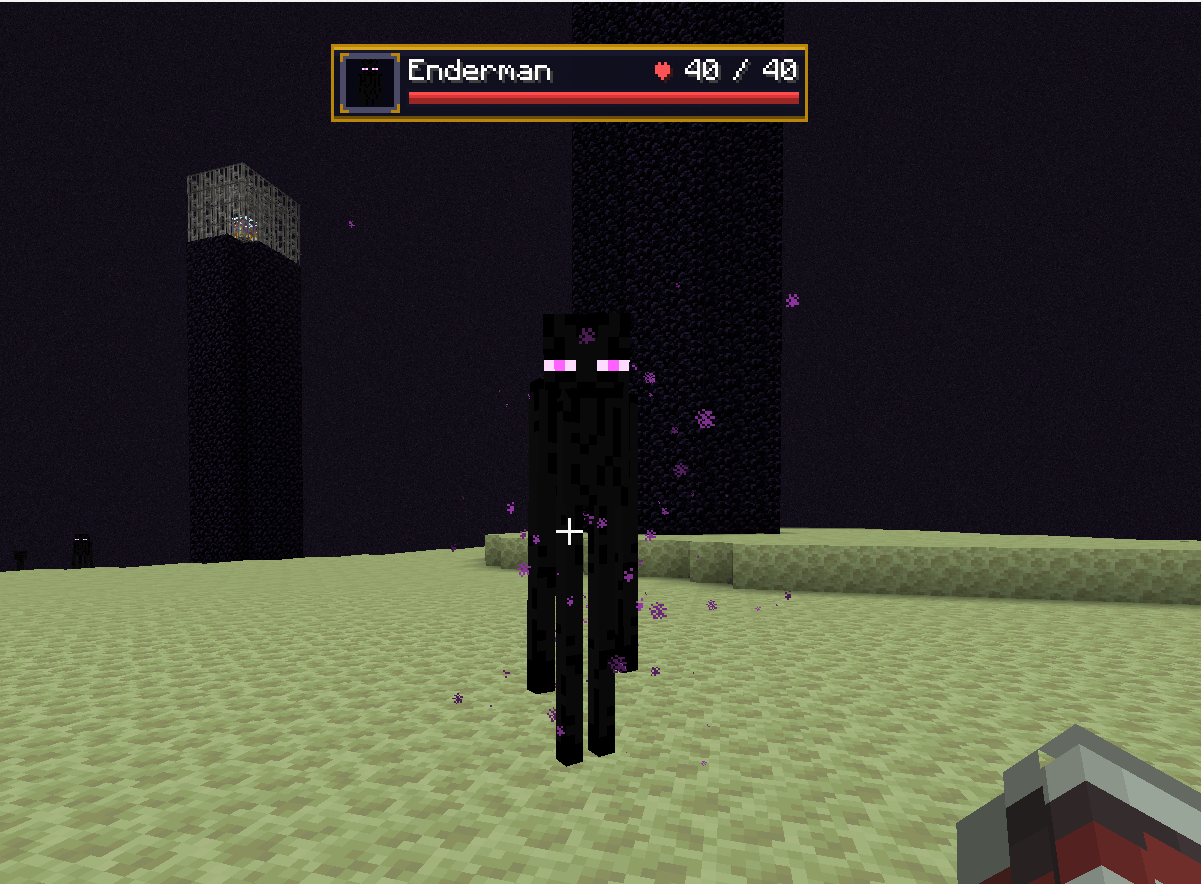
image_2026-03-08_042830141.png
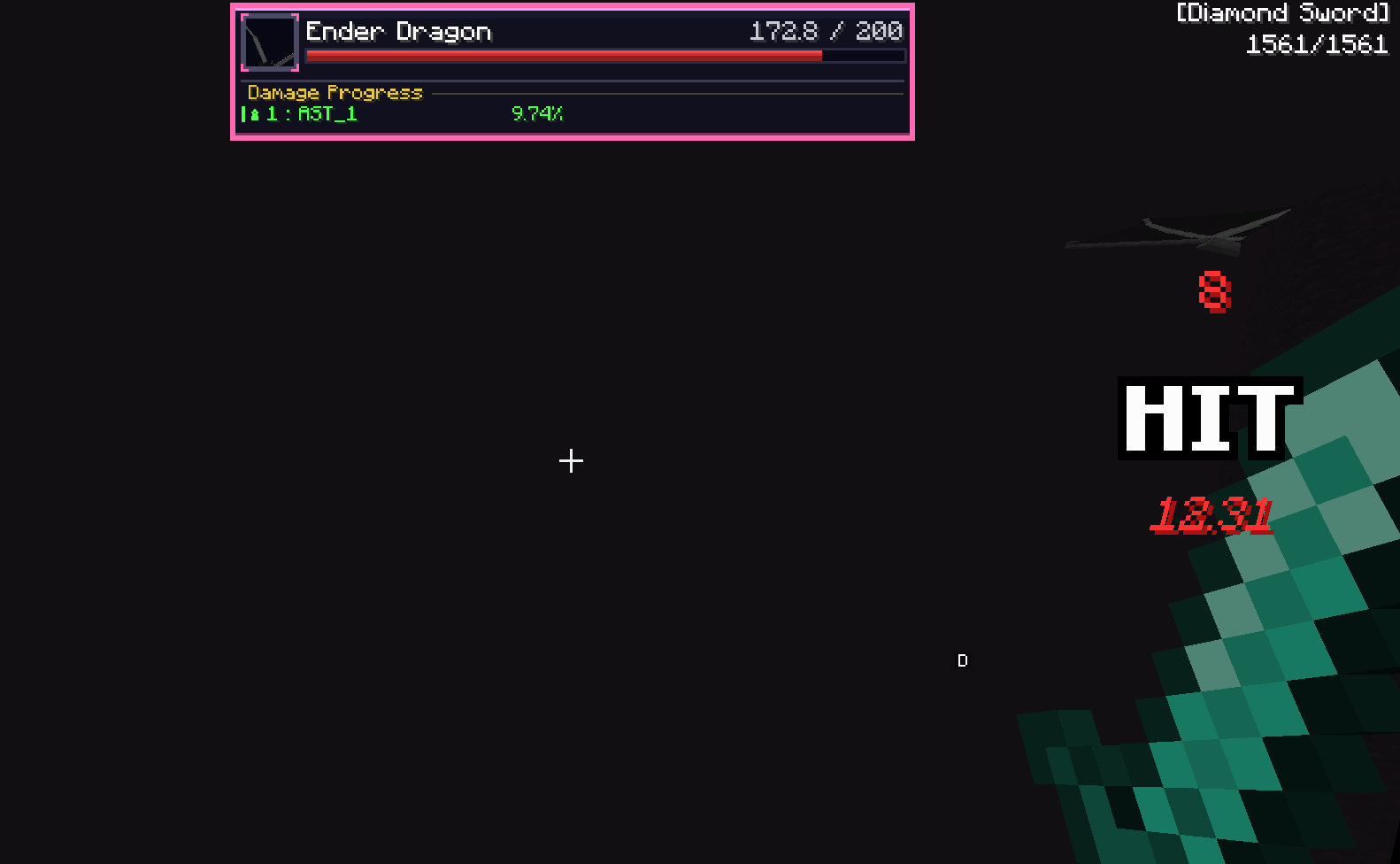
image_2026-03-08_040708370.png
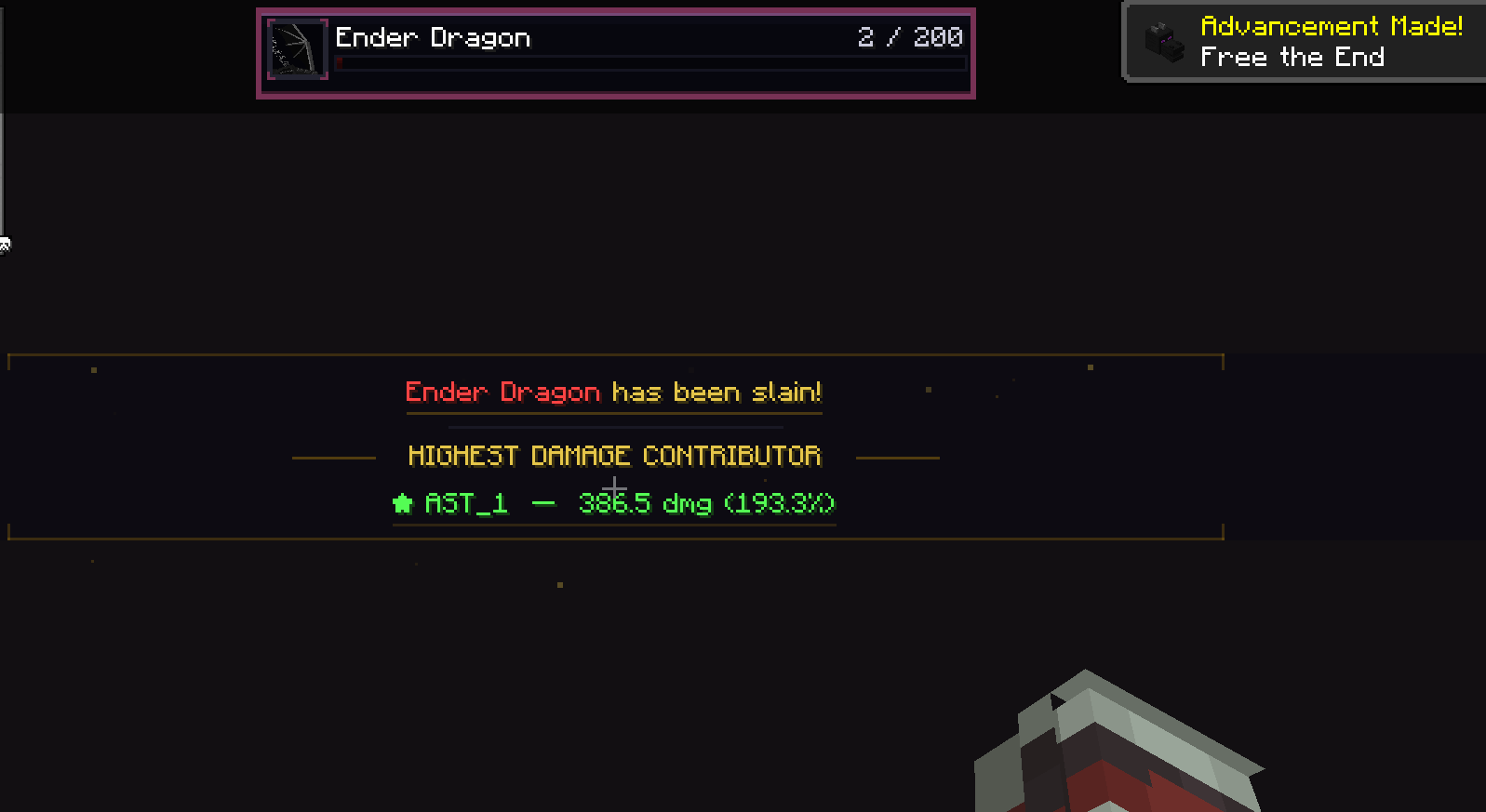
image_2026-03-08_042648579.png
ce4cc9fb-af41-47da-9c71-14ad62c6e015 (1).jpg
5df000be-9460-4045-83fa-ed6c42646ab4 (1).jpg
3c5fde37-9c9f-4238-b8e6-a6a0f3753131 (1).jpg
solmochi | Sol's Indicator (Damage...
Create your game server with 

Description
Sol's Damage Indicator
Author: solmochi
Need help, want to suggest a feature, or found a bug?
Join our community to catch exclusive early previews and upcoming changelogs before they go live!

Description
Sol's Damage Indicator is a visual combat HUD mod that shows exactly how much damage you deal in real-time. See floating damage numbers on enemies, track your hit combos with a stylish center-screen HUD, monitor any entity's health with a crosshair indicator, and watch boss fights come alive with custom RPG-themed boss bars featuring per-player damage rankings and cinematic death animations.
⚠️ Works in two modes — install on both server and client for full accuracy (melee, projectiles, spells, abilities), or use client-only for basic melee tracking.
✅ Fully functionable and playable on a Single-Player World.
Features
🌟 Damage Indicator HUD
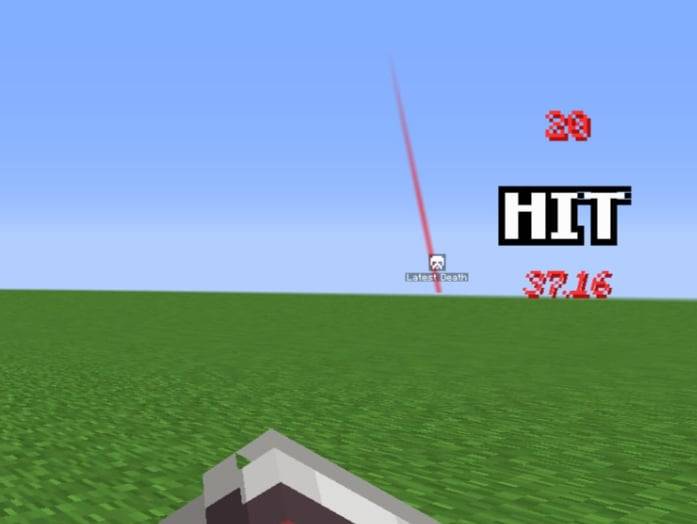
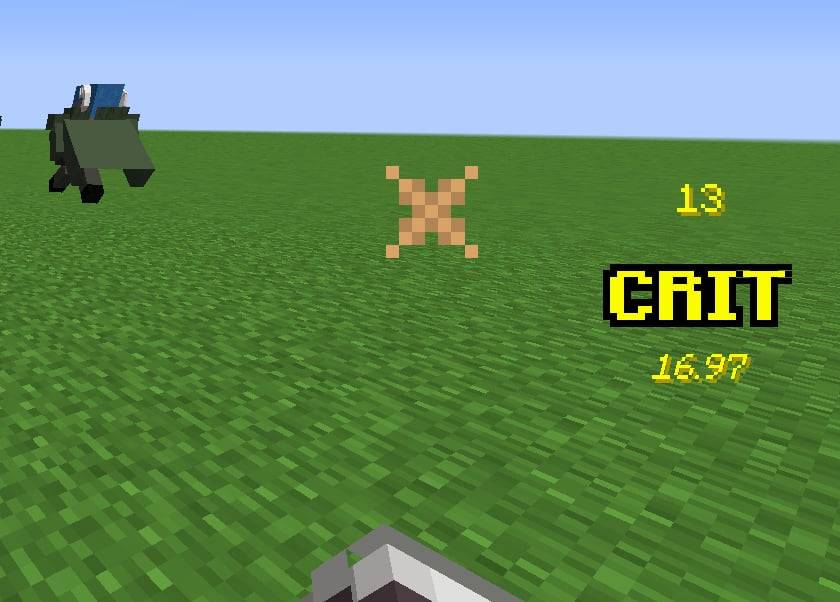
- Hit Counter & Combo Tracker — Displays hit count, "HIT" / "CRIT" text, and cumulative damage dealt on the center-right of your screen
- Throbbing Pulse Animation — Each hit triggers a scale pulse that stacks during rapid combos
- Critical Hit Detection — Crits display in green with "CRIT" text; relic crits show the multiplier (e.g., "CRIT 2.1x") in bright green
- Summary Phase — After 3.5 seconds of no hits, transitions to a summary showing total damage dealt with a dramatic pulsed "DAMAGE" label
- Auto-Fade — HUD fades out after 5 seconds of inactivity, then resets for the next combat
- Configurable Position — Can be placed on center-left or center-right of the screen
🌟 Floating Damage Numbers
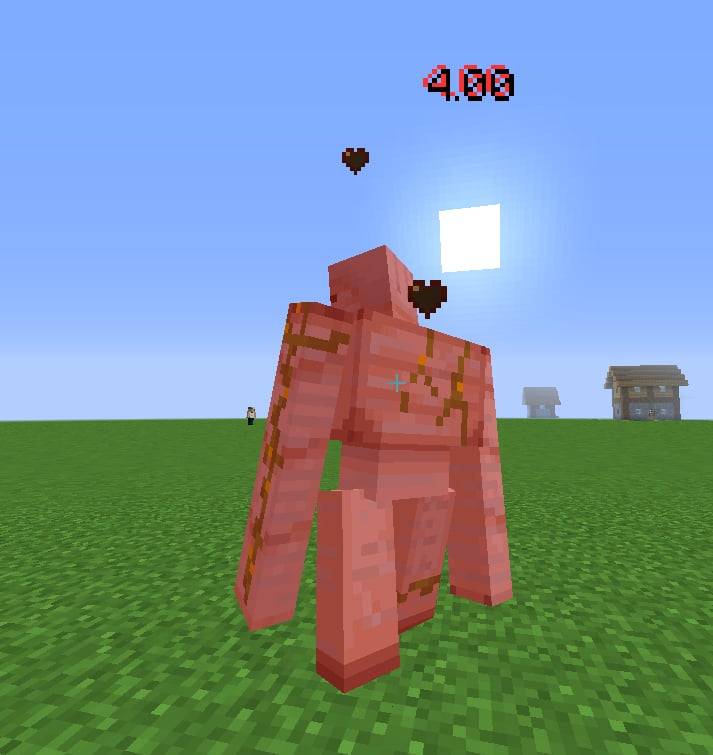
- World-Space Numbers — Damage numbers float upward from hit entities and fade out over 1.5 seconds
- Color-Coded — Red for normal hits, green for vanilla crits, bright green for relic system crits
- Crit Multiplier Display — Relic crits show the multiplier suffix (e.g., "12.50 2.1x")
- Spawn Animation — Numbers scale up with a quick throb on spawn, then settle
- Random Spread — Multiple simultaneous numbers spread out slightly to avoid overlap
🌟 Custom Boss Bar HUD
- RPG-Themed Design — Fully replaces vanilla boss bars with a styled panel featuring gold frames, gradient health bars, and entity portraits
- Entity Portraits — Renders a live 3D model of the boss entity inside a framed portrait box
- Dynamic Sizing — Bar width auto-expands to fit long entity names and HP text
- Color-Matched Bars — Health bar color adapts to the entity's custom name color, boss bar color setting, or mob type (red/green/blue)
- HP Numbers — Shows exact current HP / max HP (formatted: e.g., "125.4K / 500.0K")
- Entity Titles — Displays CustomNPC titles below the entity name when available
- Multiple Boss Bars — Supports configurable max boss bars on screen (default: 3) with "+N more" overflow label
- Compact Mode — 2nd+ boss bars use a compact layout showing only your own damage contribution
- Stale Data Cleanup — Automatically clears damage progress when entities heal to full or die
🌟 Boss Damage Progress
- Per-Player Damage Tracking — Server tracks cumulative damage dealt by each player to boss entities
- Damage Percentage Display — Shows each player's damage as a percentage of the boss's max HP (e.g., "PlayerName: 10.83%")
- RPG Rank Styling — Top contributors get medal icons: crown for #1, diamonds for #2–3, arrows for #4+
- 2-Column Grid Layout — Top 5 contributors displayed in an organized grid with a "Damage Progress" header
- Self-Highlighting — Your own name is highlighted in green; other players appear in white
- Self-Append — If you're not in the top 5, your entry is appended separately so you always see your contribution
- Auto-Detection — Uses reflection to detect any entity with a
ServerBossInfofield (supports vanilla + all modded bosses) - Inactivity Pruning — Players are removed from the damage list after configurable minutes of inactivity (default: 5 min)
🌟 Boss Death Animation
- Cinematic Kill Sequence — When a boss dies, plays a 10-second dramatic overlay with multiple phases:
🌟 Entity Health Indicator
- Crosshair Target Health — Shows a health bar panel for the entity you're looking at
- RPG Panel Design — Matches the boss bar style with gold frame, portrait, and gradient health bar
- Live Entity Portrait — Renders a 3D model of the targeted entity
- HP & Armor Display — Shows heart icon + current/max HP and diamond armor icon with armor value
- Modded Entity Support — Formats names from registry paths (e.g., "cartaddon:revolutionary_grunt" → "Revolutionary Grunt")
Client-Only Fallback Mode
- No Server Required — When the server doesn't have the mod, automatically falls back to client-side melee tracking via health deltas
- Seamless Switching — Detects server capability from the first damage packet; no manual configuration needed
- Melee Detection — Tracks attacks via
AttackEntityEventand monitors entity health changes each tick - Vanilla Crit Detection — Detects vanilla critical hits (falling + sprinting conditions) in client-only mode
Installation
- Download the mod
.jarfile - Place it in your
.minecraft/modsfolder - Launch Minecraft
For full features (all damage sources, boss tracking, death animations): Install on both server and client.
For basic melee tracking: Client-only installation works — no server needed.
Configuration
Client Settings (solsdamageindicator-client.toml)
| Setting | Default | Description |
|---|---|---|
| Boss Bar | ||
bossbar.enabled |
true |
Replace vanilla boss bars with custom styled HUD |
bossbar.damageProgress |
true |
Show per-player damage contribution below boss bars |
bossbar.barWidth |
250 |
Minimum boss bar width in pixels (100–500) |
bossbar.maxBossBars |
3 |
Max boss bars shown at once (1–10), remaining shown as "+N more" |
bossbar.deathAnimation |
true |
Play cinematic death overlay when a boss dies |
| Entity Health | ||
entityhealth.enabled |
true |
Show health bar for crosshair target entity |
entityhealth.damageProgress |
true |
Show your damage contribution below entity health bar |
entityhealth.range |
32.0 |
Max distance in blocks for entity health display (4–128) |
| Damage Indicator | ||
damageindicator.enabled |
true |
Show the center-screen damage HUD (hit count, HIT/CRIT, damage) |
damageindicator.leftSide |
false |
Position HUD on center-left instead of center-right |
| undefined |
Server Settings (solsdamageindicator-server.toml)
| Setting | Default | Description |
|---|---|---|
bossdamage.enabled |
true |
Track and broadcast per-player boss damage |
bossdamage.maxEntries |
5 |
Max top damage contributors shown in boss bar progress (1–30) |
bossdamage.relicCritIntegration |
true |
Use Sol's Relic System crit detection when available |
bossdamage.inactivityTimeout |
5 |
Minutes before inactive players are pruned from damage lists (0 = never) |
Commands
| Command | Description |
|---|---|
/solsdi debug |
Cycle through HUD debug modes (OFF → IN_TOP5 → NOT_IN_TOP5) |
/solsdi debug death |
Preview the boss death animation (alternates between "in top 5" and "not in top 5" variants) |
Note: Commands require operator permissions (permission level 2).
Cross-Mod Compatibility
Sol's Relic System Integration
- Detects custom critical hits from Sol's Relic System via reflection (no hard dependency)
- Relic crits display with bright green color and show the actual multiplier (e.g., "CRIT 2.1x")
- Floating damage numbers for relic crits are 25% larger with the multiplier suffix
- Can be toggled via
bossdamage.relicCritIntegrationserver config
Modded Boss Support
- Automatically detects any entity with a
ServerBossInfofield via reflection - Supports vanilla bosses (Wither, Ender Dragon) and all modded bosses
- Nested field search (1 level deep) catches bosses like Ender Dragon where the boss bar is on a sub-object
Modded Entity Support
- Entity health indicator works with all modded entities
- Automatically formats registry names into readable display names
- Detects CustomNPC titles via
getDisplay().getTitle()reflection
Entity Overlay Suppression
- Suppresses duplicate entity overlays from Jade, WTHIT, HWYLA, and similar mods
- Runs at highest event priority to null out
crosshairPickEntitybefore other mods read it - Restores the target after rendering so gameplay mechanics remain unaffected
How It Works
Server + Client Mode (Recommended)
- Server listens for
LivingDamageEvent(fires after ALL reductions: armor, enchantments, absorption) - Server sends a
DamageIndicatorPacketto the attacking player with the exact final damage - Client displays the accurate damage on the HUD and as floating numbers
- For boss entities, server also tracks cumulative damage per player and broadcasts updates to all boss bar viewers
Client-Only Mode (Fallback)
- Client detects player attacks via
AttackEntityEvent - Each tick, monitors the attacked entity's health for decreases
- Reports
healthBefore - healthAfteras damage dealt - Limitation: Only melee/sweep attacks are tracked; projectiles and indirect damage require the server component
See every hit. Track every boss. Dominate every fight.
Sol's Indicator (Damage, Health, Custom Boss Bar HUD, and more!) Team