Item Container Preview
- By
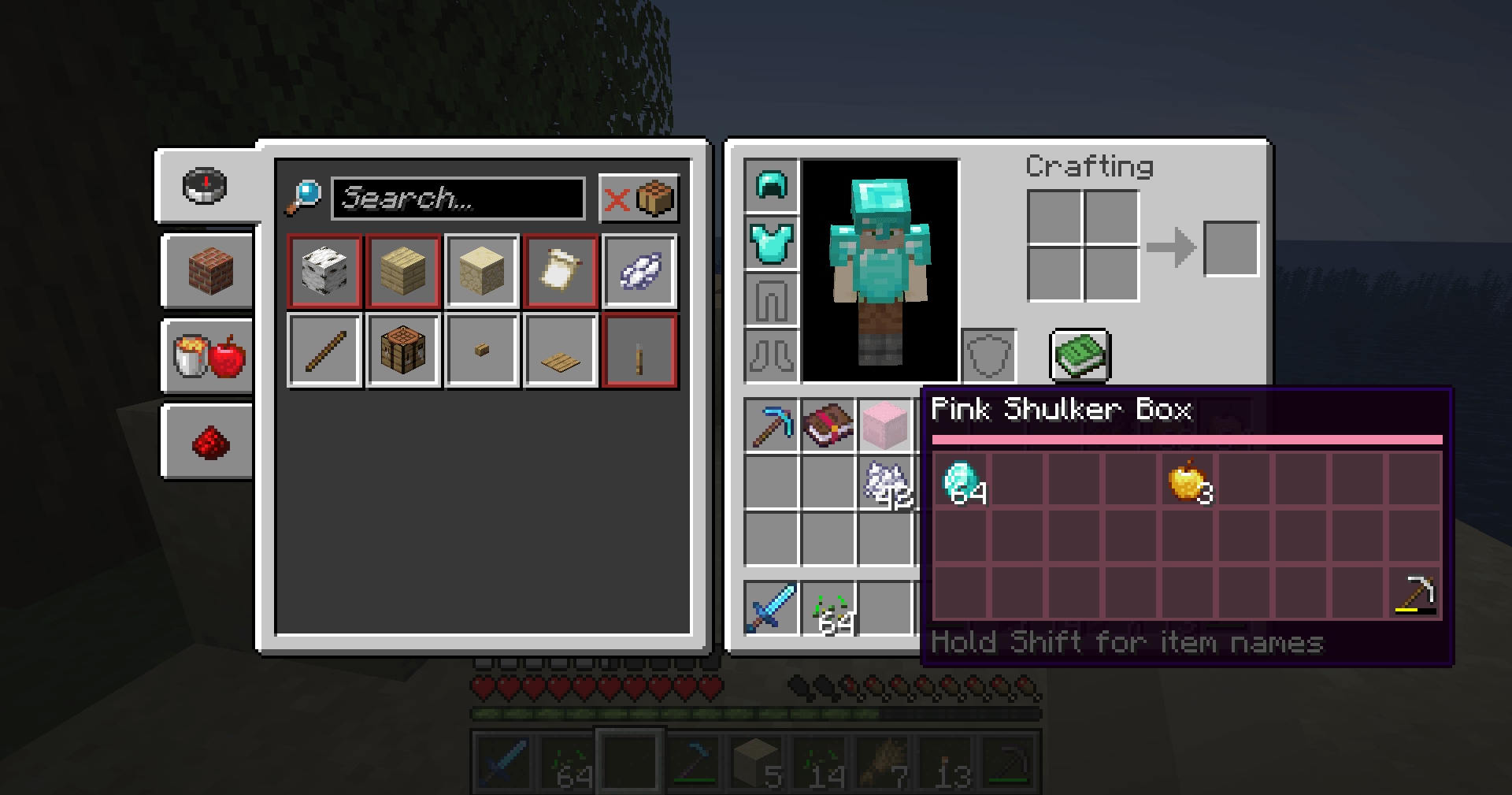
Client-side: Hover a Shulker Box to see its contents as a real item grid, tinted in the box's own color - no more placing boxes just to look inside.
2026-11-04_11.28.55.png
Description
## Look inside without placing it
Your Ender Chest is full of Shulker Boxes. Which one has the redstone? Which one has your spare tools? In vanilla you either place every box down to check, or squint at a short text list that stops after five items.
**Item Container Preview** shows the real contents right in the tooltip: a grid of item icons with stack counts and durability bars, exactly as they sit in the box.
## Features
- **Item grid in the tooltip** - hover a filled Shulker Box and see all 27 slots, with item icons, stack counts and durability bars, in the right slot positions.
- **Color-matched** - the header bar and slot tint match the box: a Pink Shulker Box gets a pink preview, a Lime one green, and so on. All 16 colors plus the undyed box.
- **Hold Shift for names** - shows a list like *64x Diamond*, with identical stacks added together, custom names in italics and rare items in their rarity color.
- **More containers** - chests, trapped chests, barrels, hoppers, dispensers, droppers and crafters that carry items (for example picked with Ctrl + middle-click in creative, or given by a map) get a preview too.
- **No double info** - vanilla's short text list under Shulker Boxes is hidden while the grid is shown.
- **Empty boxes stay normal** - nothing is added to the tooltip of an empty container.
## Controls
| Key | Action |
|---|---|
| Hover | Show the item grid |
| Shift (hold) | Show item names and counts under the grid |
## Settings
The file `config/itemcontainerpreview.properties` is created on first launch. Edit it with a text editor while the game is closed:
- `enabled` - preview on or off (default: true)
- `previewOtherContainers` - also preview chests, barrels, hoppers, dispensers, droppers, crafters (default: true)
- `tintSlots` - tint the slots in the container's color (default: true)
- `showShiftHint` - show "Hold Shift for item names" under the grid (default: true)
- `maxDetailLines` - how many name lines to show while holding Shift (default: 12)
## Works on servers
This is a **client-side only** mod. The server already sends what's inside a Shulker Box item to every player (that's how vanilla shows its short text list), and this mod only draws that same information as a grid. It works in singleplayer, on Realms and on any multiplayer server, with nothing installed on the server. It can't show anything the server doesn't already send to you.
## Requirements
- Minecraft 1.21 / 1.21.1
- Fabric Loader 0.16 or newer
- Fabric API
- Java 21
## Installation
1. Install Fabric Loader for Minecraft 1.21.1.
2. Put **Fabric API** and **Item Container Preview** in your `mods` folder.
3. Start the game and hover a filled Shulker Box.
## Modpacks
You are welcome to include this mod in any modpack. No need to ask.
## Also by this author
- **Clean Tooltip Enchants** - color-coded enchantments with (MAX) tags
- **Smart Torch Placer** - place torches with one key, optional Auto-Light for mining
- **Smart Crop Harvest** - right-click ripe crops to harvest and replant
- **Floating Damage Indicators** - damage, heal and crit numbers above mobs
- **Smart Tool Safety** - durability warnings and tool break protection
- **Smart Chest Organizer** - sort buttons and quick deposit for chests
- **Dynamic Armor HUD** - armor, held item and arrow durability on screen
- **Smart Auto-Trash** - quickly trash or auto-throw junk items
- **Dynamic Item Glow** - rarity colors and glow for items
## Honest limitations
- **Bundles** are not changed: Minecraft 1.21.1 already shows its own grid for bundles.
- **Placed chests** in the world aren't previewed - only container *items* that carry their contents (like Shulker Boxes). A normal chest you break drops its items, so its item is empty.
- **Ender Chests** have no contents on the item (they're stored per player), so there's nothing to preview.
- The colored part is the header bar and slot tint inside the tooltip; the tooltip's outer frame keeps its normal look.
- Containers from other mods are only previewed if they use the vanilla container data and are one of the supported block types.
## About the images
The project logo is an illustration created with AI assistance; it is not an in-game screenshot. The screenshots in the gallery are real, unedited in-game captures.
Item Container Preview Team