Dynamic Item Glow
- By
client-side: Valuable loot jumps out at you: colored rarity borders in every inventory and a soft glow under good items dropped on the ground.
2026-11-01_09.31.30.png
2026-11-01_09.30.47.png
Description
# Dynamic Item Glow
You open a dungeon chest, kill a raid captain or find a death pile, and you're faced with 27 slots of stuff. Which one is the enchanted book? Is that a plain diamond sword or a god sword? Dynamic Item Glow colors every item by how valuable it is – like the loot colors in your favorite RPG – so you can see the good stuff in half a second.
## Rarity colors
| Tier | Color | Examples |
|------|-------|----------|
| Common | no border (optional gray) | stone, dirt, plain tools |
| Uncommon | **Yellow** | experience bottles, dragon's breath, renamed items |
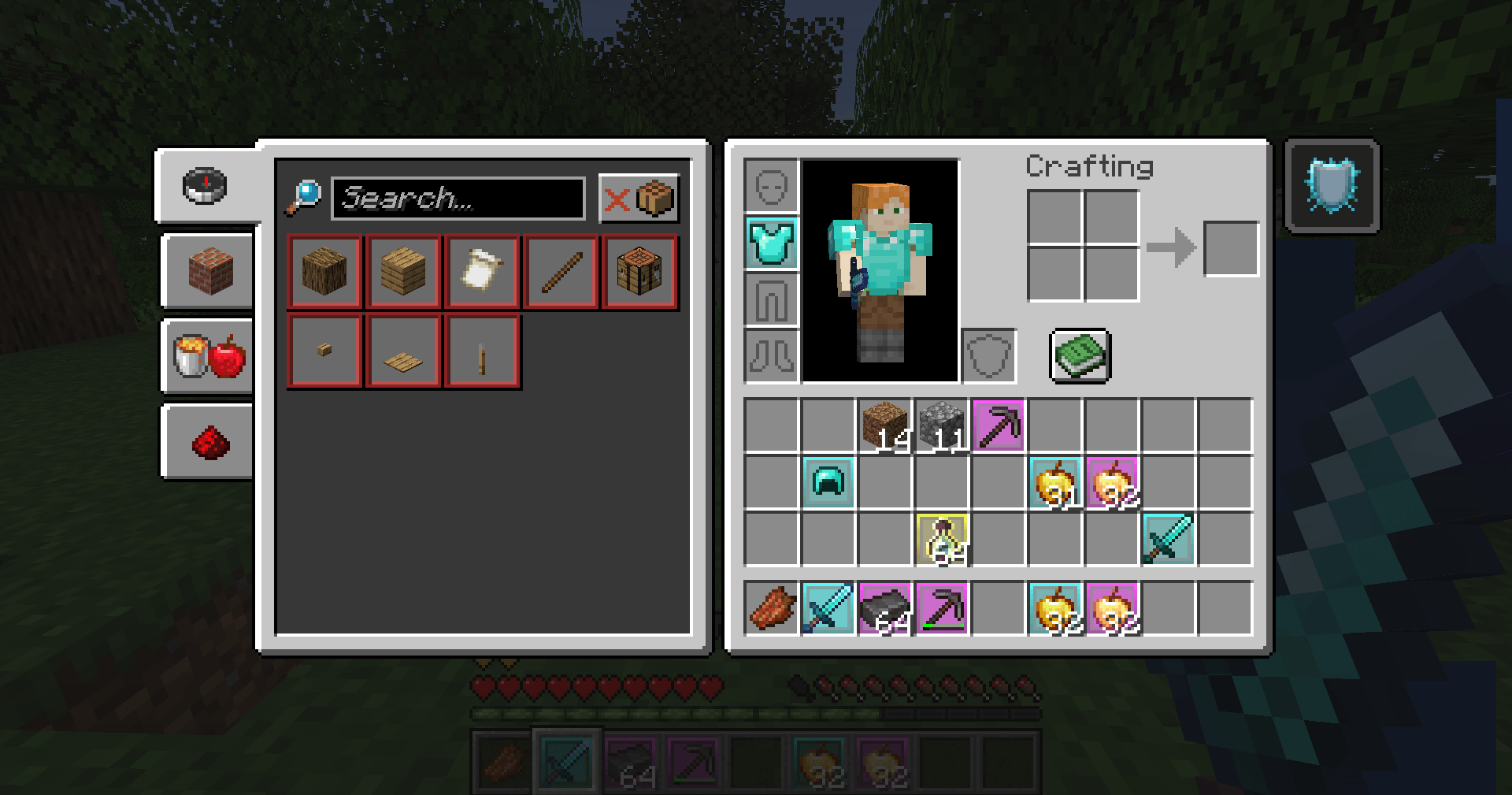
| Rare | **Aqua** | enchanted items and books, diamond gear, golden apples, beacons |
| Epic | **Magenta** | netherite gear, enchanted golden apples, dragon eggs, highly enchanted gear |
The tier comes from Minecraft's own item rarity (which already goes up when an item is enchanted), plus a few extras: **netherite** items count as Epic, **diamond** items as Rare, and items with a **custom name** are at least Uncommon.
## Where you see it
### Every inventory screen
- Your inventory, chests, double chests, ender chests, barrels, shulker boxes, furnaces, the Creative menu – every slot with a valuable item gets a **colored border** and a **soft glow behind the item**.
### Your hotbar
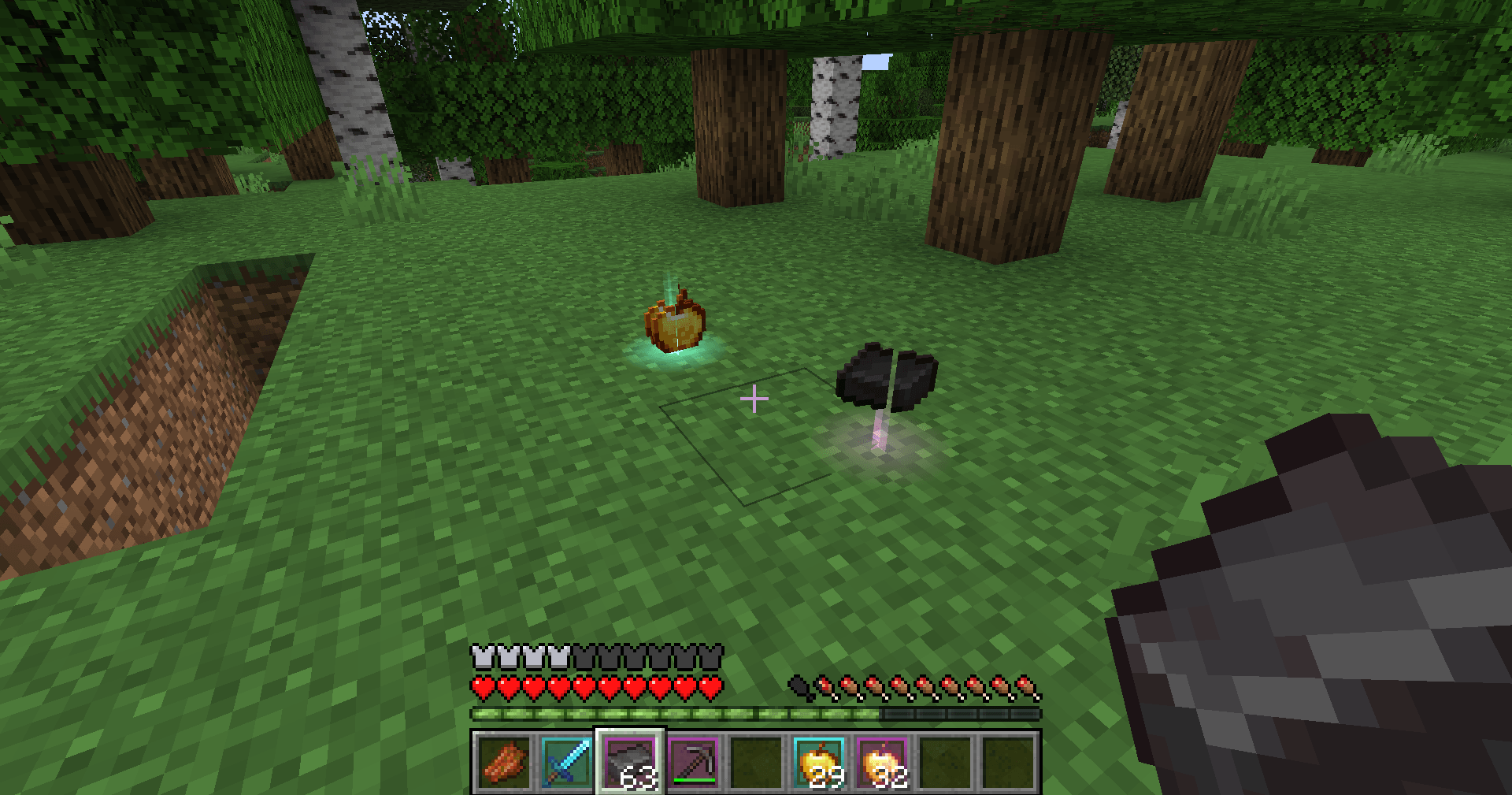
- The same borders on your hotbar and offhand slot while you play.
### Items on the ground
- Valuable dropped items get a **soft colored glow on the ground** and a short light beam, so you spot the good drops in a pile of rotten flesh and bones.
- The glow is drawn like a normal object: it is **hidden behind blocks**, so it never shows items through walls.
### Breathing animation
- **Epic** items and items with **3 or more enchantments** slowly pulse, so your best gear really stands out.
## Settings
Everything can be changed in `config/dynamic_item_glow.json` (created the first time you start the game):
- `slotBorders`, `hotbarBorders`, `groundGlow` – turn each part on or off
- `glowBehindItems` – the soft glow behind items in slots
- `showCommonBorder` – gray border on common items too
- `borderThickness` – 1 or 2 pixels
- `animation`, `animationSpeed` – the breathing effect
- `groundGlowMinTier` – `uncommon`, `rare` or `epic`: lowest tier that glows on the ground
- `groundBeamHeight` – height of the light beam (0 = no beam), `groundGlowDistance` – max distance in blocks
- `colors` – your own hex color for each tier, e.g. `"rare": "#55FFFF"`
Restart the game after editing the file.
## Works everywhere
This is a **client-side only**, purely visual mod. Install it on your own game and it works in singleplayer and on any multiplayer server – the server does not need it. It only shows information about items you can already see.
## Requirements
- Minecraft **1.21 or 1.21.1**
- **Fabric Loader** 0.15.11 or newer
- **Fabric API**
- Java 21 (included with the official Minecraft launcher)
## Installation
1. Install Fabric Loader for Minecraft 1.21.1 (with the CurseForge app or the official Fabric installer).
2. Install **Fabric API** for 1.21.1 (listed as a required dependency; the CurseForge app installs it automatically).
3. Put the `dynamic-item-glow` .jar file in your `.minecraft/mods` folder.
4. Start the game with the Fabric profile and open a chest.
## Modpacks
You are free to include Dynamic Item Glow in any modpack, no need to ask.
## Also by this author
- **Smart Chest Organizer** – one-click chest sorting and quick deposit.
- **Smart Auto-Trash** – junk items are thrown out of your inventory automatically.
- **Dynamic Armor HUD** – armor and weapon durability always on screen.
- **Smart Tool Safety** – stops nearly broken tools from being used up.
- **Floating Damage Indicators** – damage numbers above mobs.
*The project logo is an illustration created with AI assistance; it is not an in-game screenshot. The screenshots in the gallery are real, unedited in-game captures.*
Dynamic Item Glow Team