Clean Tooltip Enchants
- By
Client-side: See at a glance which enchantments are maxed, which are normal and which are curses - with clear colors in every tooltip.
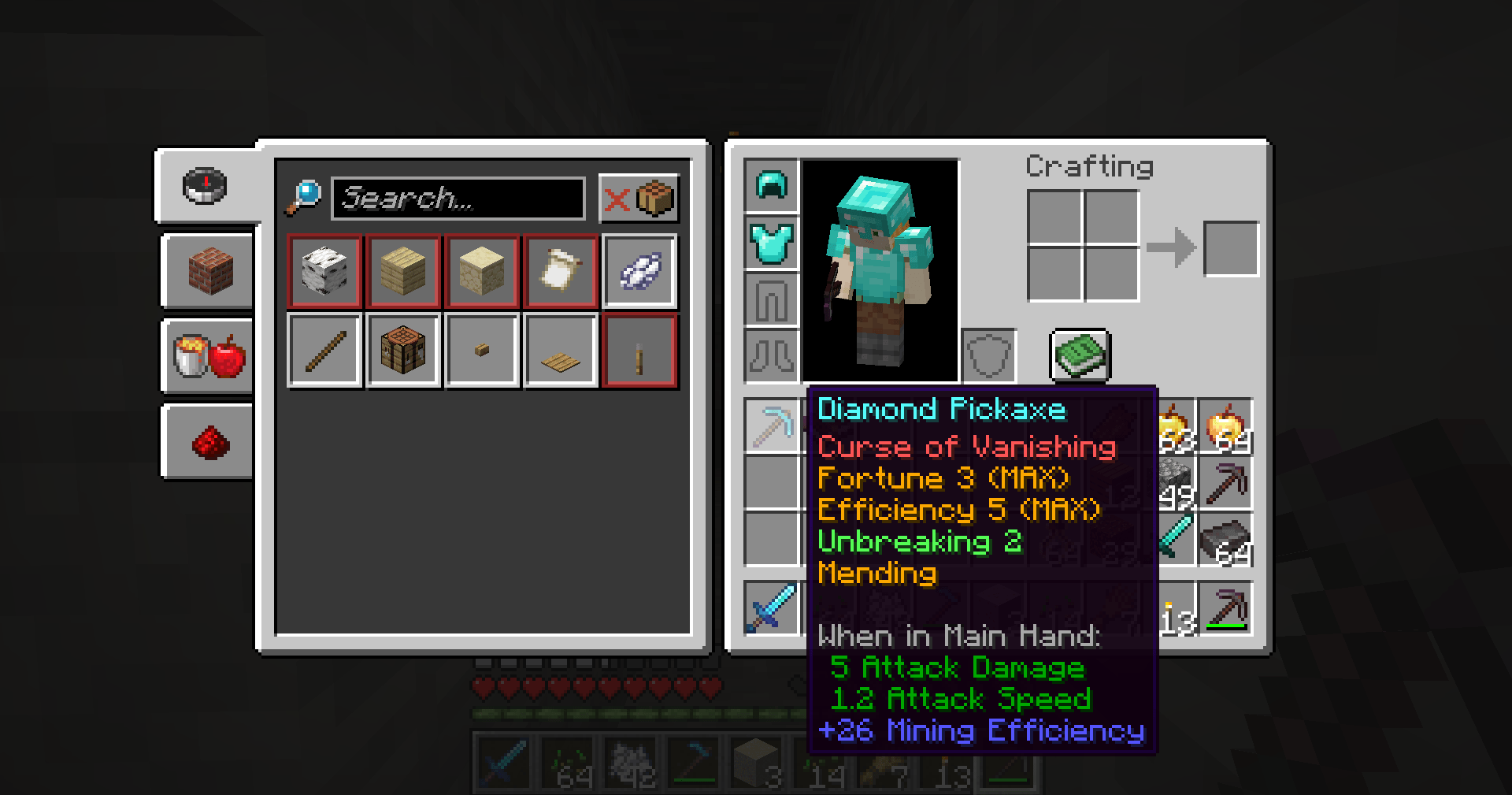
2026-11-03_09.50.58.png
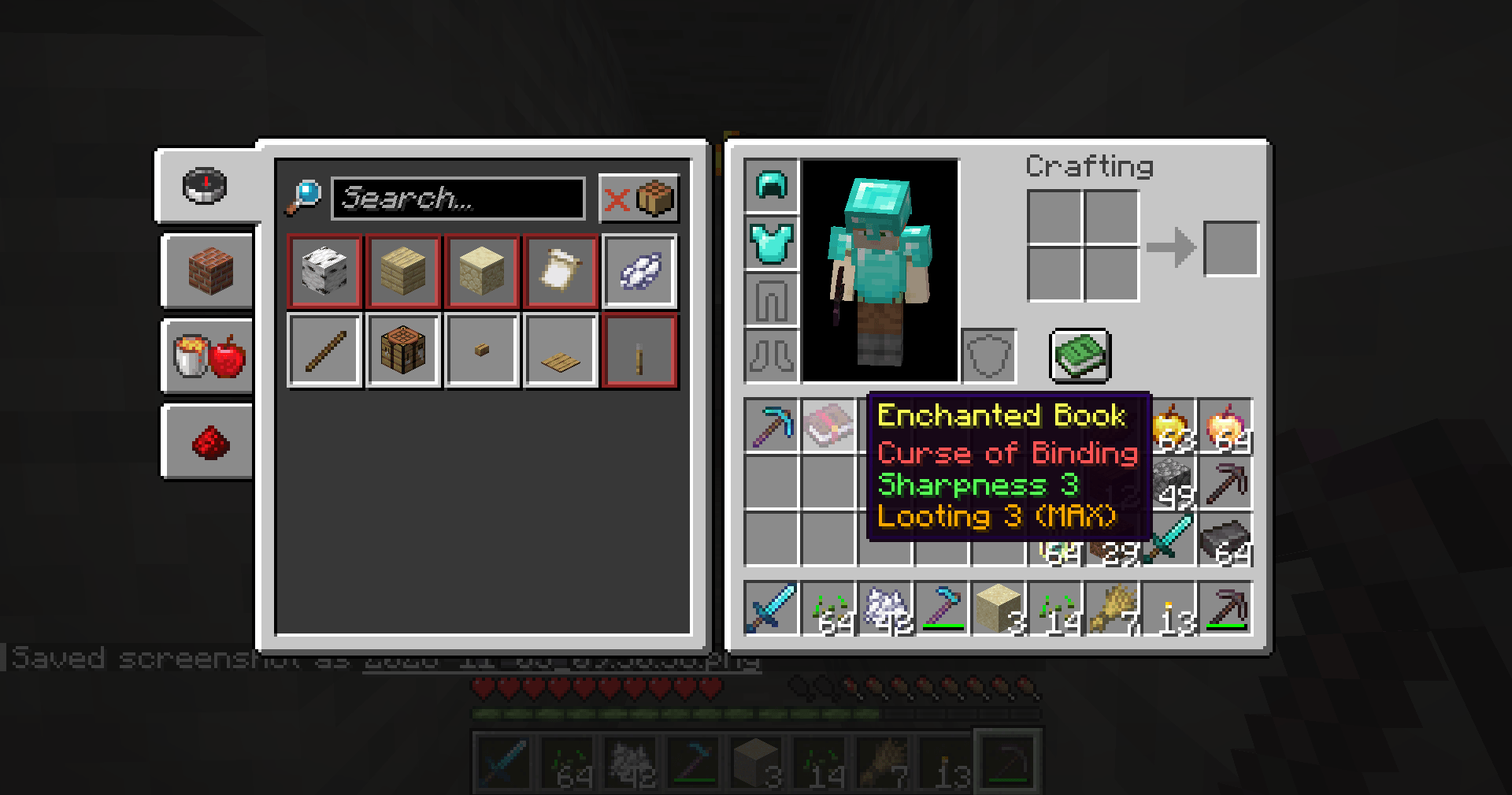
2026-11-03_09.51.04.png
Description
## Read your enchantments in one second
You find a stack of enchanted books in a dungeon chest, or a villager offers you a pickaxe with five enchantments. In vanilla it's a wall of gray text: is that Efficiency the max level? Is there a curse hiding somewhere in the list?
**Clean Tooltip Enchants** colors every enchantment line so you can tell instantly:
- **Gold** - the enchantment is at its maximum level (with a small **(MAX)** tag)
- **Green** - a normal enchantment that can still go higher
- **Red** - a curse (Curse of Binding, Curse of Vanishing)
## Features
- **Color-coded enchantments** on weapons, tools, armor, fishing rods, tridents, maces and enchanted books.
- **(MAX) tag** for enchantments at their highest level, like *Efficiency 5 (MAX)* or *Protection 4 (MAX)*. Not shown on one-level enchantments like Mending, where it would just be noise.
- **Clean numbers** - levels are shown as plain numbers (*Unbreaking 3* instead of *Unbreaking III*). Prefer Roman numerals? One setting switches them back.
- **Fixes broken high levels** - vanilla shows "enchantment.level.11" for levels above 10 (from commands or other mods). This mod shows a clean *11* (or *XI* in Roman mode).
- **Custom colors** - pick your own color for normal, max and curse lines in the config file.
- **Toggle with U** - works while playing and **while your inventory or a chest is open**, so you can compare right away. Typing in a search box or anvil doesn't trigger it.
- **Plays nice with other mods** - only the exact enchantment lines are changed. Item names, lore, attributes and lines added by other mods are left untouched.
- **Your language** - enchantment names come from the game's own translations.
## Controls
| Key | Action |
|---|---|
| U | Turn the colors on/off (in game and in inventories) |
Change it in Options > Controls > Key Binds.
## Settings
The file `config/cleantooltipenchants.properties` is created on first launch. Edit it with a text editor while the game is closed:
- `enabled` - colors on or off (also saved when you press U; default: true)
- `romanLevels` - false = "Sharpness 5", true = "Sharpness V" (default: false)
- `showMaxTag` - show "(MAX)" on maxed enchantments (default: true)
- `standardColor` - color for normal enchantments (default: green)
- `maxColor` - color for maxed enchantments (default: gold)
- `curseColor` - color for curses (default: red)
Color names: black, dark_blue, dark_green, dark_aqua, dark_red, dark_purple, gold, gray, dark_gray, blue, green, aqua, red, light_purple, yellow, white.
## Works on servers
This is a **client-side only** mod. It only changes how tooltips look on your screen, so it works in singleplayer, on Realms and on any multiplayer server without anything installed on the server. It gives no gameplay advantage.
## Requirements
- Minecraft 1.21 / 1.21.1
- Fabric Loader 0.16 or newer
- Fabric API
- Java 21
## Installation
1. Install Fabric Loader for Minecraft 1.21.1.
2. Put **Fabric API** and **Clean Tooltip Enchants** in your `mods` folder.
3. Start the game and hover over any enchanted item.
## Modpacks
You are welcome to include this mod in any modpack. No need to ask.
## Also by this author
- **Smart Torch Placer** - place torches with one key, optional Auto-Light for mining
- **Smart Crop Harvest** - right-click ripe crops to harvest and replant
- **Floating Damage Indicators** - damage, heal and crit numbers above mobs
- **Smart Tool Safety** - durability warnings and tool break protection
- **Smart Chest Organizer** - sort buttons and quick deposit for chests
- **Dynamic Armor HUD** - armor, held item and arrow durability on screen
- **Smart Auto-Trash** - quickly trash or auto-throw junk items
- **Dynamic Item Glow** - rarity colors and glow for items
## Honest limitations
- Only the enchantment lines change color. The item name keeps its normal color (Dynamic Item Glow or vanilla rarity decides that).
- Enchantments hidden by the item itself (for example with a hide-enchantments setting from a server or map maker) stay hidden.
- If another mod rewrites the enchantment lines first, this mod leaves those lines alone rather than risk breaking them.
- The "ON/OFF" message is shown in the action bar; with an inventory open it may be partly covered, but you hear a click and see the tooltip change.
## About the images
The project logo is an illustration created with AI assistance; it is not an in-game screenshot. The screenshots in the gallery are real, unedited in-game captures.
Clean Tooltip Enchants Team