Compare Tooltips
See the armor, weapon or tool you have equipped right next to the item you hover, with the stat differences in green and red.
Compare Tooltips
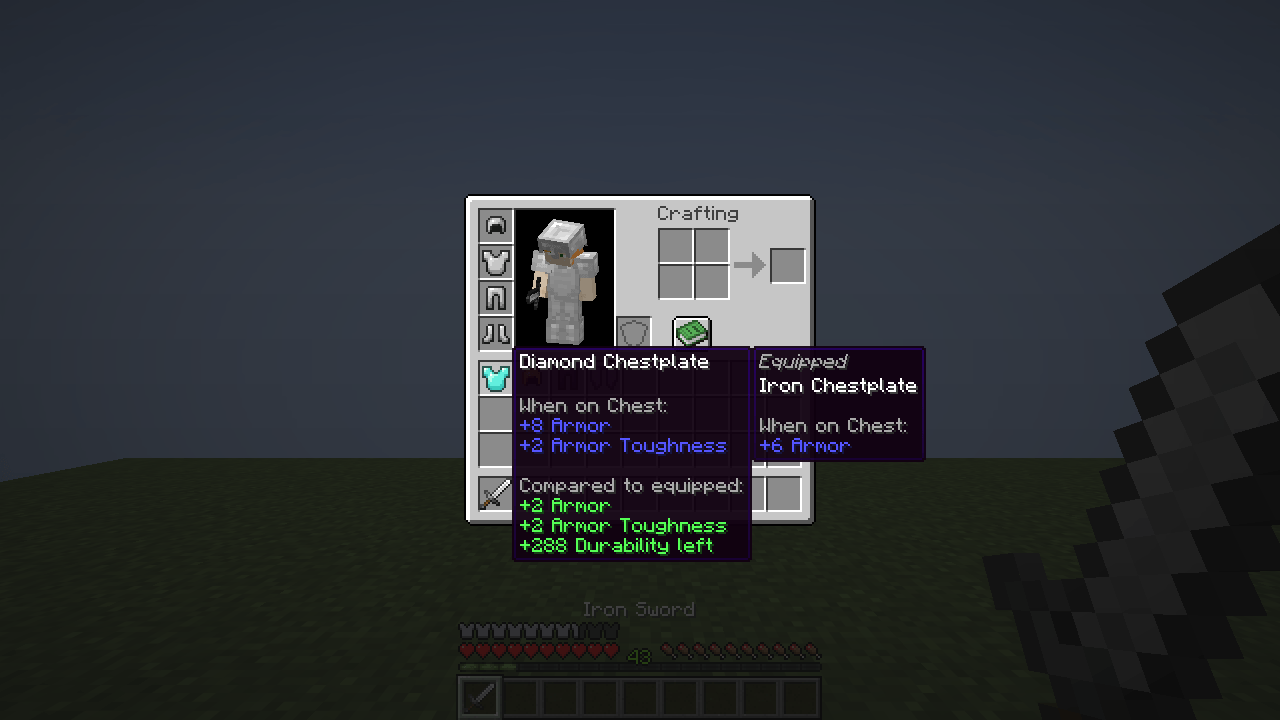
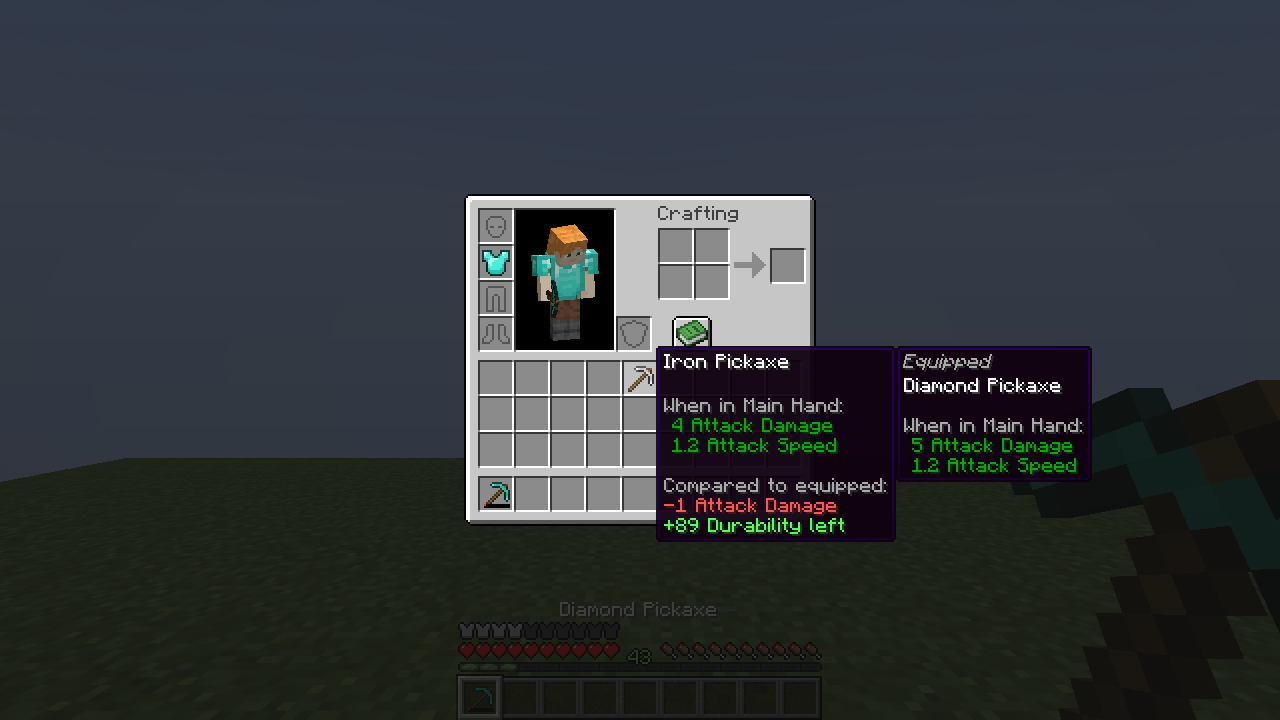
Is that new chestplate actually better? Hover it and find out. Compare Tooltips shows the armor, weapon or tool you have equipped right next to the item under your mouse, plus coloured stat differences like +2 Armor or -1 Attack Damage. No more putting gear on and taking it off again just to compare.
Features
- Side-by-side "Equipped" tooltip for helmets, chestplates, leggings, boots, elytra and other wearables, compared with what you wear in the same slot.
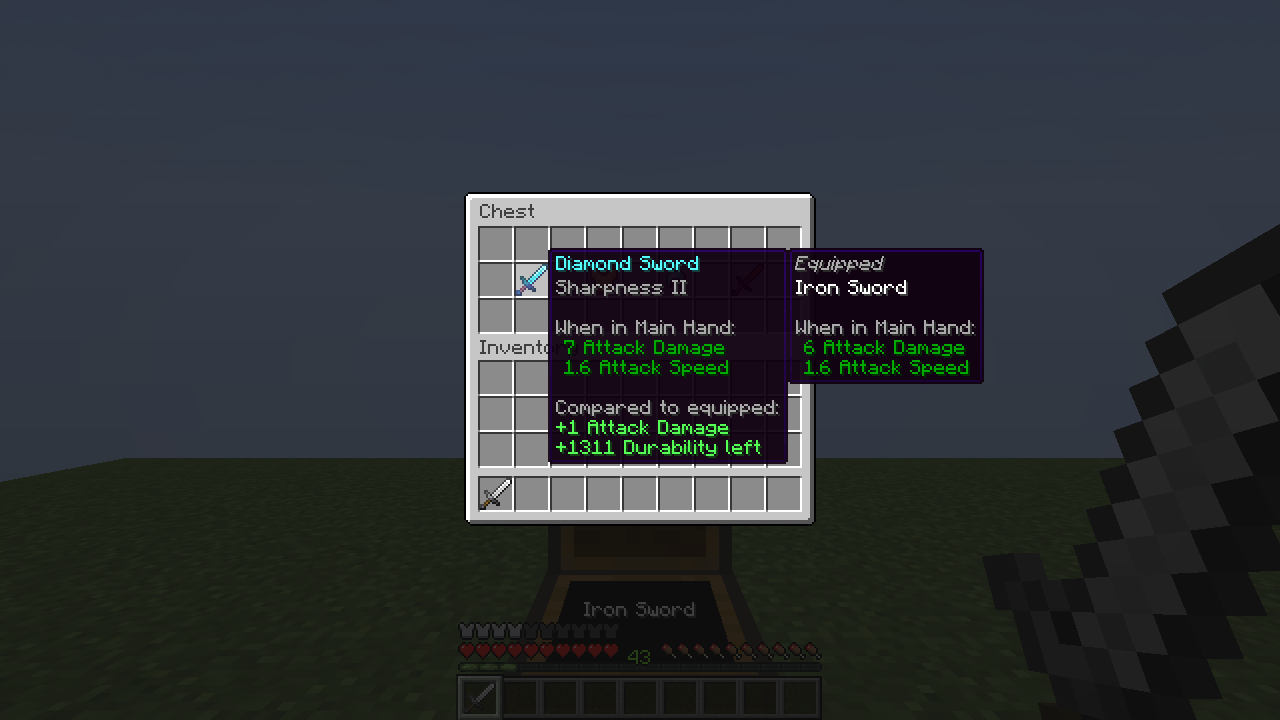
- Weapons and tools are compared with an item of the same kind in your main hand: sword with sword, pickaxe with pickaxe, axe with axe, bow with bow, and so on.
- Stat differences are added to the hovered item's tooltip: armor, armor toughness, knockback resistance, attack damage, attack speed and other attribute modifiers, plus the remaining durability. Green means better, red means worse.
- Works in container screens: survival inventory and chests (tested), and other screens built on the vanilla container screen such as barrels, shulker boxes or furnaces.
- The comparison is placed beside the normal tooltip and always kept on screen (right, left, below or above, whatever fits).
- Optional: only compare while a key is held (default Left Alt, changeable in Controls → Inventory).
- Client-side only, one small dependency (Fabric API).
Installation
- Install Fabric Loader 0.20.1 or newer for Minecraft 26.3.
- Install Fabric API.
- Put
CompareTooltips-1.0.0.jarinto yourmodsfolder.
| Minecraft | 26.3 |
| Loader | Fabric |
| Required | Fabric API |
| Side | Client only (not needed on servers) |
| Java | 25 (bundled with the official launcher for 26.3) |
Configuration
Settings are saved in config/comparetooltips.json and can be changed in game:
| Command | Effect |
|---|---|
/comparetooltips |
show the current settings |
/comparetooltips toggle |
turn the mod on or off |
/comparetooltips armor <true/false> |
compare armor and wearables |
/comparetooltips held <true/false> |
compare weapons and tools with your main hand |
/comparetooltips differences <true/false> |
show the coloured difference lines |
/comparetooltips requirekey <true/false> |
only compare while the key is held |
/comparetooltips reload |
reload the config file |
Limitations
- Not compared in 1.0.0: offhand items (shields), horse/wolf armor, Trinkets/Accessories slots, and item lists of JEI/REI/EMI.
- Enchantments appear in both tooltips but are not scored. Differences cover attribute modifiers and durability.
- Mods that replace the vanilla tooltip renderer may draw their tooltip elsewhere; the comparison follows the vanilla tooltip position.
- Tested in singleplayer with Fabric API alone and together with Sodium, AppleSkin and Mod Menu. Multiplayer and other mod combinations are untested, although the mod only runs on your client.
FAQ
Do I need it on the server? No. It is purely client-side and only reads what your own client already knows. Multiplayer has not been tested yet.
Is this a port of Equipment Compare? No. Compare Tooltips is an independent mod written from scratch for 26.3 with a similar idea. It shares no code with other mods.
Can I use it in my modpack? Yes. The mod is MIT licensed, so feel free to include it.
Will there be other Minecraft versions or NeoForge? 1.0.0 targets Fabric 26.3 only. Tell us on Discord what you need.
Community & Support
Bug reports, ideas and questions: Join our Discord
Compare Tooltips Team