Bedrock World Border
- By
A comprehensive world border addon for Minecraft Bedrock Edition that prevents players from traveling beyond specified boundaries with safe teleportation back to the border edge.
Screenshot 2025-11-26 220939.png
Screenshot 2025-11-26 220900.png
Description
BedrockWorldBorder
Java got world borders. Bedrock didn't. So we fixed that.
Ever wanted to stop your players from wandering off into the infinite void of chunks you'll never use? Maybe you're running a survival server and someone's decided to walk 50,000 blocks in one direction "just to see what's out there." Or maybe your Realm is getting a bit too spread out and the lag is starting to show. Either way, you need a wall — a big, beautiful, impossible-to-miss wall.
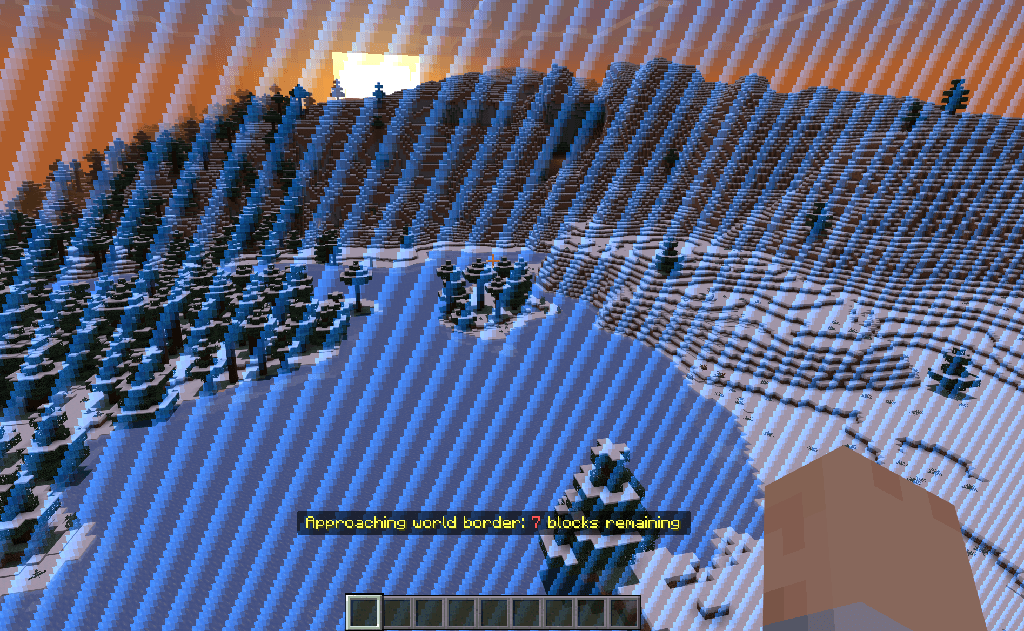
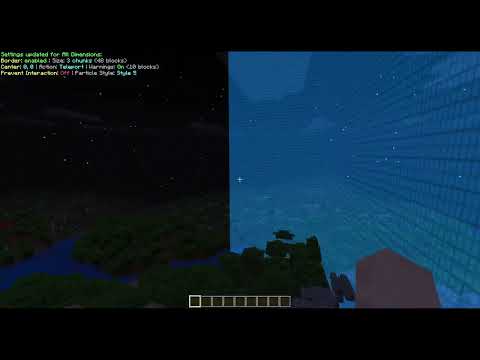
BedrockWorldBorder gives you exactly that. Proper Java Edition-style world borders, complete with towering animated particle walls that stretch 192 blocks into the sky. They look fantastic, they work in every dimension, and your players will absolutely know when they've reached the edge of civilisation.
What Can You Do With It?
Set up independent borders for the Overworld, Nether and End — each with its own size, centre point and look. Pick from 11 animated particle styles (each with a little preview icon in the dropdown, because guessing is for chumps), choose a colour, dial the opacity up or down, and make each dimension look exactly how you want it.
When a player hits the border, you've got options. Teleport them smoothly back inside (without that annoying camera snap — you're welcome), or give them a physics-based knockback that sends them bouncing off the wall. Both feel great. Knockback is particularly fun for minigame arenas.
You can also lock down the outside entirely. Turn on interaction prevention and players can't break, place or interact with anything beyond the border. No sneaky chest raiding in the wilderness.
Custom Areas
New in 4.0, and the thing people kept asking for. Your survival world is a 10,000-block border around spawn — but your PvP arena is a few hundred blocks wide and 10,000 blocks away. Previously, the moment you teleported someone there the border dragged them straight back. Not ideal for a fight.
Now you create a Custom Area. It's a second, completely separate border with its own full set of settings, so the arena can be knockback with red hearts while the main world stays teleport with classic blue stripes. Players are free inside any border, and the addon remembers which one they were last in — step out of the arena and the arena pushes you back, never the main border 10,000 blocks away. Make as many as you like. Overlap them if you want. Disable the main border and keep the areas, and you've got an arena-only setup where players roam freely until they're inside one.
Automation
Want the border to shrink by a chunk every in-game day? Want another addon to move it? Everything the menu can do, a command block can do too, via scriptevents:
/scriptevent worldborder:shrink overworld 1
/scriptevent worldborder:area create pvp_arena overworld 10000 0 12 PvP Arena
/scriptevent worldborder:style pvp_arena hearts
Setting It Up
- Download the addon and open the
.mcaddon— Minecraft imports it for you - Add both the behaviour pack and resource pack to your world
- Run
/worldborder:menu - Pick your dimension, set your size, choose a style, and you're done
Everything's configured through a clean in-game GUI with tooltips on every field. No config files to edit, no JSON to mess with.
One important thing: operators are not exempt from the border. Realm owners asked for a border that admins can't wander through by accident, so passing through is a strict whitelist. If you want to cross it yourself, open the menu, go to Bypass Whitelist and add yourself. Takes five seconds.
The Menu
/worldborder:menu is the only command, and it gets you everywhere:
| Button | What it does |
|---|---|
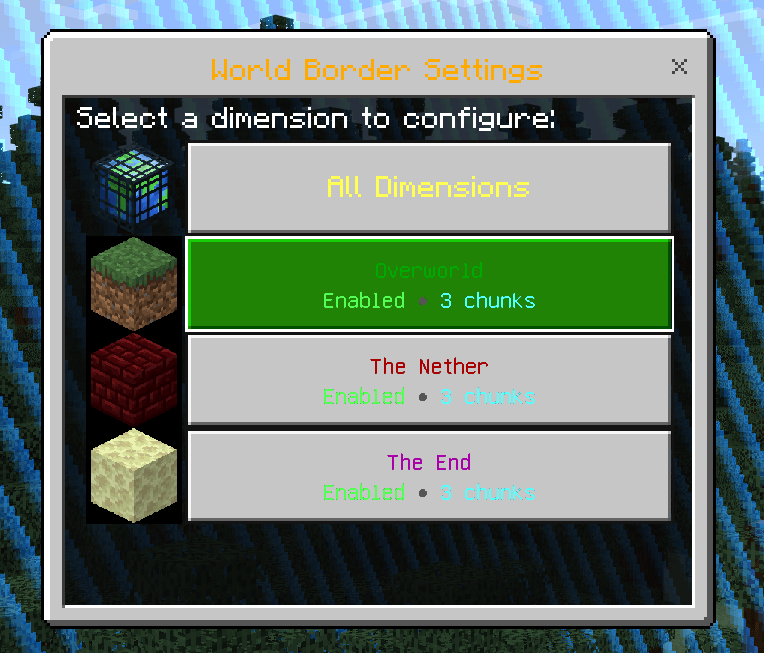
| All Dimensions / Overworld / The Nether / The End | Full settings form for that border — size, centre, action, warnings, particles, style, colour, opacity, interaction prevention |
| Custom Areas | Create, edit, rename and delete your separate bordered regions |
| Bypass Whitelist | Add online players or remove whitelisted ones, straight from dropdowns |
| View Status | Everything at a glance, per dimension and per area |
ScriptEvents
For command blocks, functions and other addons. The target is overworld, nether, end, all (the three main borders), or the id of a custom area.
| Action | Arguments | Example |
|---|---|---|
enable / disable / toggle |
<target> |
/scriptevent worldborder:enable overworld |
size |
<target> <chunks> |
/scriptevent worldborder:size all 625 |
shrink / grow |
<target> <chunks> |
/scriptevent worldborder:shrink overworld 1 |
center |
<target> <x> <z> |
/scriptevent worldborder:center nether 500 -500 |
action |
<target> <teleport|knockback> |
/scriptevent worldborder:action pvp_arena knockback |
warning |
<target> <on|off> |
/scriptevent worldborder:warning all off |
warndistance |
<target> <blocks> |
/scriptevent worldborder:warndistance overworld 30 |
particles |
<target> <on|off> |
/scriptevent worldborder:particles nether off |
interaction |
<target> <on|off> |
/scriptevent worldborder:interaction all on |
style |
<target> <style> |
/scriptevent worldborder:style overworld hexagon |
color |
<target> <colour> |
/scriptevent worldborder:color end purple |
opacity |
<target> <0-100> |
/scriptevent worldborder:opacity all 60 |
area |
create <id> <dimension> <x> <z> <chunks> [name] / delete <id> / rename <id> <name> / list |
/scriptevent worldborder:area create pvp_arena overworld 10000 0 12 PvP Arena |
whitelist |
<add|remove|clear|list> [player] |
/scriptevent worldborder:whitelist add Steve |
status / help |
/scriptevent worldborder:help |
Styles: default, square_lines, tribal, straight, square_cross, circle_glass, cross, hearts, hexagon, glyphs, square.
Colours: blue, red, green, yellow, purple, cyan, white, orange, pink, lime.
Results go to the player who triggered it (if there was one) and to the content log, so your command-block automation is auditable. shrink will never take a border below one chunk or below its warning distance.
Good to Know
- No beta APIs. This runs entirely on stable Minecraft APIs, so it won't break every other update.
- Per-dimension everything. Different sizes, styles, colours, centres and enforcement actions for each dimension — and for each custom area. Go wild.
- Strict whitelist. Nobody crosses the border unless they're on the list, operators included. Whitelisted players see a "beyond border" distance readout instead of being teleported.
- It remembers your settings. Borders, areas and the whitelist all persist between world loads. Set it and forget it.
- Warnings before enforcement. Players get distance warnings as they approach, so nobody gets teleported without fair notice.
- Upgrading from 3.x? The old commands are gone (use the menu or scriptevents), the
border_bypasstag no longer does anything (use the whitelist), and the border style resets to Default because the whole style set was replaced. Everything else carries over.
Requirements
- Minecraft Bedrock Edition 1.21.130+
Credits
Made by Rob 'myGen' Hall — myGen.co.uk
Licensed under the MIT License — see LICENSE
Bedrock World Border Team

Owner