Bedrock Relay | Proximity Voice and Chat for Discord | Realms & Servers!
- By
YOUR MINECRAFT WORLD, IN YOUR DISCORD. BOTH WAYS. Chat, joins, deaths, achievements, commands and proximity voice, on servers and now Realms. Plugins, moderation and verification, all from one dashboard at bedrockrelay.com.
💬 BEDROCK RELAY — YOUR MINECRAFT WORLD, IN YOUR DISCORD. BOTH WAYS. 💬
SERVERS. REALMS. CHAT, JOINS, DEATHS, ACHIEVEMENTS, COMMANDS AND PROXIMITY VOICE. ONE DASHBOARD.
Your players are in Minecraft. Your community is in Discord. And the two never hear a word the other says.
Someone asks "anyone on?" in Discord. Nobody answers, because everyone who's on is in the game. Someone dies to a creeper in the middle of a build and the only witness is a cow. Half your community is shouting into an empty room. The other half doesn't know they're there.
BedrockRelay fixes that. Chat flows both ways, to as many channels and Discord servers as you like. Joins, deaths and achievements turn up where everyone can see them. And players standing next to each other in the world can actually talk to each other in Discord voice.
On a dedicated server. And now on a Realm too.

⚠️ READ THIS FIRST: THIS DOWNLOAD IS A SIGNPOST ⚠️
The file on this page doesn't connect to anything. Every real BedrockRelay pack carries its own private key, made for your world and nobody else's, so it can only come from bedrockrelay.com.
Install this one and it simply tells anyone who joins where to get the real thing. You don't need it at all. Go straight to bedrockrelay.com, sign in with Discord, and BedrockRelay sets itself up for you.
🏰 NOW ON REALMS — THE BIG ONE 🏰
👻 NO SERVER. NO FILES. NO EXPERIMENTS. 👻
Realms can't talk to the internet the way a server can, so for ages the answer was "sorry, servers only." Not any more.
Sign in with the Realm owner's Microsoft account and one of our relay bots joins your Realm as a hidden player: invisible, out of the way, tucked off in the End. It does all the relaying from outside your world, so your Realm doesn't do the work.
- NOTHING TO INSTALL BY HAND — BedrockRelay puts its pack into your Realm for you, and keeps it up to date
- NO EXPERIMENTS — your Realm keeps its achievements
- ONE PLAYER SLOT — and if you play on a different account from the one that owns the Realm, make the owner account the bot and keep every slot for players
- LEAVES WHEN NOBODY'S PLAYING — Minecraft hosts each Realm session near whoever joins first. Switch this on and the bot leaves an empty Realm, so your Realm is hosted near your players, not near our bot
- PLUGINS WORK ON REALMS TOO — most of the catalog runs on a Realm, exactly as it does on a server
🔥 WHAT IT DOES 🔥
💬 CHAT, BOTH WAYS 💬
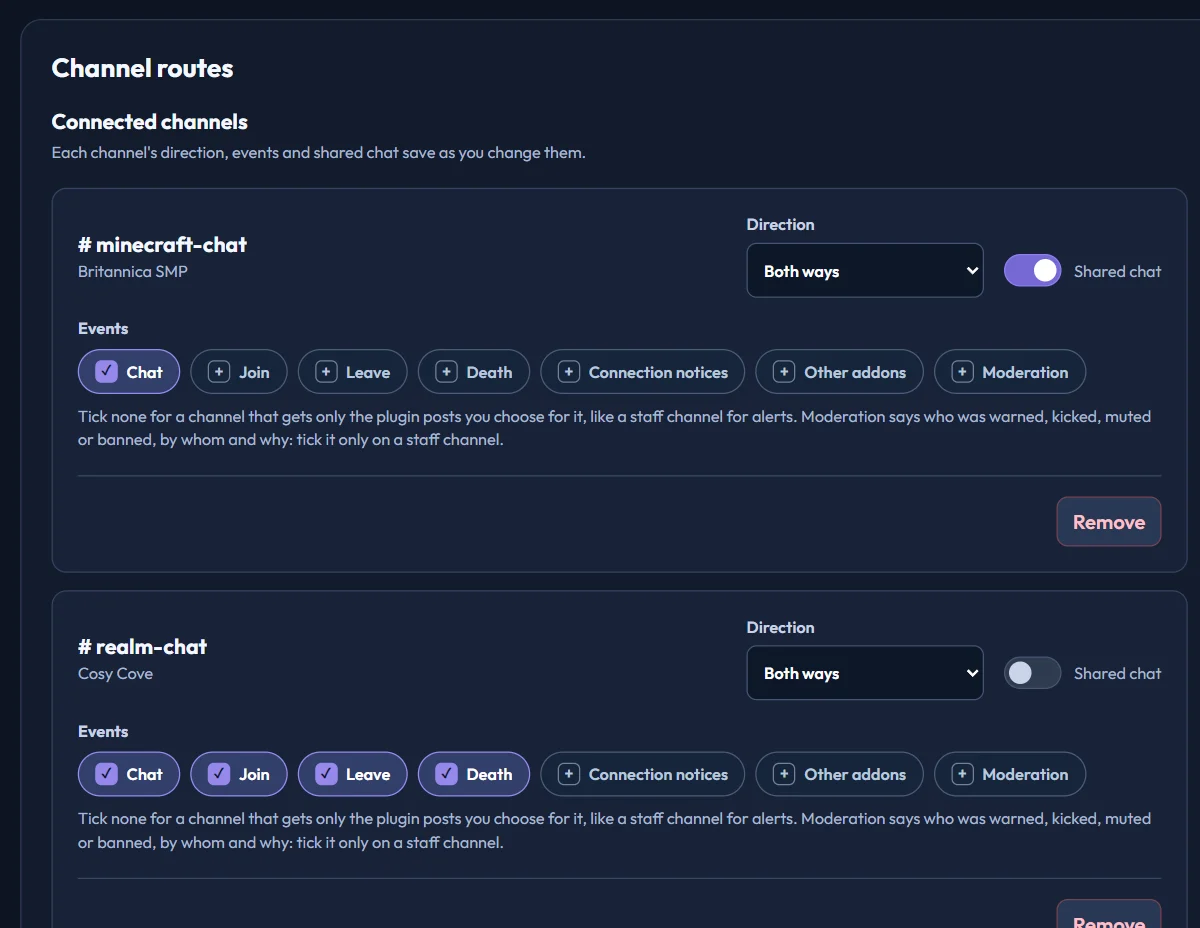
Minecraft chat goes to Discord. Discord chat comes back into the game. Every channel gets its own direction and its own events: one channel for chat, another just for deaths, a staff channel that only gets moderation. As many channels and as many Discord servers as you like. Several worlds can share one channel, and members of different Discord servers connected to the same world can talk to each other through it.
Link your Xbox account with /relay link and your Minecraft chat shows under your Discord name and picture.
🎙️ PROXIMITY VOICE 🎙️
Walk up to a friend and you're talking. Players join one Discord voice lobby. When they're close together in the world, BedrockRelay moves them into a private room. Wander off, change dimension or log out, and you're back in the lobby.
- NOTHING FOR PLAYERS TO INSTALL — it's just Discord. PC, phone, console, anyone can join in
- ONLY IF THEY WANT IT — nobody's moved unless they join the lobby themselves
- GROUPS JOIN UP — Alex is near Blake, Blake is near Casey? All three share a room
- ONE CLICK TO SET UP — choose how close counts as nearby. BedrockRelay makes the voice category, the lobby and the rooms, and tidies empty rooms away by itself
🧩 PLUGINS: ADD COMMANDS IN ONE CLICK 🧩
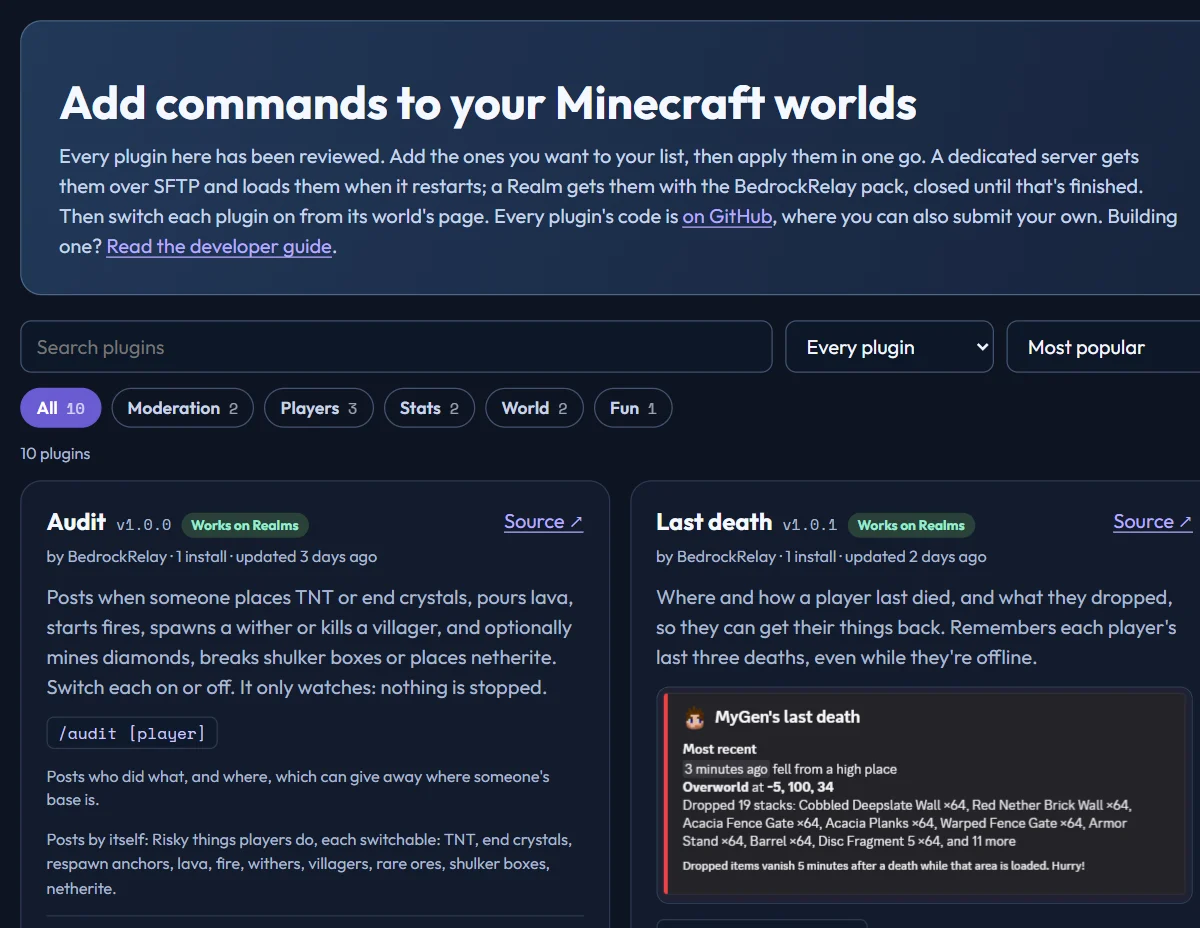
Pick from a reviewed catalog and install as many as you like in one go. Every plugin gets its own Discord commands, and you choose which roles can use them:
- STATISTICS — playtime, travel, kills, deaths, blocks mined and placed and much more, with leaderboards
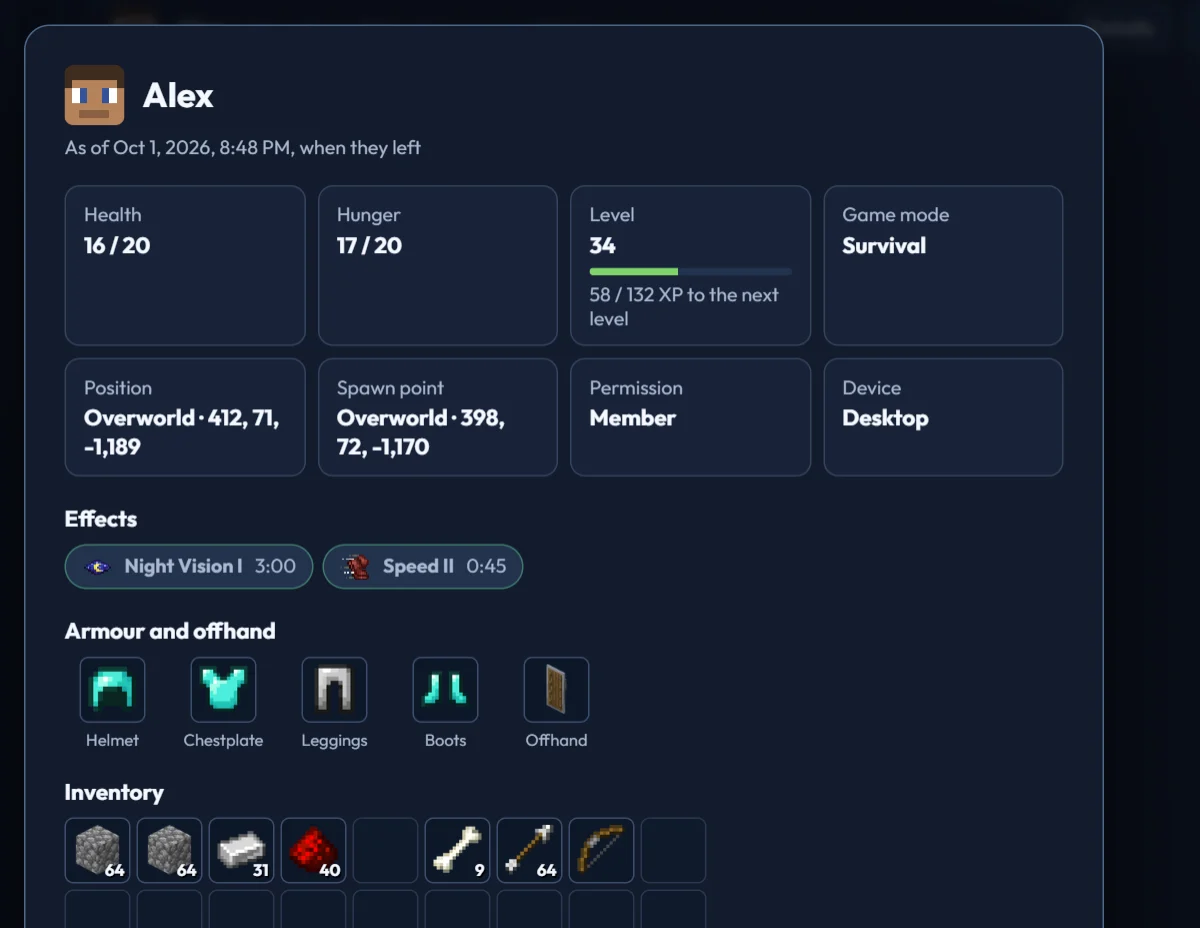
- PLAYER LIST & PLAYER CARD — who's on, what device, how long, and how they're doing right now
- MAP — the 128 × 128 blocks around any player, drawn like an in-game map, right in Discord
- PAINTINGS — a picture of exactly what a player is looking at, drawn with the game's own textures
- INVENTORY, LAST DEATH, LOCATION, SKIN, WORLD, SCOREBOARDS — and more
- AUDIT — a heads-up when someone places TNT, pours lava, starts a fire or kills a villager
- ENTITY SCAN & ITEM CLEANER — find what's lagging your world, and clear it
Some plugins can run as live boards: a leaderboard, the time of day or who's online, kept up to date in a channel by itself.
👮 LOOK AFTER YOUR PLAYERS 👮
🔨 WARN, KICK, MUTE AND BAN 🔨
From the dashboard, or from Discord with /relay mod for the roles you choose. Bans from an hour to 30 days, or for good. Bans follow a player to a new gamertag. Every action can post to a staff channel, with the reason and who did it.
🔍 SEE WHAT ANY PLAYER HAS 🔍
Health, position, armour, inventory and ender chest, live while they play, or exactly as they were when they left.
✅ VERIFICATION ✅
A Verify button in your Discord. Members sign in with Microsoft, so you know exactly which Xbox account is which, an admin approves them, and they're added to your allowlist or your Realm. No more typing gamertags into a console.
🔗 ONE LINK TO JOIN IT ALL 🔗
A short bedrockrelay.link address for your world. Players sign in once and they're in your Realm, your Discord, or both. Put it in your bio and forget about invites.
🛠️ AND THERE'S MORE 🛠️
- COMMANDS FROM DISCORD — let the roles you choose run Minecraft commands with
/relay run, or use the console on the dashboard - FARMBOT — a player that stands at your farm in creative while everyone's away, so mobs keep spawning. Move it with
/relay farmbot move - KNOW WHEN IT'S DOWN — a notice when your world goes offline and when it's back, and a warning when players can't join a server that's still running
- A BOT WITH A PERSONALITY — give it a name and a way of talking. Say its name in game or mention it in Discord, and it answers in both
- NINE LANGUAGES — the dashboard and everything the bot says in Discord, in English, Deutsch, Español, Français, 日本語, Polski, Português, Русский and 中文
- WORKS WITH YOUR OTHER ADD-ONS — chat rank add-ons, and add-ons like BedrockStatistics, BedrockAdvancements and BedrockMap that post to Discord through a bridge
- A LIVE MAP — link your world to BedrockMap and players show up on it as they move
💻 QUICK START 💻
- GO TO bedrockrelay.com and sign in with Discord
- ADD BEDROCKRELAY to a Discord server you manage
- CONNECT YOUR WORLD
- A server? Connect over SFTP and BedrockRelay installs itself, showing you every change before anything is written. No SFTP? Download the pack and install it by hand
- A Realm? Sign in as its owner, and our bot joins
- PICK A CHANNEL as soon as your world comes online
THAT'S IT. YOU'RE CONNECTED.
📥 WHAT YOU NEED 📥
- A Bedrock Dedicated Server (your own machine, a VPS or a host), or a Minecraft Realm you own
- A Discord server where you have Manage Server permission
Good to know:
- On a dedicated server, reading chat needs the world's Beta APIs experiment, and Minecraft turns off achievements on any world with an experiment on. Realms don't need it, so they keep their achievements
- Your other packs are safe. BedrockRelay installs alongside them and merges its settings into shared files without removing anyone else's
- It won't slow your world down. On a server the pack sends small batches about once a second while people are playing. On a Realm our bot does the work outside it. Formatting and delivery to Discord happen on our side
- Worlds hosted from a console, phone or PC (single-player or LAN) can't be connected
- Got the info pack from this page? Remove it once the real one's in
🎯 WHY DO WE DO THIS? 🎯
Because a Minecraft community doesn't stop at the edge of the world. The builds happen in the game. The banter happens in Discord. The best moments happen when both halves are in the same room. Now they are.
Made by MyGen Gaming — with coffee and a lot of talking to ourselves in two places at once.
Not an official Minecraft product. Not approved by or associated with Mojang or Microsoft. No creepers were harmed in the making of this update. Well. One did blow up a test build, and the whole Discord heard about it.
Bedrock Relay | Proximity Voice and Chat for Discord | Realms & Servers! Team

Owner