Bedrock Chunk Protect
- By
Protect your Minecraft Bedrock builds chunk-by-chunk! Easy menu interface, see protected areas with glowing particles, manage player permissions, and safeguard your creations from griefing.
bedrock-chunk-protect.png
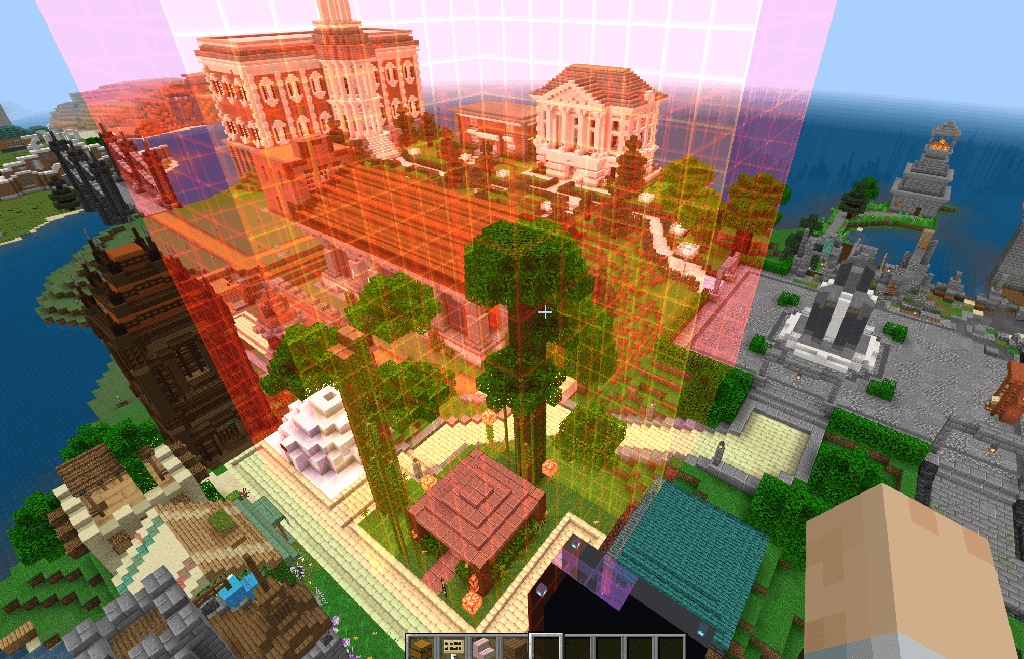
A selection of protected chunks.
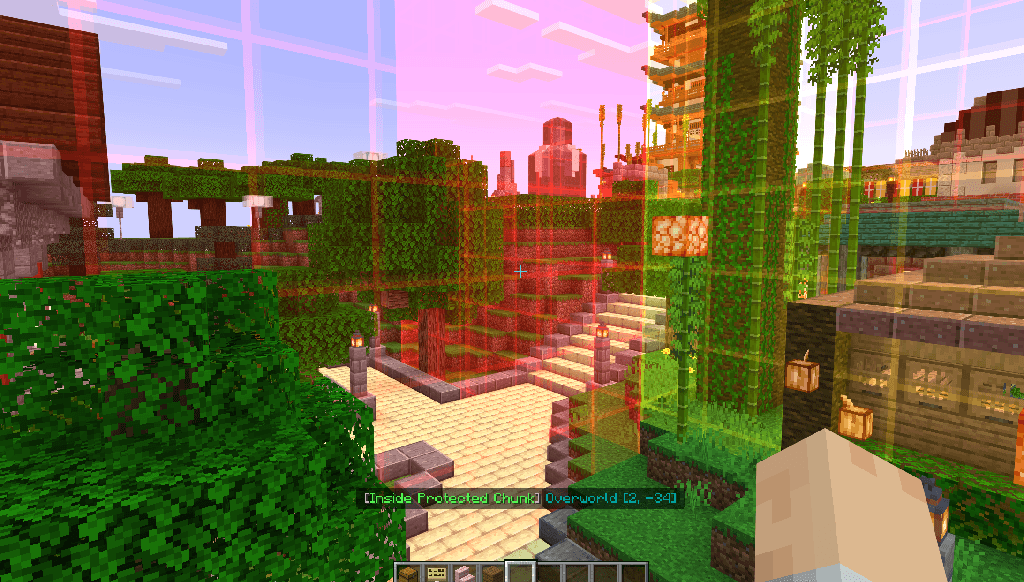
Protected chunks when inside them.
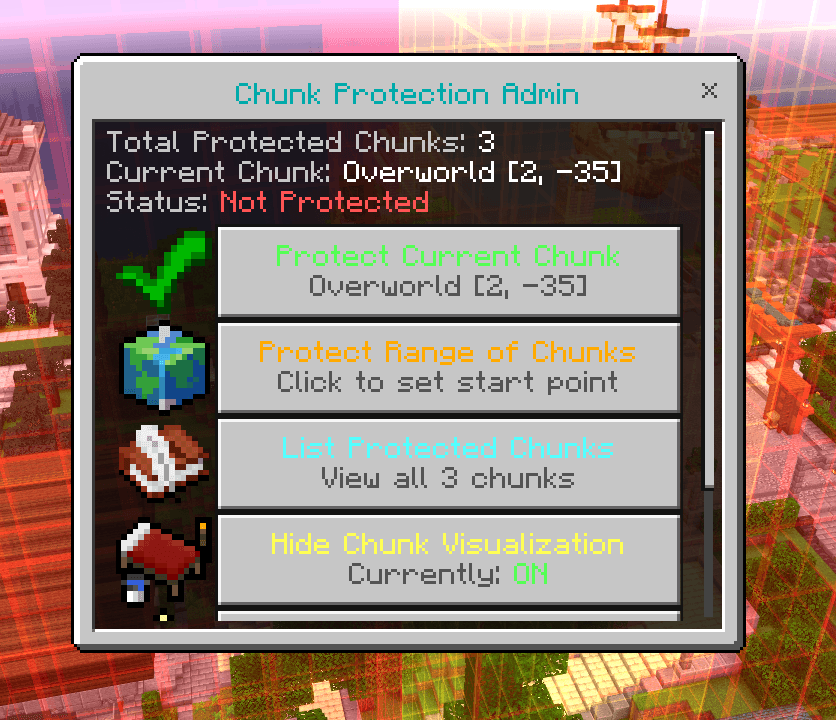
Main Admin UI.
Description
BedrockChunkProtect
Version 2.0.0 | A powerful chunk protection addon for Minecraft Bedrock Edition
BedrockChunkProtect provides comprehensive chunk-based protection for your Minecraft Bedrock worlds with an intuitive admin UI and visual particle system. Perfect for creative servers, spawn protection, and building preservation.
Features
Core Protection
- Chunk-Based Protection: Protect individual chunks (16x16 blocks) or ranges of chunks
- Comprehensive Security:
- Prevents unauthorized block breaking and placing
- Blocks explosions from damaging protected areas
- Restricts dangerous items (flint & steel, TNT, lava/water buckets)
- Prevents fluid flow into protected chunks
- Protects interactive entities (item frames, armor stands)
- Multi-Dimension Support: Works in Overworld, Nether, and End
- Data Persistence: All protections saved automatically and survive server restarts
Visual System (NEW in 2.0.0)
- Particle Visualization: See protected chunk boundaries with animated particle walls
- Red particles mark outer perimeter edges
- Yellow particles show inner chunk boundaries
- 16 blocks wide, floor-to-ceiling particle walls
- Per-player visualization (only visible to admins who enable it)
- Real-Time Feedback: Actionbar message when inside a protected chunk
Admin Interface (NEW in 2.0.0)
- Intuitive UI Menu: Access all features through
/chunk:menu- Protect/unprotect current chunk with one click
- Visual range selection (walk between corners)
- Browse all protected chunks by dimension
- Manage bypass permissions with dropdowns
- Toggle particle visualization
- Clear all protections with confirmation
Permission System
- Operator Control: Full access for players with permission level 2+
- Bypass System: Grant specific players building rights without operator status
- Flexible Management: Add/remove bypass players through UI or commands
Requirements
- Minecraft Bedrock Edition 1.20.120+ with experimental features enabled:
- Enable Beta APIs in world settings (required for script modules)
Quick Start
Using the Admin Menu (Recommended)
- Type
/chunk:menuto open the admin interface - Use the intuitive buttons to:
- Protect your current chunk
- Set up range protection by walking between corners
- View all protected chunks
- Toggle visualization to see chunk boundaries
- Manage player permissions
Using Commands
All commands require operator permissions or GameDirectors level.
Chunk Management
/chunk:protect              # Protect current chunk
/chunk:unprotect            # Unprotect current chunk
/chunk:protect_range <startX> <startZ> <endX> <endZ>
/chunk:unprotect_range <startX> <startZ> <endX> <endZ>
/chunk:list                 # List all protected chunks
/chunk:clear CONFIRM        # Remove all protections (WARNING: irreversible)
Visualization
/chunk:show                 # Toggle particle visualization on/off
/chunk:menu                 # Open admin UI menu
Player Permissions
/chunk:allow <playerName> on|off    # Grant/revoke bypass permission
/chunk:bypass_list                   # List players with bypass
Admin UI Guide
Main Menu
Access with /chunk:menu - shows current chunk status and total protected chunks.
Buttons:
- Protect/Unprotect Current Chunk - Toggle protection for where you're standing
- Protect Range of Chunks - Two-step process:
- Click to set start point
- Walk to opposite corner and click again to complete
- Cancel Range Selection - Clear start point if you change your mind (only visible after setting start)
- List Protected Chunks - View all protections grouped by dimension
- Toggle Visualization - Show/hide particle boundaries
- Manage Bypass Players - Grant or revoke building permissions
- Clear All Protections - Remove all protections (requires confirmation)
Bypass Management
Grant players building rights in protected chunks without making them operators:
- Grant Bypass: Select from online players
- Revoke Bypass: Remove permissions (works even if player is offline)
- List Bypass: View all players with permissions
Performance
- Optimized Polling: Only checks players with visualization enabled
- Event-Driven Protection: No constant polling for protection checks
- Efficient Caching: Player data cached to reduce lookups
- Smart Rendering: Only renders particles within visibility range
Credits
Author: Rob 'myGen' Hall License: CC BY-NC-SA 4.0 Website: https://mygen.co.uk
Protect your builds. Preserve your creations. BedrockChunkProtect.
Bedrock Chunk Protect Team

Owner