# Adventure Zone
Adventure Zone lets you create custom protected areas in your Minecraft Bedrock world. When players enter an active zone, they are automatically placed into Adventure mode, preventing them from breaking or placing blocks normally.
It is ideal for protecting:
* Spawn areas
* Towns and cities
* Shops
* Event locations
* Challenge areas
* Adventure maps
* Important builds
* Any location players should explore without modifying
The addon includes an owner system, an in-game administration menu, zone-management tools, player bypass permissions, and support for multiple dimensions.
> **Achievement Compatibility Notice**
>
> Following a recent Minecraft Bedrock update, activating custom behavior packs may cause Minecraft to display **“Achievements disabled.”**
>
> Adventure Zone uses stable Script APIs and does not require experimental Beta APIs. However, achievement eligibility is controlled by Minecraft, and there is currently no supported manifest option that can force achievements to remain enabled.
>
> Until Mojang changes this behavior, Adventure Zone should be considered **not achievement-compatible on affected Minecraft versions**.
# Features
* Create and manage multiple protected zones
* Automatically place players into Adventure mode inside active zones
* Restore a player’s previous gamemode after leaving a zone
* Enable or disable individual zones
* Edit existing zone settings
* Delete zones through the administration menu
* Configure zones using minimum and maximum coordinates
* Create zones in different Minecraft dimensions
* Allow selected players to bypass individual zones
* Allow trusted players to bypass every zone
* Display player coordinates, dimension, and current zone status
* Remove hostile mobs from configured zone areas
* Includes an owner-only administration item
* Uses persistent dynamic-property storage
* Designed for single-player worlds, multiplayer worlds, Realms, and dedicated servers
* Uses stable Script APIs
* Does not require experimental Beta APIs
# Zone Protection
When a player enters an active Adventure Zone:
* The player is automatically switched to Adventure mode.
* Their previous gamemode is remembered.
* Zone-control effects are applied when needed.
* The player’s location and current zone are monitored.
* Hostile mobs can be removed from the protected area.
When the player leaves the zone, the addon removes the applicable effects and restores the player’s previous gamemode.
The system also handles players moving directly from one protected zone into another.
# Multiple Dimensions
Zones are connected to the dimension in which they were created.
Supported dimensions include:
* Overworld
* Nether
* The End
Coordinates used for one dimension will not affect matching coordinates in another dimension.
# Player Bypass Permissions
Trusted players can be allowed to enter protected areas without being switched into Adventure mode.
## Global Bypass
Give a player the following tag to let them bypass every Adventure Zone:
`allowed`
## Individual Zone Bypass
Players can also bypass specific zones using the applicable zone tag.
Examples include:
* `allowed1`
* `allowed_1`
* `allowed2`
* `allowed_2`
This lets administrators grant access to one protected area without allowing the player to bypass every zone.
# Owner System
The first player to join the world becomes the permanent owner.
The owner:
* Receives access to the administration menu
* Can create and manage zones
* Can edit zone settings
* Can manage bypass permissions
* Can enable or disable zones
* Can delete existing zones
* Retains ownership across world reloads
Ownership information is stored using Minecraft dynamic properties.
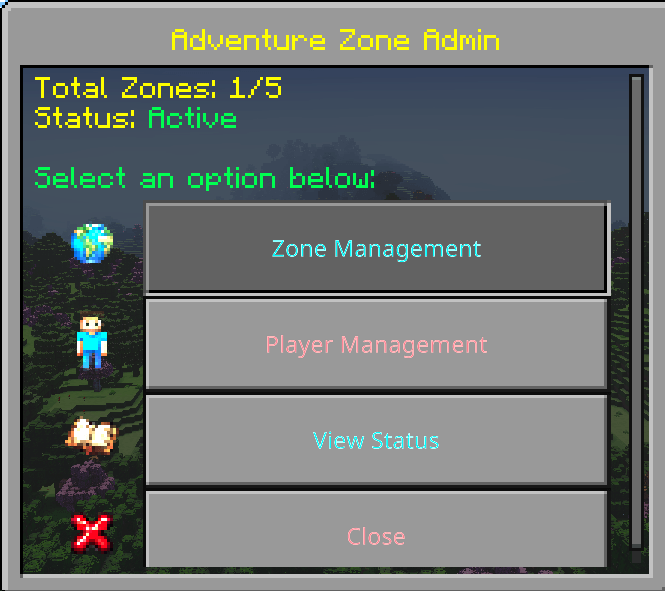
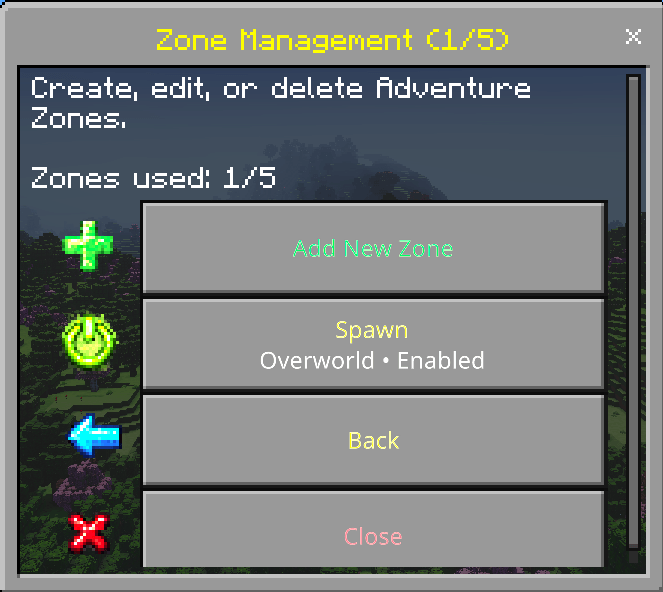
# Administration Menu
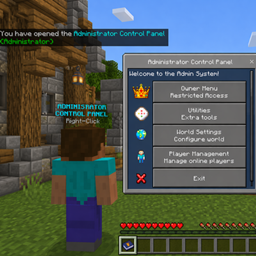
Use the included Adventure Menu item to open the administration interface.
The menu provides access to:
* Create Zone
* Manage Zones
* Edit Zone
* Enable or Disable Zone
* Delete Zone
* Player Bypass Settings
* Player and Zone Status
* Additional configuration options
The interface includes organized navigation with Back and Exit buttons.
# Creating a Zone
1. Open the Adventure Zone administration menu.
2. Select the option to create a zone.
3. Enter or set the minimum coordinates.
4. Enter or set the maximum coordinates.
5. Confirm the dimension.
6. Configure the zone’s settings.
7. Enable the zone.
Players entering the active area will automatically be placed into Adventure mode unless they have the required bypass permission.
# Player Status
The status menu can display:
* Player coordinates
* Current dimension
* Current gamemode
* Whether the player is inside a zone
* The name or number of the current zone
* Whether the player has bypass access
These details can help administrators configure and test protected areas.
# Installation
1. Download Adventure Zone.
2. Import the Behavior Pack.
3. Import the Resource Pack.
4. Activate both packs on your world.
5. Ensure both packs are the same version.
6. Join the world.
7. The first player to join will be registered as the owner.
8. Use the Adventure Menu item to configure your protected zones.
Experimental Beta APIs are not required.
# Updating the Addon
1. Back up your world.
2. Remove the old Adventure Zone Behavior Pack.
3. Remove the old Adventure Zone Resource Pack.
4. Import the new versions.
5. Reactivate both packs on your world.
6. Join the world.
7. Test your existing zones and player permissions.
Persistent zone and owner information should remain available after updating, provided the addon’s dynamic-property keys have not been changed.
# Important Notes
* Always back up your world before installing an update.
* Keep the Behavior Pack and Resource Pack on the same version.
* Do not change the addon’s dynamic-property keys.
* Test zone coordinates carefully before allowing players to join.
* Creative, Spectator, and administrative tools may affect achievement eligibility.
* Minecraft controls achievement eligibility; the addon cannot override it.
# Compatibility
Adventure Zone is designed for:
* Minecraft Bedrock Edition
* Single-player worlds
* Multiplayer worlds
* Minecraft Realms
* Bedrock Dedicated Servers
The addon uses stable Script APIs and does not require experimental Beta APIs.
# Changelog v1.0.1
## Permissions and Bypass
* Added the global `allowed` bypass tag.
* Added per-zone bypass tags such as `allowed1`, `allowed_1`, and `allowed2`.
* Players with the appropriate tags can move through protected zones without restrictions.
* Improved zone-detection reliability.
## Player Effects and Gamemode Handling
* Added player effects inside zones for improved control.
* Effects are cleared when players leave protected zones.
* Improved handling when moving directly between zones.
* Fixed situations where players could remain stuck in Adventure mode.
* Improved restoration of a player’s previous gamemode.
## Owner System
* Added automatic first-join owner registration using dynamic properties.
* The first owner automatically receives administration access.
* Owner information persists across world reloads.
* Added synchronization to ensure the owner retains the correct permissions.
## Administration Menu
* Created an in-game administration menu using `ActionFormData`.
* Added options for managing zones and addon settings.
* Improved menu organization and navigation.
* Added consistent Back and Exit button behavior.
## Interface Improvements
* Improved menu formatting and readability.
* Added a consistent layout across addon menus.
* Organized settings to reduce menu clutter.
* Fixed situations where menus would not open correctly.
## Status and Testing Tools
* Added player status information.
* Added location, dimension, and zone-status displays.
* Added coordinate and current-zone information.
* Improved tools for configuring and testing zones.
* Improved error handling in interface functions.
## Stability and Fixes
* Fixed duplicate or empty buttons appearing in menus.
* Improved `MessageFormData` button handling.
* Cleaned up menu logic to prevent interface conflicts.
* Added general performance and stability improvements.
# Additional Information
* Persistent data is stored using dynamic properties.
* Designed for Minecraft Realms and dedicated servers.
* Uses stable APIs without requiring experimental Beta APIs.
* Can be used alongside other administrative systems when compatible.
For support, suggestions, and update information, join my [Discord server](https://discord.gg/2bvzPfuY54).