Hive Info - Achievement Friendly
- By
Hive Info is a lightweight Minecraft Bedrock addon that displays live honey level information when looking at a Beehive or Bee Nest.
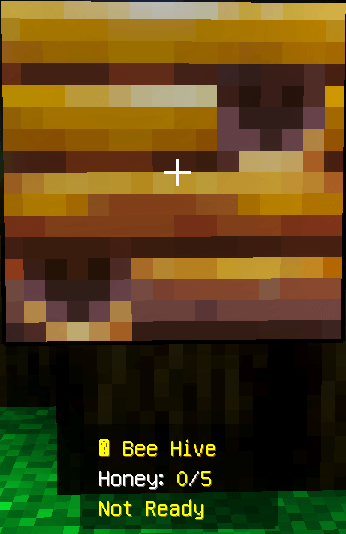
Screenshot 2026-05-12 125032.png
Description
# Hive Info
Check the honey level of Beehives and Bee Nests simply by looking at them.
**Hive Info** is a small Minecraft Bedrock utility addon that gives you an instant on-screen reading of how much honey a hive currently contains. Instead of trying to judge whether a hive is ready from its appearance or waiting for honey particles, you can look directly at the block and see its current progress.
Honey levels are displayed from **0/5 to 5/5**, making it easy to identify which hives are still filling and which ones are ready for harvesting.
The addon is designed to stay simple: there are no menus to configure, commands to remember, or special tools you need to carry.
## What Hive Info Shows
When you look at a supported hive, Hive Info can display:
* The type of hive being viewed
* Its current honey level
* Honey progress from `0/5` to `5/5`
* Whether the hive is ready to harvest
A hive that is still filling might display:
```text
🐝 Beehive
Honey: 3/5
Not Ready
```
Once it reaches maximum honey:
```text
🐝 Beehive
Honey: 5/5
Ready!
```
The information updates as you look at different hives, giving you a quick way to check an entire bee farm.
## Supported Blocks
Hive Info works with both of Minecraft's normal bee housing blocks:
* Beehive
* Bee Nest
Whether you're working with naturally generated Bee Nests or crafted Beehives in a larger honey farm, you can check their honey progress in the same way.
## Useful for Bee Farms
Managing multiple hives can make it difficult to remember which ones are ready for harvesting.
With Hive Info, you can walk through your bee farm and inspect each hive individually. A quick look tells you whether you should harvest it or leave it alone while the bees continue working.
This can be especially useful for:
* Survival bee farms
* Honey bottle production
* Honeycomb collection
* Large groups of Beehives
* Naturally generated Bee Nests
* Redstone and automated honey farms
* Decorative builds that also contain working hives
Because the information appears only when you inspect a hive, the addon stays out of the way during normal gameplay.
## Honey Levels Explained
Minecraft hives store honey using levels ranging from `0` through `5`.
Hive Info presents that information in an easy-to-read format:
* `0/5` — Empty
* `1/5` — Honey is beginning to accumulate
* `2/5` — Still filling
* `3/5` — More than halfway
* `4/5` — Almost ready
* `5/5` — Ready to harvest
When the level reaches `5/5`, Hive Info displays the **Ready!** status so you can immediately recognize a full hive.
## How to Use Hive Info
There is no setup required after activating the addon.
1. Enter your Minecraft world with Hive Info enabled.
2. Find a Beehive or Bee Nest.
3. Look directly at the hive.
4. Read the honey information displayed on your screen.
5. Wait until the hive reaches `5/5` before harvesting if you want a full hive.
Look away from the hive and the information will no longer be needed. Look at another hive to check its current level.
## Simple Survival Utility
Hive Info is intended to provide useful information without changing how Minecraft's bee and honey systems work.
The addon does not automatically collect honey, increase honey production, modify bees, or make hives fill faster.
It simply lets you see information that Minecraft is already tracking for the hive.
This keeps the addon useful for players who want a small quality-of-life improvement without significantly changing normal Survival gameplay.
## Installation
To install Hive Info:
1. Download the Hive Info Behavior Pack.
2. Import the pack into Minecraft Bedrock Edition.
3. Apply Hive Info to the world where you want to use it.
4. Leave experimental Beta API features disabled.
5. Enter the world.
6. Look directly at a Beehive or Bee Nest to test the display.
Hive Info can be added to either a new world or an existing world.
As with any addon, creating a backup of an important world before installing or updating packs is recommended.
## Achievement Compatibility
Hive Info does not require cheats or experimental Beta APIs.
On currently compatible Minecraft Bedrock versions, Hive Info can be active while **achievements remain available**.
Minecraft ultimately controls whether a world qualifies for achievements, and those requirements can change between game updates. Because of this, a future Minecraft Bedrock update could change achievement behavior for custom behavior packs.
If maintaining achievement eligibility is important to you, avoid enabling cheats or other world options that Minecraft normally identifies as incompatible with achievements. Testing after major Minecraft updates is also recommended.
## Compatibility
Hive Info is made for Minecraft Bedrock Edition and is suitable for:
* New worlds
* Existing worlds
* Single-player gameplay
* Multiplayer gameplay
* Survival worlds
* Bee farms
* Honey-production builds
* Automated farming areas
No experimental Beta APIs are required, and the addon is designed to remain a lightweight addition to normal Minecraft gameplay.
## A Small Addon With One Job
Hive Info is intentionally straightforward.
If you regularly keep bees in Minecraft, it gives you a faster way to answer one simple question:
**Is this hive ready yet?**
Look at the hive, check the honey level, and continue playing.
Hive Info - Achievement Friendly Team