# Improved Zoom
Improved Zoom adds a simple, customizable zoom system to Minecraft Bedrock Edition, giving each player control over how they want zoom to work.
Instead of relying on commands or complicated controls, zoom is activated with a quick triple-crouch. Hold the third crouch to stay zoomed in, then stand back up when you're ready to return to your normal view.
Each player can independently choose their zoom strength, enable or disable Night Vision, turn the zoom system on or off, and change their preferences through an easy-to-use in-game settings menu.
> **Achievement Friendly**
>
> Improved Zoom is designed to work without disabling achievements. The addon uses the stable Minecraft Script API and does not require experimental Beta APIs or cheats.
>
> Achievements can continue to be earned while using Improved Zoom on supported Minecraft Bedrock versions.
# Features
* Achievement friendly
* Simple triple-crouch zoom activation
* Three selectable zoom strengths
* Optional Night Vision
* Zoom On/Off setting
* Live setting changes while zoomed
* Individual settings for each player
* Automatically saves player preferences
* Automatically provides the Zoom Settings item
* Zoom Settings item supports keep on death
* Craftable replacement item
* Custom menu and item icons
* PBR / Vibrant Visuals support
* Multiplayer friendly
* Lightweight design
* Uses the stable Minecraft Script API
* No experimental Beta APIs required
# Activating Zoom
Using Improved Zoom is simple:
1. Crouch three times at a steady pace.
2. Hold the third crouch.
3. Remain crouched for as long as you want to stay zoomed.
4. Stand up to immediately return to your normal view.
The zoom effect remains active while you hold the third crouch and is automatically cleared when you stand.
## Zoom Tip
For the most reliable activation, triple-crouch at a steady pace and hold the third crouch.
Crouching extremely quickly may prevent Minecraft from detecting the complete activation sequence. If the zoom does not activate correctly, simply stand up and try the triple-crouch again.
# Zoom Settings Menu
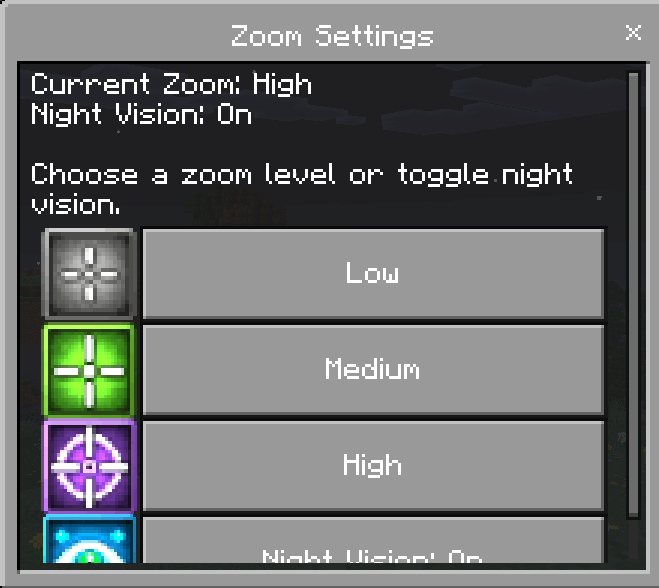
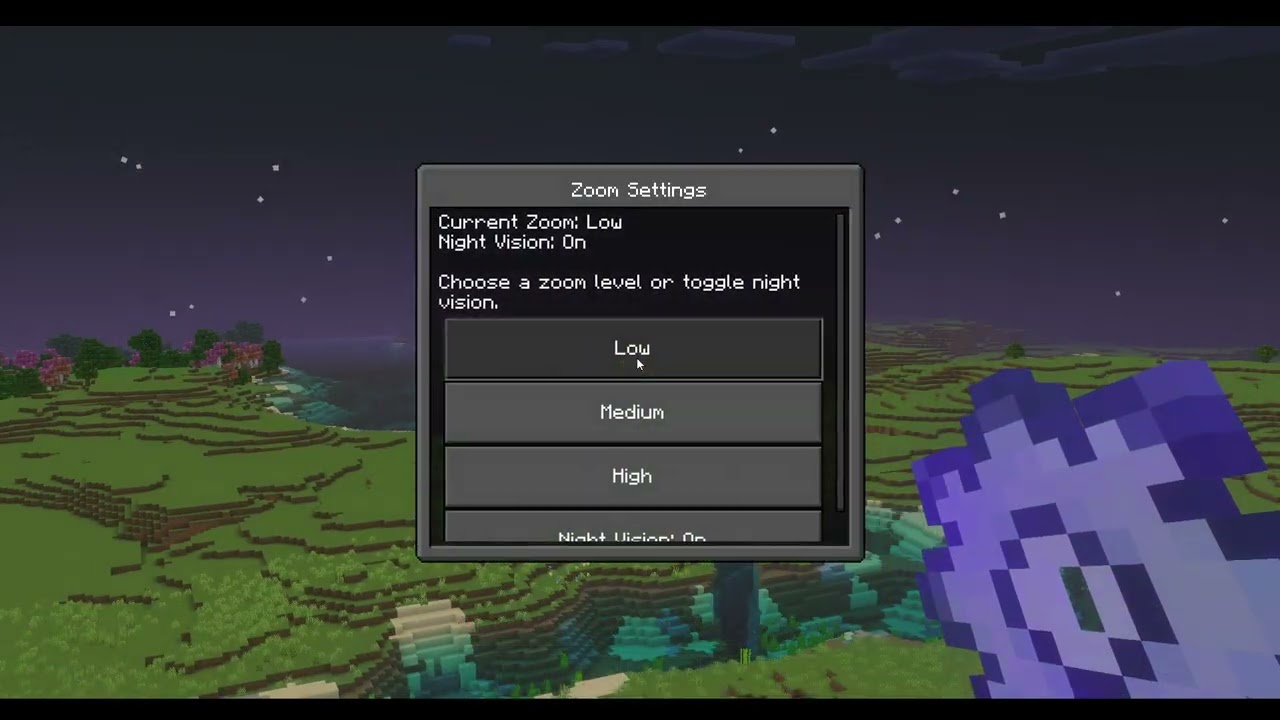
Every player receives their own personal Zoom Settings menu.
To open it:
1. Hold the Zoom Settings item.
2. Use the item while standing or crouching.
3. Choose the setting you want to change.
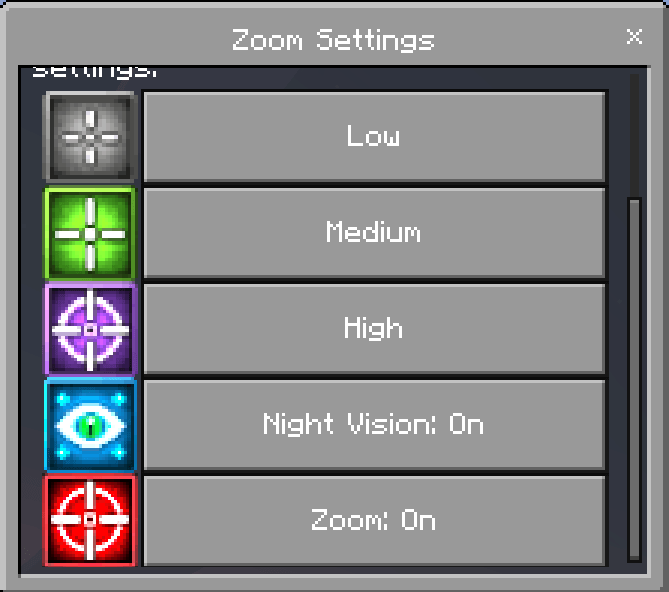
From the menu, players can:
* Turn zoom on or off
* Select Low zoom
* Select Medium zoom
* Select High zoom
* Enable or disable Night Vision
Settings belong to the individual player, so one player's choices do not affect anyone else in the world.
# Live Setting Updates
You don't have to stop zooming just to adjust your settings.
Zoom strength and Night Vision can be changed while zoom is currently active. Changes are applied immediately without requiring you to stand up or restart the zoom sequence.
This makes it easy to switch between zoom levels depending on how far away something is.
# Individual Player Settings
Improved Zoom stores settings separately for every player.
Saved preferences include:
* Zoom enabled or disabled
* Selected zoom strength
* Night Vision enabled or disabled
Player preferences are stored automatically using dynamic properties. When a player leaves and later rejoins the world, their previous settings remain available.
This also makes Improved Zoom suitable for multiplayer worlds, Realms, and Bedrock Dedicated Servers where different players may prefer different zoom configurations.
# Zoom Settings Item
Players automatically receive the Zoom Settings item when joining the world.
The item supports keep on death to help prevent players from losing access to their settings after dying.
If the item is ever lost or removed, a replacement can be crafted.
# Crafting Recipe
[Improved Zoom crafting recipe]
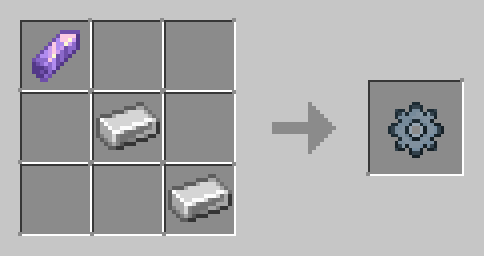
Required materials:
* 1 Amethyst Shard
* 2 Iron Ingots
# Installation
1. Download Improved Zoom.
2. Import the Behavior Pack into Minecraft Bedrock Edition.
3. Import the Resource Pack.
4. Activate both packs on your world.
5. Make sure the Behavior Pack and Resource Pack are the same version.
6. Experimental Beta APIs are not required.
7. Join the world.
8. The Zoom Settings item will be provided automatically.
The Resource Pack is required for the custom item texture, menu icons, and complete visual experience.
# How to Update
When installing a newer version of Improved Zoom:
1. Back up your world before making changes.
2. Remove the old Improved Zoom Behavior Pack.
3. Remove the old Improved Zoom Resource Pack.
4. Import the updated Behavior Pack and Resource Pack.
5. Activate both updated packs on your world.
6. Join the world and verify your zoom controls and settings.
Existing player preferences should remain available as long as the addon's saved dynamic-property keys remain unchanged.
# Important Notes
* Achievements can be earned while using Improved Zoom.
* Triple-crouch at a steady pace for reliable activation.
* Hold the third crouch to remain zoomed.
* Stand up to immediately cancel zoom.
* Each player controls their own zoom preferences.
* Turning Zoom off prevents triple-crouch activation.
* Night Vision can be used with any available zoom strength.
* Experimental Beta APIs are not required.
* Keep the Behavior Pack and Resource Pack on matching versions.
* Always back up important worlds before updating addons.
# Compatibility
Improved Zoom is designed for Minecraft Bedrock **1.26.30 and newer** and supports:
* Single-player worlds
* Multiplayer worlds
* Minecraft Realms
* Bedrock Dedicated Servers
* New worlds
* Existing worlds
* Survival gameplay
* Adventure gameplay
* Achievement-enabled worlds
# Changelog
# Changelog v1.0.5
- Fixed an issue where new players might not receive the **Zoom Settings item** when joining.
- Improved the automatic item-give system for better reliability.
- Prevented duplicate Zoom Settings items from being given on rejoin.
- Players who lose the item can still craft a replacement.
- **Sorry for missing this issue in the previous update. It has now been corrected.**
## Version 1.0.4 — API & Visual Compatibility Update
* Updated minimum supported Minecraft Bedrock version to **1.26.30**
* Updated to the current stable Minecraft Script API
* Updated `@minecraft/server` to **2.8.0**
* Updated `@minecraft/server-ui` to **2.1.0**
* Added **PBR / Vibrant Visuals compatibility** to the Resource Pack manifest
* Updated compatibility for current Minecraft Bedrock releases
* Confirmed achievement-friendly operation without experimental Beta APIs
* Existing zoom controls and functionality remain unchanged
## Version 1.0.2 — Zoom Toggle Update
### Zoom On/Off Setting
* Added a Zoom On/Off option to the Zoom Settings menu.
* The new option appears below the Night Vision setting.
* Zoom status is saved separately for every player using dynamic properties.
### When Zoom Is Off
* Triple-crouch no longer activates zoom.
* Any active zoom effect is immediately removed.
### When Zoom Is On
* Triple-crouch activation works normally.
* The player's selected zoom strength and Night Vision preference remain saved.
### Interface Improvements
* Added a red-and-white icon for the Zoom toggle.
* Improved player control over the zoom system.
## Version 1.0.1 — Interface & Resource Pack Update
### Menu Improvements
* Updated the Zoom Settings menu so it can be opened while crouching or standing.
* Removed the previous crouch-only restriction for opening the settings menu.
### Resource Pack
* Added the Improved Zoom Resource Pack.
* Added custom menu icons for Low, Medium, and High Zoom.
* Added a custom Night Vision menu icon.
* Added a custom texture for the Zoom Settings item.
* Improved the appearance and readability of the settings interface.