Zone Info: Forever
- By
(with EllesmereUI support) A zero-bloat map tooltip enhancement displaying zone levels and other informations - created specifically for WoW: Forever.
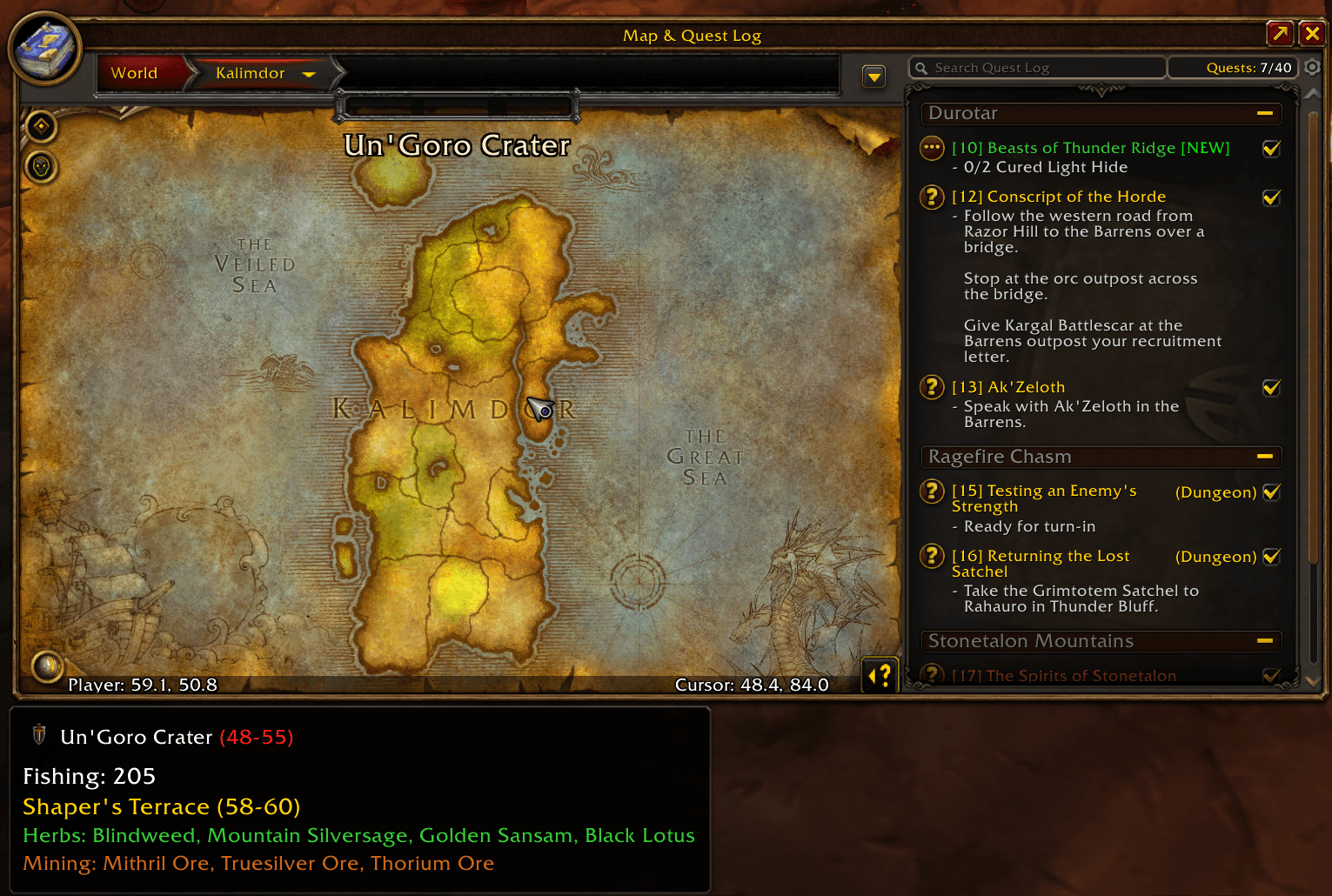
Separate Window Mode
Description
Zone Info: Forever puts what you need to know about a zone right on your World Map: its level range, dungeons, fishing skill, transport, herbs and ores. Its Journal answers the question the other way round: which zones have the herb, ore, fish or dungeon you are looking for?
If you've ever opened your map and wondered "Am I high enough level to quest here?", "What level is the dungeon in this zone?", "What fishing skill do I need here?" or "Where does this boat go?" — this addon is exactly what you need.
On the World Map
- Zone Level Ranges: Hover over any zone to see its level range next to the zone name, color-coded for your character's level (Gray, Green, Yellow, Orange or Red), so you can tell at a glance whether a zone is safe, right for you, or deadly.
- Dungeons & Raids: Every zone lists its dungeons and raids with their level ranges, including the new instances of WoW: Forever.
- Dungeon & Raid Entrances: Icons on the zone maps mark where the entrances are. Hover one for the name and level range. Blackrock Mountain and the Gates of Ahn'Qiraj list every instance behind them, and Dire Maul and Stratholme show which wing or gate each entrance leads to.
- Boats, Zeppelins and the Deeprun Tram: Icons mark the spot each one leaves from, and hovering an icon shows where it takes you. Every zone also lists its routes as text.
- Fishing Skill: Shows the skill you need to fish in the zone and the skill at which no fish gets away, for example "Fishing: 55 (no escapes: 150)", colored by your own Fishing skill. Harder spots inside a zone, such as the Bay of Storms in Azshara, are named on their own line. Forever's new zones use estimates for now.
- Herbs and Ores (optional): Lists the herbs and ores worth gathering in the zone, colored by your Herbalism or Mining skill. Off by default.
- Fish, Trunks and Crates (optional): Lists what you can fish up in the zone. Off by default.
- Faction Territory: Shows whether a zone belongs to the Alliance, the Horde, or is Contested, using the PvP shield icons.
The Journal
Click the Zone Info button on the World Map, or type /zif journal.
- Find anything: Look up a herb, an ore, a fish, a fishing pool, a chest or a dungeon and see which zones have it. Herbs, ores, pools and chests show how many spawn points each zone has, with the best zone first.
- Search by zone: Type a zone's name, or press "This zone", to see what is worth gathering there, the most plentiful first.
- Skill-ups: Keeps only the herbs and ores that can still raise your Herbalism or Mining.
- My level: Hides zones and dungeons that are too high for you.
- Dungeons tab: Every dungeon and raid with its level range, the zones it is entered from and the coordinates of each entrance.
- Click a zone to show it on the World Map, and Shift-click an item to link it in chat.
Make it yours
- Where the info shows: Under the zone name on the map, or in a separate window you can move.
- Current Zone Panel (optional): A small panel that always shows the info for the zone you are in. It can hide itself in combat.
- Every line is yours to set: Turn each kind of information on or off, and give each its own font size and color. You can also set the size of the map icons and how wide the text may get before it wraps.
- Settings: Type
/zif, right-click the World Map button, or go to Esc -> Options -> AddOns. Changes apply at once, with no reload.
Languages
Zones, dungeons, transport destinations, herbs, ores and fish take their names from your game client, so they always match your client's language. The addon's own texts are translated into German, French, Spanish, Russian, Portuguese (Brazil), Korean, Traditional and Simplified Chinese and Italian. Most of these are machine translations, so corrections are welcome.
Compatibility
- Works with the default World Map and is built for the zones, dungeons and level ranges of World of Warcraft: Forever.
- Leatrix Maps: The two work side by side. Where Leatrix Maps already draws dungeon or travel icons, Zone Info: Forever doesn't draw them a second time.
- EllesmereUI: With EllesmereUI installed, the addon's windows and settings match its look.
- Lightweight: The texts are built once, when a setting changes, and not every time you move the mouse over the map.
Thanks
Spawn counts and the names of fishing pools and chests come from GatherLite by Wuild, fish lists from FishFry by GildedVellum, entrance and transport locations from Leatrix Maps, and dungeon level ranges from ForeverDungeonJournal by Exehn.
Feel free to leave feedback or report issues in the comments/issue section!
Zone Info: Forever Team

Owner