Class Quests Forever
- By
A journal of every class quest in WoW Forever that alerts you the moment a level-up unlocks a new one.
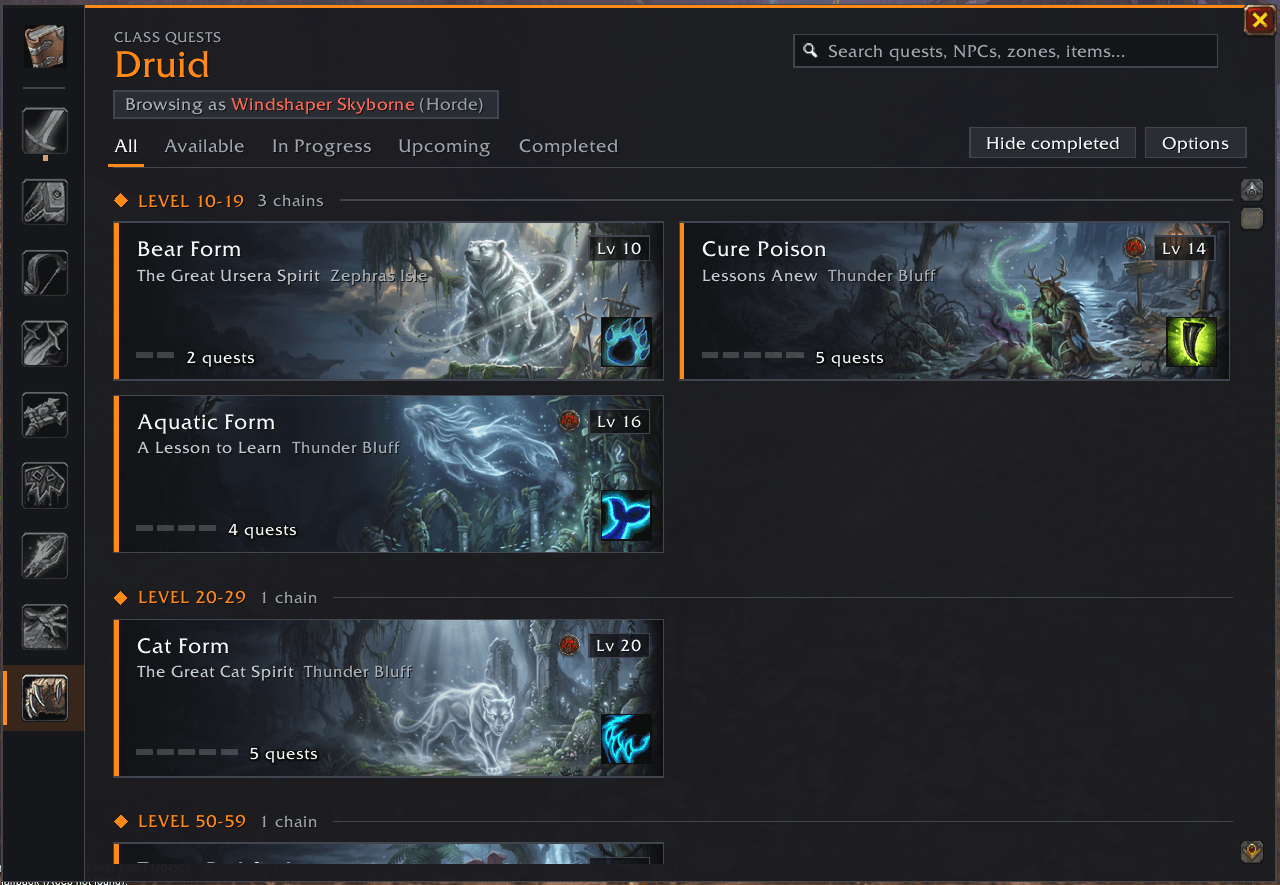
Druid Quests
Description
Class Quests Forever
Every class quest of World of Warcraft: Forever in one journal – and an alert the moment a level-up unlocks a new one.
Class quests are easy to miss: they open at odd levels, start in a capital you rarely visit, and Forever added a lot of new ones. Class Quests Forever keeps track of all of them for your character and tells you when something new is waiting.
Features
Class quest journal (/cqf)
- A card for every class quest chain, grouped by level: Available, In Progress, Upcoming, Completed.
- Search by quest, NPC, zone or reward.
- Browse the other classes too – as any race that can play them, so you see the version of each quest that race gets.
Level-up alerts
- A pop-up, a chat line and a sound when a level-up – or a turned-in quest – unlocks a new class quest.
- Each chain is announced once; a short summary at login if something is waiting.
Chain details
- Every step of the chain with its quest giver, zone and map coordinates.
- One click sets a waypoint (the game's map pin, and TomTom if installed).
- Live objectives for quests in your log, the spells and items you get, and what the chain leads to.
Tracker & tooltips
- Track chains on screen to see what each one needs next.
- Quest givers' tooltips show when they have a class quest for you.
Also: minimap button, a "Class Quests" button in the Esc menu, adjustable journal size (Ctrl + mouse wheel), key binding, settings under Options > AddOns.
Covered
All nine classes – Warrior, Paladin, Hunter, Rogue, Priest, Shaman, Mage, Warlock and Druid – with over 600 class quests in about 190 chains, from the first trainer quest to the level 60 mounts. That includes Forever's additions: Undead paladins, Dwarf shamans, the Skyborne's own quests on Zephras Isle, Cat Form for druids and more. Each character only sees the versions their race and faction can actually take.
Help fix the quest data
The quest data is built from Wowhead, and for Forever's newest quests it isn't always complete. The addon helps here on its own: when an NPC offers you a class quest it didn't expect – an unknown quest, a different quest giver, a lower level, a quest hidden from your race – it notes it and tells you once in chat.
- Type
/cqf report. - Click Select all, copy (Ctrl+C).
- Paste it [in the comments / on the issue tracker: LINK] and click Clear (sent).
Spotted something the addon can't notice (wrong order, reward, description)? Open the chain in the journal and click Report a problem. Every report makes the data better for everyone – thank you!
Commands
| Command | |
|---|---|
/cqf |
open or close the journal |
/cqf report |
send quest data problems |
/cqf options |
settings |
/cqf scale 70-160 |
journal size |
/cqf tracker |
show or hide the tracker |
/cqf minimap |
show or hide the minimap button |
/cqf status |
your class quests in one chat line |
/cqf test |
show a sample alert |
Compatibility
- Made for World of Warcraft: Forever (Interface 16001).
- Optional: TomTom (waypoint arrow), EllesmereUI (styled Esc menu button), Questionable Drops (the two Esc menu buttons sit neatly together).
Quest data based on Wowhead. Not affiliated with Blizzard Entertainment. Feedback and bug reports are very welcome.
Class Quests Forever Team

Owner