Better Vendor UI
- By
(with EllesmereUI support) A bigger, searchable, filterable vendor window with smarter junk selling.
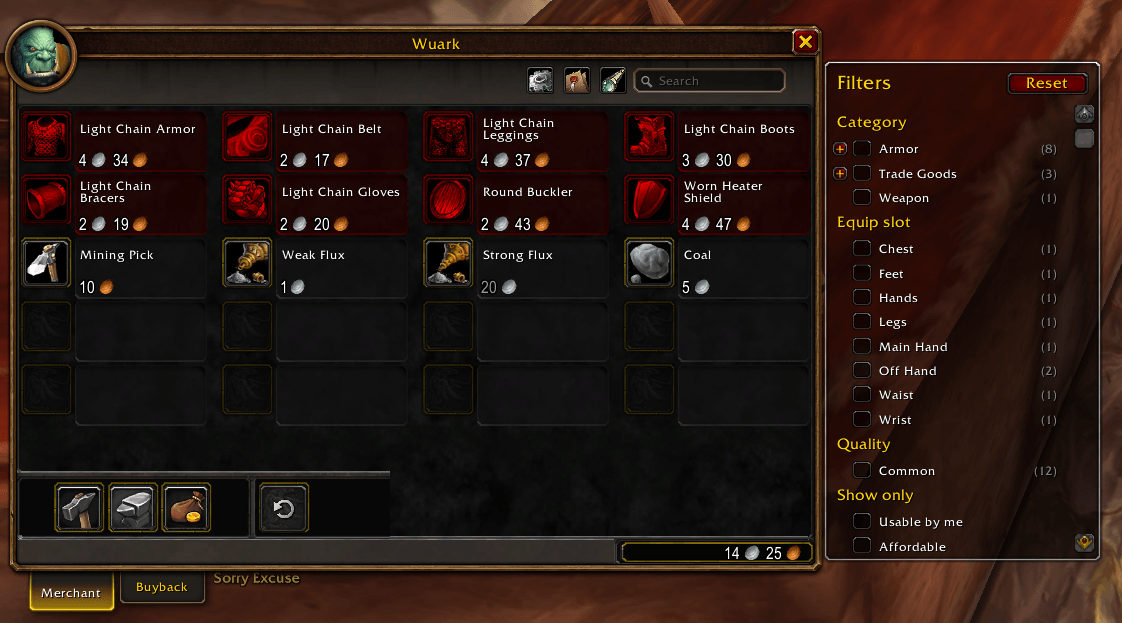
Filter Options
Description
Better Vendor UI
A bigger, smarter merchant window: see more items at once, find what you need with search and filters, and sell your junk exactly the way you want.
Features
Bigger vendor window
- Shows 20 items per page (4 × 5) instead of 10, so most vendors fit on a single page
- Fully adjustable grid: 2–6 columns and 5–10 rows
- The Buyback tab uses the full width too (for example 4 × 3)
- The bottom bar stretches to match, with the buyback slot, repair and Sell Junk buttons where you expect them
Search
- Search box at the top of the merchant window; type part of an item's name
- Dim non-matching items, or hide them completely so matches are packed together with correct page numbers
- Adjustable dim strength; search clears when you open a vendor (optional)
Filters
- Filter button next to the search box opens a filter panel beside the vendor window
- Category and subcategory (e.g. Armor → Cloth, Weapon → Sword), showing only categories this vendor actually sells, with item counts
- Quality (Poor to Epic) and optional equip slot (Head, Chest, Feet…)
- Show only: items usable by me, affordable, or in stock
- "Usable by me" can be on by default, so each character automatically sees only what it can use
- Filters reset when you open a vendor (optional)
Smarter junk selling
- Always Sell list: items that are sold with your junk, whatever their quality
- Never Sell list: grey items you want to keep
- Manage both lists by dragging items into the lists window, or with slash commands
- Sells in small batches so the server doesn't drop sales
- Optional:
- Sell junk automatically when opening a vendor (hold Shift to skip)
- Keep unbound grey weapons and armor (for the auction house)
- Sell at most 12 items at a time, so everything can still be bought back
- Chat summary of what was sold and for how much
Quality borders
- Colored item borders on vendor items, with an adjustable minimum quality
Leatrix Plus integration
If you use Leatrix Plus's "Sell junk automatically":
- Grey items on your Never Sell list are added to Leatrix's exclusions automatically, so Leatrix won't sell them
- Items on your Always Sell list are sold by Better Vendor UI when you open a vendor, since Leatrix only sells grey items
- Entries you added to Leatrix yourself are never touched
Settings
Every feature can be switched on or off in ESC → Options → AddOns → Better Vendor UI, or with the gear button on the merchant window. Changes apply immediately, with no reload needed.
Slash commands
| Command | What it does |
|---|---|
/bvu |
Open the settings |
/bvu lists |
Open the Always Sell / Never Sell lists |
/bvu wl <item> |
Add or remove an item from Always Sell (shift-click an item into chat, or use its ID) |
/bvu bl <item> |
Add or remove an item from Never Sell |
Known issues
- With a wide merchant window open, other windows (character sheet, spellbook) may open overlapping it.
- If you ever see an "Interface action blocked" message while using a vendor, please report it with what you were doing.
Feedback
Found a bug or have an idea? Leave a comment or open an issue.
Better Vendor UI Team

Owner