XPectations
- By
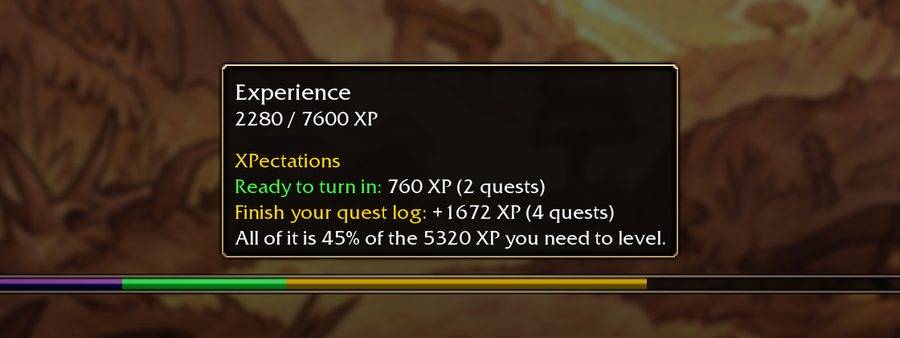
See what your quest log is worth: a ghost on your XP bar, green for quests ready to turn in, yellow for the rest.

download.jpg
download.jpg
download.jpg
download.jpg
download.jpg
Description
See what your quest log is worth, right on your XP bar. A ghost fill starts where your XP ends, the way the game shows rested XP: green for quests ready to turn in, yellow for everything else in your log, and blue for the rested XP you have. You see where you will land before you head back to town.

Made for WoW Forever (1.60.1). Small and standalone: nothing else to install.
See it
A ghost on your XP bar

- Green: XP you can collect right now, from quests that are complete.
- Yellow: what finishing the rest of your quest log adds on top.
- Blue: your rested XP, under the green and yellow (they turn a little see-through so it shows). Rested XP boosts kills, not quests, so it never moves the green and yellow.
- Drawn in Forever's own bar art, so it is shaded like your XP beside it. It follows the bar when it moves, hides, fades or resizes in Edit Mode, and the bar's text, border and mouseover work as before.
The next level

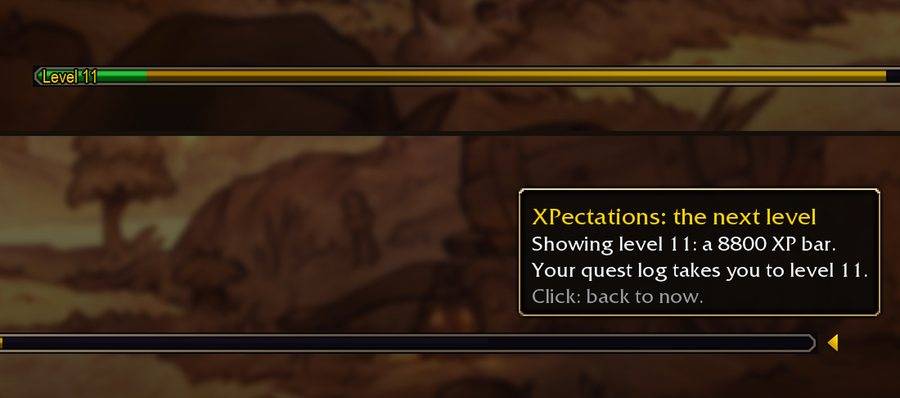
- When your quests will level you up, a small gold arrow appears at the end of the bar. Click it: the bar becomes the next level's, showing where your quest XP lands in it. Click again for the level after; right-click steps back. There is a key binding too.
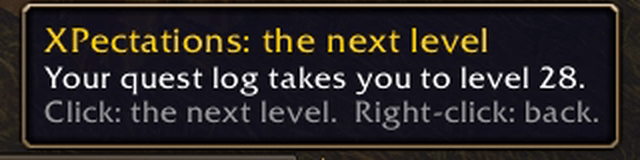
- Each level's bar is longer than the last, and quests far below you pay less once you have passed them (80% at 6 levels over, down to 10% at 10 or more). The preview counts both, using Forever's own XP table. Quests that scale with you are not reduced.
The numbers
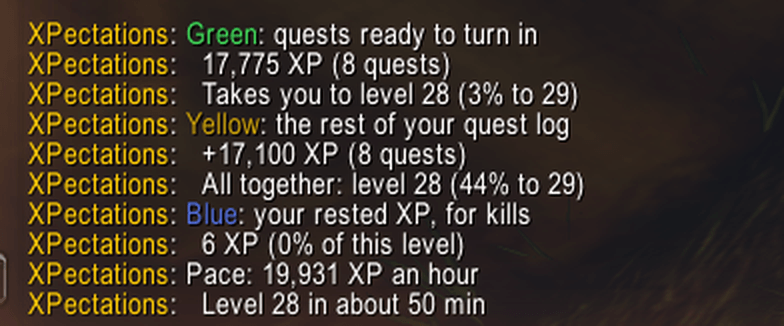
- Hover the XP bar, or type
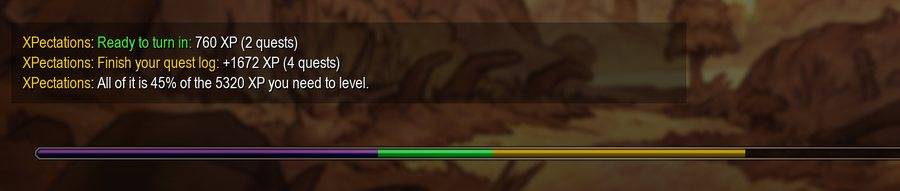
/xpect: XP ready to turn in, XP left in your log, and the level it all takes you to. - After a couple of minutes of play: your pace, how much an hour, and about how long to the next level at it.
- Your rested XP, and what share of the level it is.
Yours to tune
- Each colour, the arrow and the rested fill on or off, and an opacity slider (Options, AddOns, XPectations).
- Count every quest in your log, or only the ones you track.
Numbers you can trust
- Quest XP comes from the game itself, at your level: what the server will actually pay.
- A quest the game has not loaded yet counts as 0 for a moment, and the tooltip says how many are still loading. Failed quests are not counted, and the preview stops at the level cap.
Getting started
- Install it, then restart the game fully (a
/reloaddoes not pick up a new addon). - Have some quests in your log: the ghost appears on your XP bar.
- Settings: Options, AddOns, XPectations, or
/xpect options.
Commands
| Command | What it does |
|---|---|
/xpect |
The XP in your quest log, in chat |
/xpect next |
Show the next level's bar (the same as clicking the arrow) |
/xpect complete, /xpect pending |
Turn the green or the yellow ghost on or off |
/xpect rested on / off |
Show your rested XP on the bar and in the numbers, or not |
/xpect tracked on / off |
Count only the quests you track, or every quest in the log |
/xpect options |
Open the settings |
/xpect help |
List the commands |
Questions
Does it change my interface? No. It draws on the game's own XP bar and changes nothing else. The arrow at the end of the bar is the only thing it adds, and you can turn it off.
Nothing shows on my XP bar. Type /xpect: it says why (at the level cap, XP turned off, or no XP bar on screen).
Does it count rested XP? It shows it, in blue, but does not add it to the green and yellow, because rested XP only boosts what kills pay.
Does it send anything anywhere? No. It reads your quest log and your XP bar, and that is all.
Known limits
- XP for a level you have not reached yet is worked out from the game's XP rules, so it can be a few points off from rounding.
- The preview assumes you hand in your complete quests first.
XP bar art, fonts and the XP table are Blizzard's, drawn from the game's own files. Made by Mistius.
XPectations Team