Roll Initiative
- By
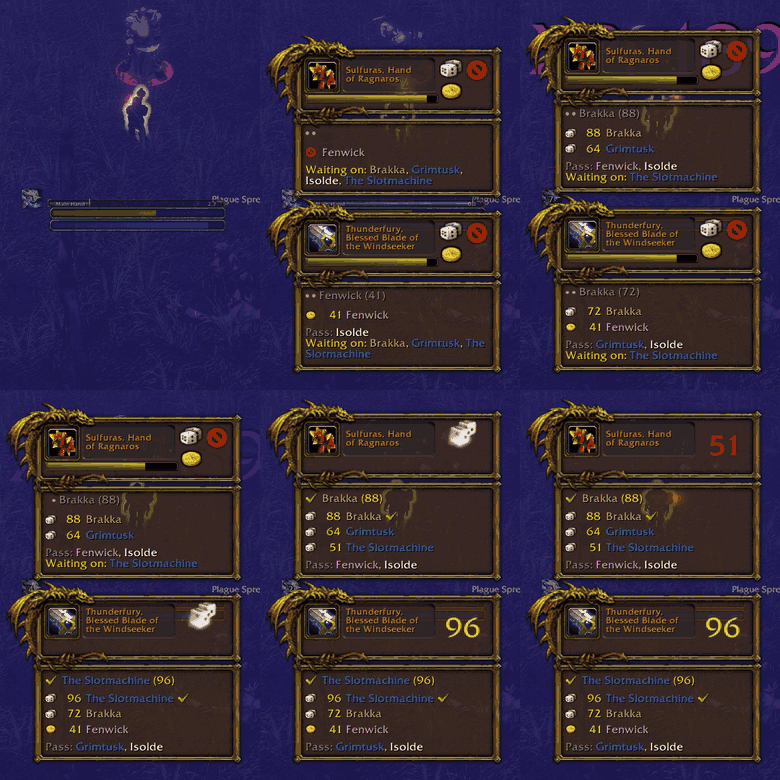
Everyone's loot roll under the game's own roll window: who picked Need, Greed or Pass, what they rolled, and a green check for the winner. Classic's gold roll frame, and a roll history by boss.
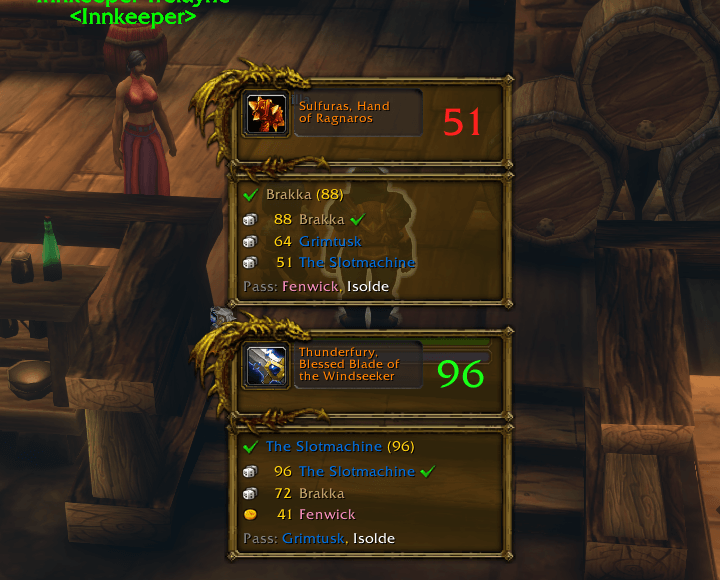
decided.png
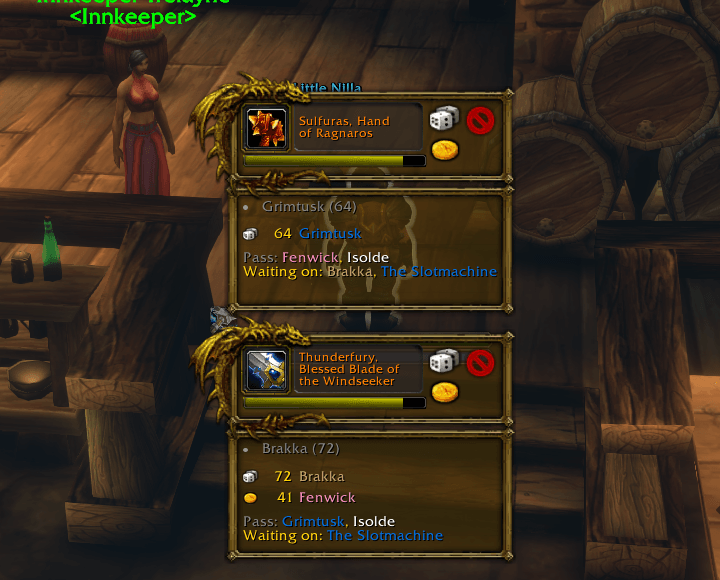
rolling.png
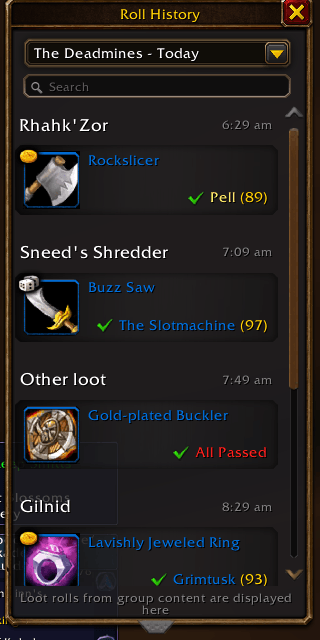
history.png
hero_small.gif
hero.webp
Description
Everyone's loot roll, right under the game's own roll window. Roll Initiative shows who picked Need, Greed or Pass, what they rolled, who is still deciding, and a green check for the winner, in classic's gold roll frame. It keeps a roll history by boss.
Made for WoW Forever (1.60.1). It uses the game's own art, words and windows, so it looks like the game drew it.
What you get
Every roll, in the open
- A card under each roll window lists everyone in the group: a dice for Need, a coin for Greed, a red sign for Pass, the number they rolled, and their name in their class colour.
- The winner gets a green check, and the roll leading so far is shown while the roll is still open.
- Anyone who passed is on one line under the rolls ("Pass: Fenwick, Isolde"), and anyone still deciding is named under that ("Waiting on: Brakka").
- "(2 won)" beside a name says how many items they have already won in this run, in the grey the game uses for "(Off-Spec)".
- A roll of 100 plays the game's 100 sound.
Classic's gold roll window
- Forever's own roll window is the retail grey one. Roll Initiative draws classic's instead: gold border, the gold dragon on Bind on Pickup loot, the dice, coin and Pass buttons, and the timer bar. The buttons roll for you exactly as the game's do (the Bind on Pickup confirm still comes up).
- After you roll, your number plays the game's own dice animation, green while it is winning and red when it is not.
- The game's own window waits off screen while ours is up, and comes straight back if anything goes wrong.
A roll history by boss
- /rollinitiative (or click a card) opens a copy of the game's Loot Rolls window: a dropdown of your runs, a search box, each boss with the time, and every item with its winner.
- Hover an item for the full list of rolls. At the foot: who won what this run, and your own luck.
Yours to tune
- Right-click a card for the game's own menu: post the result to group chat, keep it open, hide it, open the history or the options.
- Finished rolls stay up for 8 seconds by default (3, 8, 15 or 30), longer while you hover them. Options are in the game's own Settings: Options, AddOns, Roll Initiative.
- Names work with Forever's two-part names ("First Surname").
Getting started
- Install it, then start the game fully (a
/reloaddoesn't pick up a new addon). - Type
/rollinitiative demoto see two made-up rolls, or/rollinitiative demo legendaryfor Thunderfury and Sulfuras. Nothing is saved. - Roll on something in a group. That is all there is to it.
Commands
| Command | What it does |
|---|---|
/rollinitiative (or /rolls, /rollcall) |
Open the roll history |
/rollinitiative demo |
Play made-up rolls (add legendary for the legendaries) |
/rollinitiative options |
Open the options |
/rollinitiative sound, watching, wins |
Switch the 100 sound, rolls you can't roll on, and "(N won)" on or off |
/rollinitiative linger <seconds> |
How long finished rolls stay |
/rollinitiative clear |
Clear this character's roll history |
Questions
Does it send anything anywhere? No. It only reads the rolls the game shows you. Posting a result to group chat is something you choose from the right-click menu.
Do I need another addon? No. It stands alone.
Where do the rolls come from? From the game's own loot history, so every player's pick and number is there, and from the game's roll chat lines when the history has nothing.
Early release
This is the first release (0.1.0). The look, the roll window, the card and the history have been run in game with the example rolls; the history with real dungeon loot is still being checked. If something looks off, tell me in the comments, with what the roll was, and I will fix it.
Art and game text are Blizzard's, drawn from the game's own files. Made by Mistius.
Roll Initiative Team