Xius Kill Streak
- By
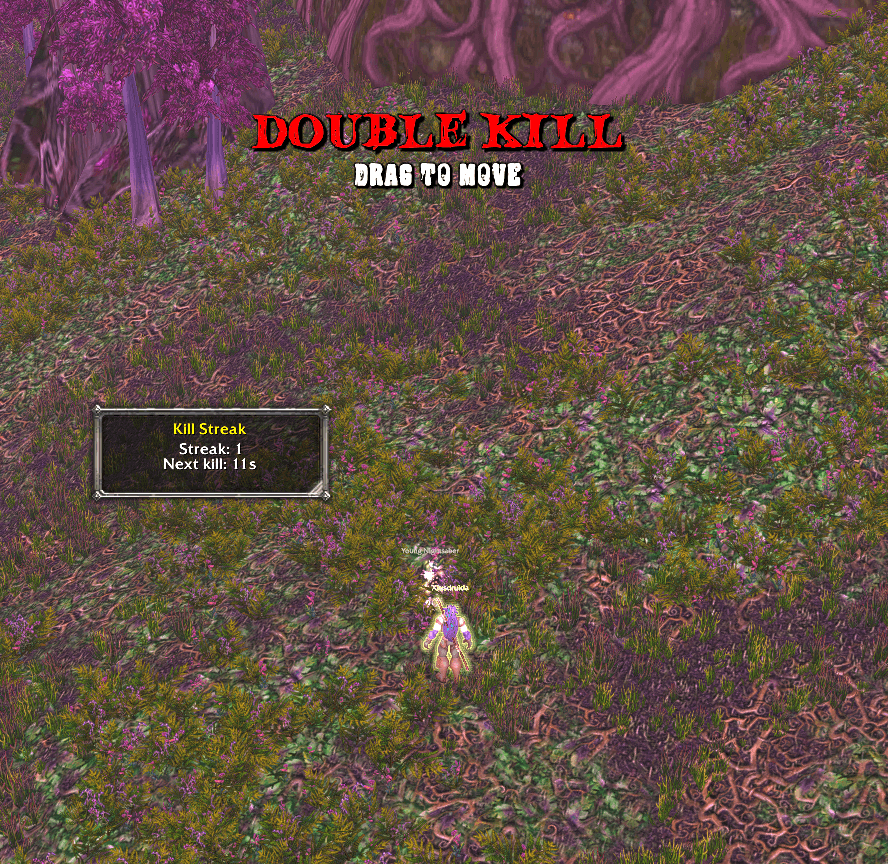
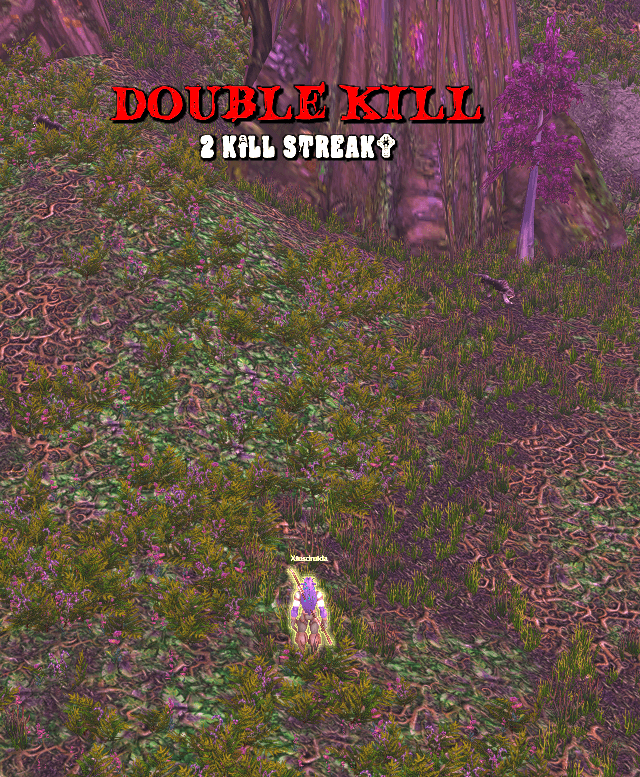
A ten-tier kill streak announcer for WoW Forever/Retail. Mobs and enemy players both count. Each new tier fills the screen with a banner and an announcer call, and a small counter shows the chain plus the time left to keep it going. Dying clears the streak
xks2.png
xks1.png
Description
Xius Kill Streak
A ten-tier kill streak announcer for World of Warcraft Forever (1.60.1) and modern retail. Mobs and enemy players both count. Each new tier fills the screen with a banner and an announcer call, and a small counter shows the chain plus the time left to keep it going. Dying clears the streak.
Features
Escalating streaks
- Ten tiers: Double Kill, Triple Kill, Multi Kill, Mega Kill, Ultra Kill, Monster Kill, Godlike, Holy Shit, Finish Him, and Toasty.
- Tightening window: The first kill has 25 seconds. Each tier after that allows less time for the next kill, down to 3 seconds at Toasty.
- One kill, one point: A killing blow on a mob or an enemy player advances the chain. The same death is counted once.
- Death resets: Dying clears the streak.
| Tier | Kills | Next kill within | Call |
|---|---|---|---|
| 1 | 2 | 22s | Double Kill |
| 2 | 3 | 18s | Triple Kill |
| 3 | 5 | 15s | Multi Kill |
| 4 | 8 | 12s | Mega Kill |
| 5 | 12 | 10s | Ultra Kill |
| 6 | 16 | 8s | Monster Kill |
| 7 | 20 | 6s | Godlike |
| 8 | 25 | 5s | Holy Shit |
| 9 | 30 | 4s | Finish Him |
| 10 | 40 | 3s | Toasty |
The first kill, before any tier, has 25 seconds.
Banner and counter
- Banner: The tier name and kill count. It is the only place the custom fonts are used.
- Counter: A small default-styled box,
Streak: 4andNext kill: 12s, shown while a chain is live. - Move and resize: Unlock the frames, drag the banner or the counter, and drag the counter corner to resize it.
- Sounds: Each tier plays its announcer call. Sounds can be turned off. The test button still plays.
Counting does not use the combat log. Experience text, the killing-blow float, "You have slain", party kills, honor, and your current target dying cover kills that grant no experience or hide names in combat. That keeps it working on Forever and retail, where addon combat-log access is blocked.
Controls & Slash Commands
| Command / Input | Action |
|---|---|
/xks or /xiuskillstreak |
Open the options page |
/xks test |
Play the Toasty banner |
/xks test 1 through /xks test 10 |
Play that tier |
/xks reset or /xks clear |
Clear the current streak |
/xks unlock / /xks lock |
Unlock or lock the banner and counter |
/xks resetpos or /xks default |
Reset banner and counter position and size |
/xks sound |
Toggle announcer sounds |
/xks on / /xks off |
Enable or disable kill streaks |
| Drag the banner or counter | Move them (when unlocked) |
| Counter corner | Resize the counter (when unlocked) |
The same controls are under Game Menu → Options → AddOns → Xius Kill Streak.
- Enable kill streaks: Count killing blows. Turning this off clears the current streak and hides the banner.
- Play streak sounds: Announcer voice on each new tier.
- Unlock banner and counter: Drag to move. Drag the counter corner to resize.
- Test Toasty Banner and Reset Positions.
Position, size, and these options are saved per account in XiusKillStreakDB.
Installation
- Download the latest release
.zip(or use Code → Download ZIP on this page). - Extract the
XiusKillStreakfolder into your client's addon directory:- Forever:
World of Warcraft Forever\Interface\AddOns - Retail:
World of Warcraft\_retail_\Interface\AddOns - If you downloaded the repository ZIP, rename the extracted
XiusKillStreak-mainfolder toXiusKillStreak.
- Forever:
- Verify the folder contains
XiusKillStreak.toc,Config.lua,Banner.lua,Options.lua, andCore.lua, plusSoundsandFont. - Launch the game, confirm Xius Kill Streak is checked in your AddOns menu, and run
/reload. - Type
/xks testto preview Toasty, then/xks unlockand drag the banner and counter into place.
Compatibility: World of Warcraft Forever (TOC 16001) and modern retail (TOC 120105, 120107). Pure Lua 5.1 with zero external library dependencies.
File Overview
| File | Purpose |
|---|---|
XiusKillStreak.toc |
Addon manifest (interface versions, saved variables, load order) |
Config.lua |
Tier list, countdown windows, announcer files, and banner fonts |
Banner.lua |
Streak banner, streak counter, move, and resize |
Options.lua |
AddOns options page |
Core.lua |
Kill tracking, sounds, and slash commands |
Sounds |
Announcer calls, one file per tier |
Font |
Banner fonts |
More From Xius
Xius Marks Bar: A compact raid marking bar. Click the flag for world markers or the star for target markers, with 5 / 10 / 20 pull timers, ready check, and role check built in.
GitHub · CurseForge
Xius Threat Meter: A clean, lightweight threat meter. Shows who is on the enemy's threat table, how much threat each player and pet has, and warns you before you pull aggro.
GitHub · CurseForge
Xius XP & Reputation Tracker: A compact HUD card that replaces the default XP and reputation bars with a single movable panel: level, XP, rested, watched faction, session rates, gold, and time-to-level.
GitHub · CurseForge
Xius Max Graphics: Pick-and-choose graphics upgrades for Forever and retail. Ultimate, Balance, and Defaults presets push view distance, grass, shadows, water, and image clarity past the normal graphics menu, with optional loot and gathering sparkles.
GitHub
All Xius addons share the same clean, dark gold style for a unified UI.
Credits
The banner title uses CF Night of the Damned. The banner subtitle uses Blood Crow by Iconian Fonts (Daniel Zadorozny). Blood Crow may be freely distributed for non-commercial use.
License
Released under the GNU General Public License v3.0.
Development & AI Disclosure
This addon was built and refactored with the assistance of AI development tools (Cursor / LLMs) for code generation, UI layout structure, and kill-tracking flow, with manual architecture, in-game verification, and maintenance by Xius.
Xius Kill Streak Team