xthreat3.png
xthreat1.png
Description
Xius Threat Meter
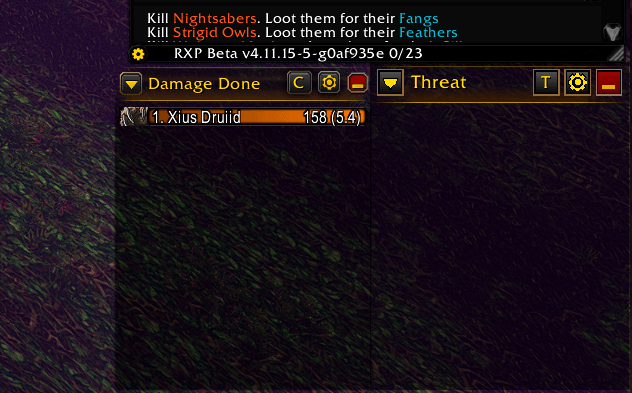
A clean, lightweight threat meter designed for World of Warcraft Forever (1.60.1). Styled to sit right next to the built-in Damage Done meter as if it were part of the default UI: the same glowing gold title bar, bevelled header buttons, class-colored bars, and see-through dark background. It shows who is on the enemy's threat table, how much threat each player and pet has, and how close everyone is to pulling aggro.
⚔️ Live Threat Tracking
- Group & Raid Support: Tracks you, your party, your raid (up to 40 players), and all pets on the enemy's threat table.
- Target or Focus: Watch threat on your current target, or switch to your focus target with a single click (
T/Fbutton). - Ranked Bars: Every row shows its rank, player name, total threat, and threat percentage, e.g.
1. Xius 1,234 (87%). - Relative Fill: Bars fill relative to the top of the list, the same way the damage meter does, so the gap between you and the tank is easy to read at a glance.
- Detailed Tooltips: Hover any bar to see exact threat, threat %, raw threat %, and whether that player is currently tanking.
🔔 Aggro Warning
- Pull Alert: Plays a warning sound and turns the window title red when your threat gets close to the tank's.
- Adjustable Threshold: Choose when the warning fires (50% – 100%, default 90%).
- Tank Aware: Never warns you while you are the one tanking, and resets once your threat drops back down.
🖥️ Damage Meter Styling
- Matching Title Bar: Warm amber glow, thin gold underline, and fade-out edges, the same look as the built-in meter's header.
- Matching Buttons: Bevelled dropdown arrow, target/focus toggle, gold settings gear, and red minimize button.
- Class Colors & Icons: Bars use class colors with class icons; pets get green bars with their own portraits.
- See-Through Background: A neutral dark backdrop with adjustable opacity so the world shows through, just like the damage meter.
Display States
- Expanded: Title bar plus as many threat rows as fit the window height. Resize the window to show more or fewer rows (up to 40).
- Minimized: Collapses upward into just the title bar. The minimize button turns into a gold
+; click it again to expand.
Controls & Slash Commands
| Command / Input | Action |
|---|---|
/xtm or /xthreat |
Show or hide the window |
/xtm help |
Display slash command help |
/xtm config |
Open the settings window |
/xtm test |
Toggle test mode (sample bars for positioning and styling) |
/xtm lock / /xtm unlock |
Toggle window movement and resizing lock |
/xtm target / /xtm focus |
Choose which enemy to track |
/xtm reset |
Reset window position and size |
| Left-Drag Title Bar | Move the window (when unlocked) |
| Right-Click Title Bar | Open the quick menu |
| Bottom-Right Corner Drag | Resize the window |
▼ Button |
Quick menu: Target / Focus, Test Mode, Lock, Settings, Hide |
T / F Button |
Switch between target and focus threat |
| Gear Button | Open the settings window |
| Red Button | Minimize / expand |
Configuration
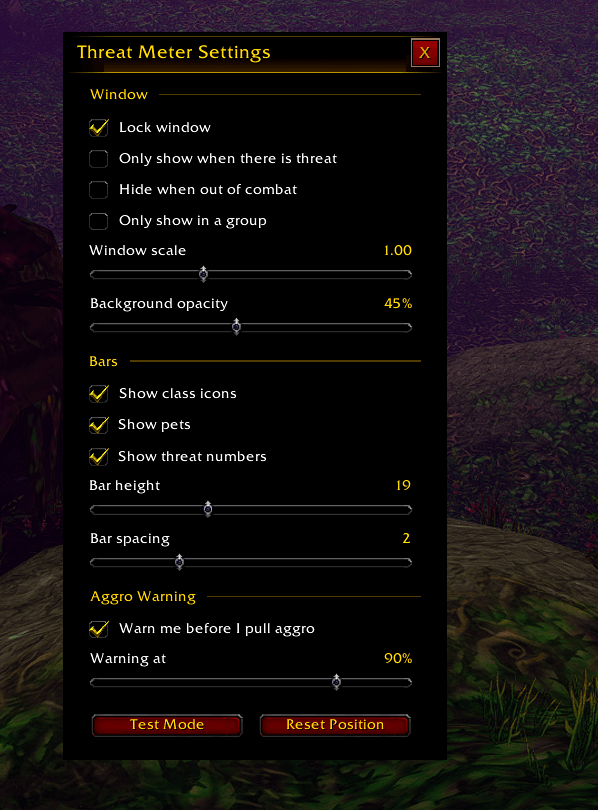
Access settings with the gear button or /xtm config:
- Window: Lock window, only show when there is threat, hide when out of combat, only show in a group.
- Appearance: Window scale (0.5x – 2x) and background opacity.
- Bars: Show class icons, show pets, show threat numbers, bar height, and bar spacing.
- Aggro Warning: Turn the warning on or off and set the threshold.
- Tools: Test mode and reset position buttons.
All settings are saved per account in XiusThreatMeterDB.
Installation
- Download the release
.zip. - Extract the
XiusThreatMeterfolder directly into your client's addon directory:World of Warcraft Forever\Interface\AddOns - Verify the folder contains
XiusThreatMeter.toc,Config.lua,Core.lua, andOptions.lua. - Launch the game, confirm Xius Threat Meter is checked in your AddOns menu, and run
/reload. - Type
/xtm testto preview the bars and drag the window into place.
Compatibility: Built for World of Warcraft Forever (TOC 16001). Pure Lua 5.1 with zero external library dependencies.
📈 More From Xius
Check out my other lightweight UI addons for World of Warcraft Forever:
- Xius XP & Reputation Tracker: A compact HUD card that replaces the default XP and reputation bars with a single movable panel featuring level, XP, rested bonus, watched faction, session rates, gold, and time-to-level.
- Xius Threat Meter: A clean, lightweight threat meter built for real-time aggro tracking without interface clutter.
- Xius Marks Bar: A compact, quick-access raid target marking bar designed for fast, seamless pull and crowd-control coordination.
All three addons are designed to pair together for a clean, unified HUD.
Development & AI Disclosure
This addon was built and refactored with the assistance of AI development tools (Cursor / LLMs) for code generation, UI layout structure, and visual styling, with manual architecture, in-game verification, and maintenance by Xius.
Xius Threat Meter Team