marks5.png
marks4.png
marks3.png
marks2.png
marks1.png
Description
Xius Raid Marks
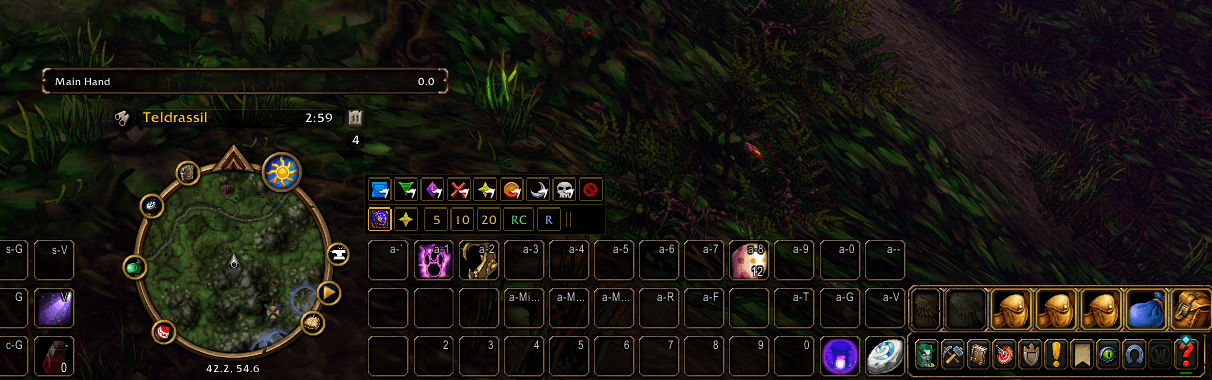
A compact, dark-themed raid marking bar built for World of Warcraft Forever (1.60.1). Click the flag to open world (ground) markers, click the star to open target markers, and keep your pull timers, ready check, and role check one click away. It's styled to blend in with your action bars and meter windows instead of fighting them.
Inspired by Forever Raid Marks, rebuilt from scratch as a standalone addon with a cleaner, smaller design.
🎯 Click-to-Expand Marking
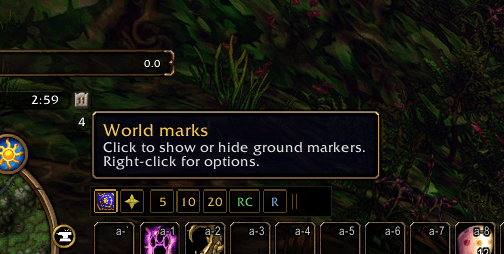
- Flag → World Marks: Opens a row of all 8 world markers plus a Clear All button. Left-click places a marker, right-click removes it.
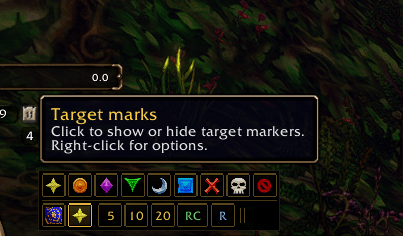
- Star → Target Marks: Opens a row of all 8 raid target icons plus a Clear Mark button. Left-click marks your target, right-click clears it.
- One Row at a Time: Opening one row closes the other. Click the open icon again to collapse back to the compact bar.
- Works in Combat: Opening, closing and marking all work mid-fight.
- Active Highlight: The flag or star glows soft gold while its row is open.
⏱️ Always-On Group Tools
- Pull Timers (5 / 10 / 20): Uses Deadly Boss Mods if installed, otherwise the built-in group countdown, and falls back to a chat countdown ending in "GO!".
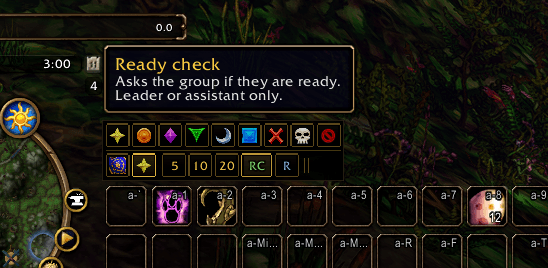
- RC (Ready Check): Starts a ready check for the group.
- R (Role Check): Asks everyone to choose a role.
🖥️ Clean, Compact Design
- Matches Your UI: Near-black slots with thin muted gold borders, in the style of the damage and threat meters and the default action bars.
- Small Footprint: A slim bar of 20px buttons. Everything stays on one line until you open a row.
- Smart Growth: Grows upward when placed near the bottom of the screen and downward near the top, so your timer buttons never jump.
- Out-of-the-Way Tooltips: Tooltips appear above (or below) the whole bar, never on top of the buttons you're about to click.
- Pixel-Snapped: Borders stay crisp and even at any size.
Display States
- Collapsed: Flag • Star • 5 • 10 • 20 • RC • R • Move grip
- World Marks Open: Blue Square • Green Triangle • Purple Diamond • Red Cross • Yellow Star • Orange Circle • Silver Moon • White Skull • Clear All
- Target Marks Open: Star • Circle • Diamond • Triangle • Moon • Square • Cross • Skull • Clear Mark
Controls & Slash Commands
| Command / Input | Action |
|---|---|
/xrm or /xiusmarks |
Display slash command help |
/xrm config or /xrm opt |
Open the AddOn options panel |
/xrm lock / /xrm unlock |
Lock or unlock bar movement |
/xrm reset |
Move the bar back above the action bar |
/xrm show / /xrm hide |
Open target marks / collapse all rows |
| Left-Click Flag / Star | Open or close world / target marks |
| Right-Click Flag, Star, or Grip | Open options |
Drag the Grip (‖) |
Move the bar (when unlocked) |
| Left / Right-Click a Mark | Place / remove that mark |
Configuration
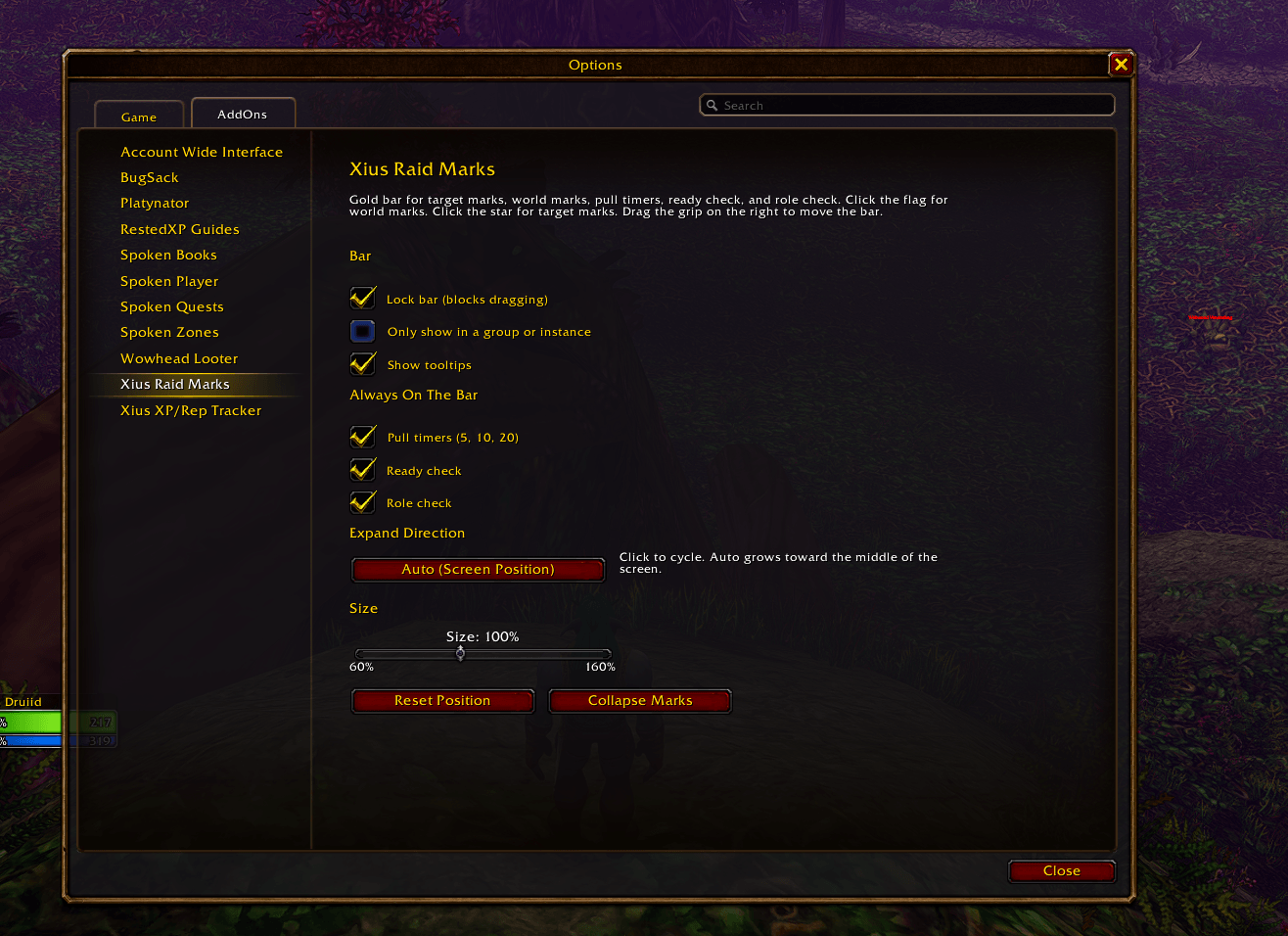
Access settings via /xrm config or Game Menu → Options → AddOns → Xius Raid Marks:
- Bar: Lock position, only show in a group or instance, show or hide tooltips.
- Always On The Bar: Toggle pull timers, ready check, and role check individually.
- Expand Direction:
Auto (Screen Position),Always Expand Up, orAlways Expand Down. - Size: 60% – 160% scale. The bar stays exactly where you placed it when resizing.
- Reset Position / Collapse Marks: Quick buttons to restore defaults.
Installation
- Download the release
.zip. - Extract the
XiusRaidMarksfolder directly into your client's addon directory:World of Warcraft Forever\Interface\AddOns - Verify the folder contains
XiusRaidMarks.toc,Core.lua, andConfig.lua. - Launch the game, confirm Xius Raid Marks is checked in your AddOns menu, and run
/reload. - If you also have Forever Raid Marks installed, disable it to avoid two marking bars.
Note: Raid markers follow normal game rules. In a raid you need to be leader or assistant to place marks and start ready checks.
Compatibility: Built exclusively for World of Warcraft Forever (TOC 16001). Pure Lua 5.1 with zero external library dependencies. Settings are saved account-wide.
📈 More From Xius
Check out my other lightweight UI addons for World of Warcraft Forever:
- Xius XP & Reputation Tracker: A compact HUD card that replaces the default XP and reputation bars with a single movable panel featuring level, XP, rested bonus, watched faction, session rates, gold, and time-to-level.
- Xius Threat Meter: A clean, lightweight threat meter built for real-time aggro tracking without interface clutter.
- Xius Marks Bar: A compact, quick-access raid target marking bar designed for fast, seamless pull and crowd-control coordination.
All three addons are designed to pair together for a clean, unified HUD.
Development & AI Disclosure
This addon was built and refactored with the assistance of AI development tools (Cursor / LLMs) for code generation, UI layout structure, and secure frame logic, with manual architecture, in-game verification, and maintenance by Xius.
Xius Marks Bar Team