FallenLootFeed
- By
Clean, movable loot and money notifications with item icons, smart stacking and a quality filter. For WoW: Forever and Classic Anniversary.
FallenLootFeed-Settings.gif
Description
FallenLootFeed
Clean, good-looking loot notifications for WoW: Forever and TBC Anniversary, with group loot, a loot history and a gold-per-hour tracker.
Every item you pick up shows up on screen with its icon, its name in quality color, the count, how many you now carry and what it sells for. Money too. Pick the look you like, see every change live in the options window, then go farm.
What's new in 3.0
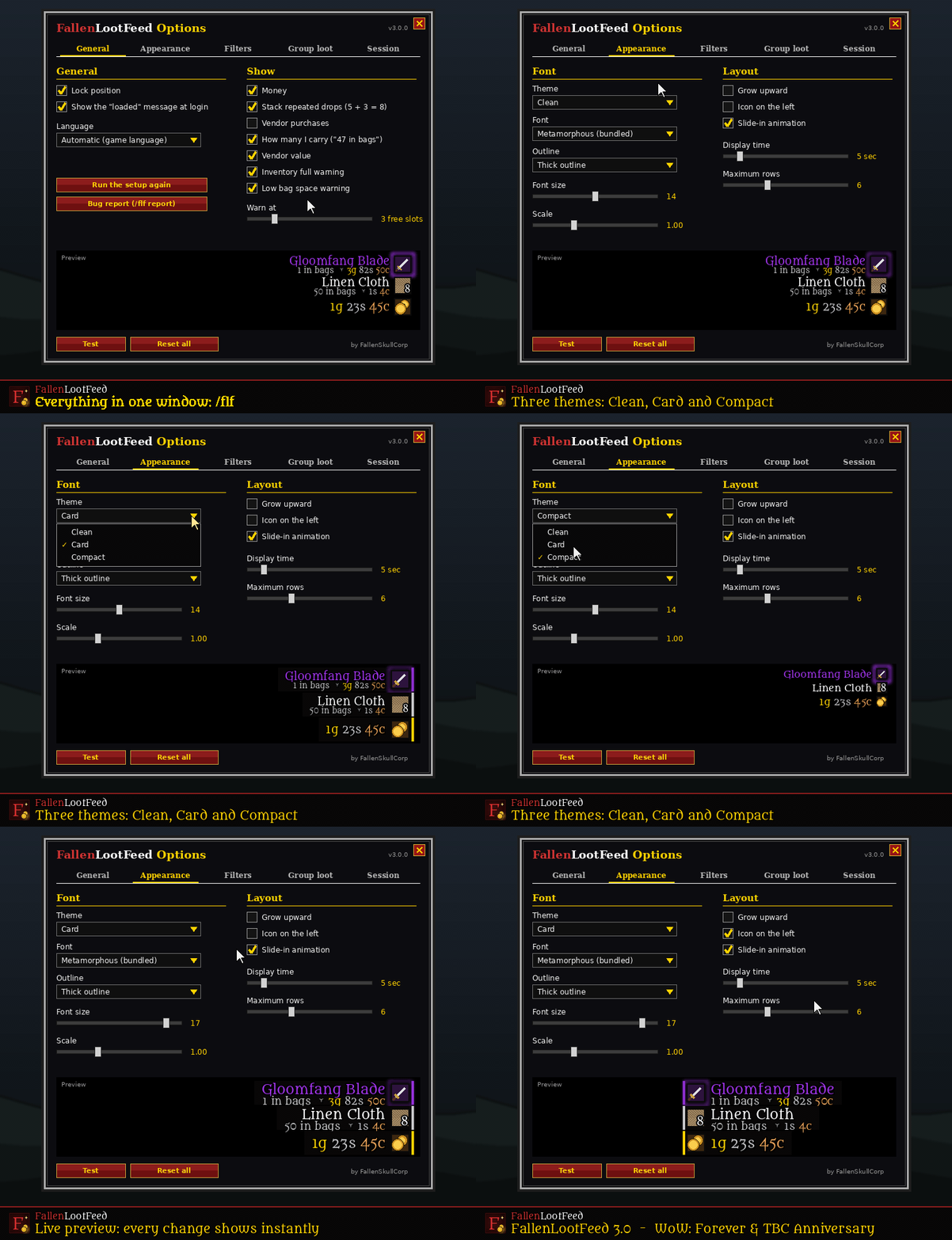
- Three themes: Clean (text and icon only), Card (a dark card behind each drop with an edge in the item's quality color) and Compact (one small line per drop).
- Live preview: the bottom of the options window shows sample notifications that change instantly as you adjust theme, font, size or layout.
- Setup wizard for new players: language, theme and position, then what to show. Takes about ten seconds.
- Built for WoW: Forever and TBC Anniversary.
- Bug report window (
/flf report): one box with everything we need to help you, ready to paste into our Discord. - Error guard: if one part of the addon runs into a problem, the rest keeps working.
- New look shared by every Fallen addon, fully translated into Turkish.
Options window with live preview
Features
Your loot
- Item icon, quality-colored name and count. Hover the icon for the item tooltip.
- Bag totals: "47 in bags" under every drop, so you know when you've farmed enough.
- Vendor value of each drop, right under its name.
- Smart stacking: 5 cloth and then 3 more shows one row with 8.
- Looted items, quest rewards and crafted items. Vendor purchases are hidden unless you turn them on.
- Money in gold, silver and copper. Your guild bank share is kept out of it.
Rare drops
- Epic and better items get a pulsing glow in their quality color and play a sound. You choose the threshold, or turn it off.
Group loot
- A second, separately movable panel shows who in your party or raid got which item, in their class color.
- Minimum quality (green / blue / purple), include your own loot, display time and number of rows are all adjustable.
Loot history and session
- Loot history window (
/flf log): everything you looted this session with time, count and value. Sort by newest or by highest value, Shift-click to link in chat. - Session tracker: money looted, vendor value of your items and gold per hour, per character. It keeps running through
/reloadand logouts until you reset it.
Bags
- Low bag space warning when only a few slots are left (adjustable).
- Inventory full warning when your bags are full.
Filters
- Hide items below a quality.
- Hide quest items, consumables or trade goods.
- Ignore list: Alt-click an item in the feed to never see it again.
Clicks
- Shift-click an icon to link the item in chat, Alt-click to ignore it, right-click to dismiss the notification.
Look and layout
- Three themes, five fonts, outline, font size and scale.
- Grow up or down, icon on the left or right, slide-in animation, display time and number of rows.
- While locked, clicks go straight through to the game world.
Languages
- English and Turkish, chosen automatically or by hand. Every command works in both languages (
/flf lockor/flf kilit).
Getting started
- Install the addon and log in. New players get a short setup wizard.
- Type
/flfany time to open the options. You can also find them under Esc > Options > AddOns > FallenLootFeed. - Press Test to see sample notifications, and Test group loot for the group panel.
Commands
| Command | What it does |
|---|---|
/flf |
Open the options window |
/flf unlock / lock |
Move / lock both feeds |
/flf test / grouptest |
Sample notifications |
/flf log |
Loot history window |
/flf session |
Session summary (session reset to start over) |
/flf ignore <item> / unignore <item> / ignorelist |
Ignore list |
/flf group |
Toggle group loot |
/flf setup |
Setup wizard |
/flf whatsnew |
What's new |
/flf report |
Bug report for Discord |
/flf status |
Current settings |
Supported versions
| Client | Status |
|---|---|
| WoW: Forever | ✅ |
| TBC Anniversary | ✅ |
Coming from LootFeed?
FallenLootFeed is the same addon under its new name. Install it and log in once: your old settings are imported automatically. Then disable the old LootFeed.
Found a bug?
Type /flf report, copy the text and share it on the FallenSkullCorp Discord with a few words about what happened: [Discord invite link]
Türkçe
FallenLootFeed, topladığın her eşyayı ikonu, kalite renginde adı, adedi, çantandaki toplamı ve vendor değeriyle gösterir. 3.0 ile gelenler:
- Üç tema: Sade, Kart ve Kompakt.
- Ayarlar penceresinde canlı önizleme.
- Yeni oyuncular için kurulum sihirbazı.
- WoW: Forever ve TBC Anniversary desteği.
- Discord için hata raporu (
/flf rapor).
Bunların yanında grup ganimeti paneli, ganimet geçmişi, saatlik altın takibi, çanta uyarıları, tür filtreleri ve yok sayma listesi de var.
Eklentinin tamamı Türkçe, komutlar da Türkçe çalışır: /flf kilit, /flf geçmiş, /flf oturum. Ayarlar için /flf yazman yeterli.
Made by FallenSkullCorp. Check out the other Fallen addons. Font: Metamorphous by Sorkin Type Co., SIL Open Font License 1.1.
FallenLootFeed Team