Description
WhereGuild
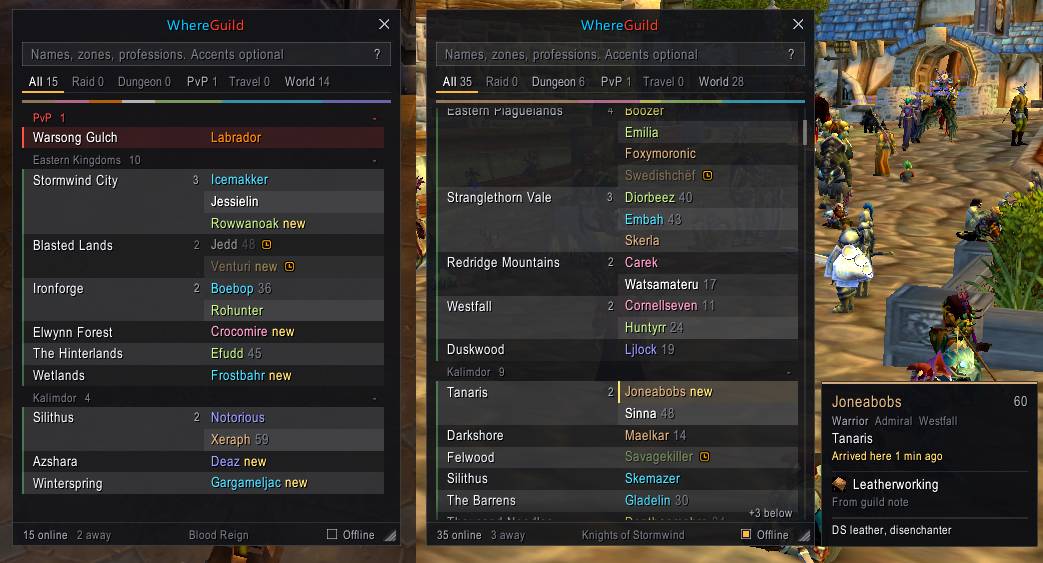
See who is on, where they are clumped up, and who can craft what, at a glance.
Pop it open and you can tell right away: that is a full Strat run, there are nine people in Stormwind I can run over to, half the guild is still in that one zone today.
Features
- Zone view. Each zone is a block with everyone there listed beside it. Raids, dungeons, PvP and travel come first, then the world grouped by continent with yours on top. Biggest groups first.
- Party fill for dungeons. Dungeon counts read 3/5 or 5/5 so you can tell a full run from one with room.
- Just arrived. Guildmates who just moved to a zone get a small "new" tag, and a group landing together shows "3 just arrived". Catch a group forming and whisper in while it is still worth asking.
- Live tab. A reader's digest of guild posts. Guild chat and guildmates in LFG and Trade, sorted into color-blocked sections (dungeon runs, raids, enchants, herbs and mats, crafting, trade, help and more), so you can see at a glance who is actively asking for help and whether they are still on. Banter and strangers stay out.
- Who is active. AFK and DND guildmates are dimmed with the away or busy icon, and listed after the active people.
- Class bar. A thin strip of class colors shows the mix of max-level players in view. Hover for who can heal or tank, click a class to show only them.
- Smart search. Name, zone, class, role, rank, guild notes or profession. Combine words:
mage strat,tailor 275,healer 60. Accents optional:bjornfinds the accented name. - Professions. Shared automatically between guildmates running WhereGuild, and read from guild notes for everyone else.
- Quick actions. Click a name to whisper. Right-click to invite with a short cast bar you can cancel. Shift-click to put the name in chat, Ctrl-click to copy it. Click an offline name to copy it or drop it into Send Mail.
- Invited tab. Keeps track of everyone you invited today.
- Offline view. Optional section grouped by last seen: Today, This week, This month, Longer.
- Hover cards. Hover a zone to see everyone there. Hover a name for class, rank, professions as skill bars, and notes.
- Clean and calm. Flat translucent window, soft hover, folding sections, Esc to peel back filters, resizable and remembered.
Commands
/whereguildor/wgopen or close the window/whereguild tailoropen with a search/whereguild scale 1.2window scale/whereguild resetreset size, scale and position
Notes
- Classic has no guild profession API. Exact skill levels show for guildmates who also run WhereGuild; everyone else is read from guild notes when their note mentions a profession.
- WoW Classic only reports the zone, not the subzone (Booty Bay shows as Stranglethorn Vale).
- Flights and boats can briefly show as a travel zone.
- The roster refreshes every 10 seconds while the window is open and reacts instantly to guild online and offline messages.
WhereGuild Team