Redline
- By
A fire mage HUD for Classic Era that shows your team’s Ignite at a glance, with a Practice mode that plays a fight with your own spells.
Description
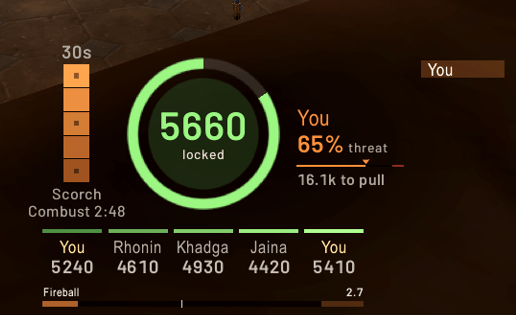
Redline is a fire mage HUD for Classic Era. It shows your team's Ignite at a glance: who owns it, how many stacks it has, how long it will keep rolling, and how close the owner is to pulling threat.
Heads up: this has not been tested in a live raid yet. So far it has been built and checked against simulated fights and real raid logs from Warcraft Logs, played back through the addon. If something looks wrong in a real raid, please tell me.
What the HUD shows
- The Ignite ring: time left before it rolls out, filling back up on every crit
- The tick: how hard the Ignite is hitting, and whether it is locked at five stacks
- Five stack slots: who landed each crit and how big it was
- The owner and their threat, with how much is left before they pull
- Scorch: stacks, time left, and a mark on every brick you landed
- Last crits on the target, with yours highlighted
- Your Combustion: charges or cooldown
It shows up in raid and dungeon combat and stays out of the way everywhere else.
Practice Your own spell buttons play a practice fight. Cast Fireball, Scorch, Pyroblast, Fire Blast and Combustion like normal and Redline plays you in a staged fight. Nothing real is cast and no mana or reagents are used. The cast line marks the last 0.4 seconds where your next spell chains, plus the Ignite's server ticks, so you can learn the timing by feel.
Zone A short looping demo of the whole HUD, so you can see what everything means before your first raid with it.
Sounds Practice and Zone have a few quiet sounds, all in one key. Redline plays no sounds in real raids.
How to use it Click the minimap button for the menu:
- Zone: a looping demo of the HUD
- Practice: play a practice fight with your own spells
- Stop: back to normal
- Move HUD: drag it where you want, scroll to resize, then Done
- Sounds: on or off
- Commands: every /red command in one list
- Send report: copy a report to share
Shift-click the minimap button to turn Redline off or on.
Commands /red or /redline /red practice /red zone /red hide /red unlock and /red lock to move and scale the HUD /red show boss|combat|always /red sound /red report
Feedback After a raid, click the minimap button, then Send report, and paste it in the comments with a sentence or two on how it felt. Most useful: did the owner, stacks and drops match what really happened, and did anything look wrong or confusing mid-fight?
Redline reads the combat log only. It never casts, targets or presses anything for you.
Redline Team