Upgrade Spotter - Upgrade Arrows & Junk Tint for Your Bags
- By
A green arrow on bag gear that beats what you wear, a yellow arrow on gear you can unlock, and a grey tint on junk. Built for WoW: Forever.
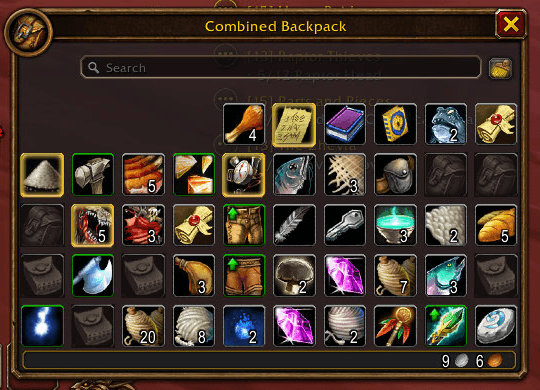
Combined Backpack with three green upgrade arrows on gear that beats what is equipped.
logo-1024.png
Description
You shouldn't have to compare every tooltip in your bags to find out what's an upgrade and what's vendor trash. Upgrade Spotter shows you, at a glance, what's worth wearing and what's worth selling on WoW: Forever.
Why players use it
- A green arrow means this item is better than what you're wearing, and you can put it on right now.
- A yellow arrow means it will be better once you unlock it: reach the level, train the weapon, or hit 40 for Mail or Plate. Hover it to see exactly what you need.
- A grey tint marks junk, so selling at a vendor is obvious.
- It works in Blizzard's bags, the combined bag, the bank, and Bagnon.
30-second start
- Open your bags. Green and yellow arrows are on by default.
- Hover an item with an arrow to see what it beats, or what it still needs.
- Type
/upgradespotterto pick your role, switch to item level, import a Pawn scale, or change the grey tint.
Features
- Green arrow: this item is better than what you're wearing, and you can put it on right now.
- Yellow arrow: this item will be better once you unlock it: reach the required level, train the weapon skill, reach level 40 for Mail or Plate, or raise a profession you have. Hover it to see exactly what you need, like Upgrade at level 32 or Needs Two-Handed Swords training.
- No false hope: items your class can never use (a rogue and an axe, a mage and mail, "Classes:" lines) never get an arrow.
- Smart comparisons: rings and trinkets are compared with your weaker one, one-handers with your weaker hand if you can dual wield, two-handers with your main hand plus off hand, and an off hand never counts while you hold a two-hander.
- Scored for your role: stat weights for Tank, Melee, Ranged, Caster and Healer, picked from your talents automatically. Reads every stat and the "Equip:" bonuses (crit, hit, spell damage, healing, mp5, attack power). Prefer simple? Switch to item level.
- Your own weights: paste a Pawn scale and the arrows use it.
- Tooltip line: Upgrade over [Old Boots]: +12 score (+18%), so you know why.
- Grey tint for junk: grey-quality items, and soulbound gear that isn't an upgrade (skipped if you can disenchant it). Hearthstones, soul shards, enchanting rods and equipment-set items are never greyed.
- Works everywhere: Blizzard's bags, the combined bag, the bank and its tabs, plus Bagnon.
- Pretty settings window: dark window with a gold title and a tooltip on every option, in the shared Ironhide Addons window and in the game's AddOns options.
Commands
/upgradespotter: open the settings (/upspot,/gbtand/greytintalso work)/upgradespotter role tank(or melee, ranged, caster, healer, auto): set how items are scored/upgradespotter ilvl//upgradespotter stats: compare by item level, or by stats/upgradespotter green//upgradespotter yellow: turn each arrow on or off/upgradespotter why: hover an item and type this to see its score and requirements/upgradespotter refresh: re-check your bags
FAQ
Why is something I'd never wear marked green?
The arrows follow the role in /upgradespotter. If Auto picked the wrong one (no talents yet, for example), choose your role there.
Does it use Pawn? It doesn't need Pawn, but you can paste a Pawn scale into the settings and it will use your weights.
My bag addon doesn't show arrows. Blizzard bags, the bank and Bagnon are supported. Tell us which bag addon you use and we'll look at it.
What is Ironhide Addons? The family of addons Upgrade Spotter belongs to. If you have more than one, they share one settings window and one minimap button. Search "Ironhide Addons" on CurseForge.
Why the new name?
Upgrade Spotter used to be called Grey Bag Tint. To keep your settings, log in once with both installed, then delete the old GreyBagTint folder from Interface\AddOns. The old /gbt command still works.
Support
Found a bug or have an idea? Join the Ironhide Addons Discord: https://discord.gg/a2x9SjtWxD (post in #bug-reports or #feature-requests).
Built for WoW: Forever (1.60.1). Ironhide Addons is a fan-made addon collection and is not affiliated with or endorsed by Blizzard Entertainment.
Upgrade Spotter - Upgrade Arrows & Junk Tint for Your Bags Team