Spec Keeper - Dual Spec Action Bar Saver & Restore
- By
Forever's Dual Spec bug can wipe your action bars. Spec Keeper saves each spec, spots a wipe, and puts everything back in one click.
logo-1024.png
Description
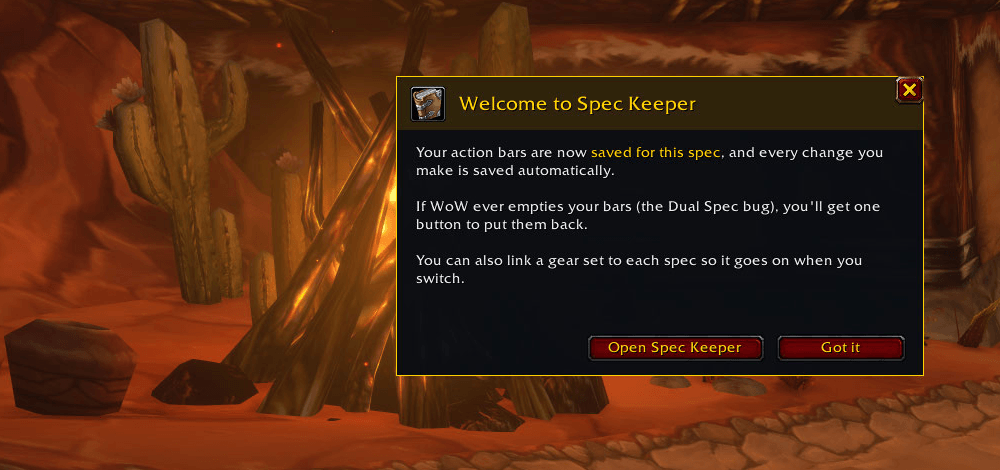
Forever's Dual Spec bug can empty your action bars after a login or a spec swap. Spec Keeper notices, and puts them back.
Why players use it
- Each spec's bars are saved automatically, including every change you make.
- When many buttons vanish at once, you get a plain-words prompt: Restore my bars or Keep them empty.
- One click puts back spells, macros, items, mounts, companion pets and gear-set buttons, with undo and history if you change your mind.
- Optional: link a gear set to each spec so it goes on when you switch.
- Never creates, edits or deletes macros.
30-second start
- Install it and log in. Spec Keeper saves your bars straight away.
- Play as normal. Every change you make is saved for the spec you're in.
- If WoW empties your bars, click Restore my bars on the prompt (or type
/sk restore). - Optional: open Spec Keeper (
/skor the minimap button) and pick a gear set for each spec.
Features
- Saves each spec separately: your Primary and Secondary bars are kept apart, and every change you make is saved automatically.
- Spots a wipe for you: checks your bars after login, after a loading screen and after a spec swap. If many buttons vanish at once, you get a plain-words prompt: Restore my bars or Keep them empty.
- One-click restore: puts back spells, macros, items, mounts, companion pets and gear-set buttons on all bars, including the stance and form bars. The pet bar comes back too when your pet is out.
- Smart about Forever spell names: restores by spell ID first, and falls back to the base spell or the spell's name when Forever has renamed or re-ranked it.
- Undo: changed your mind? One click puts the bars back exactly how they were before the restore.
- History: the last 5 layouts for each spec, each with a Use this button.
- Gear per spec: link one of your Equipment Manager sets to each spec and it goes on when you switch.
- Always restore automatically: tick it once and future wipes are fixed without asking, with a note in chat.
- Pretty and simple: dark window with a gold header, a card for each spec showing how full each bar is, and a tooltip on every button. It lives in the shared Ironhide Addons window, with a minimap button and an entry in the game's AddOns options.
Safe by design
- Never creates, edits or deletes macros. A macro goes back on your bar only if a macro with that exact name still exists. Missing ones are listed so you can remake them.
- Never saves a wiped layout over your good one. Saving pauses while a wipe is waiting for your answer.
- Only fills empty buttons. Buttons you changed yourself are left alone.
- Nothing is placed during combat. Restores and gear swaps wait until combat ends.
- Spells you don't have right now (for example talent spells from your other spec) are listed, not forced.
- Doesn't touch your game settings files.
Commands
/skor/speckeeper: open or close Spec Keeper/sk restore: put back missing buttons for this spec/sk undo: undo the last restore/sk save: save your bars now (it also saves by itself)/sk status: what's saved for each spec/sk check: test the game functions Spec Keeper uses/sk welcome: show the welcome message again
FAQ
Does it fix the bug itself? No addon can stop the game from emptying the bars, but Spec Keeper notices it straight away and undoes it in one click, or automatically if you turn that on.
Some macros didn't come back.
Spec Keeper never creates macros. If a macro was deleted, remake it in /macro with the same name and drag it back on, or restore again.
I removed a lot of buttons on purpose and got the prompt. Click Keep them empty. Your new layout is saved and the old one stays in History. You can also raise the "buttons missing" number in Settings.
/sk doesn't work.
Another addon already uses /sk, so Spec Keeper steps aside. Use /speckeeper instead.
What is Ironhide Addons? The family of addons Spec Keeper belongs to. If you have more than one, they share one settings window and one minimap button. Updates come from CurseForge: search "Ironhide Addons".
Support
Found a bug or have an idea? Join the Ironhide Addons Discord: https://discord.gg/a2x9SjtWxD (post in #bug-reports or #feature-requests).
Built for WoW: Forever (1.60.1). Ironhide Addons is a fan-made addon collection and is not affiliated with or endorsed by Blizzard Entertainment.
Spec Keeper - Dual Spec Action Bar Saver & Restore Team