Mount Gear Swap - Auto Carrot & Speedometer
- By
See how fast you're really going, and swap on your Carrot, riding gloves and spurs every time you mount. They come off when you jump down.
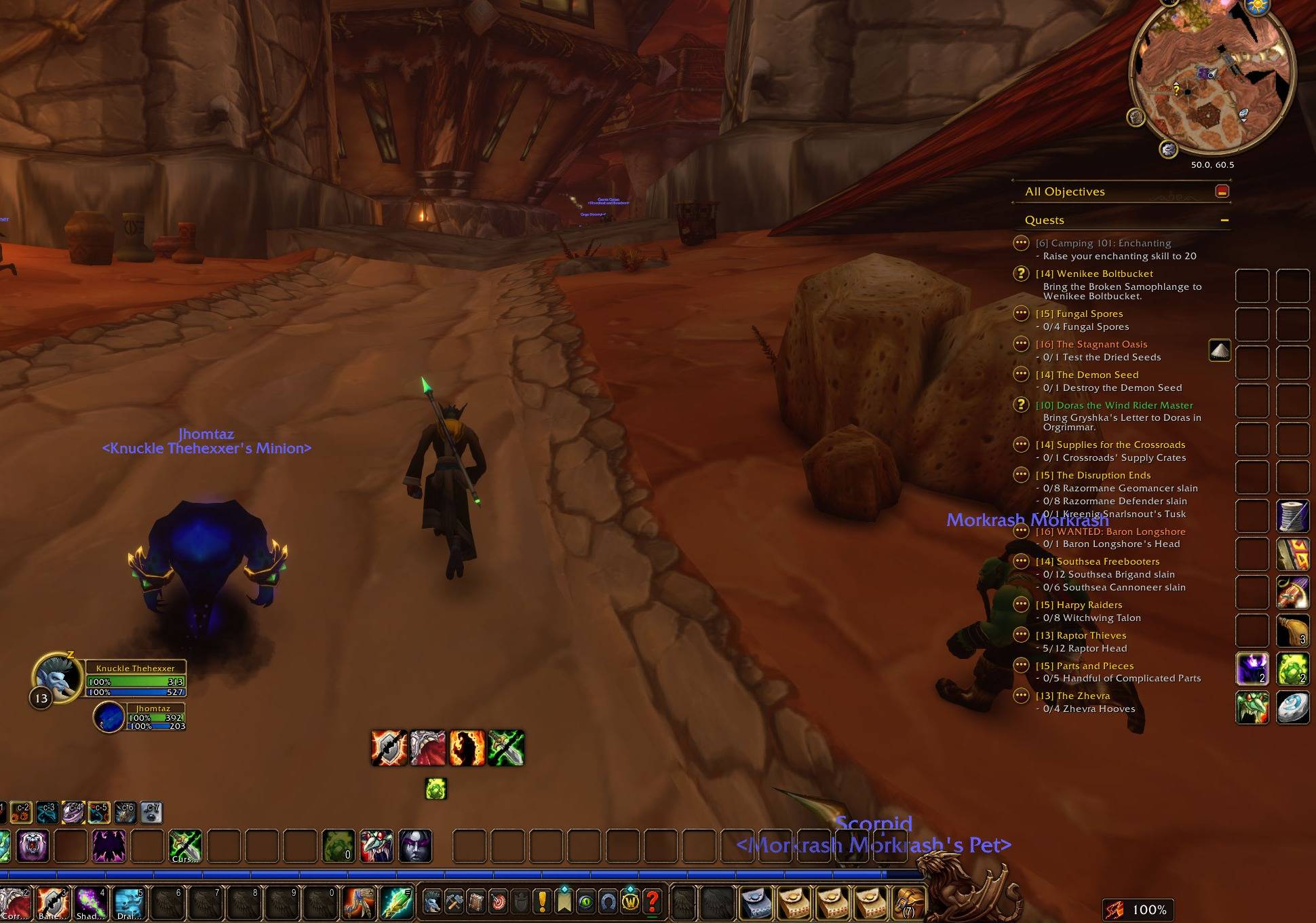
Running through Orgrimmar with the SpeedSwap meter in the bottom right, reading 100%.
logo-1024.png
Description
Mount Gear Swap - Auto Carrot & Speedometer
It's easy to forget your Carrot on a Stick, riding gloves and spurs when you mount, and easier still to leave them on when a fight starts. Mount Gear Swap shows how fast you're really going, and puts your speed gear on whenever you mount up. Get off, and your normal gear comes straight back.
Why players use it
- A clear speed meter: % of normal running speed, colour-coded, with an optional yards-per-second line.
- Hover the meter to see where the speed is coming from: your mount, a sprint, a potion, and every piece of speed gear you're wearing.
- Speed gear goes on when you mount, and your normal set comes back when you jump off. No setup beyond saving the set once.
- Combat-safe: gear never changes in combat or while you're casting. The swap waits and happens as soon as it's safe.
30-second start
- Install and log in. The speed meter appears at the top of your screen. Drag it where you want it.
- Put on your speed gear (for example Carrot on a Stick, your riding gloves and your spur boots).
- Type
/speedswap save, or open the settings and click Save Current Gear on the Speed Gear tab. - Put your normal gear back on. From now on, mounting up swaps your speed gear on and getting off swaps it back.
Lock the meter in the settings when you're happy with its spot (Shift+drag still moves it).
WoW: Forever has more speed sources than ever: Carrot on a Stick, Riding Skill gloves, Mithril Spurs, Minor Speed boots, the Gift of Galloping, the Desert Rose, Wintersaber Hide-Lined Gloves, the Rider of the Plaguelands set and more. Mount Gear Swap shows what they add up to, and makes sure the mount gear is on when you ride and off when you fight.
Features
- Speed meter: your speed as a % of normal running speed, colour-coded: grey standing, orange slowed, white running, green faster, gold at epic-mount pace. Optional yards-per-second line.
- Where your speed comes from: hover the meter to see what's speeding you up: your mount, Sprint, Dash, Aspect of the Cheetah, Travel Form, a Swiftness Potion, the Gift of Galloping, and every piece of speed gear you're wearing. It also shows your fastest speed this session.
- Automatic speed-gear swap: mount up and your speed set goes on. Dismount and your normal gear comes back, exactly as it was.
- Combat-safe: gear never changes in combat or while you're casting. The swap waits and happens as soon as it's safe.
- Finds speed gear for you: Carrot on a Stick, Riding Skill and Mithril Spurs enchants, Minor Speed boots, and Forever speed items are recognised when you save. Click any slot to add or remove it from the swap.
- Travel Form and Ghost Wolf: druids and shamans can swap on travel forms too (optional).
- Safe with your bags: if an item is banked or sold it tells you once and skips it. If your bags are full it leaves the speed item on instead of dropping anything, and finishes when you free a slot.
- Put it anywhere, any size: drag the meter anywhere, lock it, resize it from 50% to 200%, and change the background opacity. It stays where you put it after a reload or a resolution change, and can't be lost off-screen.
- A proper settings window: a clean dark window with a live preview of the meter, your speed set shown with item icons, and a tooltip on every option. Open it from the minimap button, by right-clicking the meter, from Options → AddOns, or with
/speedswap. - Part of Ironhide Addons: shares one settings hub with our other addons when you have more than one installed, and works fine on its own.
Commands
/speedswap: open or close the settings window (/mountgear,/speed,/speedoand/speedometeralso work)/speedswap lock/unlock: stop or allow dragging the meter/speedswap scale 50-200: set the meter size in %/speedswap reset: put the meter back at the top centre at 100% size/speedswap show/hide: show or hide the meter/speedswap save: save the speed gear you're wearing/speedswap clear: forget the speed set/speedswap swap on/off: turn the automatic swap on or off/speedswap forms on/off: also swap in Travel Form and Ghost Wolf/speedswap minimap on/off: show or hide the minimap button/speedswap status: what the gear swap is doing right now/speedswap help: list the commands in chat
FAQ
My gear didn't swap when I mounted.
Were you in combat or casting? The swap waits until both are over. Type /speedswap status to see what it's waiting for.
It says an item isn't in my bags. The item is in your bank or was sold. Get it back, or click its slot in the Speed Gear tab to stop swapping it.
Something I wear wasn't recognised as speed gear.
Open /speedswap, go to Speed Gear and click that slot. Gold slots are swapped.
Can I wear the speed gear on foot? Yes. Only the slots in your speed set ever change, and only when you mount or dismount.
I lost the meter.
Type /speedswap reset.
Does it work with Outfitter, ItemRack or other gear managers? Yes, but don't let two addons swap the same slots on mount, or they'll fight each other. Turn off one of the two mount swaps.
Why the new name?
This addon is now called Mount Gear Swap (it used to be SpeedSwap, and before that Speedometer). Your settings carry over, and /speedswap still works. /mountgear is a new alias. To keep settings from the old Speedometer folder, log in once with both installed, then delete Interface\AddOns\Speedometer.
Support
Found a bug or have an idea? Join the Ironhide Addons Discord: https://discord.gg/a2x9SjtWxD (post in #bug-reports or #feature-requests).
Built for WoW: Forever (1.60.1). No libraries, no dependencies. Ironhide Addons is a fan-made addon collection and is not affiliated with or endorsed by Blizzard Entertainment.
Mount Gear Swap - Auto Carrot & Speedometer Team