TradeUtilityBar_CurseForge_Promo_v1.jpg
Description
Trade Utility Bar
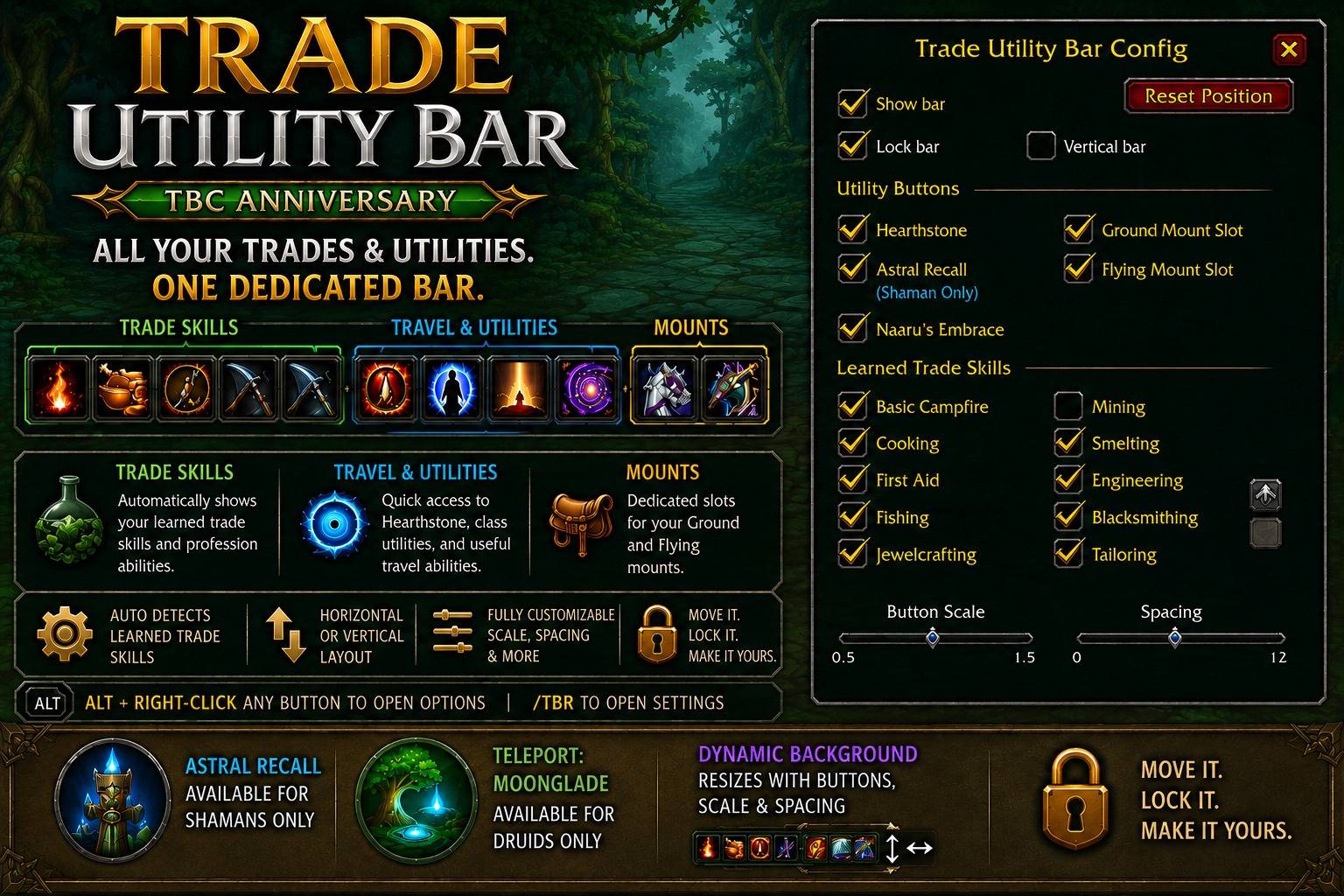
A Clean, Configurable Trade & Utility Bar for WoW TBC Anniversary
Trade Utility Bar is a lightweight, configurable action bar built specifically for World of Warcraft: The Burning Crusade Anniversary 2.5.6.
The addon provides a dedicated bar for your professions, trade abilities, travel utilities, and mounts without taking up valuable space on your normal action bars.
Trade Utility Bar was built from scratch specifically for the TBC Anniversary client, with a focus on simplicity, compatibility, and easy configuration.
Features
Automatic Trade Skill Detection
Trade Utility Bar automatically detects the trade skills and supported profession abilities your character has learned and adds them to the bar.
Supported abilities include:
- Alchemy
- Blacksmithing
- Enchanting
- Engineering
- Jewelcrafting
- Leatherworking
- Mining
- Tailoring
- Cooking
- First Aid
- Fishing
- Disenchant
- Smelting
- Basic Campfire
- Herbalism-related abilities
- Skinning-related abilities
- Pick Lock
- Poisons
Only abilities available to your character are displayed.
Individual learned trade abilities can also be enabled or disabled through the addon configuration window.
Hearth & Travel Utilities
Trade Utility Bar includes a dedicated section for common travel and utility abilities.
Supported utilities include:
- Hearthstone
- Naaru's Embrace
- Astral Recall
- Teleport: Moonglade
Class-specific options are automatically handled by the addon.
Shaman
Astral Recall is automatically detected and available for Shaman characters.
The Astral Recall configuration option only appears when playing a Shaman.
Druid
Teleport: Moonglade is automatically detected and available for Druid characters who have learned the spell.
The Teleport: Moonglade configuration option only appears when playing a Druid.
Other classes will not see these class-specific options cluttering their configuration menu.
Ground & Flying Mount Slots
Trade Utility Bar provides two customizable mount buttons:
- Ground Mount
- Flying Mount
This gives you dedicated locations for your preferred mounts without requiring additional normal action-bar slots.
Mount assignments are stored with your Trade Utility Bar configuration.
Organized Button Groups
The bar automatically organizes buttons into three sections:
Trade Skills | Travel & Utility | Mounts
Visual separators are placed between the groups, making it easy to distinguish profession abilities from Hearthstone/travel abilities and mounts.
Separators are only displayed when the applicable groups are present.
Dynamic Bar Background
The Trade Utility Bar background automatically adjusts to match the current bar.
Changing any of the following will automatically resize the background:
- Number of visible buttons
- Button scale
- Button spacing
- Visible utility abilities
- Trade skills
- Mount buttons
- Group separators
There is no oversized or fixed background frame when using a smaller configuration.
Adjustable Button Scale
The entire button layout can be resized from the configuration window.
Increase the scale for larger, easier-to-see profession buttons or decrease it to create a compact utility bar.
The bar background and separators automatically adjust with the new button size.
Adjustable Button Spacing
Button spacing can be independently adjusted.
This allows you to create anything from a tightly packed compact bar to a more spacious button layout.
Background sizing is recalculated automatically whenever spacing changes.
Horizontal or Vertical Layout
Trade Utility Bar can be configured to display in either:
- Horizontal
- Vertical
This makes it easy to place the bar along the bottom, side, or other areas of your UI.
Movable & Lockable
Unlock the bar to position it anywhere on your screen.
Once positioned, lock the bar to prevent accidentally moving it during normal gameplay.
Your selected position is saved between sessions.
Quick Configuration
Open the Trade Utility Bar options using:
/tbr
You can also open the options window directly from the bar using:
Alt + Right-Click
Alt + Right-Click only opens the configuration window and does not activate the button underneath your mouse cursor.
Configuration Options
The configuration window provides control over:
- Enable/disable the bar
- Lock/unlock the bar
- Horizontal or vertical orientation
- Button scale
- Button spacing
- Hearthstone
- Naaru's Embrace
- Astral Recall — Shaman only
- Teleport: Moonglade — Druid only
- Ground Mount slot
- Flying Mount slot
- Individual learned trade skills
The configuration interface automatically adapts to your character's class and learned abilities.
Designed for TBC Anniversary
Trade Utility Bar was developed specifically for:
World of Warcraft: The Burning Crusade Anniversary
Game Version: 2.5.6
Interface: 20506
The addon is not a port of an old Retail addon or a collection of compatibility patches.
It was built from scratch around the functionality needed for the TBC Anniversary client.
Why Trade Utility Bar?
Professions and utility abilities can consume a surprising number of normal action-bar slots.
Fishing, Mining, Smelting, Cooking, First Aid, profession windows, Hearthstones, class travel abilities, and mounts all compete with combat abilities for space.
Trade Utility Bar gives those abilities their own dedicated home.
Keep your combat bars focused on combat while keeping your professions and travel utilities immediately accessible.
Slash Command
/tbr
Opens the Trade Utility Bar configuration window.
You can also Alt + Right-Click the Trade Utility Bar to open the configuration window.
Version 1.0.0
Initial Release
- Built specifically for WoW TBC Anniversary 2.5.6
- Automatic learned trade-skill detection
- Individual trade-skill visibility controls
- Hearthstone support
- Naaru's Embrace support
- Shaman Astral Recall support
- Druid Teleport: Moonglade support
- Class-specific configuration options
- Dedicated Ground Mount slot
- Dedicated Flying Mount slot
- Horizontal and vertical layouts
- Adjustable button scaling
- Adjustable button spacing
- Dynamic background resizing
- Automatic group separators
- Movable bar
- Lock/unlock functionality
/tbrconfiguration command- Alt + Right-Click quick configuration access
Trade Utility Bar
Keep your trades and travel utilities organized without sacrificing your combat action bars.
Trade Utility Bar
Trade Utility Bar is created by Micheal Scott.
Special thanks to the World of Warcraft addon community for continued testing and feedback.
Trade Utility Bar Team