GreenWall TBC Anniversary
- By
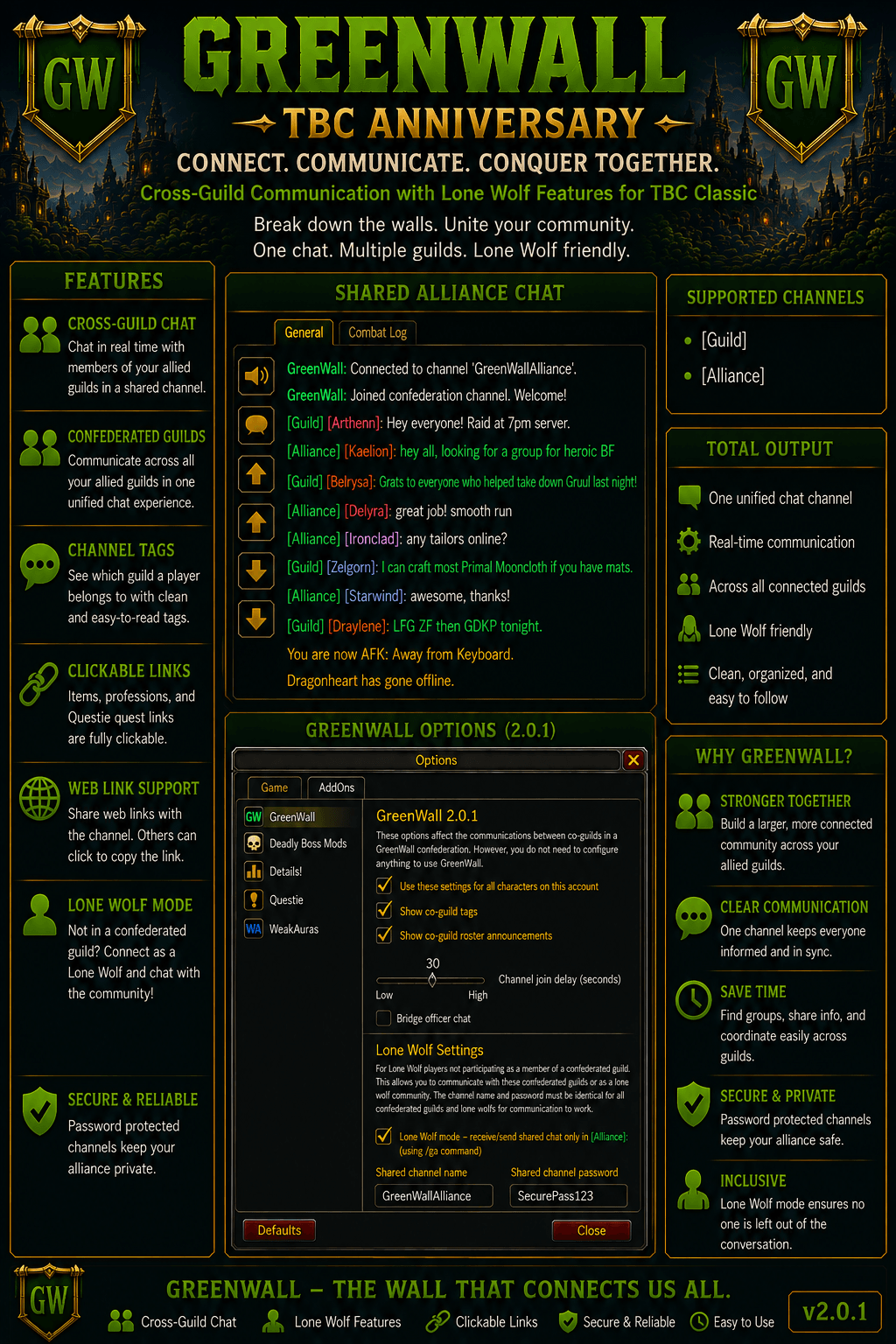
This is a fix for "GreenWall — Bridged Guild Chat for WoW Confederations" using Chat GPT as the latest update to wow TBC classic broke the addon. This addon allows alliance guilds to communicate through regular guild chat
ChatGPT Image Aug 15, 2026, 01_40_44 PM.png
ChatGPT Image Aug 15, 2026, 01_18_18 PM.png
ChatGPT Image Aug 15, 2026, 01_10_47 PM.png
ChatGPT Image Aug 15, 2026, 12_47_54 PM.png
Description
GreenWall TBC Anniversary 2.0
Bridged Guild & Alliance Chat for WoW Confederations
This is an improved version of GreenWall — Bridged Guild Chat for WoW Confederations, updated for World of Warcraft: The Burning Crusade Classic Anniversary.
This version includes compatibility fixes, quality-of-life improvements, clickable link support, and the new Lone Wolf / Alliance Chat system, allowing players outside the configured guild confederation to participate in the shared community chat. Or for those that just want to use it as a simple chat across players regardless of guild affiliation or not.
ChatGPT was used to assist with updating, debugging, and expanding the addon.
Based on GreenWall - Revived by Pmptasty and the original GreenWall project.
What Is GreenWall?
Blizzard guilds have membership limits, forcing larger communities to split across multiple guilds. GreenWall allows those guilds to continue communicating as though they were one community.
GreenWall transparently bridges guild chat across every configured guild in a confederation using a shared hidden chat channel.
With GreenWall 2.0, that communication can now extend beyond the guild confederation through the new Alliance Chat (/ga) and Lone Wolf Mode.
This allows regular raiders, friends, former guild members, or other approved players to participate in the shared community without requiring them to join one of the confederated guilds.
GreenWall 2.0 — Lone Wolf & Alliance Chat
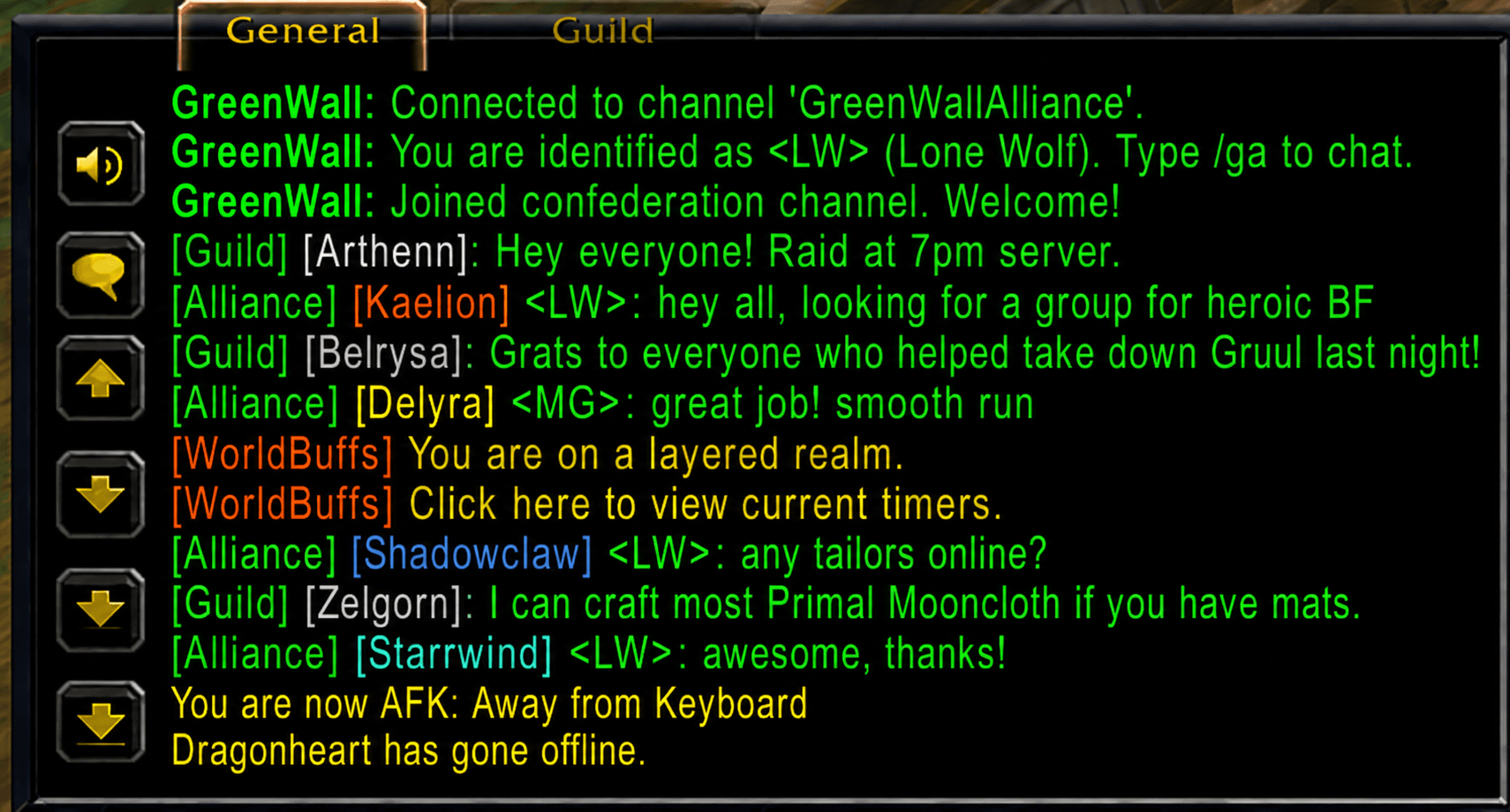
Alliance Chat /ga
GreenWall 2.0 introduces a new Alliance Chat mode using:
/ga
Alliance Chat uses the same hidden GreenWall communication channel used by the guild confederation.
This creates one shared communication network for:
- Confederated guild members
- Alliance guilds
- Regular community members
- Friends and recurring raiders
- Players outside the configured guild confederation
- Lone Wolf players
Players outside the confederation are identified with the:
<LW>
tag.
For example:
[Alliance] [Someplayer] <LW>: Anyone need a healer?
Lone Wolf Mode
Lone Wolf Mode allows a player who is not participating as a member of a configured GreenWall guild to connect directly to the confederation's hidden communication channel.
When Lone Wolf Mode is enabled:
- The player is identified as
<LW>. /gasends messages through the GreenWall hidden channel.- Incoming GreenWall communication is displayed through Alliance Chat.
- The player's normal
/gremains associated with their actual WoW guild. - Normal
/gmessages are not broadcast through GreenWall. - GreenWall traffic is kept separate from the player's normal guild chat.
- The hidden channel name and password are taken directly from the player's GreenWall options rather than Guild Information.
This means a player can belong to an unrelated WoW guild while still participating in your GreenWall community.
Confederated Guild Members
Players belonging to a properly configured GreenWall confederated guild do not need to enable Lone Wolf Mode.
Their existing GreenWall functionality remains intact:
/g
continues to operate as the normal bridged guild conversation between configured guilds.
GreenWall automatically obtains the hidden channel configuration from the guild's Guild Information settings.
The Lone Wolf option is intended for characters that need direct Alliance Chat access rather than normal confederated guild-chat operation.
Persistent Alliance Chat
Alliance Chat behaves similarly to WoW's built-in persistent chat modes.
Typing:
/ga
switches the chat input into:
Alliance:
You can then continue chatting without typing /ga before every message.
Pressing Enter again returns you directly to Alliance Chat until you intentionally switch to another chat type such as:
/g— Guild/p— Party/raid— Raid/s— Say/r— Reply- A numbered custom channel
Alliance Chat uses the same green chat color as WoW guild chat so it visually fits with GreenWall's existing communication system.
Shared Hidden Channel
GreenWall uses a hidden custom WoW chat channel as its transport.
In GreenWall 2.0, both the existing guild-confederation system and Lone Wolf functionality use this same underlying communication channel.
For normal confederated guild members, the channel configuration continues to come from the GreenWall directives stored in Guild Information.
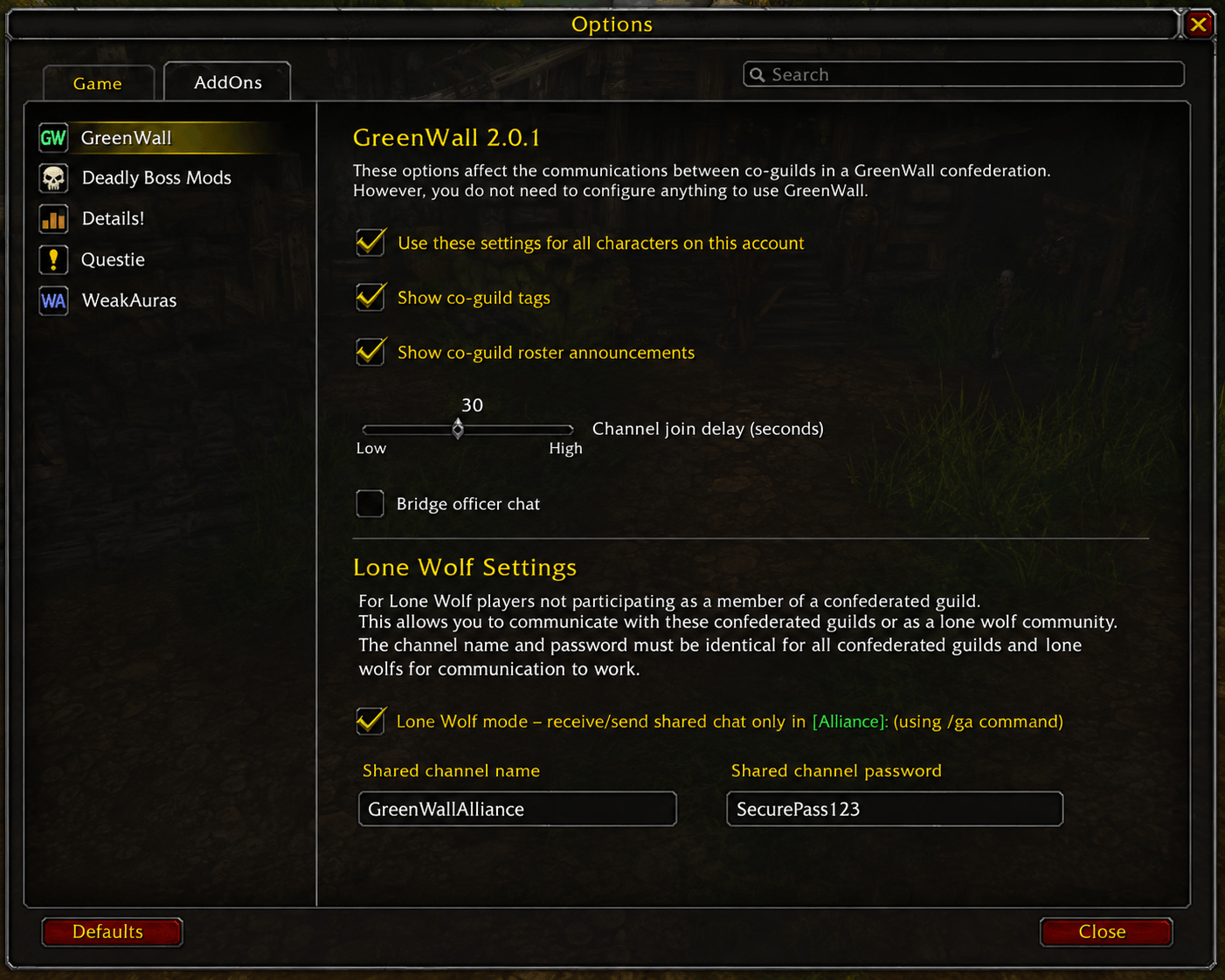
For Lone Wolf users, the exact channel name and password can be entered directly in:
Options → AddOns → GreenWall
When Lone Wolf Mode is enabled, those options take priority over any Guild Information configuration on that character.
This provides one shared GreenWall communication network without requiring a separate Alliance channel.
Core Features
Transparent Guild-Chat Bridging
- Messages typed in
/gin one configured guild can appear in the other configured guilds in real time. - Messages remain attributed to their original sender.
- Optional co-guild tags identify which guild the speaker belongs to.
- Character realm suffixes are removed from displayed names for cleaner chat.
- Player names can display using their WoW class color.
- No designated gateway player is required.
- The hidden GreenWall channel does not need to be manually monitored by members.
Example:
[Guild] [Crazylock] <CG>: Ready for raid?
Lone Wolf / Alliance Communication
- Adds
/gaAlliance Chat. - Allows players outside the guild confederation to participate.
- Lone Wolf users are automatically identified as
<LW>. - Uses the same underlying GreenWall hidden channel.
- Lone Wolf
/gtraffic remains separate from GreenWall. - Incoming GreenWall traffic is displayed through Alliance Chat for Lone Wolf characters.
- Alliance Chat can remain selected persistently between messages.
- Alliance Chat uses the Guild chat color.
Clickable Quest, Item & Profession Links
GreenWall TBC Anniversary includes improvements to preserve clickable links across bridged communication.
Supported links include:
- Item links
- Profession links
- Profession patterns/recipes
- Quest links
- Questie-compatible quest links
Quest links sent through the confederation can be opened rather than appearing only as non-interactive text.
Clickable Web Links
GreenWall 2.0 also supports web addresses shared through GreenWall chat.
When a supported web address is clicked, GreenWall opens a dedicated copy window containing the complete URL.
The URL is automatically selected so it can easily be copied with:
Ctrl+C
The dedicated copy window avoids modifying WoW's normal hyperlink behavior for items, professions, and quests.
Roster & Presence Announcements
GreenWall supports cross-confederation roster and presence notifications.
Supported events include:
- Online
- Offline
- Guild joins
- Guild departures
- Other supported roster changes
Online/offline detection includes a short hold-down period to reduce false notifications when players temporarily leave and rejoin the hidden channel while:
- Zoning
- Hearthing
- Entering an instance
- Leaving an instance
- Reloading the UI
- Transitioning between areas
This helps prevent normal gameplay transitions from being incorrectly reported as actual logouts.
Character-Specific Lone Wolf Settings
Lone Wolf configuration is stored per character.
This allows one character to operate normally as a confederated guild member while another character on the same account can operate as a Lone Wolf.
Lone Wolf configuration includes:
- Enable/disable Lone Wolf Mode
- Hidden channel name
- Hidden channel password
- Alliance Chat behavior
When Lone Wolf Mode is enabled, the manually entered GreenWall channel configuration is authoritative for that character.
GreenWall Settings
GreenWall can be configured through:
Options → AddOns → GreenWall
The options window can also be opened with:
/gw settings
The settings interface includes the new Lone Wolf configuration in addition to GreenWall's existing options.
Officer-Chat Bridging
GreenWall retains support for optional officer-chat bridging.
- Uses a separate hidden officer channel.
- Configured through the appropriate GreenWall officer configuration.
- Officers can individually enable officer-chat bridging.
- Non-officers do not receive officer traffic.
- Officer-note access is checked before the bridge is activated.
Officer-chat functionality remains separate from the new Lone Wolf / Alliance Chat system.
How GreenWall Works
GreenWall does not depend on a single gateway player.
Instead, configured clients join a shared hidden custom chat channel. GreenWall packages communication for transport over that channel and reconstructs it for display through the appropriate GreenWall chat output.
The transport can carry multiple GreenWall message types while keeping the hidden communication channel out of normal gameplay chat.
Because each participating client can communicate directly through the shared channel, the system does not stop working simply because one particular guild member logs out.
Guild Configuration
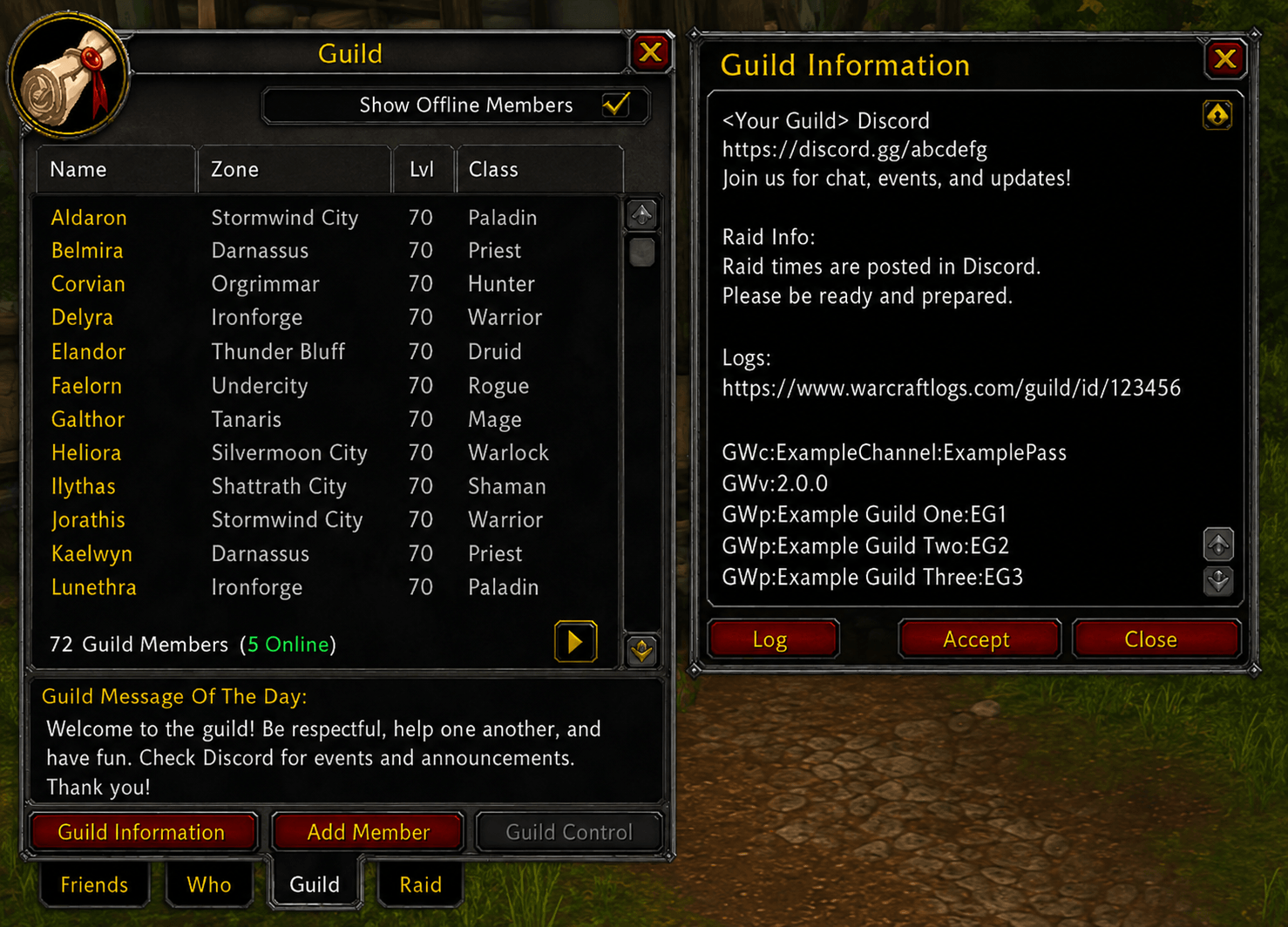
Confederated guilds continue to configure GreenWall through the Guild Information panel.
Example:
GWc:channel_name:password
GWp:Confederated Guild:CG
GWp:Second Guild:SG
The common GWc directive defines the shared hidden channel.
GWp entries identify participating guilds and their abbreviated tags.
After configuration changes, reload GreenWall with:
/gw reload
Lone Wolf users do not need access to Guild Information. They enter the shared channel credentials directly through the GreenWall options window.
Officer Chat Configuration
GreenWall can optionally bridge Officer Chat (/o) between the confederated guilds.
Officer Chat uses a separate hidden channel from the normal GreenWall guild-chat channel.
Where to Configure Officer Chat
The Officer Chat configuration must be placed in the Guild Master's Officer Note.
Use:
GWa:channel_name:password
Example:
GWa:CommunityOfficers:ExamplePassword
The channel name and password must be identical in every confederated guild participating in shared Officer Chat.
Enabling Officer Chat
Each officer who wants to participate must enable the feature:
/gw ochat on
Disable it with:
/gw ochat off
This can also be set using the check box in the GreenWall options windows (/gw setting)
The character must have permission to view Officer Notes for GreenWall to read the configuration.
How It Works
Once configured:
/omessages are relayed between participating confederated guilds.- Incoming messages appear as normal Officer Chat.
- Only eligible officers with Officer Chat enabled participate.
- Officer Chat uses a separate hidden channel from normal GreenWall
/gcommunication. - Officer Chat is not relayed to Alliance Chat (
/ga). - Lone Wolf (
<LW>) users cannot access Officer Chat.
Example
Guild Information:
GWc:CommunityChat:ExamplePassword
GWp:Guild One:G1
GWp:Guild Two:G2
Guild Master's Officer Note:
GWa:CommunityOfficers:OfficerPassword
The GWc configuration controls the normal GreenWall communication channel, while GWa in the Guild Master's Officer Note controls the separate Officer Chat bridge.
Important: Every participating confederated guild must configure the same
GWachannel name and password in its Guild Master's Officer Note for cross-guild Officer Chat to work.
Useful Slash Commands
/gw help— Display GreenWall commands./gw settings— Open the GreenWall options window./gw status— Display connection and channel information./gw reload— Reload the GreenWall guild configuration./gw reset— Reset channels and reload configuration./gw roster on|off— Toggle roster notifications./gw ochat on|off— Toggle officer-chat bridging where available./gw debug 0..5— Set diagnostic level./gw verbose on|off— Toggle verbose diagnostic information./gw version— Display GreenWall version information./ga— Send or switch to Alliance Chat.
Requirements
- World of Warcraft: The Burning Crusade Classic Anniversary
- GreenWall installed on participating clients.
- A free WoW custom-channel slot for the GreenWall hidden channel.
- Confederated guilds must use matching GreenWall channel configuration.
- Lone Wolf users must be provided the correct hidden channel name and password.
- Players must otherwise be able to participate in the same WoW custom-channel environment.
The hidden channel password should only be distributed to players you want participating in the shared GreenWall community.
GreenWall 2.0 Highlights
GreenWall 2.0 expands GreenWall from a guild-to-guild bridge into a broader community communication system.
Major additions include:
- New Lone Wolf Mode
- New
/gaAlliance Chat <LW>identification for non-confederated participants- Persistent Alliance Chat mode
Alliance:chat-input header- Guild-green Alliance Chat appearance
- Character-specific Lone Wolf settings
- Manual Lone Wolf channel/password configuration
/gw settingsoptions shortcut- Improved shared-channel connection handling
- Improved online/offline notification reliability
- Questie-compatible clickable quest links
- Clickable item and profession links
- Clickable web URLs with dedicated copy window
- Class-colored player names
- Cleaner cross-guild chat formatting
GreenWall's existing confederated /g system remains available for configured guild members while Lone Wolf Mode provides an additional way for approved players outside those guilds to remain part of the community.
Credits, License & Source
GreenWall is based on the original GreenWall project.
Original copyright:
Copyright (c) 2010–2020 Mark Rogaski
GreenWall is released under the MIT License.
This TBC Anniversary version contains additional compatibility fixes and functionality developed from the GreenWall codebase, with ChatGPT used as a development and debugging aid.
See also:
GreenWall - Revived by Pmptasty
Original GreenWall source and documentation remain valuable references for the project's design, configuration format, and API.
If You Like GreenWall, You May Also Like
GreenWall Roster – TBC Classic Anniversary
A Blizzard-Style Alliance Roster for GreenWall Confederations
GreenWall Roster is a companion addon for GreenWall that provides a unified roster view for members across your confederated guilds.
https://www.curseforge.com/wow/addons/greenwall-roster-tbc-classic-anniversary
GreenWall TBC Anniversary Team