TomoMod Forever
- By
One addon. One complete UI. TomoMod Forever unifies unit frames, cooldowns, bags, chat, damage meter and more in a fast, modular interface built for Forever and designed to play your way.
Description


⚔️ TomoModForever — A Complete Interface for WoW: Forever
One addon. One design. Built for Azeroth as it was.
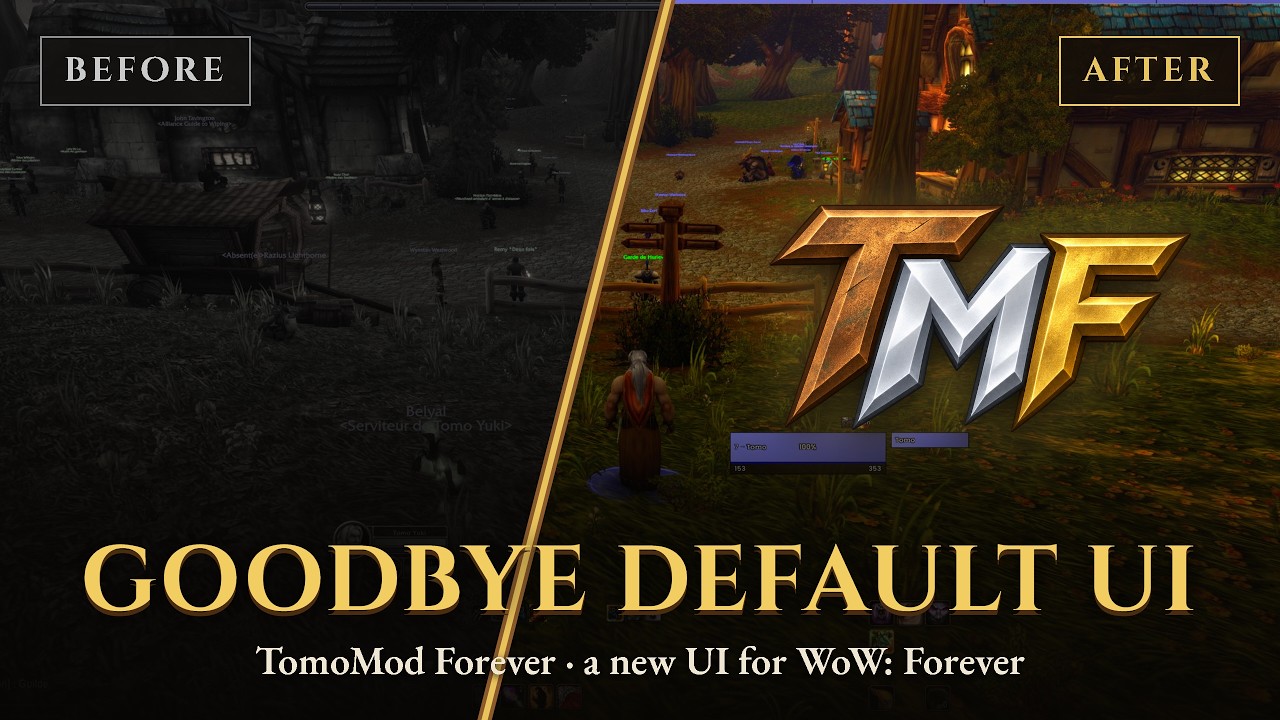
TomoModForever is a complete, modular interface suite made specifically for World of Warcraft: Forever. It is the streamlined edition of TomoMod: the same polished frames and one-window configuration, without a single module for systems Forever does not have. On top of that, it adds features made for life in Forever: a camp HUD, a full-width XP bar and missing-buff reminders.
No Mythic+ panels you will never open. No skyriding bar. No housing clock. Just the interface you play with every day, dressed in bronze and gold.
Install → type /tm → play.
✨ Why TomoModForever?
- Made for Forever, not adapted to it. Every module that depends on retail-only systems has been removed from the code, not hidden. Less to load, less to configure, nothing that breaks.
- Settings you see change live. No more closing the window to check the result: every setting is applied to your UI the moment you touch it.
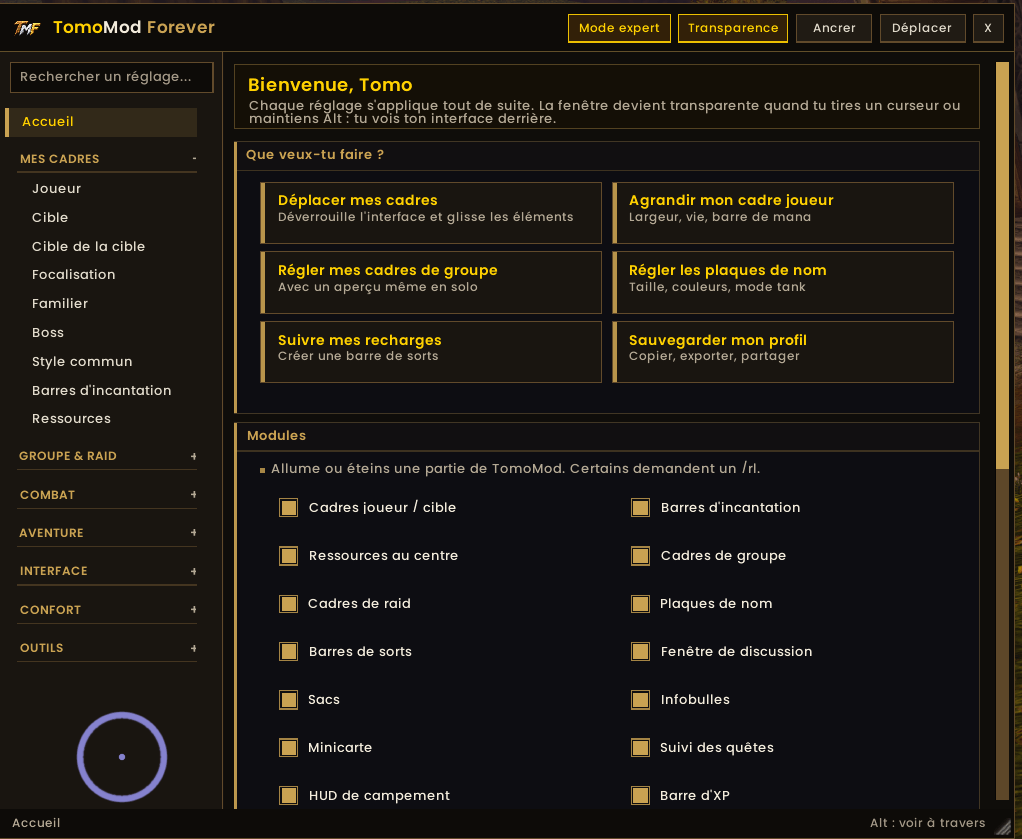
- Built for newcomers. A Home page that asks "What do you want to do?", plain-word settings, and a simple mode that hides everything advanced until you want it.
- A Forever look. Aged-bronze borders, antique-gold frames, golden-yellow titles and off-white text — an interface that belongs in vanilla-era Azeroth.
- Lightweight by design. The settings window is LoadOnDemand: it only loads the first time you open it.
🖥️ A Settings Window That Stays Out of Your Way
- Compact and docked to the side of the screen, so the frames you are editing stay visible. One click moves it to the other edge; drag it anywhere you like.
- Live apply with an "Applied" confirmation. Settings that resize protected frames wait for the end of combat and tell you so.
- See-through mode: the window fades while you drag a slider or hold Alt, so you can watch your UI change behind it.
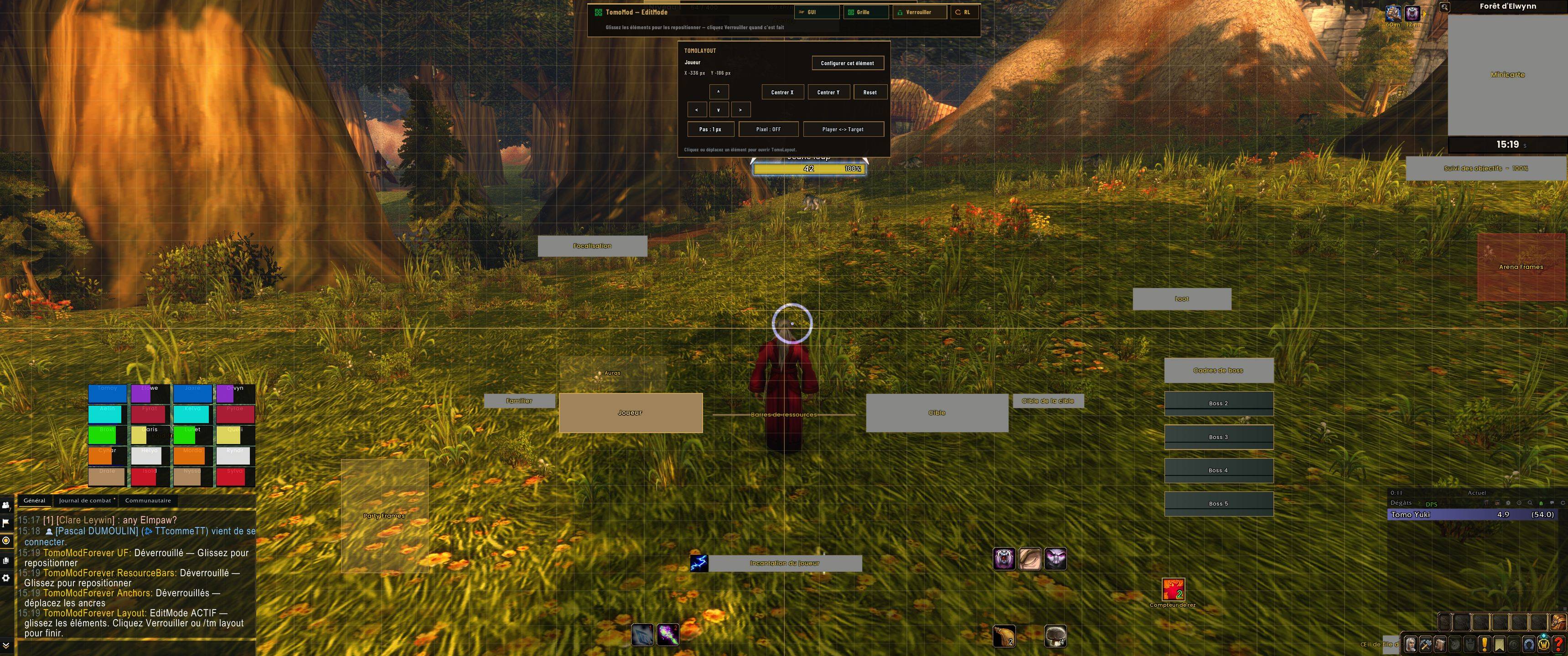
- "Show me": every frame page outlines the real frame on screen in gold.
- Live previews, even solo: five stand-in party members, a 20-player raid grid and castbars without casting.
- Search finds any setting, opens its page and highlights it.
- Simple / expert mode: the essentials by default, every option one click away.
- Edit Mode (
/tm layout) to drag every element with the mouse, with grid, snapping and pixel-perfect nudging.
🔥 Adventure — Made for Forever
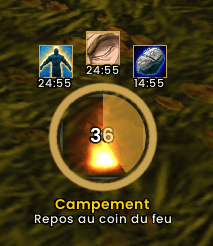
Camp HUD
Reach a campfire and a round HUD appears. Click it to sit down. The ring fills while you rest, the flames come alive, and every bonus gained at the camp is shown around it so you never forget what you picked up. Walk away and it fades out. Works in every client language.
Edge XP Bar
A thin bar along the top or bottom edge of the screen, with rested XP, 10 % ticks and your level centered on it. Each gain pops a "+xp". Hover it to see XP per hour, the time to your next level and the quests ready to turn in. On level up, a golden light runs across the bar and "Level N!" rises in the middle of the screen. At max level it shows your watched reputation. Blizzard's XP bar is hidden while it is on.
Missing Buffs
An icon appears when one of your class self-buffs, auras, aspects or weapon enchants is not up. Click it to cast. Turn off any rule you do not want, or add your own buffs by name.
🧩 What's Inside
Unit Frames & Nameplates
- Player, target, target of target, focus, pet and boss frames
- A real mana / energy bar on the player frame, or your resource in the middle of the screen — your choice
- Auras, castbars, raid markers, leader and role indicators
- Damage trail: the health you lose stays red for a moment, then drains away
- Low-health alert: the player frame pulses red under a threshold you choose
- Nameplates with health, castbars, threat, tank mode and important-cast highlighting
- Target arrows in five styles, with size, gap, colour and anchor options
Party & Raid
- Party, arena and raid frames with role-aware layouts
- Healer indicators: HoTs, defensives, dispels and heal prediction
- Healer indicator editor: place each healing spell (HoTs, shields, beacons) anywhere on the party or raid cell by dragging it on a live preview (Priest, Druid, Paladin, Shaman)
- Battle-resurrection counter
Resources & Castbars
- Class resource bars and a player castbar with GCD spark and interrupt feedback
- Castbars shake when your cast is interrupted
Cooldowns
- Cooldown Manager integration with keybinds and proc glows
- Spell bars: create rows of cooldown icons in a few clicks, by spell name or straight from Blizzard's cooldown lists
Damage Meter
- Built-in damage and healing meter with fight history, spell and target breakdowns, and death recap
Chat, Bags & Skins
- Redesigned chat with tabs, sidebar shortcuts and a copy window
- All-in-one bags with search, item level and pinning
- Skins for tooltips, game menu, objective tracker, reputation bar, color picker and group manager
Map & Navigation
- Restyled minimap with an addon-button collector and info panel (zone, coordinates, clock, durability)
- Waypoints with in-world navigation (
/tm way); the beacon and the edge arrow can each be turned off - Rare alert banner
Quality of Life
- Auto quest accept / turn-in, auto repair and grey selling, merchant tools
- Fast loot, cinematic skip, auto-fill DELETE, auto accept invites and summons
- Floating combat text options, Bloodlust sound, AFK screen, companion reminder
- CVar optimizer and a diagnostics window (
/tmdiag)
Profiles
- Ready-made styles (Tank, Healer, DPS) and a guided installer
- Profiles with backups, selective import/export and context profiles
🚫 Not Included (on purpose)
These TomoMod modules rely on systems that do not exist on WoW: Forever and were removed entirely:
Mythic+ (studio, tracker, score, keys, teleports) · Action bars & totem bar · Housing · Skyriding · World quests · Compass · Consumable tracker · Prey tracker · Class reminder · Gear advisor · Loot browser · Profession helper · Auction recipe tracker · Tooltip IDs · Character skin
📦 Installation
Copy these two folders into your Forever client's Interface\AddOns\ folder:
TomoModForeverTomoModForever_Options
🔄 Updating from 1.0.x? Delete the old
TomoModForever_AstralForge,TomoModForever_CDStudio,TomoModForever_GroupStudioandTomoModForever_ResourceCastStudiofolders. The Studios are gone: their settings now live in the main window. Your positions and settings are kept.
⚠️ Do not enable TomoMod and TomoModForever at the same time. They share the same core code. TomoModForever stores its settings separately (
TomoModForeverDB), so your TomoMod profiles are never touched.
⌨️ Commands
| Command | Action |
|---|---|
/tm |
Open the settings |
/tm layout |
Toggle Edit Mode |
/tm install |
Run the installer again |
/tm way |
Waypoint commands |
/tm reset |
Reset all settings |
/tm help |
Full command list |
/tmdiag |
Diagnostics window |
/rl |
Reload the UI |
🎨 The Forever Palette
| Element | Color |
|---|---|
| Borders & ornaments | Aged bronze #8B6B3F |
| Frames | Antique gold #C9A252 |
| Titles | Golden yellow #FFD100 |
| Text | Off-white #F2EBDB |
🌍 Languages
English · Français · Deutsch · Español · Italiano · Português (BR)
🐞 Feedback
Found a bug? Open the diagnostics window with /tmdiag, export the report and attach it to your issue. It shows exactly what went wrong.
Author: TomoAniki
TomoMod Forever Team