TomoMod
- By
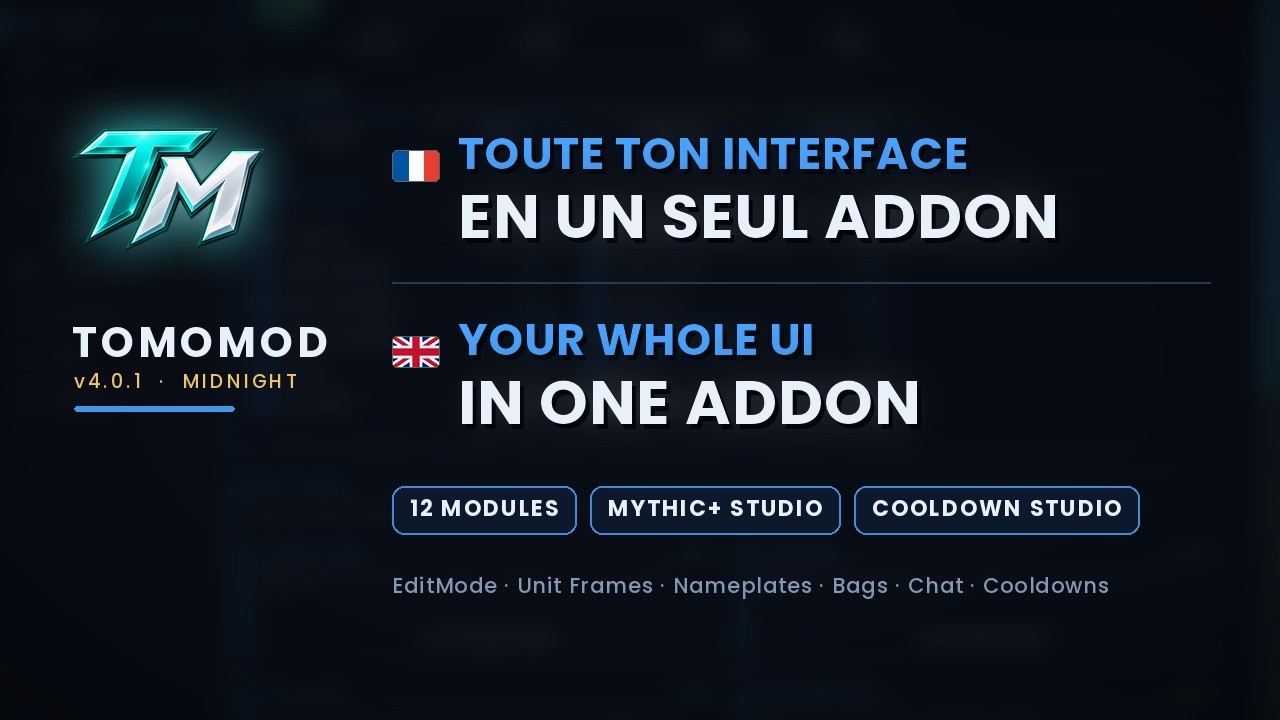
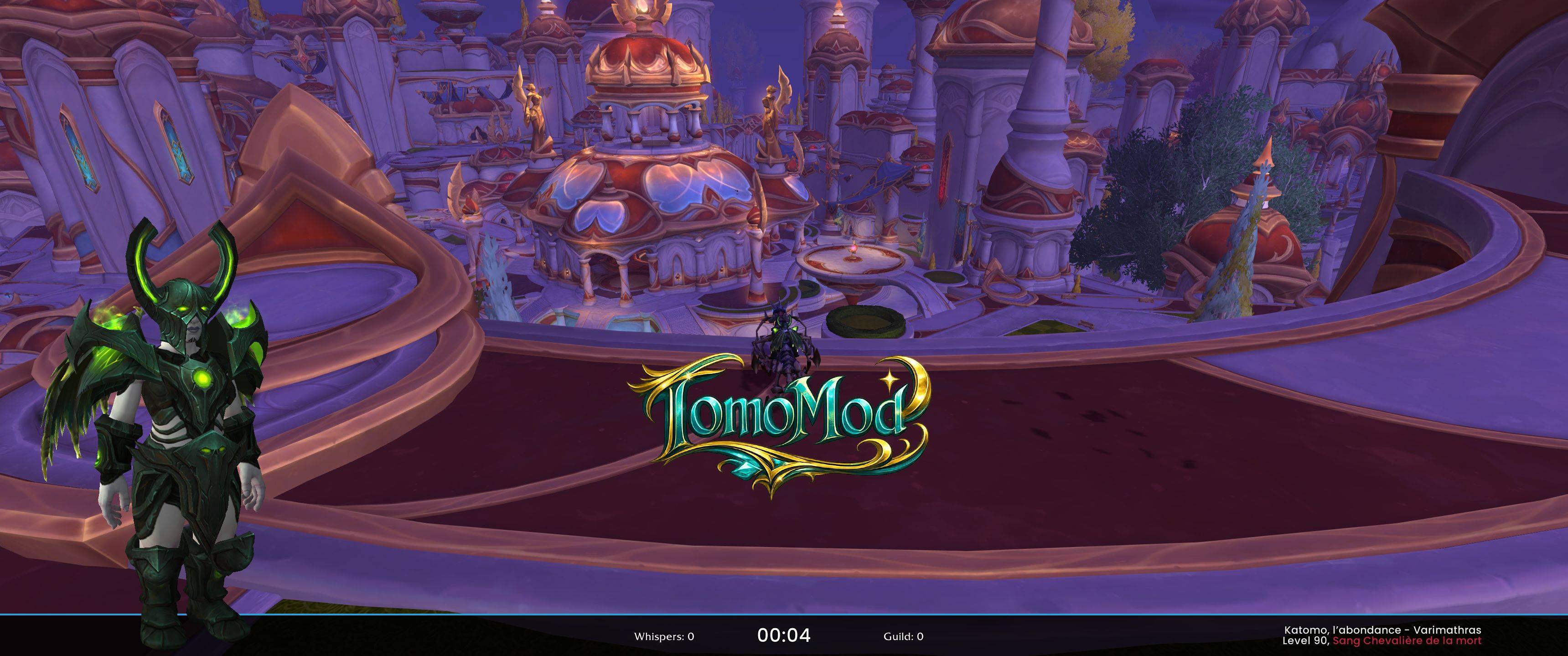
One addon. One complete UI. TomoMod unifies unit frames, action bars, cooldowns, Mythic+ tools, bags, chat, damage meter and more in a fast, modular interface built for Midnight and designed to play your way.
Description



⚡ TomoMod — Your Complete World of Warcraft Interface
One addon. One design. One place to configure your UI.
TomoMod is a complete modular interface suite for World of Warcraft, built to replace and enhance the parts of the Blizzard UI you interact with every day.
Unit Frames, Party & Raid Frames, Nameplates, Castbars, Action Bars, Cooldowns, Chat, Bags, Damage Meter, Character UI, navigation tools and dozens of quality-of-life features all share the same modern TomoMod design.
TomoMod runs on both modern branches of the game:
🌑 Midnight — the full suite, every module
♾️ Forever — the same interface, automatically adapted to a level-60 Azeroth
No configuration strings are required. No scripting is required. No separate download is required — one install covers both clients.
Install → choose a role preset → play.
Author: TomoAniki Interface: 120100 (Midnight) • 16001 (Forever) CurseForge Project ID: 1446255
♾️ TomoMod on WoW: Forever
World of Warcraft: Forever is not a Classic client. It runs vanilla-era Azeroth on the modern engine — the same Edit Mode, the same C_* API, the same Cooldown Manager that Midnight uses.
That is exactly why TomoMod feels at home there: the interface you build on Forever is the interface you already know.
Detected automatically
TomoMod identifies your client at login and configures itself accordingly. Nothing to tick, nothing to install differently.
Curious what it decided? Run:
/tm flavor
Honest about what Forever does not have
Forever has no Mythic+, no player housing, no skyriding and no world quests. Rather than showing you tabs and frames that could never do anything, TomoMod simply removes those modules on that client.
Disabled on Forever:
- Mythic+ Suite (Tracker, Studio, TomoScore, Keys, Dungeon Teleports)
- Housing Tools
- Skyriding information
- World Quest Tools
- Compass
- Consumable tracking
- Prey Tracker
Your settings are never destroyed. Take the same profile back to Midnight and those modules are simply waiting to be switched on again.
Everything else is fully available
Unit Frames • Party & Raid Frames • Healer Studio • Nameplates • Castbars • Class Resources • Action Bars • Cooldown Studio • Chat V4 • Bags V4 • Damage Meter • Character Interface • Minimap • EditMode • Profiles • Diagnostics • the quality-of-life modules
Class-specific features follow your client: TomoMod shows the resources, cooldowns and reminders that actually exist for your class there.
🚀 Designed to Be Easy From the First Login
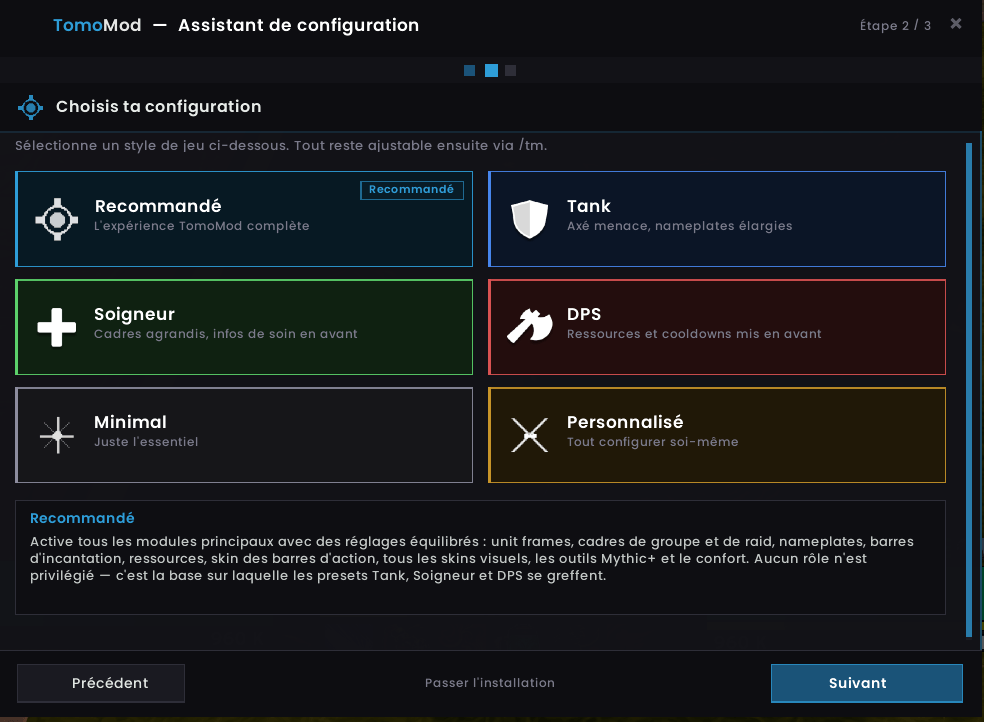
TomoMod includes its own installation assistant.
Choose how you play:
🎯 Recommended
The complete TomoMod experience with balanced defaults.
🛡️ Tank
Threat information, enlarged nameplates and tank-oriented visibility.
💚 Healer
Larger group frames and healing information placed front and center.
⚔️ DPS
Resources and cooldown information emphasized.
✨ Minimal
Only the essentials.
🛠️ Custom
Configure every category yourself.
Every preset adapts to your client — on Forever you are never offered a category the game does not have.
Everything can still be changed afterward with:
/tm
And if you ever want to start again:
/tm install
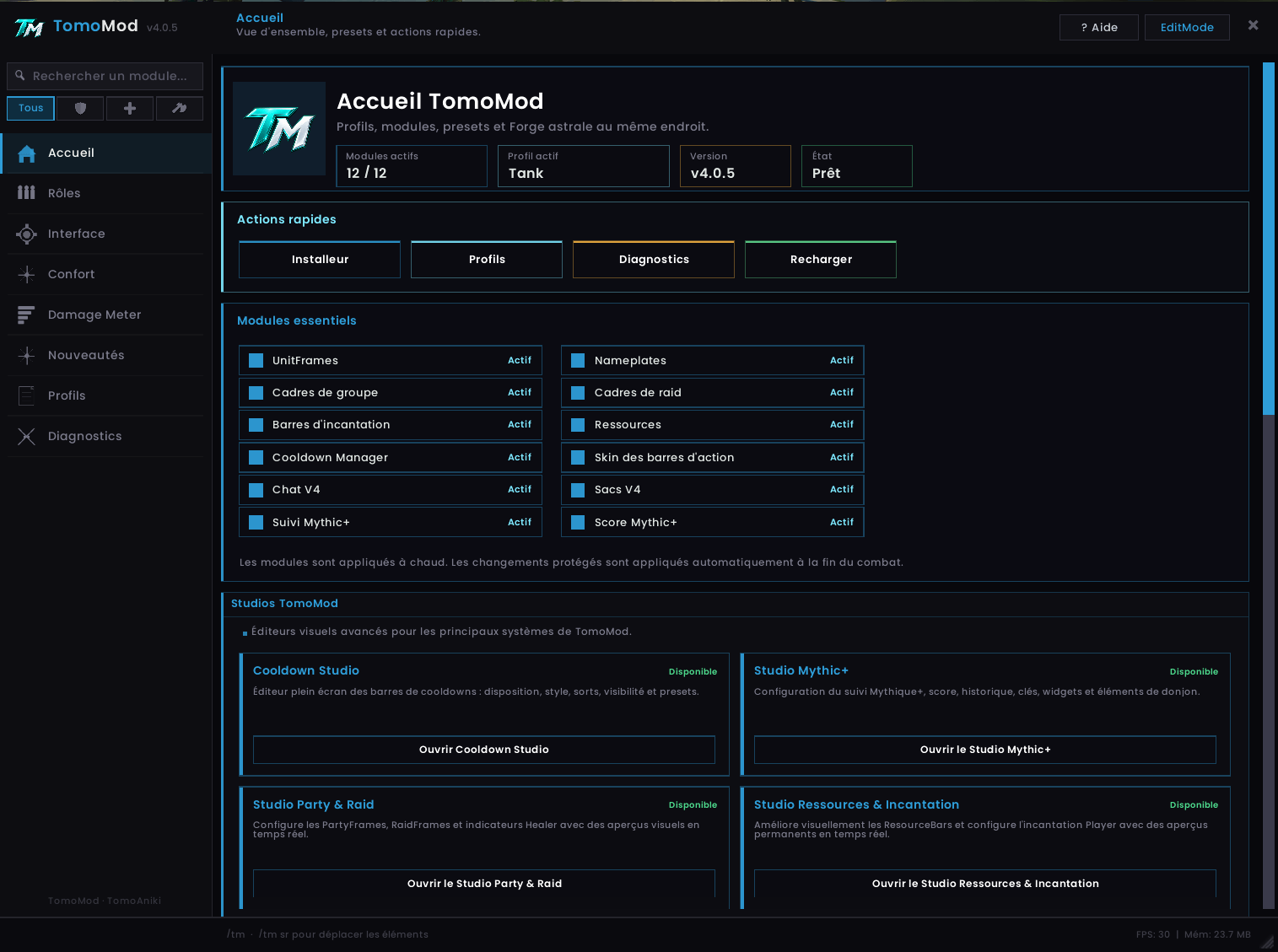
🖥️ One Unified Control Center
TomoMod 4 introduces a redesigned configuration interface that puts the whole suite in one place.
The Home dashboard immediately shows:
- Active profile
- TomoMod version
- Enabled modules
- Installation tools
- Profile management
- Diagnostics
- Quick reload
- Cooldown Studio access
- Integration with other Tomo addons
The interface is organized by purpose instead of forcing you to search through hundreds of unrelated options.
Main categories include:
Home • Roles • Interface • Units • Combat • Convenience • Damage Meter • Profiles • Diagnostics
Major configuration panels are also LoadOnDemand, so editors that you are not using do not need to remain loaded during normal gameplay.
🎯 Unit Frames
Midnight and Forever
TomoMod provides a complete replacement for the main Blizzard unit frames.
Supported units:
Player • Target • Target of Target • Pet • Focus • Boss 1–5
Features include:
- Class and reaction colors
- Health and power information
- Absorb shields
- Heal prediction
- Buff and debuff tracking
- Aura timers and stacks
- Threat indicators
- Raid markers
- Leader indicators
- Multiple health text formats
- Movable layouts
- Custom scale and appearance
The goal is to keep important combat information readable without covering the screen.
👥 Party & Raid Frames
Midnight and Forever
Group frames are designed for both small-group content and raids — from a five-man dungeon to a forty-player Forever raid.
Party Frames
- Health, absorbs and heal prediction
- Class-color support
- Role icons
- Raid markers
- Ready-check information
- Range fading
- Role sorting
- Dispel highlighting
- HoT tracking
- Interrupt cooldown information
- Battle resurrection information
- Healer power display
Raid Frames
- Grid and list layouts
- Adaptive group sizes
- Absorb and heal prediction
- HoTs and debuffs
- Dispel indicators
- Defensive cooldown icons
- Incoming resurrection indicators
- Raid markers
- Ready checks
- Range fading
- Battle Rez counter
💚 Healer Studio
Midnight and Forever
Healers can go further with the dedicated TomoMod Healer Studio.
Healer Studio is a LoadOnDemand editor designed specifically for the TomoMod Party and Raid Frames.
It allows healers to control the presentation of:
- HoTs
- Shields
- Healing buffs
- Class-specific effects
Instead of forcing every healer into the same layout, TomoMod lets you build the healing information around the way you play.
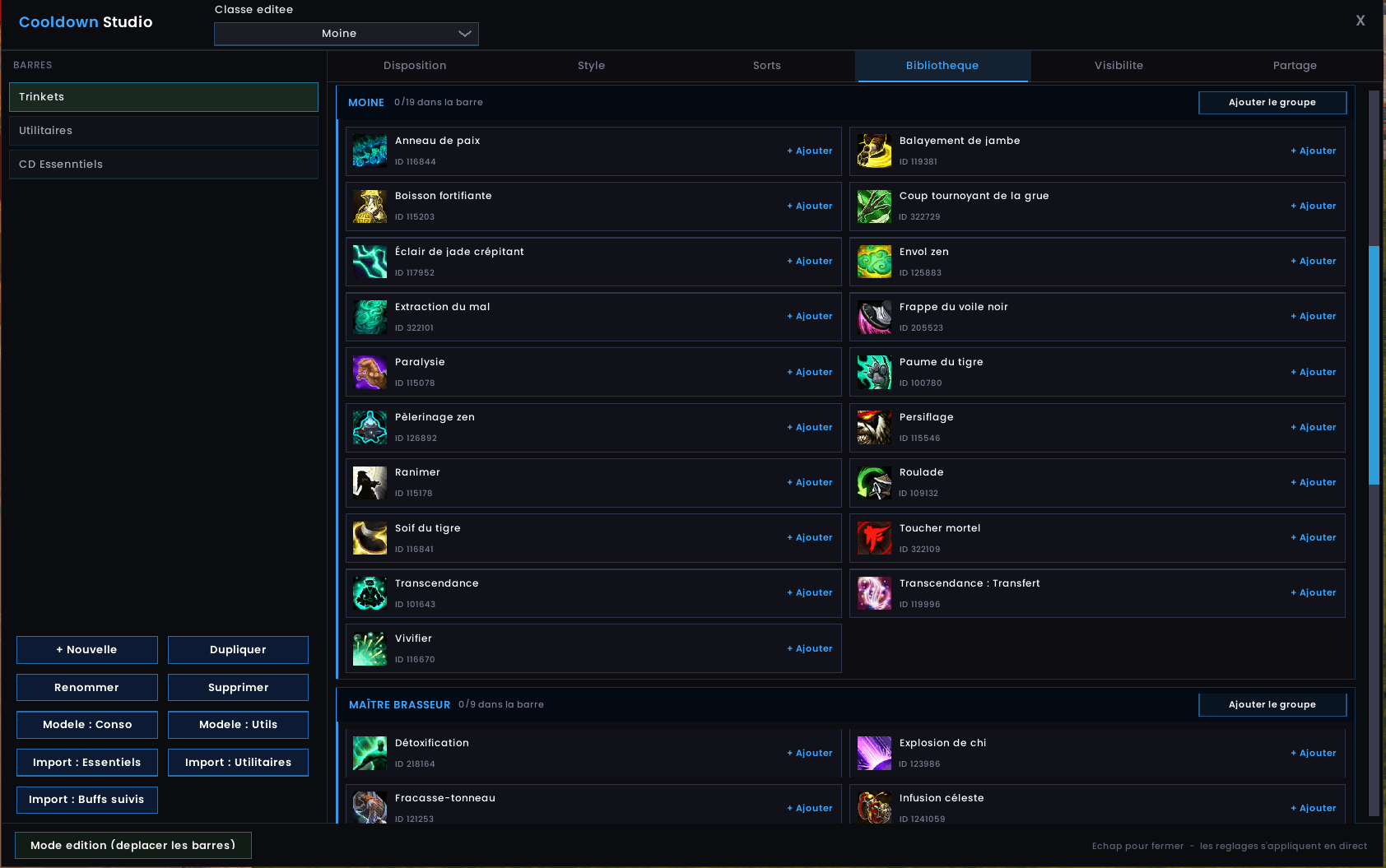
⚡ Cooldown Studio
Midnight and Forever
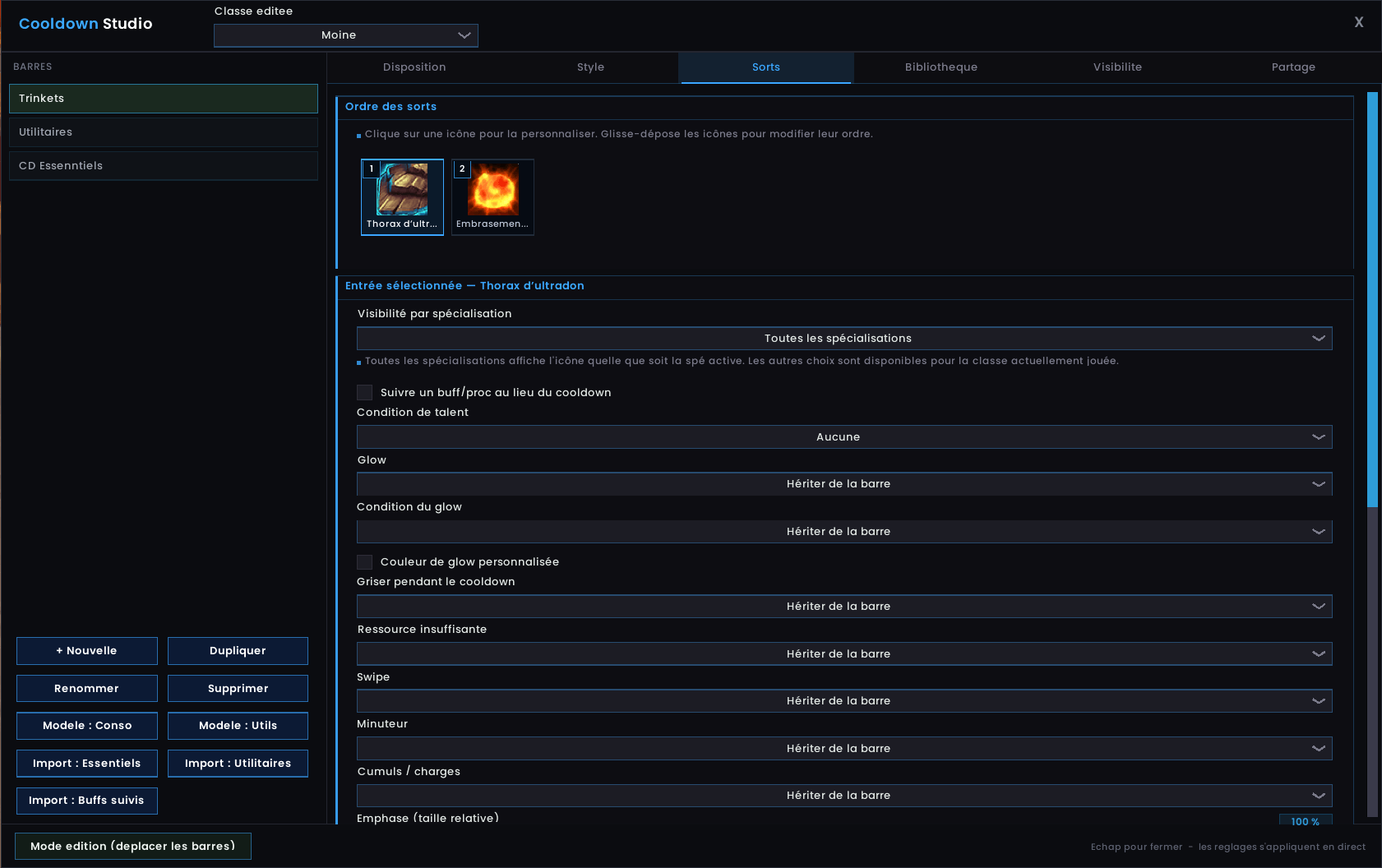
Cooldown Studio is one of TomoMod's most advanced customization tools.
It provides a dedicated full-screen editor for building and configuring your cooldown bars.
🖱️ Visual Spell Editor
Your abilities are represented directly by their icons.
Click an icon to configure it.
Drag and drop icons to change their exact order.
Individual abilities can override settings such as:
- Specialization visibility
- Talent requirements
- Buff / proc tracking
- Glow behavior
- Glow condition
- Custom glow color
- Cooldown desaturation
- Insufficient-resource display
- Cooldown swipe
- Timer
- Stacks and charges
- Relative icon emphasis
You can work with:
Spells • Items • Trinkets
without manually editing configuration files.
📚 Cooldown Library
Cooldown Studio includes a visual spell library generated from your character.
Browse abilities by class and specialization and add them directly to the selected bar.
The Library includes:
- Ability icons
- Spell names
- Spell IDs
- Class groups
- Specialization groups
- Search
- One-click additions
- Complete group installation
It also clearly shows which abilities are already present in the selected bar.
The library is built from your character, so on Forever it reflects that client's reworked spellbooks and talent trees rather than a Midnight list.
🧠 Contextual Cooldown Presets
Cooldown Studio can create context-aware presets for different types of gameplay.
For example:
Solo → Minimal
Dungeon → Group setup
Raid → Raid setup
The correct configuration can automatically become visible when your group context changes.
Manual additions and per-spell customization are preserved when generated presets are updated.
A guided tutorial is included for players opening Cooldown Studio for the first time.
🎮 Action Bars
Midnight and Forever
TomoMod supports:
Action Bars • Pet Bar • Stance Bar • Extra Action Button • Zone Ability
Choose from multiple visual styles:
Classic • Flat • Outlined • Glass • Minimal
Each bar can be configured independently.
Options include:
- Button size
- Spacing
- Opacity
- Fade on hover
- Empty buttons
- Out-of-range coloring
- Click-through
- Combat visibility
- Target visibility
- Group visibility
- Modifier visibility
- Custom conditions
TomoMod's Action Bars are designed to remain responsive even in demanding combat situations.
🎬 Castbars
Midnight and Forever
Standalone Castbars are available for:
Player • Target • Focus • Pet • Bosses
Features include:
- Multiple spark styles
- Channel tick marks
- Empowered cast stages
- Interrupt feedback
- Latency indication
- Optional GCD visualization
- Custom positioning
- Custom scaling
🔵 Class Resources
Midnight and Forever
TomoMod supports resource displays across the WoW class roster.
Depending on your class, specialization and client, this includes resources such as:
- Combo Points
- Chi
- Holy Power
- Arcane Charges
- Soul Shards
- Essence
- Death Knight Runes
- Soul Fragments
- Maelstrom Weapon
- Icicles
- Stagger
- Druid form-dependent resources
- And more
Only what your character actually has is displayed — no empty bars for systems your client does not use.
Visibility can adapt to combat, targets and specialization.
🔲 Nameplates
Midnight and Forever
TomoMod Nameplates are built for clarity during both normal gameplay and large combat pulls.
Features include:
- Class colors
- NPC reaction colors
- Boss / Elite / Rare classification
- Integrated castbars
- Interrupt indicators
- Aura tracking
- Tank threat colors
- Friendly name-only mode
- Group role indicators
- Performance-oriented frame reuse
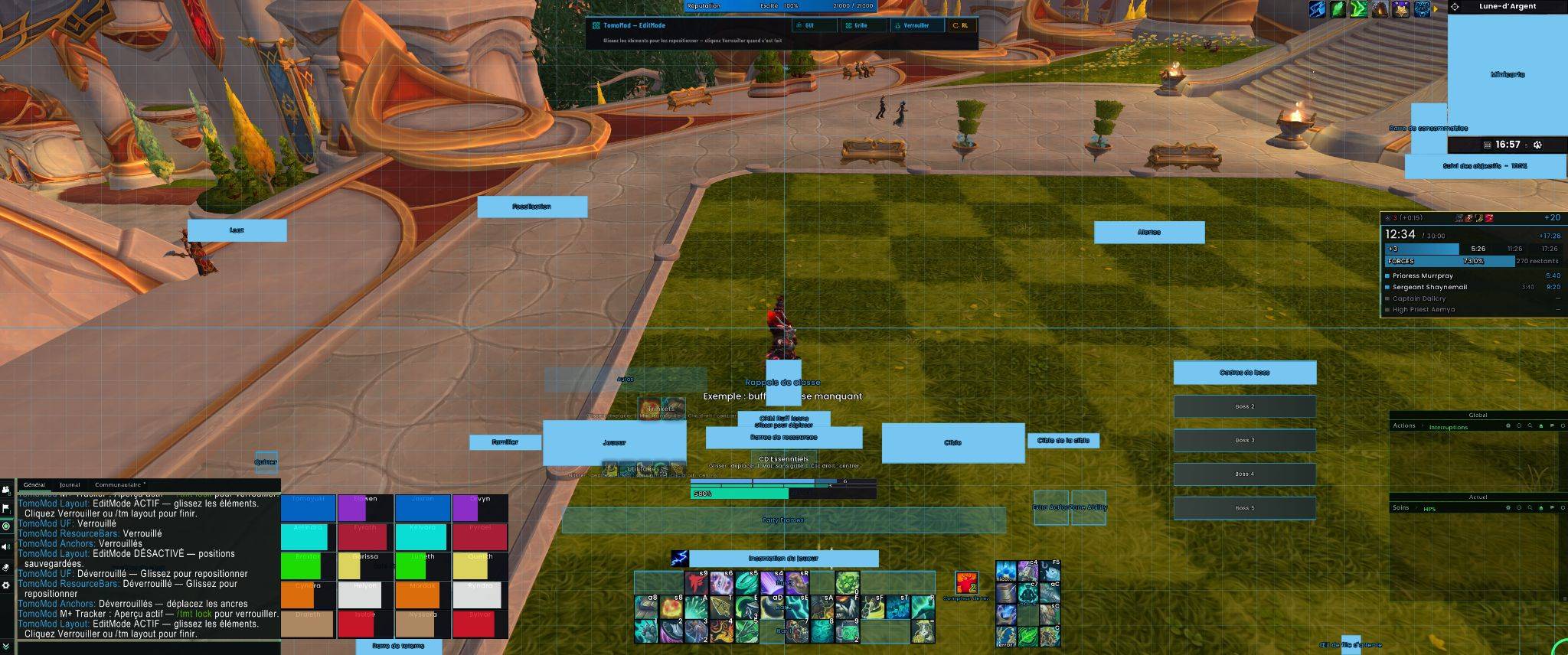
🗺️ TomoMod EditMode
Midnight and Forever
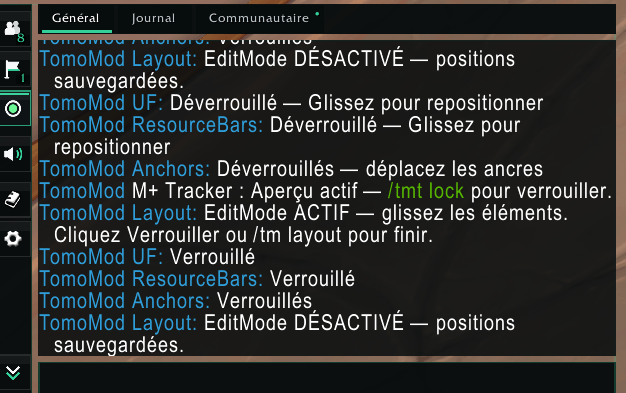
One command unlocks your interface:
/tm layout
TomoMod's EditMode displays movable anchors across the entire UI.
You can visually reposition elements such as:
- Unit Frames
- Party Frames
- Raid Frames
- Castbars
- Resource Bars
- Action Bars
- Cooldown bars
- Class reminders
- Alerts
- Minimap elements
- Boss Frames
- Additional HUD components
An optional alignment grid makes it much easier to build a clean and symmetrical layout.
Only the anchors that exist on your client are shown, so the layout screen never fills with handles for absent modules.
When you're finished, lock everything again and continue playing.
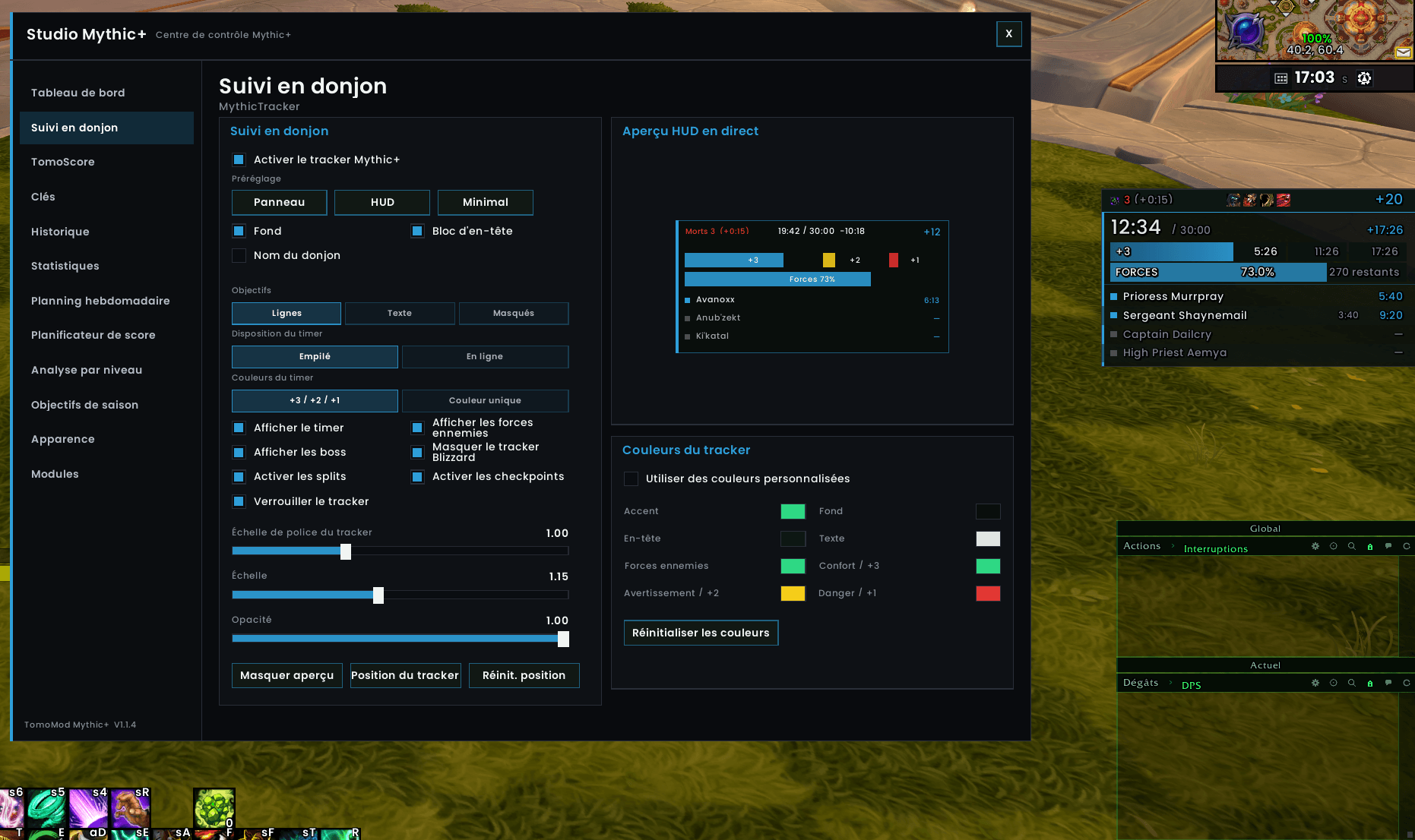
🏆 Mythic+ Suite
🌑 Midnight only. Forever has no Mythic+ content, so this entire suite is disabled on that client.
TomoMod contains a dedicated Mythic+ environment rather than only a basic dungeon timer.
⏱️ Mythic+ Tracker
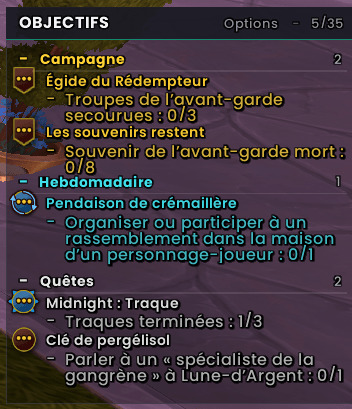
The in-dungeon HUD can display:
- Current timer
- Dungeon limit
- +3 / +2 / +1 thresholds
- Enemy Forces
- Remaining forces
- Boss progression
- Boss split times
- Death count
- Time penalty
- Keystone level
Multiple tracker layouts are available, including compact HUD modes.
🧭 Mythic+ Studio
🌑 Midnight only.
The dedicated Mythic+ Studio acts as the control center for TomoMod's dungeon tools.
Sections include:
- Dashboard
- Dungeon Tracker
- TomoScore
- Keys
- Run History
- Statistics
- Weekly planning
- Score Planner
- Level analysis
- Seasonal objectives
- Appearance
- Modules
Tracker appearance can be customized directly from the Studio, including:
- Scale
- Opacity
- Fonts
- Timer presentation
- Objective layout
- Boss information
- Enemy Forces display
- Custom colors
- Preview mode
📈 Mythic+ Score & Great Vault
🌑 Midnight only.
TomoMod integrates Mythic+ information directly into the character experience.
Quickly view:
- Seasonal Mythic+ score
- Dungeon levels
- Individual dungeon rating
- Best completion times
- Great Vault progress
- Raid objectives
- Dungeon objectives
- Delve objectives
This information is presented without needing to leave your normal character interface.
🚪 Dungeon Teleports
🌑 Midnight only.
Available Mythic+ teleports can be accessed directly from the TomoMod character interface.
This provides quick access to your seasonal dungeon teleports without searching through the spellbook.
📜 Run History & Planning
🌑 Midnight only.
The Mythic+ module also includes tools designed for players who want to track progression over time.
Depending on the available season data, the Studio can provide:
- Run History
- Statistics
- Weekly objectives
- Score planning
- Keystone analysis
- Seasonal progression
📊 Integrated Damage Meter
Midnight and Forever
TomoMod includes its own Damage Meter.
It can provide dedicated windows for combat information such as:
- Damage
- Healing
- Actions
- Interrupts
The meter follows the TomoMod visual style and integrates directly with the rest of the interface.
Players who prefer the standalone TomoDamageMeter can install it separately; TomoMod is designed to avoid running two copies of the same meter.
💬 Chat V4
Midnight and Forever
Chat V4 completely refreshes the presentation of the Blizzard chat system while keeping Blizzard responsible for the secure chat functionality underneath.
Features include:
- Modern dark interface
- Interactive tabs
- General Chat
- Combat Log integration
- Community tab
- Friends access
- Guild access
- Player status
- Voice controls
- Copy Chat
- Loot Browser shortcut
- Settings shortcut
- Scroll-to-bottom shortcut
- Timestamps
- Short channel names
- Class-colored mentions
- Clickable URLs
- Message fading
- Custom opacity
- Custom font sizing
The Chat frame is also compatible with TomoMod EditMode.
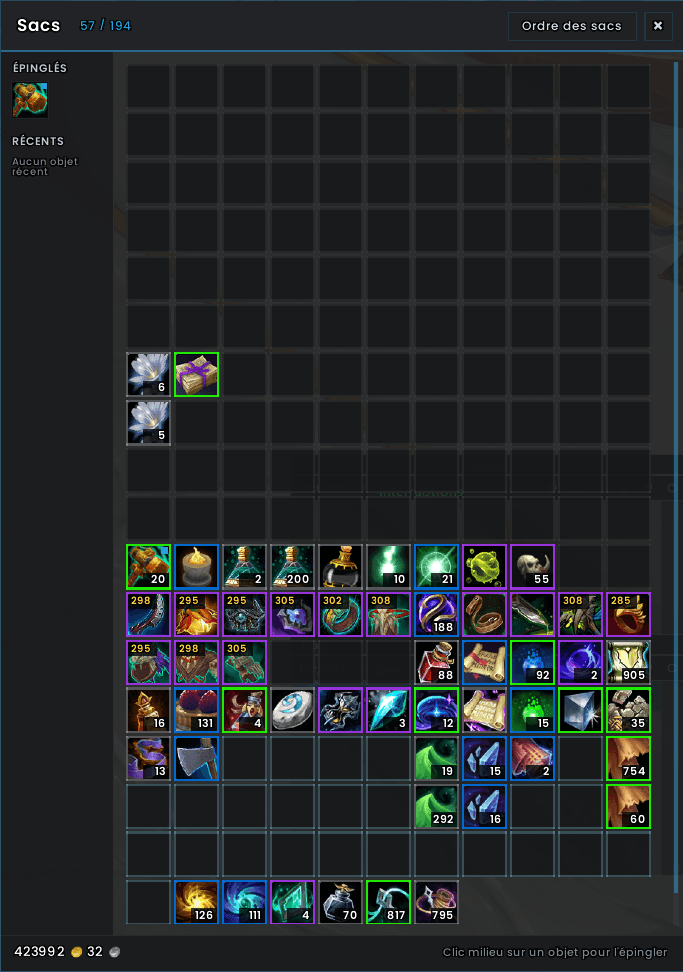
🎒 Bags V4
Midnight and Forever
TomoMod includes its own modern inventory presentation.
Features include:
- Combined bag mode
- Separate bag mode
- Live item search
- Visual sorting
- Item quality borders
- Item-level display
- Adjustable columns
- Adjustable slot size
- Adjustable spacing
- Custom scale and opacity
- Pinned items
- Recently acquired items
- Gold display
- Movable window
Middle-click an item to pin it for quick access.
TomoMod keeps Blizzard's real item buttons underneath, preserving normal item interaction.
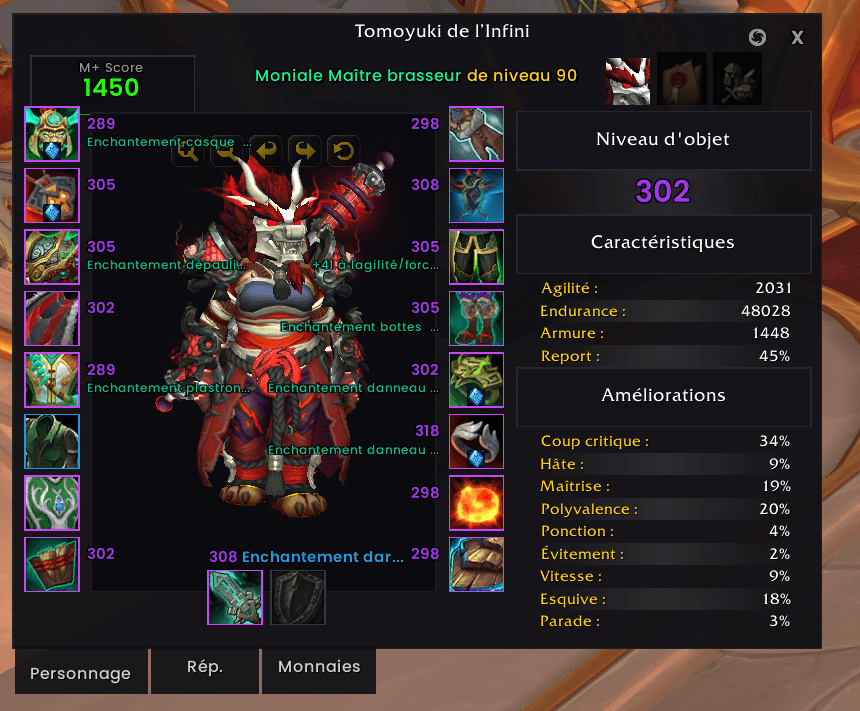
👤 Character Interface
Midnight and Forever
The Character and Inspect windows can be restyled to match the rest of TomoMod.
Visible information includes:
- Equipped items
- Item levels
- Gems
- Enchant information
- Character model
- Main statistics
- Secondary statistics
Additional panels provide fast access to reputation, currencies and other character information.
On Midnight the character panel also surfaces your Mythic+ rating.
🧭 Minimap & Exploration
Midnight and Forever
TomoMod provides a heavily customized Minimap environment.
It can include:
- Coordinates
- Zone information
- Clock
- Calendar
- Tracking controls
- Mail indicator
- Custom Minimap appearance
The tracking menu provides quick access to categories such as:
- Poison discovery
- Pet tracking
- Auctioneer
- Bank
- Barber
- Flight Master
- Food & Drink
- Innkeeper
- Gear upgrades
- Mailbox
- Profession Masters
- Reagents
- Repairs
- Stable Master
- Transmogrification
Tracking categories follow what your client actually supports.
🧪 Preparation & Consumables
🌑 Midnight only. The preparation panel is built around the Midnight flask, food and weapon-enhancement set, so it is disabled on Forever.
TomoMod can remind you about missing preparation buffs.
The preparation panel can monitor things such as:
- Flask
- Food
- Weapon enhancements
Missing preparation is immediately highlighted so you know what needs attention before a pull.
🧭 Navigation
Waypoints
Midnight and Forever
Create a waypoint:
/tm way x y
Remove it:
/tm way clear
Navigation can provide:
- Direction
- Distance
- On-screen indication
- Off-screen indication
Compass
🌑 Midnight only.
A configurable heading bar displays cardinal directions and navigation information.
World Quest Tools
🌑 Midnight only. Forever has no world quests.
Browse World Quests from a dedicated map interface and navigate toward selected objectives.
🏠 Housing Tools
🌑 Midnight only. Forever has no player housing, so the whole Housing module is disabled there.
TomoMod includes quality-of-life functionality for WoW's Housing system.
Features can include:
- Decor information
- Placement information
- Remaining stock
- Duplication helpers
- Editor clock
- Decorating session timer
- Total decorating time
- Quick home teleport
Use:
/tm home
for quick Housing travel when available.
🧩 Quality of Life
TomoMod contains many optional convenience modules.
Available on both clients
- Class reminders
- Rare alerts
- Merchant improvements
- CVar optimization
- Combat text
- Co-tank tracking
- Bloodlust / Heroism sound
- Profession helpers
- Leveling information
- Tooltip IDs
- Cursor Ring
- AFK Screen
- Auto repair
- Auto sell
- Fast loot
- Invite helpers
- Summon helpers
- Quest helpers
🌑 Midnight only
- Consumable tracking
- Skyriding information
- Prey Tracker
- Compass
- World Quest tools
You choose which modules are active — TomoMod only ever offers you the ones your client can actually run.
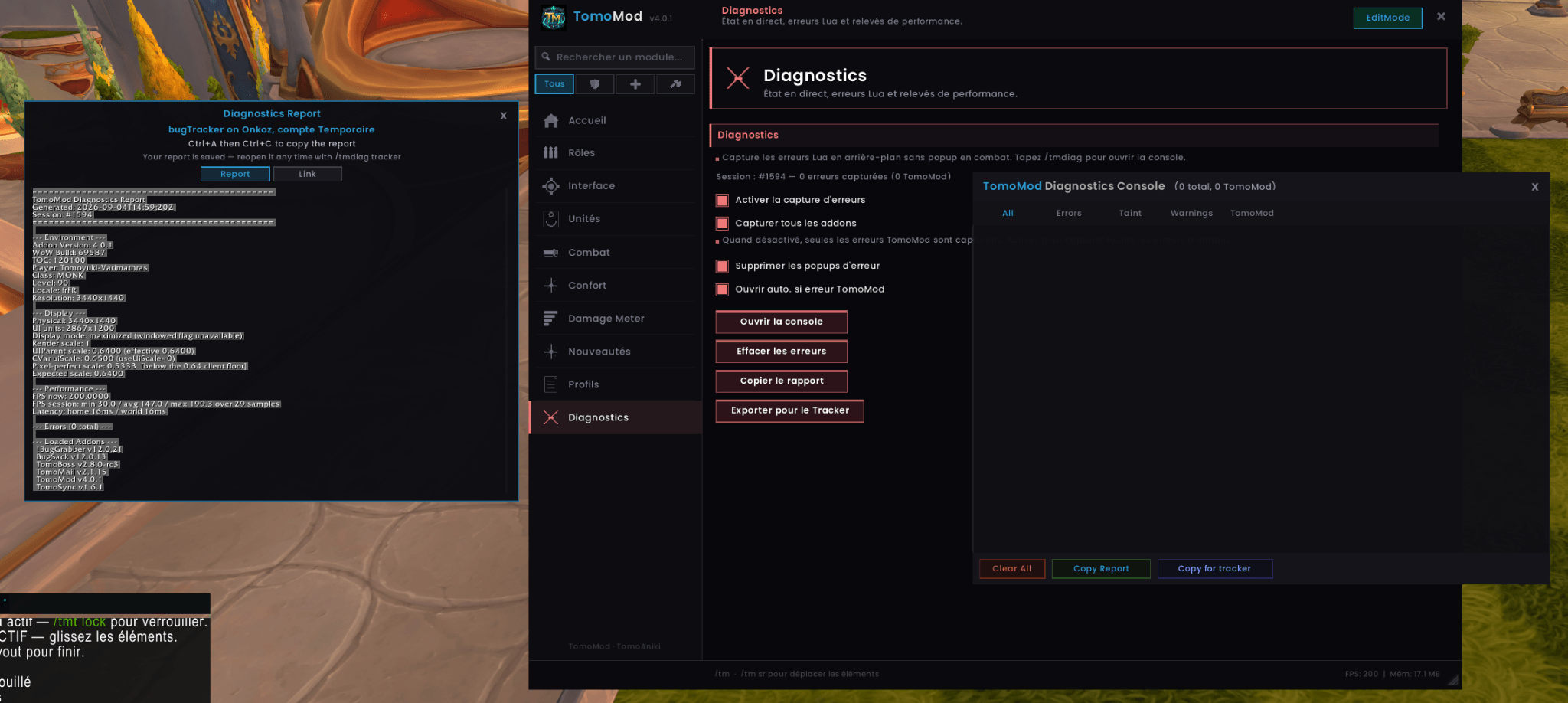
🔎 Diagnostics
Midnight and Forever
TomoMod includes a built-in diagnostics system designed to make bug reports easier for both players and developers.
It can record:
- Lua errors
- TomoMod errors
- Taint information
- Warnings
- Addon environment
- Detected client and interface version
- Display information
- Performance information
- Loaded addons
Reports can be copied directly or exported in a format suitable for a bug tracker.
Open diagnostics with:
/tmdiag
Export with:
/tmdiag export
This makes reporting difficult or player-specific problems much easier — and tells us straight away which client you were on.
🎭 Profiles
Midnight and Forever
Build different layouts for different characters, roles or specializations.
TomoMod supports:
- Named profiles
- Profile duplication
- Rename
- Delete
- Specialization assignments
- Automatic profile switching
- Import / Export
- Selective configuration import
For example, your Tank interface can be completely different from your Healer or DPS setup.
Profiles travel between clients. Import a Midnight profile on Forever and TomoMod keeps everything that applies, quietly standing down the modules that client does not have — your settings are preserved, not erased.
⚙️ Modular Architecture
TomoMod contains a large feature set, but several advanced editors are loaded only when required.
LoadOnDemand components include major systems such as:
- TomoMod Options
- Cooldown Studio
- Healer Studio
- Mythic+ Studio (Midnight only)
You get the features of a large UI suite without keeping every configuration interface active during normal gameplay.
On Forever, modules that cannot run are never loaded at all — they cost you nothing in memory or performance.
🌍 Languages
TomoMod includes support for:
🇬🇧 English 🇫🇷 Français 🇩🇪 Deutsch 🇪🇸 Español 🇮🇹 Italiano 🇧🇷 Português do Brasil
📋 Commands
| Command | Function |
|---|---|
/tm |
Open TomoMod |
/tm install |
Open the installation assistant |
/tm layout |
Toggle TomoMod EditMode |
/tm flavor |
Show the detected client and active modules |
/tm home |
Housing teleport (Midnight) |
/tm way x y |
Create a waypoint |
/tm way clear |
Remove the active waypoint |
/tm key |
Keystone tools (Midnight) |
/tm loot |
Loot Browser |
/tm prof |
Profession Helper |
/tmdiag |
Diagnostics |
/tmdiag export |
Export diagnostics |
/tm reset |
Reset TomoMod |
/rl |
Reload the UI |
🛡️ Built for Modern WoW
TomoMod is developed specifically around the current WoW interface environment — the one shared by Midnight and Forever.
Forever runs vanilla-era content on that same modern client: Edit Mode, the modern C_* API and the Cooldown Manager are all present. TomoMod targets that platform directly rather than shipping a stripped-down Classic build.
The addon aims to keep Blizzard responsible for protected and secure game actions while TomoMod handles presentation, customization and additional information around them.
This approach is especially important for systems such as:
- Action Bars
- Chat
- Bags
- Combat UI
- Protected frames
TomoMod continues to evolve alongside World of Warcraft, on both branches.
🐛 Bugs & Feedback
Found a problem?
Please include as much information as possible:
- Which client — Midnight or Forever
- What happened
- What you were doing
- Your class
- Your specialization
- Whether you were in combat
- Whether the issue can be reproduced
- Your TomoMod diagnostics report
Use:
/tmdiag export
to generate a report. It records your client automatically.
You can report issues through CurseForge or the project's GitHub bug tracker.
💡 Feature Requests
Suggestions and feedback are welcome.
CurseForge
https://www.curseforge.com/wow/addons/tomomod
❤️ Special Thanks
Taluani • Rodelin • Krentos • Adamas • Tigredefeu
Thank you for testing, feedback and helping TomoMod improve.
TomoMod
Your UI. Your layout. Your way to play. On both Azeroths.
TomoMod Team