TomoDamageMeter
- By
A damage meter that tells you why, not just who. Click any bar for a spell breakdown, any death for a recap, and get a full group scorecard when the key ends: interrupts, deaths and avoidable damage, not just DPS.
Description




TomoDamageMeter
A combat meter that tells you why, not just who.
TomoDamageMeter is a lightweight, modern combat meter for World of Warcraft: Midnight and World of Warcraft: Forever, built around Blizzard's native C_DamageMeter API.
It gives you the leaderboard you expect, then lets you immediately investigate what happened: expand a player to inspect spells, review deaths, browse completed combat segments, compare two pulls, review a dungeon run, or compare your own performance with previous runs.
No CLEU / combat-log parsing. TomoDamageMeter is designed around the modern C_DamageMeter and secret-value model shared by Retail and Forever.
Now on WoW: Forever
WoW: Forever runs on the modern WoW client, with the same addon API and the same combat restrictions as Midnight. TomoDamageMeter uses that shared foundation, so one single package works on both games: same features, same settings, same commands.
- Same meter, same windows — DPS, healing, deaths, interrupts, spell breakdown, Death Recap, Pull Compare and Run Recap all work the same way.
- Adapts to the client — if a meter type is not provided by the game, TDM hides it automatically instead of throwing errors.
- Dungeon runs without keystones — Forever has no Mythic+. Run Recap and Run History record your dungeon runs from instance entry to exit, or on dungeon-finder completion. The keystone-level filter only applies to Retail.
Installing on Forever
CurseForge does not offer a separate Forever game version yet. Download the regular file and extract the TomoDamageMeter folder into the Forever client's Interface/AddOns folder (on the beta: _classic_beta_/Interface/AddOns).
Forever beta note: the beta client is still evolving. If your settings don't persist between sessions, this is a known beta client issue affecting all addons, not TomoDamageMeter.
11 meter types, 3 session modes
Damage
- DPS
- Damage Done
- Damage Taken
- Avoidable Damage Taken
- Enemy Damage Taken
Healing
- HPS
- Healing Done
- Absorbs
Actions
- Interrupts
- Dispels
- Deaths
Each window can independently use:
- Current
- Previous Fight
- Overall
Create up to 5 independent meter windows and watch different metrics side by side.
Premium TDM interface
TomoDamageMeter ships with its own TDM Red identity:
- Dark charcoal UI with red, white and chrome accents
- Premium static HUD borders and highlights
- Official TDM logo and round minimap icon
- Dashboard-style settings
- Centralized window management
- Window snapping, locking, resizing and saved positions
- Out-of-combat opacity
- Pinned self bar
- Configurable fonts, textures, bar height and number formats
- LibSharedMedia statusbar support
- Multiple live meter skins
The settings panel keeps its TDM Red identity while meter skins only affect the meter windows themselves.
Spell Breakdown
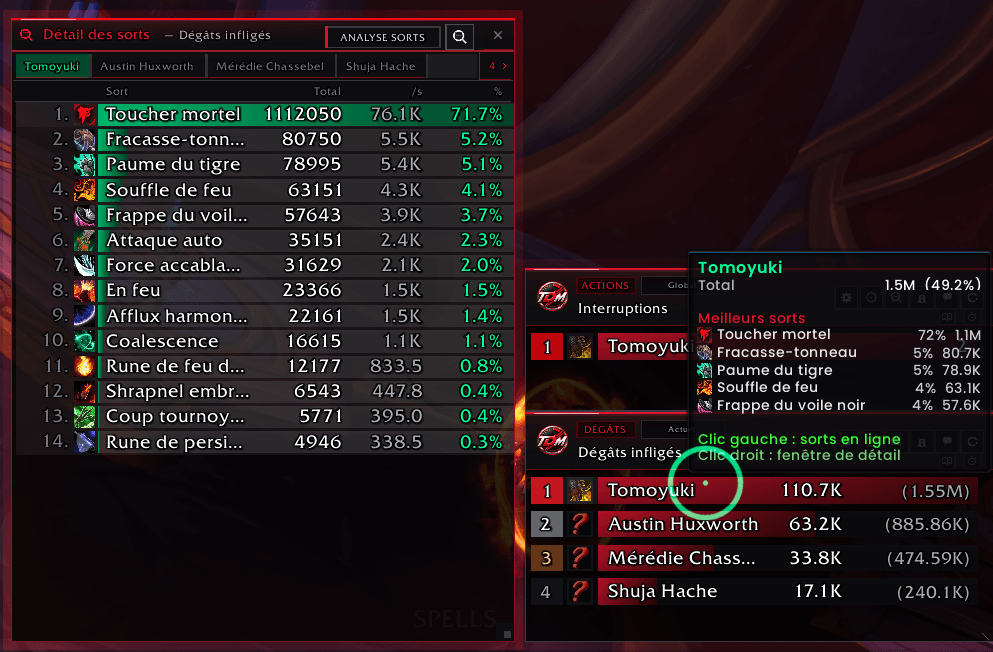
Left-click a player to expand their spells directly inside the meter.
Right-click a player, or use the breakdown button, to open the standalone Spell Breakdown window with:
- Spell icons and names
- Total damage/healing
- DPS/HPS per spell
- Percentage contribution
- Player selector
- Search
- Pet and guardian attribution
- Overkill information
- Avoidable and killing-blow flags when provided by Blizzard
Advanced Spell Details
When Blizzard exposes the information, TDM can also show:
- Unit / target name
- Class
- Creature classification
- Pet or mob attribution
- Amount attributed to that unit
- Share of the spell
- Specialization icon
- Normal / Elite / Rare / Rare Elite / World Boss classification
Unreadable or secret information is simply omitted instead of causing errors.
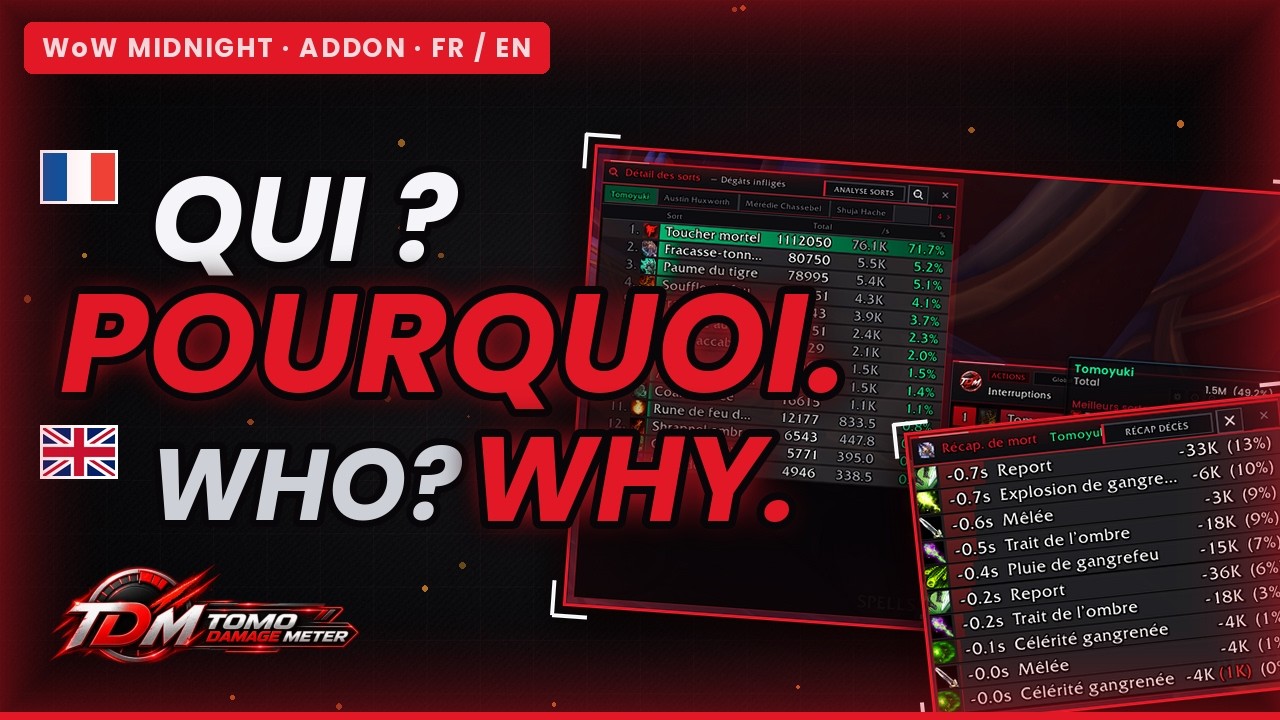
Death Recap
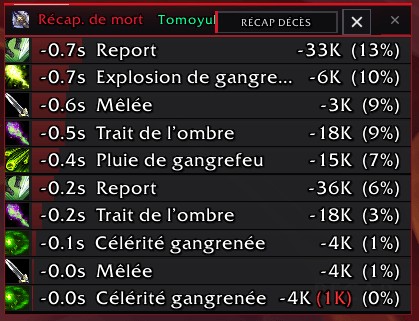
Deaths are not just a number.
Open a player's death recap to review their final moments, including incoming damage, healing, health loss and the killing blow.
Target & Segment Breakdown
Browse completed combat segments from the current session and inspect the enemies and spell contributions inside a pull.
Pull Compare
Compare two completed combat segments side by side.
Choose pull A as the reference and pull B as the comparison, then inspect:
- Damage or Healing mode
- Player-by-player DPS/HPS
- Percentage delta
- Segment labels and duration
Click a player to drill down into a spell-by-spell A/B comparison.
Useful for raid progression, repeated boss attempts, talent testing and answering:
What actually changed between these two pulls?
Commands:
/tdm pulls/tdm compare
Run Recap
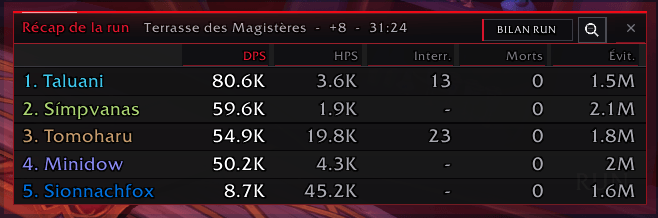
At the end of a dungeon, TomoDamageMeter can present a group scorecard with:
- DPS
- HPS
- Interrupts
- Deaths
- Avoidable damage
- Run duration
Works with Mythic+ keystones on Retail and with regular dungeon runs on both Retail and Forever.
Use /tdm recap to reopen the latest recap.
Personal Performance
The Run Recap includes a personal Performance panel comparing the current run with up to 5 previous runs on the same map.
It shows:
- Current
- Average of the previous 5
- Best
- Delta
Metrics:
- DPS
- HPS
- Interrupts
- Deaths
- Avoidable damage
- Completion time
The comparison understands direction: more DPS/HPS/interrupts is better, while fewer deaths, less avoidable damage and a shorter duration are better.
Run History
TomoDamageMeter stores up to 10 completed runs per dungeon.
The Run History browser lets you:
- Browse runs by dungeon
- Filter by keystone level (Retail)
- Review date, level, duration and personal statistics
- Select any two runs as A and B
- Compare the two runs side by side
Use:
/tdm history
Run History works from saved numeric snapshots and does not poll combat data in the background.
Multi-window layout
Create up to 5 independent windows.
For example:
- Window 1 — DPS
- Window 2 — Damage Done
- Window 3 — Interrupts
- Window 4 — Avoidable Damage
- Window 5 — HPS
Windows can be moved, resized, locked and snapped together.
Hidden meter windows are excluded from normal live UI refresh work.
Minimap & Addon Compartment
The native TDM minimap button supports full 360° dragging, saved position and adjustable scale.
Left click
Open settings.
Right click
Open quick actions:
- Settings
- Show / hide meters
- Lock / unlock all windows
- Reset combat data
- Run Recap
- Hide minimap button
The icon can always be restored from settings.
TomoDamageMeter is also registered in Blizzard's Addon Compartment.
Reports
Report meter results directly to supported chat channels with a configurable number of rows.
Lightweight by design
TomoDamageMeter is event-driven and avoids unnecessary work:
- Uses Blizzard's native
C_DamageMeter - No
COMBAT_LOG_EVENT_UNFILTERED - No
CombatLogGetCurrentEventInfo() - No permanent minimap
OnUpdate - Hidden windows are skipped during normal combat refreshes
- Run History / Performance use saved numeric snapshots
- Pull Compare only reads data when you open or refresh it
- Advanced Spell Details are guarded against secret/unreadable values
- Meter types and events missing from the client are skipped safely
Languages
Fully localized in 9 languages:
- English
- French
- German
- Spanish
- Italian
- Portuguese (Brazil)
- Russian
- Simplified Chinese
- Traditional Chinese
Commands
| Command | Action |
|---|---|
/tdm or /tomodm | Open settings |
/tdm toggle | Show / hide meter windows |
/tdm recap | Open the latest Run Recap |
/tdm history | Open Run History |
/tdm pulls | Open Pull Compare |
/tdm compare | Open Pull Compare |
/tdm reset | Reset combat sessions |
/tdm lock | Lock / unlock all windows |
/tdm diag | Arm the C_DamageMeter diagnostic probe |
/tdm help | Show command help |
Requirements
- World of Warcraft Retail — Midnight (Interface 120100 / 120007)
or World of Warcraft: Forever (Interface 16001, beta and launch) - Blizzard's built-in
Blizzard_DamageMeter(included in both games)
Clean. Powerful. Yours.
Part of TomoSuite, by TomoAniki.
TomoDamageMeter Team