Titan Panel (GearScore)
- By
Plugin for Titan Panel that shows the gear score of your character.
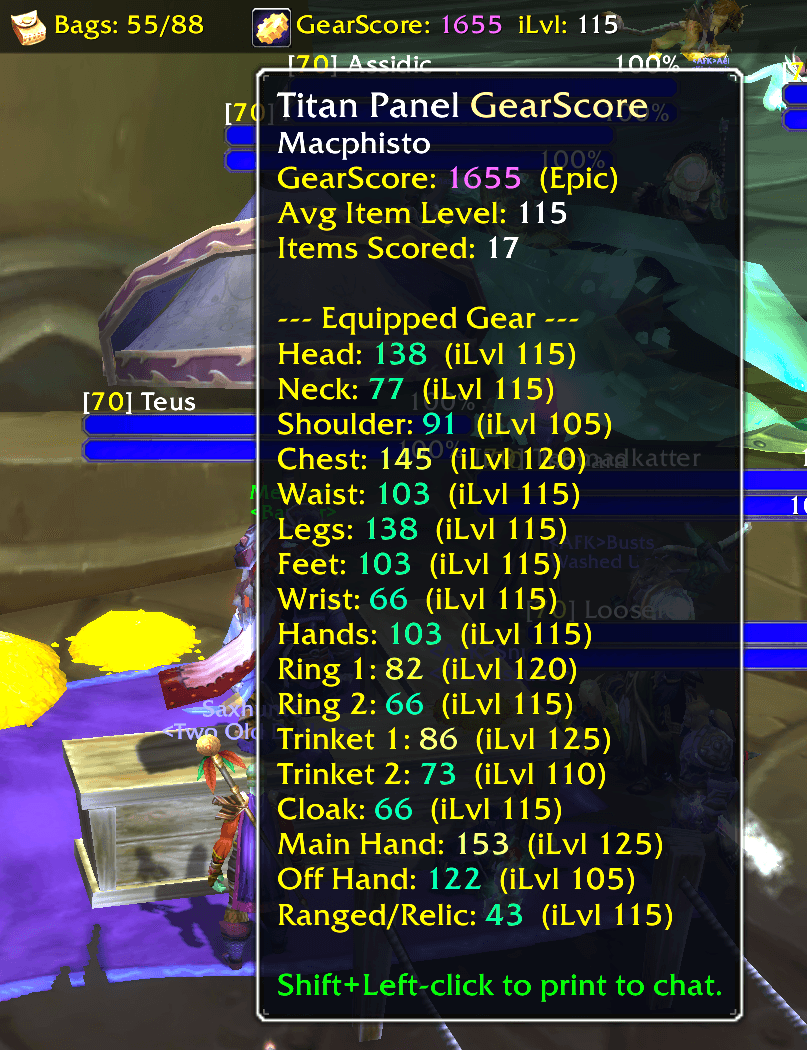
titan-gearscore.png
Description
Titan Panel [GearScore]
See your GearScore and average item level on Titan Panel in World of Warcraft: Forever. The number changes color along a smooth gray-to-orange item-quality ramp as your gear improves.
Features
- GearScore and equipped average item level on the Titan bar, updated when you change gear.
- A detailed tooltip with per-slot scores and item levels, plus clearly marked empty slots.
- Hunter-aware weighting for melee and ranged weapons.
- Shift+Left-click to print your score to chat.
/tgsand/titangsslash commands.- A right-click option to show or hide average item level on the bar.
- No extra addon or library dependency beyond Titan Panel.
What does ? mean? An equipped item is still loading or cannot be read right now, so the displayed GearScore may be partial. Hover over the plugin to see which slots are affected. The score refreshes when item data arrives and after combat.
Installation
Install Titan Panel, then install TitanGearScore for the WoW: Forever game version. For manual installation, place the TitanGearScore folder in:
World of Warcraft/_classic_beta_/Interface/AddOns/Enable GearScore from Titan Panel's plugin list under Interface.
Compatibility
- WoW: Forever 1.60.1, Interface
16001. - Requires a Titan Panel version with Forever support.
- Uses the Classic GearScore scale of 200 points per color bracket. The score formula is based on GearScoreLite by Mirrikat45, with item-level thresholds from TacoTip by kebabstorm.
This release no longer targets TBC Classic Anniversary. The Forever port passed offline checks but has not yet been verified in game. If you encounter a load error or an incorrect score, leave a comment or open a GitHub issue.
Titan Panel (GearScore) Team