promotional bannermobile promotional banner

ThreatPips

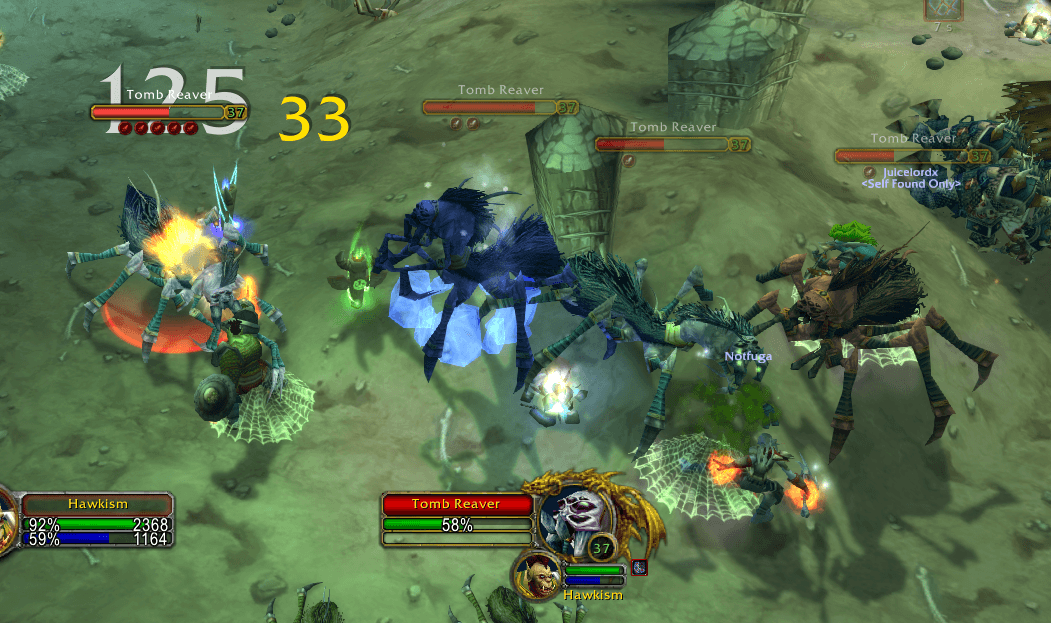
Your threat on every enemy at a glance: 1–5 DPS role icons under the nameplate health bar, going orange as you catch the tank and red when the mob turns on you.
item image

Description

ThreatPips puts your threat where you're already looking: right under the enemy's health bar.

Every mob whose threat table you're on gets a row of 1 to 5 of Blizzard's own DPS role icons under its nameplate. Each icon is 20% of the threat of whoever the mob is currently attacking, so five icons means you're neck and neck with the tank — or already tanking it.

How to read it

  • 1 icon = 1–20% of the tank's threat, 2 = 21–40%, 3 = 41–60%, 4 = 61–80%, 5 = 81–100% or tanking
  • White — safe
  • Orange — you have more threat than the tank but the mob hasn't switched to you yet
  • Red — the mob is on you

Features

  • Works on the default Blizzard nameplates, no setup
  • Moves out of the way of the mob's cast bar and back up when the cast ends
  • Nothing is drawn on mobs you haven't touched, so the screen stays clean
  • Updates instantly from the threat events plus a light half-second safety refresh
  • Icon size is adjustable and saved per character
  • No libraries, no options panel, one Lua file

Commands

  • /tpips — toggle on/off
  • /tpips size <6–40> — icon size (default 12)
  • /tpips reset — reset icon size

Made for Classic Era (Interface 11509). Part of a family of minimal addons alongside XPMeter, MoveSpeed and ImbueCheck.

The ThreatPips Team

profile avatar
Owner
  • 6
    Projects
  • 34
    Downloads

More from hawk1shView all

  • BagTidy project image

    BagTidy

    Sort bags, sell junk, search your inventory. Fast batched bag sorting for Classic Era with your own sort order (/bt config) — Sell and Sort buttons and a Search field right on the backpack.

    • 5
    • September 5, 2026
  • ImbueCheck project image

    ImbueCheck

    Shaman reminder: a small clickable box when your weapon has no imbue (Rockbiter, Flametongue, Frostbrand, Windfury) or it is about to run out.

    • 4
    • September 5, 2026
  • ChatKeeper project image

    ChatKeeper

    Double-click any chat window to select and copy its text, and keep your chat history across /reload and relogs. No buttons, no setup.

    • 3
    • September 5, 2026
  • Channel Order project image

    Channel Order

    Rearrange your chat channel numbers with a simple up/down list. Move General, Trade, LFG etc. to the slot you want, click Set Order, done.

    • 3
    • September 5, 2026
  • BagTidy project image

    BagTidy

    Sort bags, sell junk, search your inventory. Fast batched bag sorting for Classic Era with your own sort order (/bt config) — Sell and Sort buttons and a Search field right on the backpack.

    • 5
    • September 5, 2026
  • ImbueCheck project image

    ImbueCheck

    Shaman reminder: a small clickable box when your weapon has no imbue (Rockbiter, Flametongue, Frostbrand, Windfury) or it is about to run out.

    • 4
    • September 5, 2026
  • ChatKeeper project image

    ChatKeeper

    Double-click any chat window to select and copy its text, and keep your chat history across /reload and relogs. No buttons, no setup.

    • 3
    • September 5, 2026
  • Channel Order project image

    Channel Order

    Rearrange your chat channel numbers with a simple up/down list. Move General, Trade, LFG etc. to the slot you want, click Set Order, done.

    • 3
    • September 5, 2026