BagTidy
- By
Sort bags, sell junk, search your inventory. Fast batched bag sorting for Classic Era with your own sort order (/bt config) — Sell and Sort buttons and a Search field right on the backpack.
Screenshot 2026-09-05 192621.png
Description
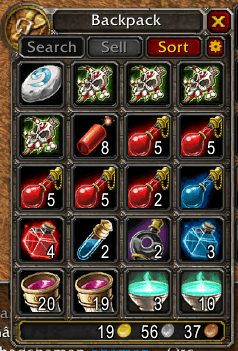
BagTidy puts four small controls on your backpack: Search, Sell, Sort and a cogwheel for the sort order. They do exactly what they say. No libraries, no setup, one Lua file.
Sort merges partial stacks, then sorts every bag in a few quick passes. It plans the whole layout up front and fires every non-colliding move at once, so a full sort takes moments instead of shuffling one item at a time. Quivers, ammo pouches, soul bags and herb bags are filled with what belongs in them first; the backpack and ordinary bags fill from the top-left down.
Sell vendors every gray item and prints what it sold and for how much. The button is disabled unless a vendor window is open, so a stray click can never do anything.
Search filters every open bag as you type, by name, class, or subclass, dimming what doesn't match.
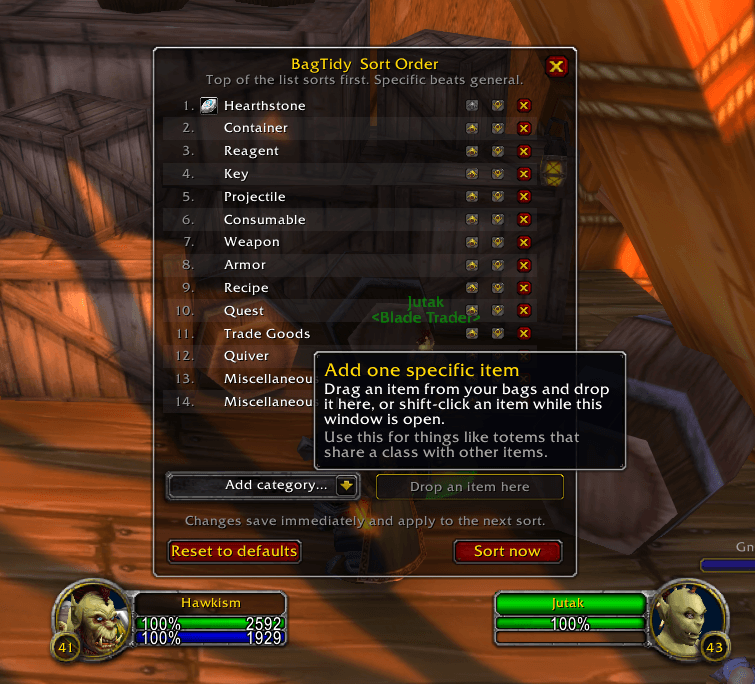
Your own sort order. The cogwheel next to Sort (or /bt config) opens a simple list. Move rows up or down, remove them, add a whole item class (Armor), a class and subclass (Consumable > Potion), or one specific item by dragging it onto the menu or shift-clicking it in your bags. The most specific row wins, so you can pull potions out of Consumables or pin your totems right under your Hearthstone. Saved account-wide, applied on the next sort.
Defaults are tuned for levelling and Hardcore: Hearthstone in slot 1, then containers, quest items, consumables, weapons, armor, recipes, trade goods, reagents, ammo, keys, miscellaneous, and junk last.
Commands
/bt: sort bags/bt sell: sell gray items to the open vendor/bt config: open the sort order menu/bt reset: restore the default order/bt help: list commands (/bagtidyworks the same as/bt)
Won't run in combat or with a vendor, trade, mail or auction window open; locked items are skipped and retried; a stall detector means it can never loop forever.
Made for Classic Era (Interface 11509). Part of a family of minimal addons alongside XPMeter, MoveSpeed and ImbueCheck.
BagTidy Team