promotional bannermobile promotional banner

Channel Order

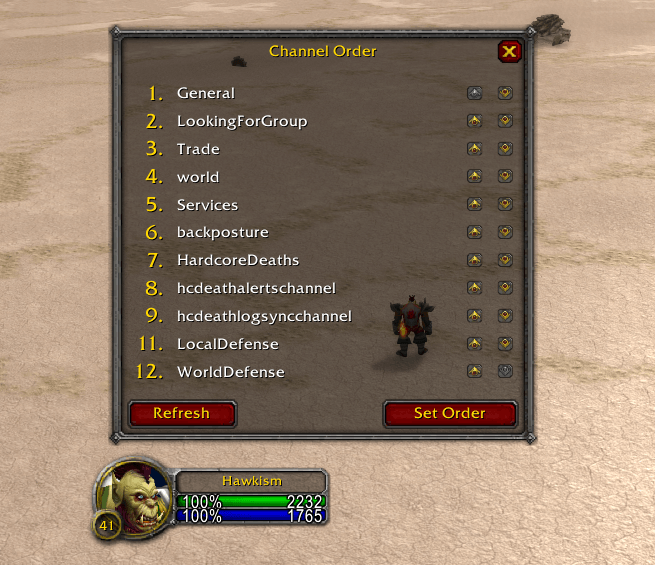
Rearrange your chat channel numbers with a simple up/down list. Move General, Trade, LFG etc. to the slot you want, click Set Order, done.
item image

Description

Channel Order is a tiny, zero-config tool for WoW Classic Era that lets you reorder your chat channel numbers.

Joined General, Trade and LookingForGroup in the "wrong" order? Is /3 Trade on one character and /2 on another? Instead of leaving and rejoining channels until the numbers line up, open Channel Order, move the channel names up and down, and click Set Order.

How it works

  • Type /chanorder (or /channelorder) to open the window
  • The numbers on the left stay fixed; use the up/down arrows to move channel names into the slot you want
  • Click Set Order to apply. The addon uses the game's own channel-swap function, so you never leave a channel
  • Refresh re-reads your channel list; Escape closes the window
  • If your channel list changes while the window is open (zoning changes the General channel, joining or leaving a channel) the addon notices and asks you to arrange again rather than applying a stale order

Features

  • Draggable window in the standard Blizzard dialog style
  • No libraries, no options panel, no saved variables, one Lua file
  • Works on any character, any number of channels

Commands

  • /chanorder or /channelorder — open/close the window

Made for Classic Era (Interface 11509). Part of a family of minimal addons alongside XPMeter, MoveSpeed and ImbueCheck.

The Channel Order Team

profile avatar
Owner
  • 6
    Projects
  • 34
    Downloads

More from hawk1shView all

  • BagTidy project image

    BagTidy

    Sort bags, sell junk, search your inventory. Fast batched bag sorting for Classic Era with your own sort order (/bt config) — Sell and Sort buttons and a Search field right on the backpack.

    • 5
    • September 5, 2026
  • ImbueCheck project image

    ImbueCheck

    Shaman reminder: a small clickable box when your weapon has no imbue (Rockbiter, Flametongue, Frostbrand, Windfury) or it is about to run out.

    • 4
    • September 5, 2026
  • ChatKeeper project image

    ChatKeeper

    Double-click any chat window to select and copy its text, and keep your chat history across /reload and relogs. No buttons, no setup.

    • 3
    • September 5, 2026
  • ThreatPips project image

    ThreatPips

    Your threat on every enemy at a glance: 1–5 DPS role icons under the nameplate health bar, going orange as you catch the tank and red when the mob turns on you.

    • 3
    • September 5, 2026
  • BagTidy project image

    BagTidy

    Sort bags, sell junk, search your inventory. Fast batched bag sorting for Classic Era with your own sort order (/bt config) — Sell and Sort buttons and a Search field right on the backpack.

    • 5
    • September 5, 2026
  • ImbueCheck project image

    ImbueCheck

    Shaman reminder: a small clickable box when your weapon has no imbue (Rockbiter, Flametongue, Frostbrand, Windfury) or it is about to run out.

    • 4
    • September 5, 2026
  • ChatKeeper project image

    ChatKeeper

    Double-click any chat window to select and copy its text, and keep your chat history across /reload and relogs. No buttons, no setup.

    • 3
    • September 5, 2026
  • ThreatPips project image

    ThreatPips

    Your threat on every enemy at a glance: 1–5 DPS role icons under the nameplate health bar, going orange as you catch the tank and red when the mob turns on you.

    • 3
    • September 5, 2026