ChatKeeper
- By
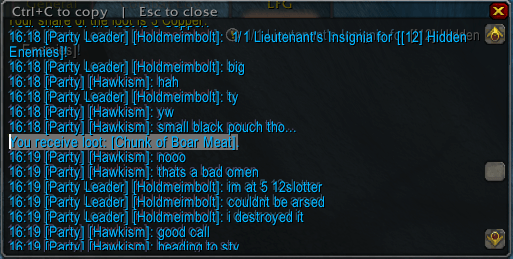
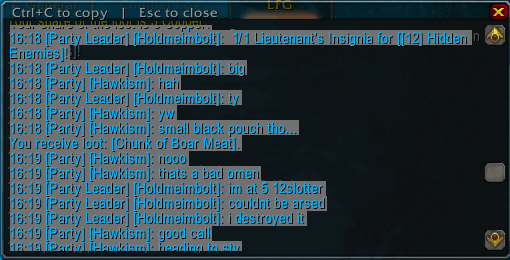
Double-click any chat window to select and copy its text, and keep your chat history across /reload and relogs. No buttons, no setup.
Screenshot 2026-09-05 162634.png
Screenshot 2026-09-05 162557.png
Description
ChatKeeper fixes two things the Classic Era chat window can't do on its own: copying text out of it, and remembering what was said after a reload.
Copy chat, almost natively
Double-click anywhere on a chat window. It turns into a selectable copy of itself, in the same place, with the same font, and with everything already highlighted. Press Ctrl+C to grab it all, or drag to select just the part you want. Esc closes it (so does pressing Enter to start typing). Colour codes, icons and link junk are stripped so what lands in your clipboard is clean text.
No button on your chat frame, no slash command to remember. There is also an optional key binding under Key Bindings → AddOns if you prefer a hotkey.
Remember chat
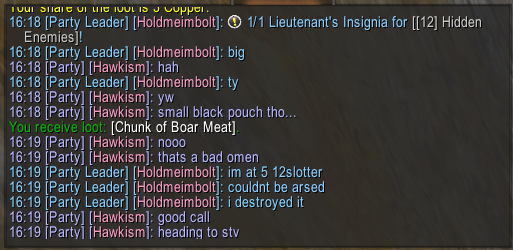
Each chat window keeps its last 300 lines across /reload and relogs. They come back under a grey --- previous session --- divider, so you can still read what your group said while you were fixing your UI. Saved per character. Item and player links in restored lines still work.
Features
- Double-click to copy from any chat window, including extra tabs you've created
- Selection box matches the chat window's font and position
- Clean text output (no
|cffcolour codes or texture tags) - Chat history restored per window after reload or relog, 300 lines by default (0–2000)
- Combat log is left alone
- No libraries, no options panel, one Lua file
Commands (optional)
/ck lines <n>— lines saved per window (0 disables history)/ck clear— forget the saved history/ck copy [n]— open the copy box for chat window n
Works with the default Blizzard chat frames. If you use ElvUI's chat module, it already has its own chat history and copy button, so you won't need this.
Made for Classic Era (Interface 11509). Part of a family of minimal addons alongside XPMeter, MoveSpeed and ImbueCheck.
ChatKeeper Team