TBC Quest Rep Tracker
- By
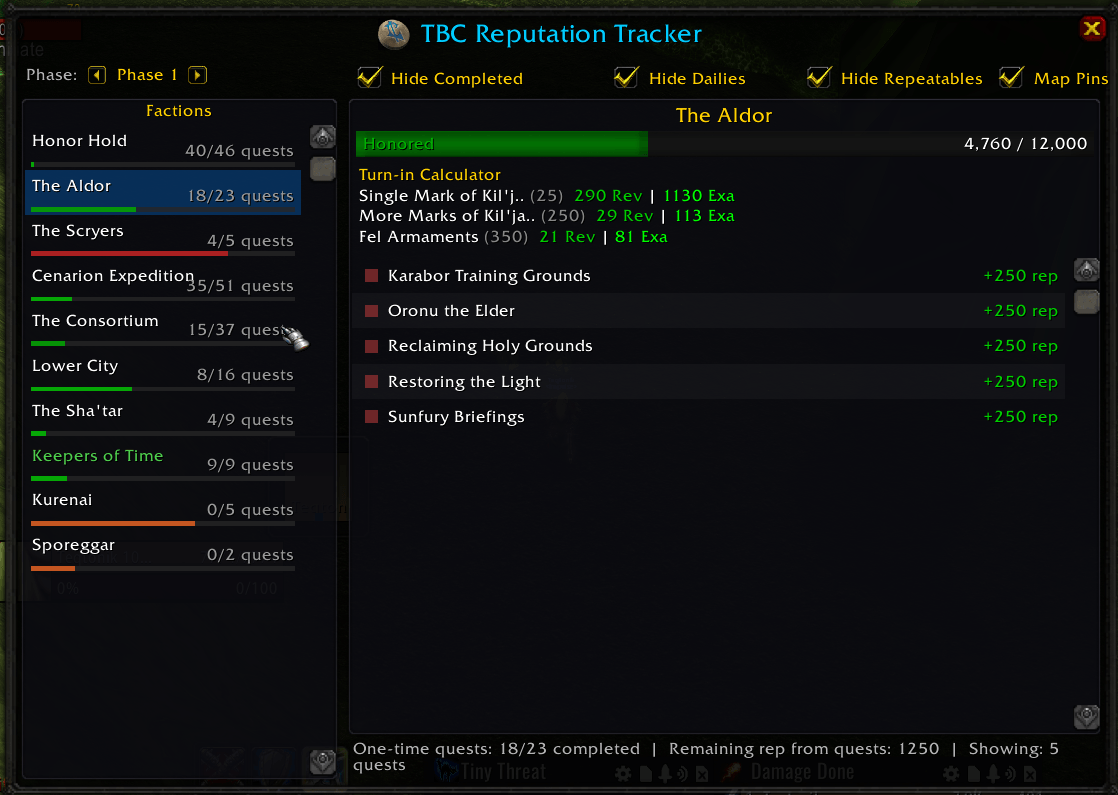
Tracks all quests that grant TBC faction reputation using Questie's database. Browse quests by faction, see completion progress, and spot rep quests on the world map with green indicators on Questie pins.
Discord_hl2bA179og.png
Description
TBC Reputation Tracker
Track every quest that awards Burning Crusade faction reputation — right inside your game. Built as a Questie extension, TBC Reputation Tracker pulls quest data directly from Questie's database so it's always accurate and up to date.
Features
- All 17 TBC factions — Honor Hold, Cenarion Expedition, Netherwing, Sha'tari Skyguard, and more
- Faction-specific quest lists — See every quest that awards rep for a faction, with rep amounts shown
- Smart filtering — Hide completed quests, dailies, or repeatables with one click
- Completion tracking — Quest completion counts per faction with color-coded progress bars on every faction button
- Live reputation bars — Each faction in the sidebar shows a colored progress bar for your current standing tier, and selecting a faction displays a prominent rep bar with your exact progress
- Turn-in calculator — Automatically calculates how many repeatable turn-ins you need to reach Honored, Revered, and Exalted for factions like Aldor, Scryers, Cenarion Expedition, and Sporeggar
- Phase selector — Filter factions by content phase (Phase 1 through Phase 5)
- Questie map pin integration — Green glow indicators appear on Questie's quest giver icons for quests that award tracked rep, with rep details shown in the tooltip on hover
- Click-to-map — Click any quest in the tracker to instantly open your world map and highlight the exact quest giver location with a pulsing green indicator
- Map toggle button — Quickly show/hide rep indicators on the world map
- Minimap button — One-click access to the tracker window
- Lightweight — No bundled quest data; everything is queried from Questie at runtime
Slash Commands
/reptrackor/trt— Toggle the tracker window/reptrack reset— Reset saved settings/reptrack pins— Force-refresh map pin overlays/reptrack debug— Toggle diagnostic output
Requirements
- Questie (required dependency) — TBC Reputation Tracker uses Questie's quest database and will not load without it
Installation
Install via CurseForge or manually place the TBCReputationTracker folder into your Interface\AddOns directory. Make sure Questie is also installed.
The TBC Quest Rep Tracker Team