Proccy
- By
Tracks and displays proc buffs from trinkets, enchants, meta gems, and more. Shows icons with cooldown timers and plays sound alerts so you never miss a proc.
Screenshot 2026-03-09 072619.png
Screenshot 2026-03-09 175320.png
Description
Proccy
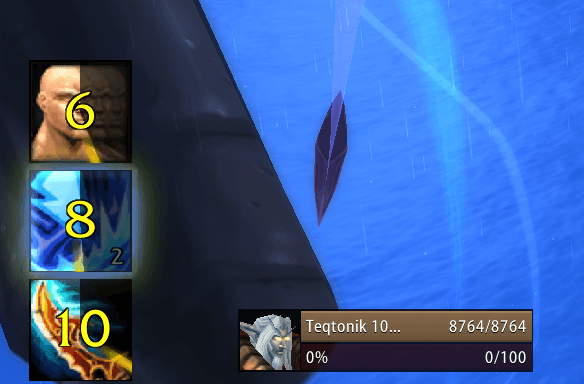
Proccy monitors your combat log for proc buffs and displays them as icon frames with cooldown sweep timers. Each proc can play a sound alert so you can react instantly, even when you're not watching your buffs.
Built for WoW Classic - The Burning Crusade Anniversary Edition.
Features
Proc Tracking
- 50+ built-in procs covering trinkets, enchants, meta gems, weapon procs, and set bonuses
- Cooldown sweep overlay shows remaining buff duration at a glance
- Duration text countdown on each icon
- Stacking proc support (Mongoose, Crusader, DMC: Crusade, etc.) with stack count display
- Glowing border on stacking buffs with color progression based on stack count
- Automatically detects buff applications, stack changes, and removals via the combat log
Sound Alerts
- Per-proc sound assignment from 10 built-in game sounds
- Separate stack sound option for stackable procs (plays when gaining 2+ stacks)
- Custom sound file support - drop your own
.oggfiles into the sounds folder - Sound file auto-detection via the included scan script (no manual path typing needed)
- "Set All Sounds" button to mass-assign a sound to every proc at once
- Any proc can be set to silent individually
Configuration UI
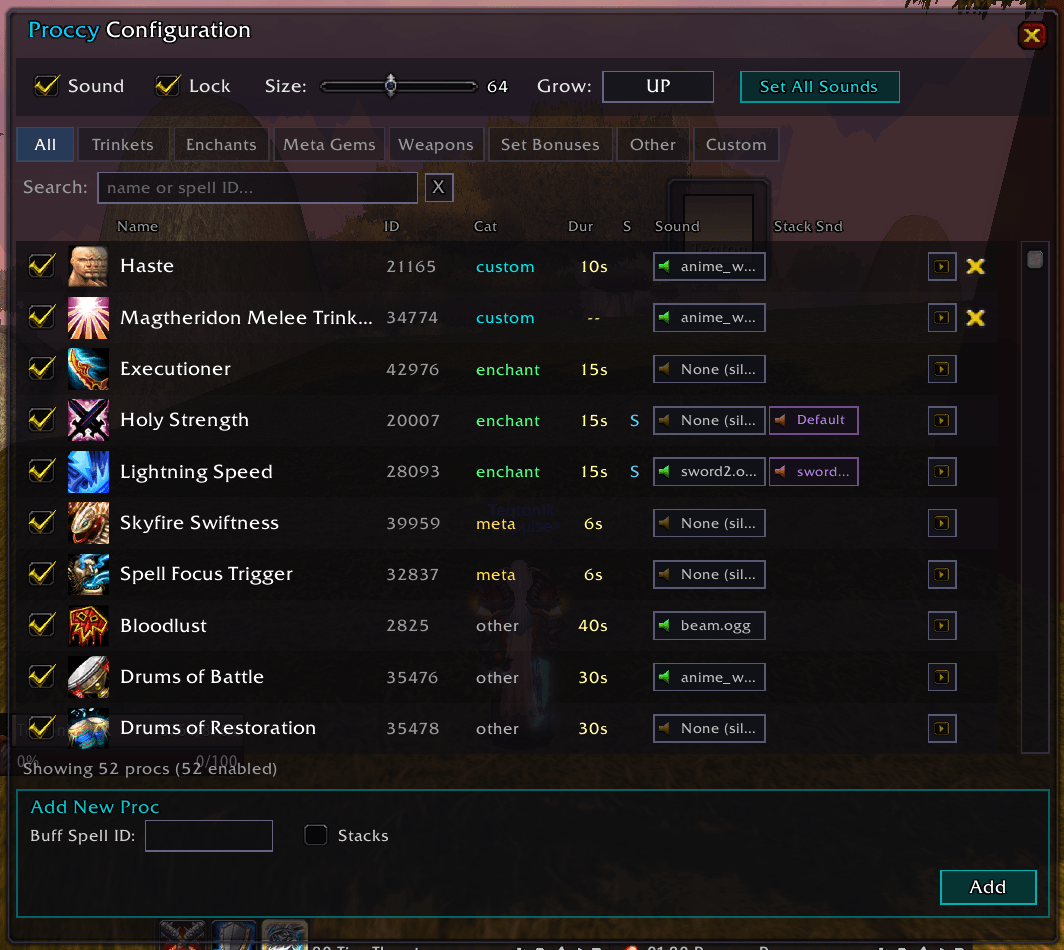
Open with /proccy or /proccy config.
- Search bar - find procs instantly by name or spell ID
- Category filter tabs - browse by Trinkets, Enchants, Meta Gems, Weapons, Set Bonuses, or Custom
- Per-proc controls - enable/disable, assign sounds, test button to preview sound and icon
- Icon size slider - resize proc icons from 16 to 128px (applies immediately)
- Growth direction - choose which way icons expand: right, left, up, or down
- Draggable anchor - position the proc display anywhere on screen, then lock it in place
- Add custom procs - track any buff by entering its spell ID
Slash Commands
| Command | Description |
|---|---|
/proccy |
Open the configuration UI |
/proccy lock |
Lock the icon anchor in place |
/proccy unlock |
Unlock the anchor for repositioning |
/proccy size <16-128> |
Set icon size |
/proccy sound <on|off> |
Toggle sound alerts |
/proccy grow <direction> |
Set growth direction (right/left/up/down) |
/proccy test <spellID> |
Test a proc display |
/proccy reset |
Reset anchor position to center |
Examples of Tracked Procs
Trinkets: Dragonspine Trophy, Quagmirran's Eye, Darkmoon Card: Crusade, Hourglass of the Unraveller, Tsunami Talisman, Madness of the Betrayer, and more
Enchants: Mongoose, Executioner, Battlemaster, Spellsurge
Weapon Procs: Crusader, Fiery Weapon, Lifestealing
Meta Gems: Mystical Skyfire Diamond, Thundering Skyfire Diamond
Set Bonuses: Various tier set procs
Missing a proc? Add it yourself through the config UI with just the spell ID.
The Proccy Team