Raidify | Raid Roster, Signups & Attendance for Classic, TBC & MoP
- By
Invite and organize a 40-player raid in under two minutes. Import your roster and groups, auto-invite from Discord signups, assign roles, and track attendance — for Classic Era, TBC Anniversary, MoP, and soon Future.
Screenshot 2026-08-06 165453.png
Screenshot 2026-08-06 135731.png
Screenshot 2026-08-06 165502.png
Screenshot 2026-08-06 165511.png
Description
Invite and organise your raid in under two minutes
Raid night always starts the same way: forty people to invite, groups to sort, assignments to hand out, and someone always missing. Raidify turns that into a few clicks. Plan on the web, sign up in Discord, then run the raid in-game. Full documentation: raidify.app/addon/docs Web app: raidify.app
Works on Classic Era, TBC Anniversary, and MoP Classic. Free to use.
Getting the raid in
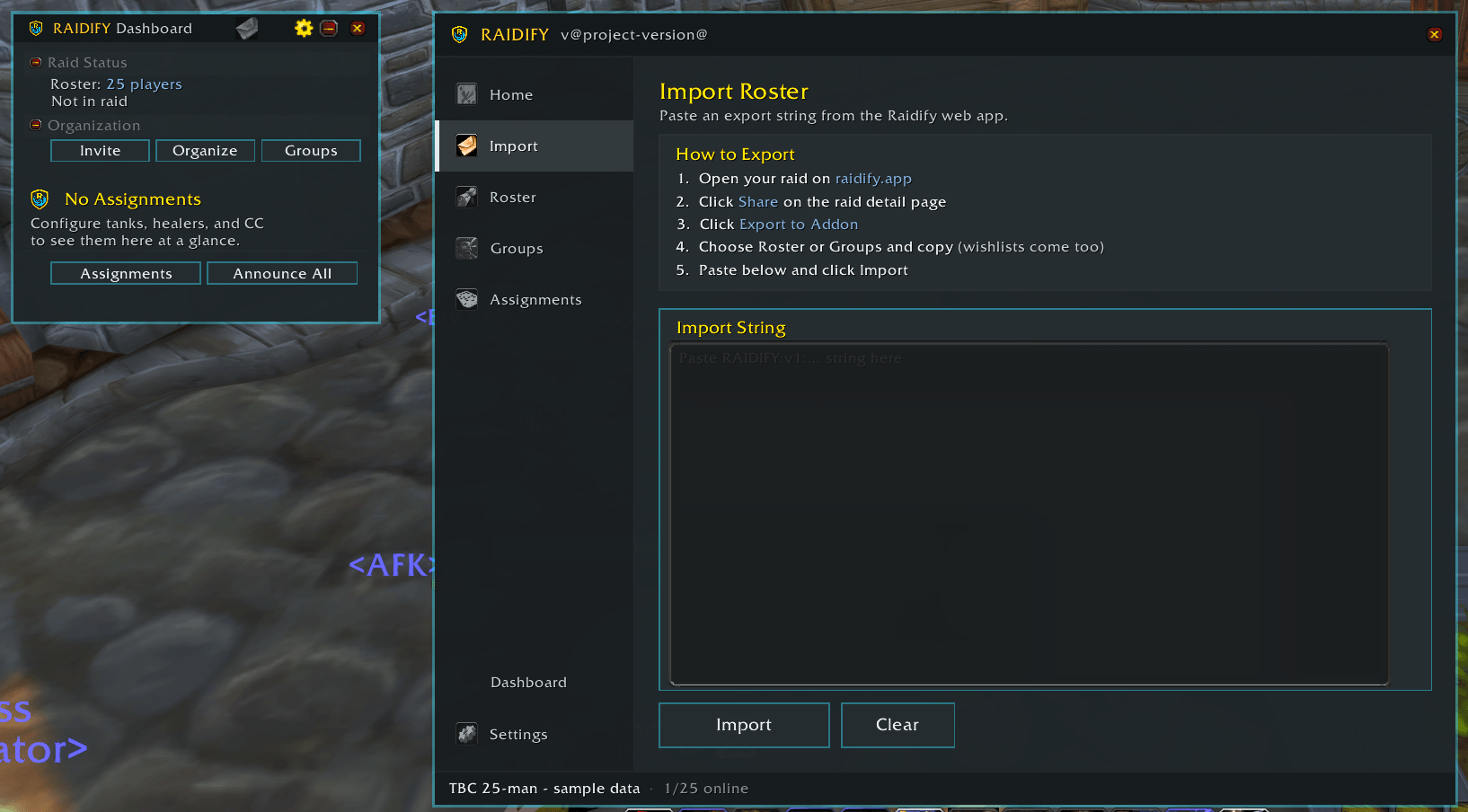
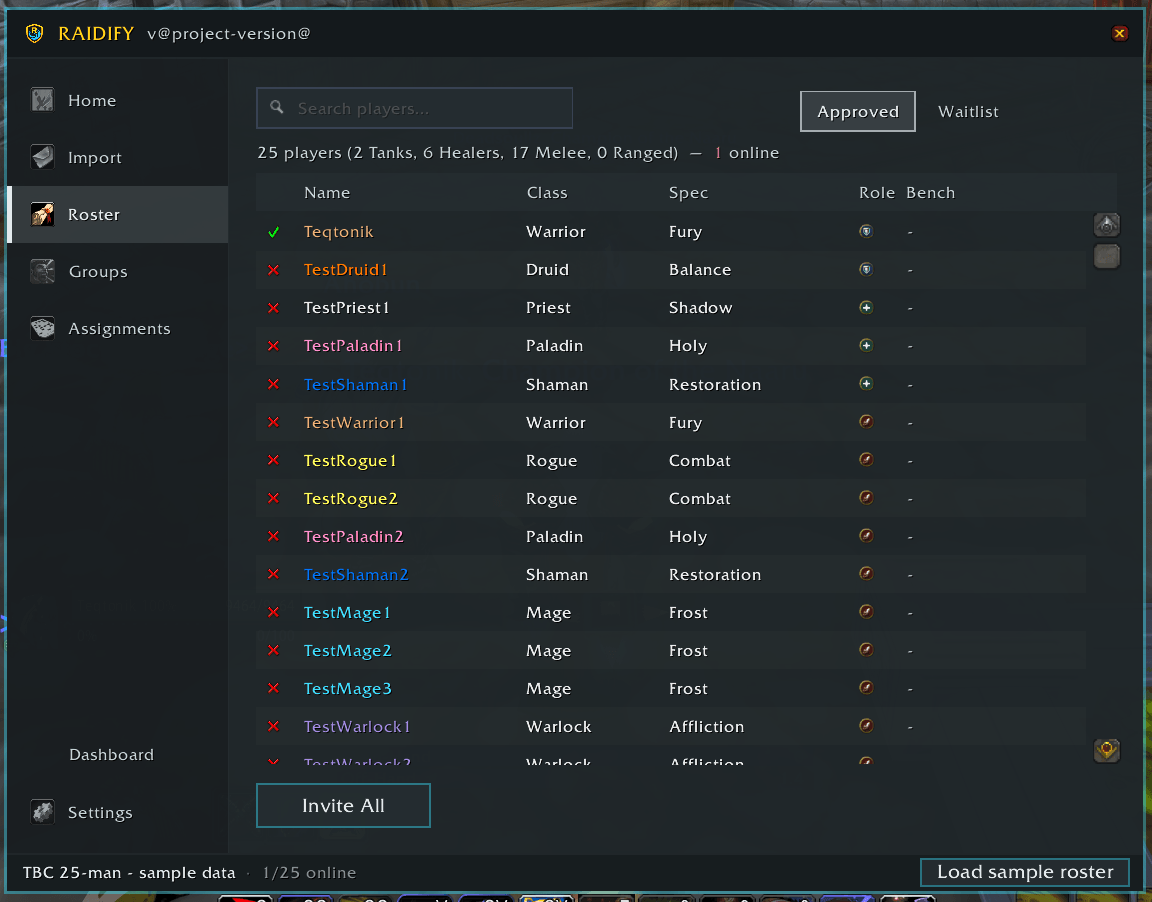
Import roster and groups — Paste one string from the web app and your whole raid,
with its planned group layout, is loaded in-game.
Invite All — One button invites every online player on your roster.
Auto-invite on whisper — Players whisper inv and get invited automatically.
Roster-gated by default, with fuzzy name matching so a small typo between the sign-up
name and the character name still works.
Repeating invites — /rf invite auto keeps sweeping for stragglers so you aren't
re-inviting the same four people every ten minutes.
Auto-organise — Moves everyone into their planned group in one action.
Group editor — Drag players between groups, or click two players to swap them,
then apply the layout to the live raid.
Untracked players — Anyone in the raid who isn't on the roster is detected and
can be added on the spot, so pugs and last-minute swaps don't break your layout.
Assignments
Set assignments in-game or import them, then push them where people will actually read them.
- Warlock — soulstones and curse assignments
- Tanks — tank targets and tank rotations
- Healers — healing assignments per target
- Hunters — pull targets and tranq rotation
- Crowd control — multi-class CC, per target
- Interrupts — player to target, with the specific enemy spell
- Group buffs — Fortitude, Arcane Intellect, Gift of the Wild
Announce to raid chat, raid warning, party, say, or a custom channel — all at
once or one category at a time.
Players whisper for their own —
!raidify(or!rf) whispers a player their personal assignments, so you aren't answering "what am I on?" during a pull. Officer sync — Assignments and notes sync between officers running Raidify. Any
officer can request a full sync or broadcast theirs to the group.
During the raid
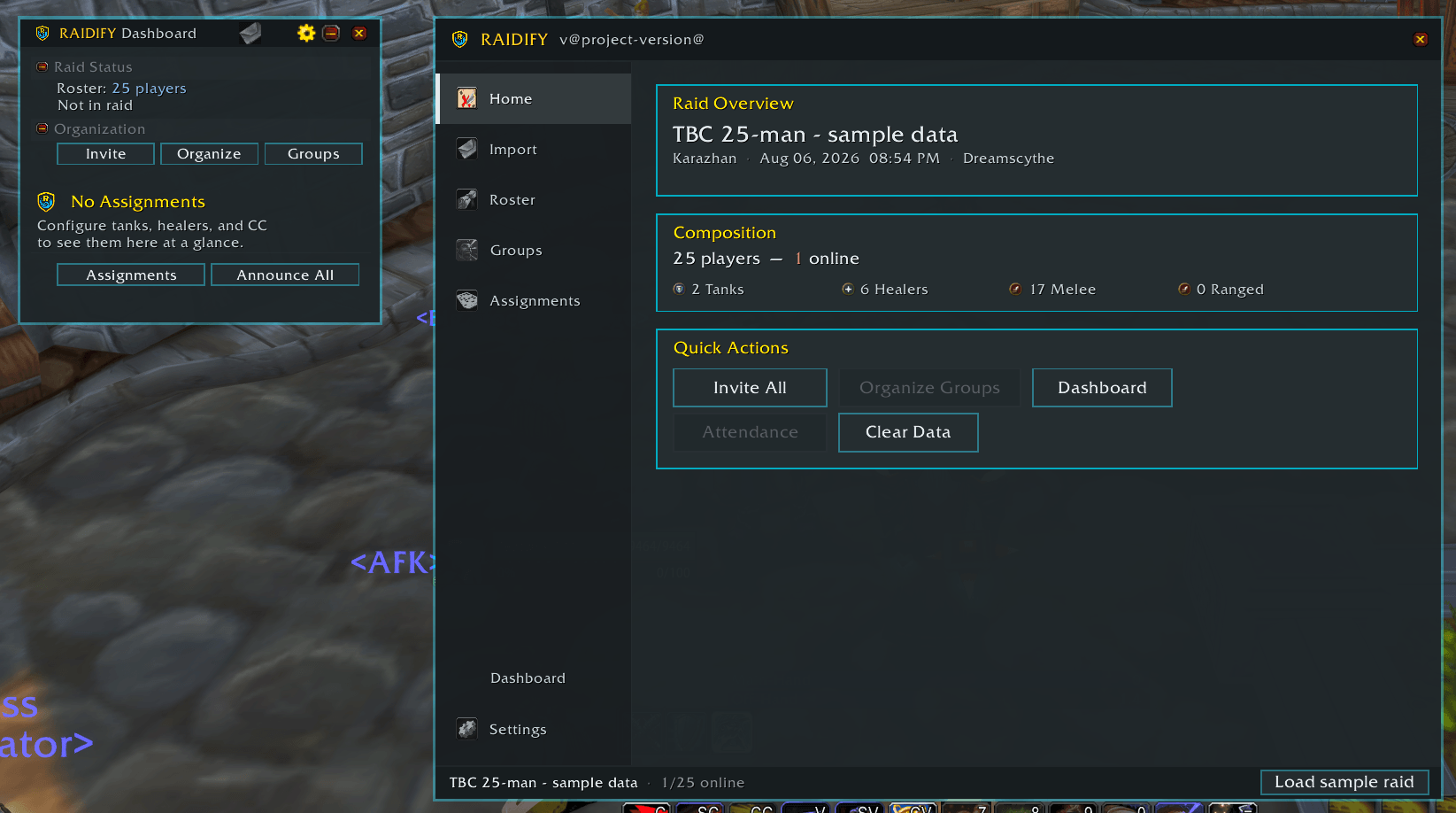
Raid leader dashboard — A compact floating panel showing every assignment at a
glance, with per-section announce buttons. Draggable, position remembered, minimises
when you need the screen.
Notes window — A floating, resizable, MRT-style notes display you can dock for
the whole night. Renders raid target icons, spell links, and class-coloured player
names, with an encounter dropdown to switch between fights. Turn on the personal
filter and each player sees only the lines addressed to them.
Interrupt tracker — Live interrupt cooldowns for your assigned interrupters.
Soulstone tracking — Detects soulstone application and use from the combat log
and shows current status, so you know what's up before the pull.
Command palette — /rfp opens a searchable palette of every Raidify action, in
the style of a code editor. Bindable under Key Bindings > AddOns > Raidify.
Attendance
Tracking is automatic. Once a roster is imported, Raidify records join and leave
times whenever you're in a raid or party. There is no button to remember to press,
and a fresh import starts a clean session for the next night.
Bench credit — /rf bench <name> marks a player you asked to sit. They keep full
attendance credit, which matters when attendance drives loot priority.
Sweep — /rf sweep tells you who sat and who never made it in.
Export — Send the night's attendance back to the web app to keep roster history
and reliability up to date.
Loot
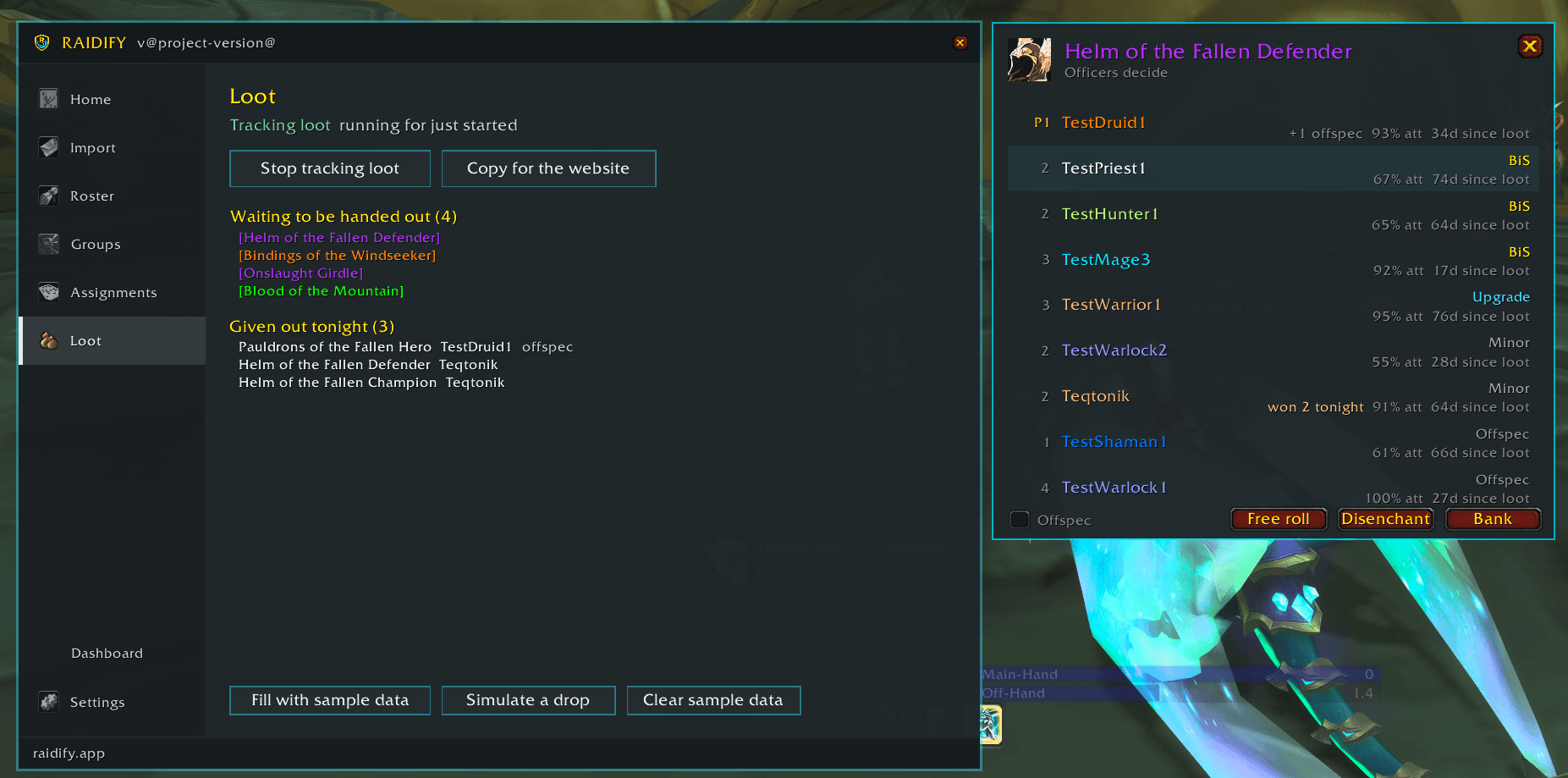
The companion Raidify Loot addon adds loot council sessions: automatic drop detection, candidate cards showing who wants what, and a session record you can send back to the web app.
/rf softres shares your soft-reserve link in raid chat for the raid to fill in.
Try it without a raid
/rf test loads a mock raid so you can set up assignments, lay out the dashboard,
and preview the notes window on your own, before raid night. Inviting, organising and
attendance need a real raid and aren't simulated.
Commands
| Command | What it does |
|---|---|
/raidify or /rf |
Open the main window |
/rfp |
Command palette |
/rf import |
Import roster and groups from the web app |
/rf roster |
Show imported roster status |
/rf groups |
Show and edit the group layout |
/rf invite |
Invite all online roster members |
/rf invite auto |
Keep sweeping for stragglers |
/rf autoinvite |
Toggle auto-invite on whisper |
/rf organize |
Organise the raid into imported groups |
/rf assignments |
Open the assignments window |
/rf note |
Toggle the floating notes window |
/rf dashboard |
Toggle the raid leader dashboard |
/rf interrupts |
Toggle the interrupt tracker |
/rf announce |
Announce assignments |
/rf sync |
Request an assignment sync |
/rf attendance |
Export attendance |
/rf bench <name> |
Mark a player as benched (keeps full credit) |
/rf unbench <name> |
Remove a bench mark |
/rf sweep |
Report who sat and who never got in |
/rf softres |
Share the soft-reserve link in raid chat |
/rf loot |
Loot council (requires Raidify Loot) |
/rf test |
Toggle test mode |
/rf status |
Show current import status |
/rf options |
Settings |
/rf clear |
Clear imported data |
/rf help |
Full command list in-game |
Whisper commands — players can whisper the raid leader !raidify, !rf, or |
|
!assignments to get their own assignments. |
|
| Minimap button — left-click opens the main window, shift+left-click toggles the |
dashboard, drag to reposition.
Roster status icons
The roster view shows invite status, not online status:
- ✅ Invite accepted
- ❓ Invite pending
- ❌ Invite failed — offline, or the character name doesn't match
The Raidify | Raid Roster, Signups & Attendance for Classic, TBC & MoP Team