StyleWeaver
- By
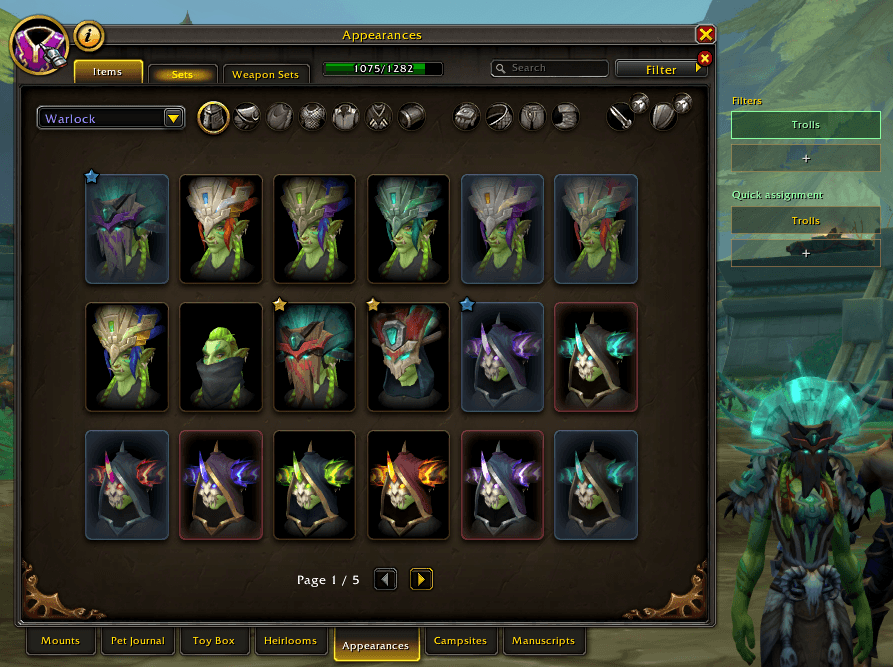
StyleWeaver expands World of Warcraft's Transmog and Wardrobe interfaces with powerful personal filters, quick assignment tools, sorting options, a wishlist, and configurable shortcuts — directly inside Blizzard's existing UI.
2026-09-09 11_58_36-World of Warcraft.png
2026-09-09 11_58_54-World of Warcraft.png
2026-09-09 11_59_03-World of Warcraft.png
Description
StyleWeaver
StyleWeaver expands World of Warcraft's Transmog and Wardrobe interfaces with powerful personal filters, quick assignment tools, priorities, sorting options, and configurable shortcuts — directly inside Blizzard's existing UI.
The new All Classes and armor type browsing options introduced with StyleWeaver 1.1 were inspired by the Transmog changes announced at BlizzCon 2026. Starting with content update 12.2.5, Blizzard has announced that players will be able to transmog gear across armor types without restriction, opening up far more possibilities for creating and browsing appearances across classes and armor categories.
Build your own appearance collections, quickly organize Transmog items, assign priorities, and control exactly which appearances you want to see without replacing Blizzard's native interface.
Cross-Class & Armor Type Browsing
- Use All Classes to browse appearances independently of the currently selected class
- Select one or multiple classes at the same time
- Filter appearances by Cloth, Leather, Mail, Plate, or Cosmetic
- Combine multiple classes and armor types using StyleWeaver's multi-selection system
- Left-click a class or armor type to include it
- Right-click a class or armor type to exclude it
- Excluded selections are highlighted in red, while classes retain their familiar Blizzard class colors
- Cross-class browsing also supports main-hand and off-hand weapon appearances
- Armor type filters do not restrict weapon appearances during normal cross-class browsing
- The optional 12.2.5 Restrictions mode is enabled by default on first use and automatically activates StyleWeaver's All Classes data mode
- With 12.2.5 Restrictions enabled, armor types remain unrestricted while genuine class-specific restrictions and the current class's weapon proficiencies are respected
- Back, Shirt, and Tabard always remain fully visible regardless of StyleWeaver's class, armor type, or 12.2.5 restriction filtering
- The filter button automatically shows the selected filter name or Multiple Filters when several filters are active
Custom Filters
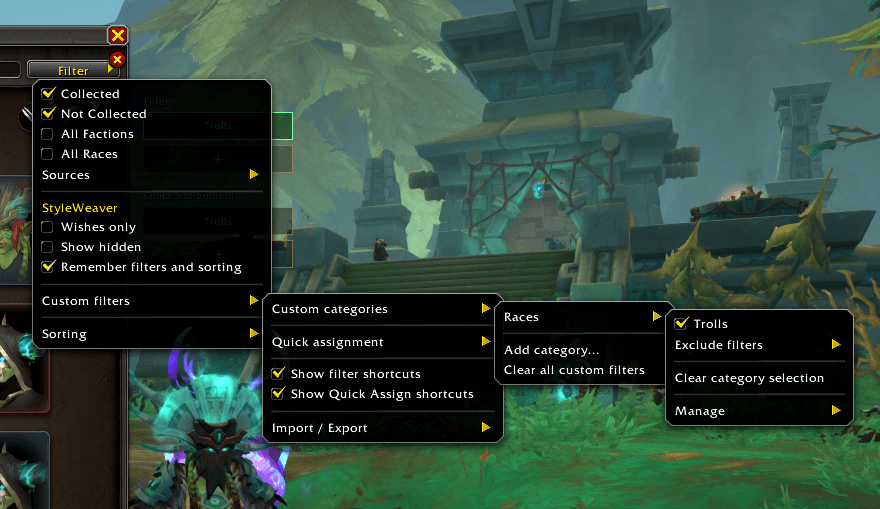
- Create your own categories and filters for Transmog appearances
- Set filters to Active to include appearances or Passive to exclude them
- Combine filters with OR logic within categories and AND logic across categories
- Lock filters so they remain active when filters or categories are cleared
- Move filters between categories without losing assignments, states, locks, or shortcuts
- Filter the current result by an assigned Priority in addition to your custom categories
- Optionally remember active filters and sorting between sessions
Quick Assign & Shortcuts
- Start Quick Assign for any filter and assign appearances simply by clicking their tiles
- Clearly see assigned appearances through green borders and checkmarks
- Right-click appearances during Quick Assign to manage their filter assignments
- Use Priority Quick Assign to rapidly give appearances a priority from 1 to 100
- Clicking an appearance that already has the active Quick Assign priority resets it to the default priority of 100
- Add configurable Filter and Quick Assign shortcut buttons beside Blizzard's appearance interfaces
- Right-click Filter shortcuts to toggle Active or Passive, lock them, change them, or remove them
- Filter shortcuts follow the same Active / Passive / Lock rules as the main filter menu
Wishes, Favorites & Hidden
Manage appearances using dedicated Wishes, Favorites, and Hidden controls with Show, Hide, and Only modes.
You can also apply these states to the entire current filtered result at once.
Uncollected appearances can be added to the built-in wishlist, while unwanted appearances can be hidden locally without modifying Blizzard's collection data.Priorities & Sorting
Assign individual appearances a priority from 1 to 100, with lower numbers displayed first and 100 acting as the default priority.
Priorities can be edited from appearance context menus, assigned rapidly through Priority Quick Assign, or applied to the entire currently displayed result across all result pages from the Sorting menu.A dedicated Priority filter lets you narrow the current appearance result to a specific priority while combining it with your existing custom filters.
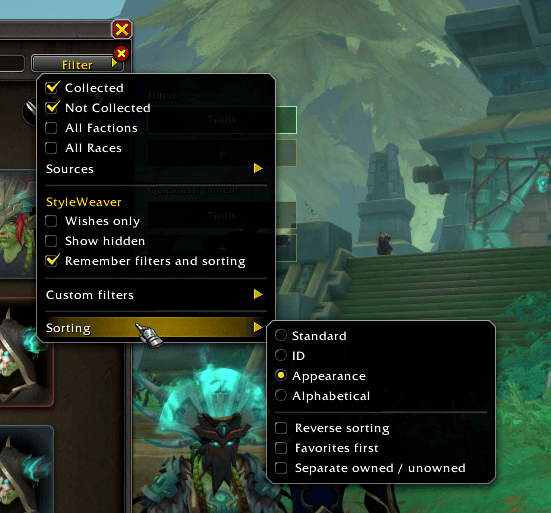
Sort appearances by Standard, Appearance ID, Blizzard appearance order, or Alphabetical, with additional options such as reverse sorting, favorites first, ownership grouping, and priority grouping.
At the Transmogrifier, the hide-slot entry always remains before normal appearance results.Sets
StyleWeaver also extends Blizzard's Sets interface with custom-filter and priority tools.
Assign individual set pieces, the currently displayed set version, all visible versions, or a specific version directly to your StyleWeaver filters.
Categories and filters can also be created directly from set assignment menus, with the selected appearances assigned immediately.Set-piece priorities can be applied to individual appearances or to entire set-version scopes.
Shared appearances keep the same priority wherever they are used.Import & Export
Export and import your custom categories, filters, and appearance assignments, making it easy to back up or transfer your setup.
Performance
StyleWeaver uses session-based caching for cross-class appearance data to reduce repeated processing when switching between filters.
Uncached cross-class views are processed gradually and display a loading progress indicator, helping keep Blizzard's appearance browser responsive even when large numbers of appearances need to be evaluated.
Relevant collection changes automatically invalidate affected cached data so newly collected or changed appearances can be reflected without rebuilding everything unnecessarily.Blizzard UI Integration
StyleWeaver stays fully integrated into Blizzard's existing Transmog and Wardrobe interfaces.
There is no separate main window or minimap button, and Blizzard's native search, filters, usability rules, and interface structure remain intact.
StyleWeaver Team