SSX Queue
- By
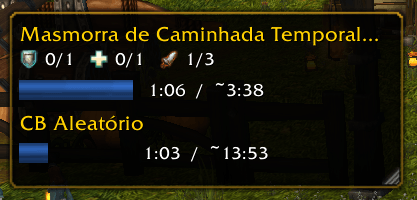
A floating window that tracks every queue — dungeons, raids, battlegrounds, arenas — with a progress bar and a call alert.
screenshot_1.png
Description
SSX Queue
Stop hovering over the eye icon. See your queue at a glance.
By default, the only way to check your queue status is to hover over the queue eye on the minimap. SSX Queue shows a small floating window as soon as you join any queue, with a progress bar comparing your time in queue against the estimated wait — and a clear alert with a countdown when you're finally called.
Supported queues
- Group Finder (PvE): dungeons (normal, heroic, timewalking, holiday events), Raid Finder (LFR) and scenarios.
- PvP: battlegrounds, arena skirmishes, rated arenas, Solo Shuffle, rated battlegrounds and brawls.
- Premade Groups: pending applications and group invites.
- Pet Battle PvP queue.
In more than one queue at once? Each one gets its own line.
While you wait
- Queue name and, for Group Finder queues, the roles already filled (tank / healer / damage), just like the default tooltip.
- Progress bar that fills as time passes, e.g.
2:13 / ~8:00. - If the wait goes over the estimate, the bar turns orange and shows how much longer it's been (e.g.
+1:20 over estimate). - If the game gives no estimate, only your time in queue is shown.
When you're called
- The entry turns green — "Group found!", "PvP ready!" or "Group invite!".
- Shows the dungeon or map name and your role.
- A countdown bar shows how much time you have left to respond.
- You still accept through the default game popup — SSX Queue only informs, it never accepts or declines for you.
The window
- Appears automatically when you join a queue and disappears when the queue ends.
- Compact, with no title bar — just the information you need.
- Drag it anywhere on screen.
- Resize by dragging the bottom-right corner: the whole window scales, text and bars together.
- Position and size are saved between sessions.
Commands
| Command | Description |
|---|---|
/ssx queue test |
Shows a sample queue and call so you can position and resize the window. Run again to turn it off |
/ssx queue reset |
Restores the default position and size |
/ssx info |
Lists the commands of all installed SSX addons |
Requirements
- SSX Core (required) — the shared library used by all SSX addons. The CurseForge app installs it automatically.
Notes
- For Group Finder dungeon/raid calls, the game doesn't expose the remaining time to accept; SSX Queue uses an approximate 40-second countdown. PvP and premade invite countdowns use the exact time from the game.
Part of the SSX addon family
SSX Queue is part of the SSX collection of lightweight quality-of-life addons. All SSX addons share the /ssx command — type /ssx info to see everything that's installed.
SSX Queue Team