SSX Character Panel
- By
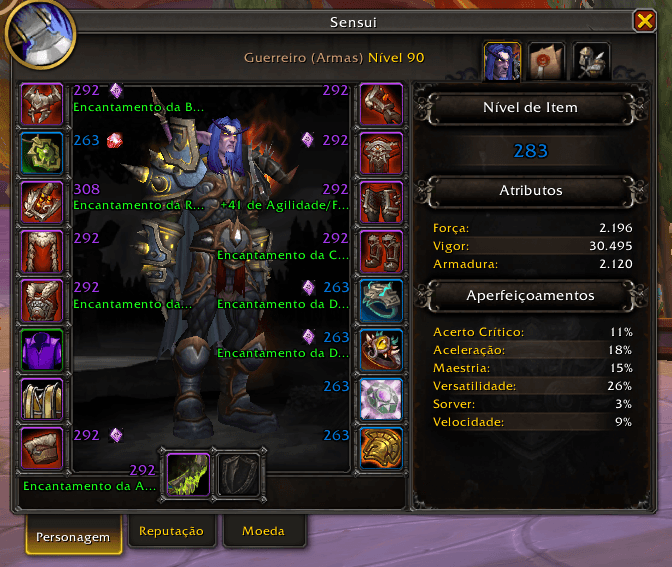
Shows item level, gems and enchants next to every equipped item on the character window.
screenshot_1.png
Description
SSX Character Panel
See your whole gear setup at a glance — no more hovering over every slot.
SSX Character Panel adds the key information about each equipped item right next to its slot on the default character window (C). Spot a missing enchant, an empty socket or a low item level instantly.
Features
- Item level next to every slot, colored by item quality (epic, rare, uncommon…).
- Gems shown as small icons next to the item level, using each gem's own icon.
- Empty sockets clearly marked with the empty-socket icon, so you never forget to gem an item.
- Enchants shown in green below the item level, without the "Enchanted:" prefix. Long names are trimmed to fit.
- Smart layout — info appears beside the left column, beside the right column and around the weapon slots, without covering your character model.
- Live updates — refreshes when you swap gear, enchant or socket an item.
- Works with the default Blizzard character window — no replacement frames.
- Shirt and tabard slots are ignored.
Commands
| Command | Description |
|---|---|
/ssx ilv |
Shows whether the display is on or off |
/ssx ilv on |
Shows item level, gems and enchants |
/ssx ilv off |
Hides the extra information |
/ssx info |
Lists the commands of all installed SSX addons |
Your on/off choice is saved between sessions.
Requirements
- SSX Core (required) — the shared library used by all SSX addons. The CurseForge app installs it automatically.
Compatibility
- Works alongside popular addons such as Pawn.
Part of the SSX addon family
SSX Character Panel is part of the SSX collection of lightweight quality-of-life addons. All SSX addons share the /ssx command — type /ssx info to see everything that's installed.
SSX Character Panel Team