SSX Chat
- By
Copy the text of any chat window with one click — clean, plain text ready for Ctrl+C.
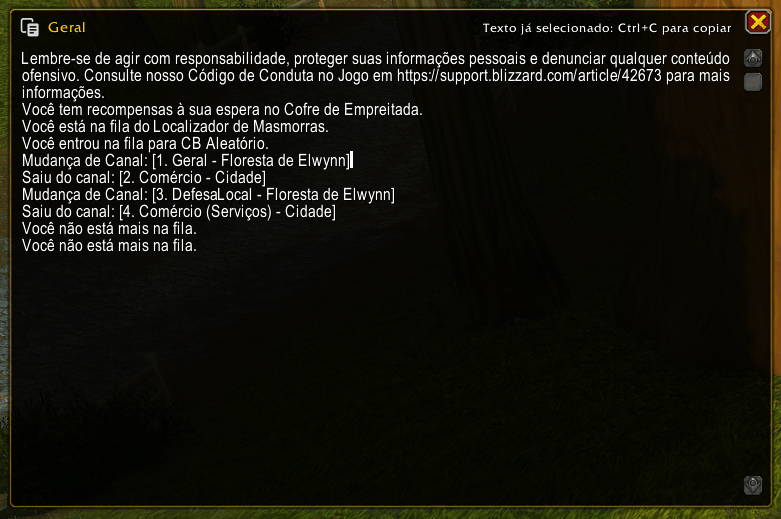
screenshot_1.png
Description
SSX Chat
Copy text from any chat window with a single click.
World of Warcraft doesn't let you select and copy chat messages. SSX Chat fixes that: click the small button on any chat window and a copy window opens with the entire chat history as clean, plain text — already selected, so all you need to do is press Ctrl+C.
Features
- Copy button on every chat window — including the Combat Log and pop-out whisper windows.
- Unobtrusive by design — the button is a small, semi-transparent gray icon that only brightens when you hover over it.
- Clean text — color codes, textures and icons are stripped out. Item, spell and quest links are kept as readable text, e.g.
[Thunderfury, Blessed Blade of the Windseeker]. - Ready to copy — the text opens fully selected and scrolled to the most recent messages.
- Simple copy window — movable, read-only, closes with Esc or the close button.
- Slash commands for keyboard users.
Commands
| Command | Description |
|---|---|
/ssx copy |
Opens the text of the currently selected chat tab |
/ssx copy <n> |
Opens the text of chat window number n (e.g. /ssx copy 2) |
/ssx info |
Lists the commands of all installed SSX addons |
Requirements
- SSX Core (required) — the shared library used by all SSX addons. The CurseForge app installs it automatically.
Known limitations
- Addons cannot write directly to the clipboard, so the final Ctrl+C is up to you.
- Some messages are protected by the game during encounters ("secret values") and cannot be read by any addon; those lines are skipped.
- Battle.net (Real ID) friend names are protected by Blizzard and appear as
?. - Only the messages still stored in the chat window's history can be copied.
Part of the SSX addon family
SSX Chat is part of the SSX collection of lightweight quality-of-life addons. All SSX addons share the /ssx command — type /ssx info to see everything that's installed.
SSX Chat Team