Spoken Storylines
- By
Groups quest chains into full storylines in Azeroth's Compendium with step/final rewards and Spoken Readables links, tracks active quests in a themed popup with waypoints, and plays chains in order through Spoken.
Description
Spoken Storylines is an addon for Spoken that groups quest chains into full storylines inside Azeroth's Compendium, adds a themed quest tracker popup, and plays every quest's dialogue in order instead of one quest at a time.
Quest chains in classic WoW bounce you all over the world (The Legend of Stalvan, The Defias Brotherhood, The Missing Diplomat, The Thandol Span), so it's easy to lose track of where a story left off or whether finishing a chain is worth the detour. With Storylines, you can read or listen to the entire chain from start to finish, see which steps your character can pick up right now, check step and final-chain rewards upfront, and drop waypoints straight to quest givers, objectives, or turn-ins.
What you need: Spoken, Spoken Quests (bundled with Spoken), and whichever Spoken voice packs you want to hear. Works with Questie for quest locations and rewards, WaypointUI or TomTom (recommended on Classic clients without built-in map pins), and Spoken Readables if installed.
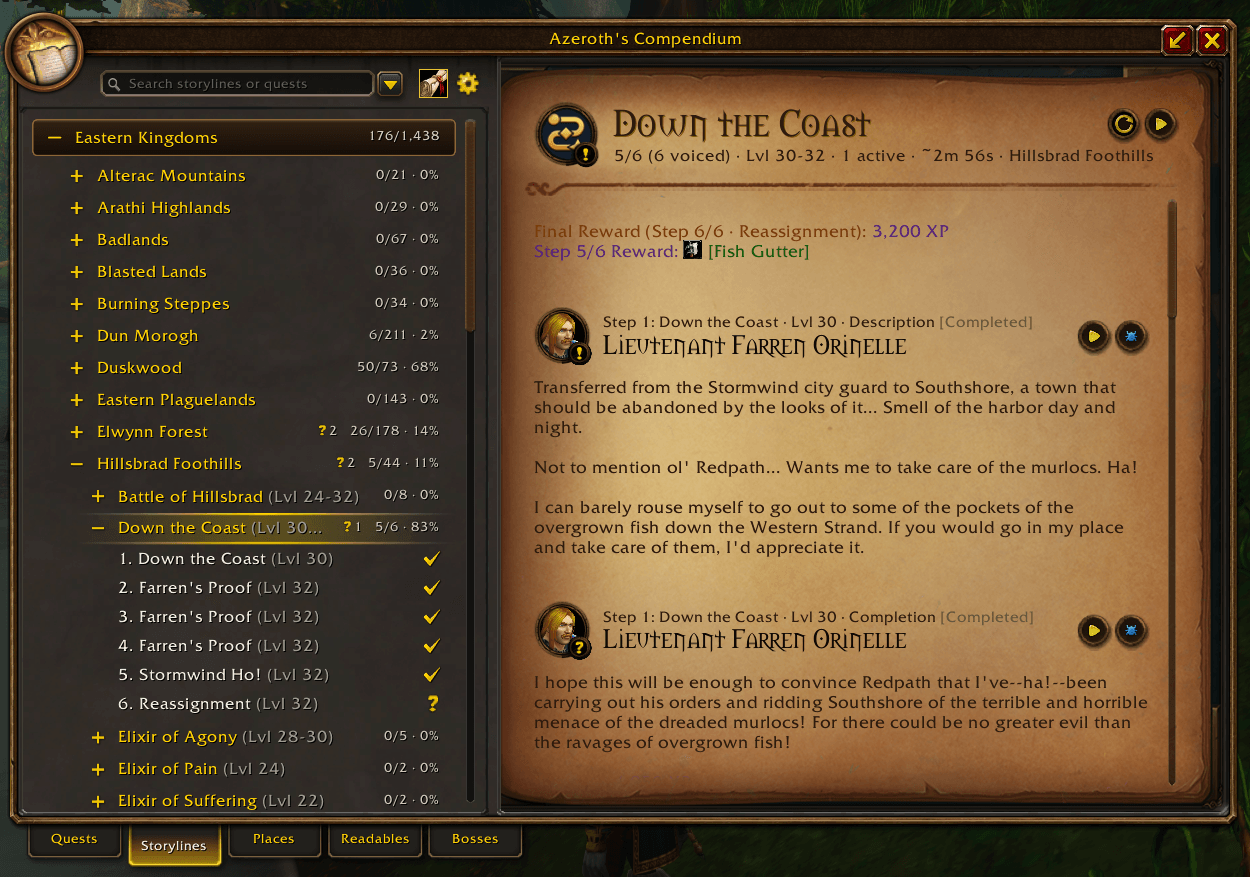
Full Storylines in Azeroth's Compendium
- Organizes 750+ quest chains (3,300 quests) from Spoken Quests' database into complete cross-zone arcs.
- Shows quest levels (
Lvl) everywhere and marks startable quests with[!]/Availableindicators based on your level, race/class, quest log, completed quests, and chain prereqs (using Questie's database when loaded). - Previews per-step rewards and a Final Reward summary (with step count and notable upcoming items) right on the Compendium page—showing items, choices, coin, XP, and faction reputation.
- Links with Spoken Readables (when installed): any quest step tied to a readable item or world book/plaque gets a
[Readable]tag and a Book button that jumps straight to it in the Readables tab. - Puts a map pin button next to any quest you can start so you can drop a Blizzard/WaypointUI pin (or TomTom arrow) directly on the quest giver NPC, object, or drop source.
- Hit Play at the top of a storyline to queue every quest's Offer and Turn-in in order, or use Play Remaining / Skip Completed Quests with estimated audio runtime (
~Xm Ys) upfront. - Automatically opens on your current zone when you run
/sl, and lets you sort by Zone, Nearest Zones, Distance, Active Quests, Quest Level, Length, or Name.
Active Storylines Tracker (Popup Quest Tracker Replacement)
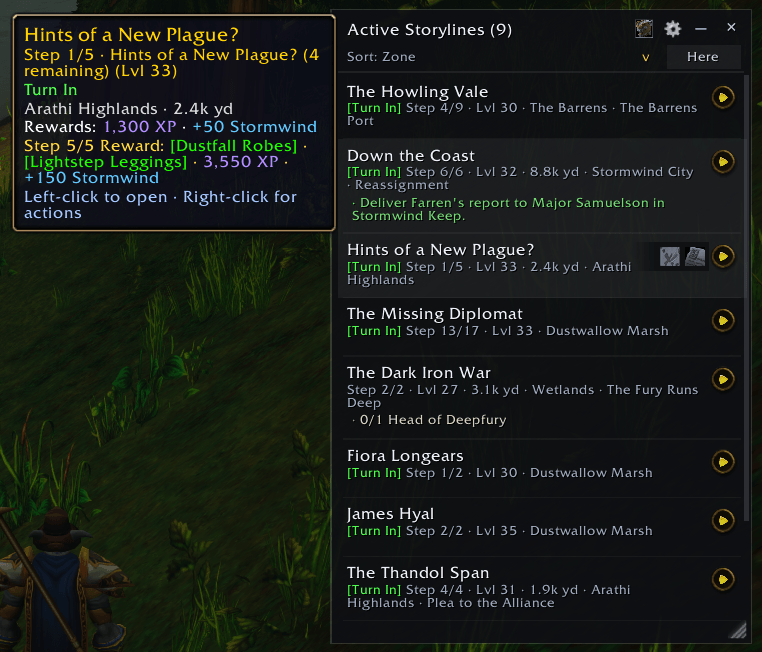
- A movable, resizable popup (
/sps active) with a clean Modern Minimal look by default—crisp1pxborders, a flush right-edge auto-fading scrollbar, and word-wrapped rows that maximize horizontal space. - Displays
[Turn In]tags, quest levels (Lvl), distances, and live quest objectives under each quest. - Hover any row to preview remaining chain steps, current step rewards, and final/notable chain rewards, plus quick Open in Quest Log and Track & Set Waypoint buttons with a solid fade-edged backing so underlying text never bleeds through.
- Right-click any row for quick playback, tracking, Quest Log, and Compendium shortcuts.
- Sort by Zone, Nearest, Turn-In Ready, Progress, Name, or Longest, filter to your current zone with Here, or group rows by zone.
- Want to replace Blizzard's default tracker? Turn on Include Standalone Quests to show non-chain quests from your log too, and Hide Blizzard Quest Tracker to tuck the default frame away.
UI Themes, Quick Settings, Storyline Banner & Gamepad
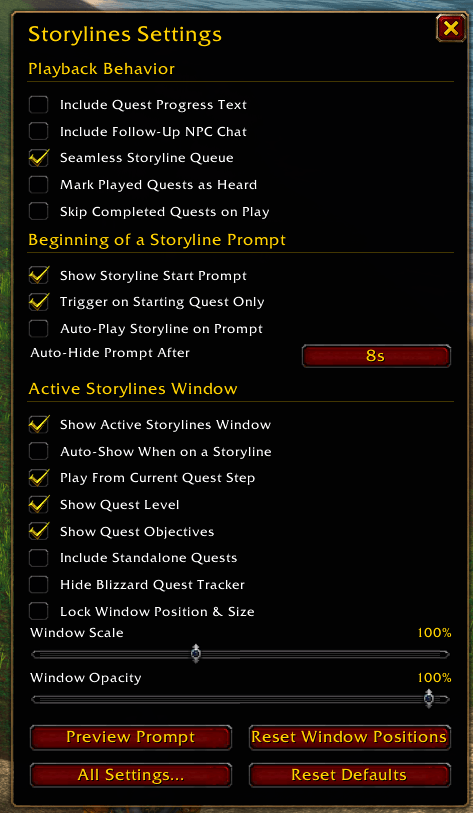
- Switch between 5 built-in UI themes (Modern Minimal default, Midnight Glass, Obsidian Frost, Crimson Ember, and Azeroth Classic) live across Active Storylines, the Start Banner, and Quick Settings (while also supporting EllesmereUI skins if installed).
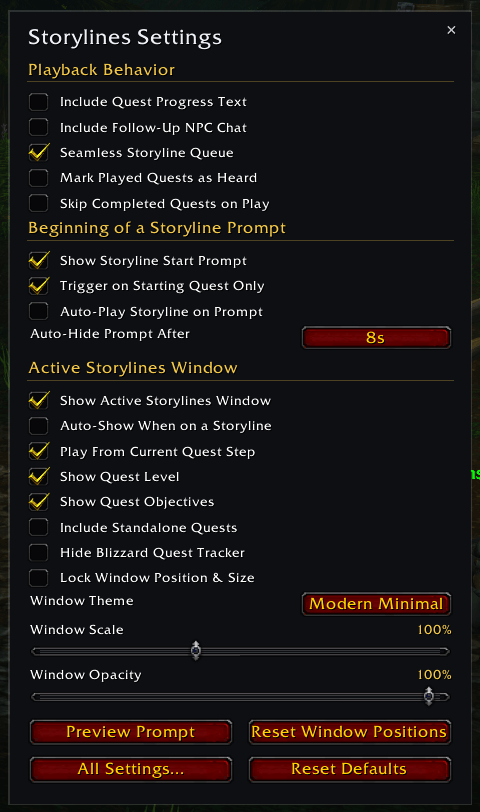
- Click the gear icon on the Compendium or Active Storylines title bar to switch themes, tweak playback options, scale (
75%–140%), window opacity (35%–100%), tracker toggles, reset positions, or reset everything back to defaults. - When you accept the first quest of a storyline, a small draggable banner pops up showing quest count, voiced count, and runtime so you can hit play right away (or turn it off in settings).
- Built with gamepad/controller compatibility in mind: combat-safe Compendium portrait creation, D-pad-navigable Settings/Sort/Row menus and confirmations, clean focus bounds, controller-friendly Quest Log opens, and opt-in
/sps focusso gameplay focus isn't stolen automatically. - Uses event-driven updates instead of constant polling loops, and pauses background work in combat so FPS and CPU stay low.
Commands & Compatibility
/sl,/storylines,/sps- Open the Storylines tab in Azeroth's Compendium/sps active- Toggle the Active Storylines popup window/sps focus- Focus the Active Storylines window with controller D-pad/sps testprompt- Preview and move the start-of-storyline banner/sps stop- Stop storyline playback/sps settings- Open Spoken -> Storylines settings/sps <questID>- Jump directly to a quest's storyline and play it
Tested on WoW Forever. Includes .toc support and API fallbacks for Classic Era (Vanilla) and TBC Anniversary—not yet tested live on those clients, so please report any issues. Does not support Cataclysm / Mists of Pandaria Classic or Retail. Supports both standard Blizzard UI and EllesmereUI, plus Questie, WaypointUI, TomTom, and Spoken Readables. Doesn't modify any Spoken or Spoken_Quests files, so updating Spoken won't overwrite anything.
Spoken Storylines Team