Spectacle
- By
Spectacle is graphics and weather for WoW Forever in one window: presets from Potato to past Ultra, every graphics setting the client has on its own page, the weather as the game draws it, and rain or snow of your own, whenever you like.
download.jpg

preview.webp

download.jpg
download.jpg
download.jpg
Description
Spectacle is graphics and weather for WoW Forever in one window: presets from Potato to past Ultra, every graphics setting the client has on its own page, the weather as the game draws it, and rain or snow of your own, whenever you like.
Made for WoW Forever (1.60.1). Standalone: nothing else to install. /spec opens the window.
Features
Presets, from the game's own rows
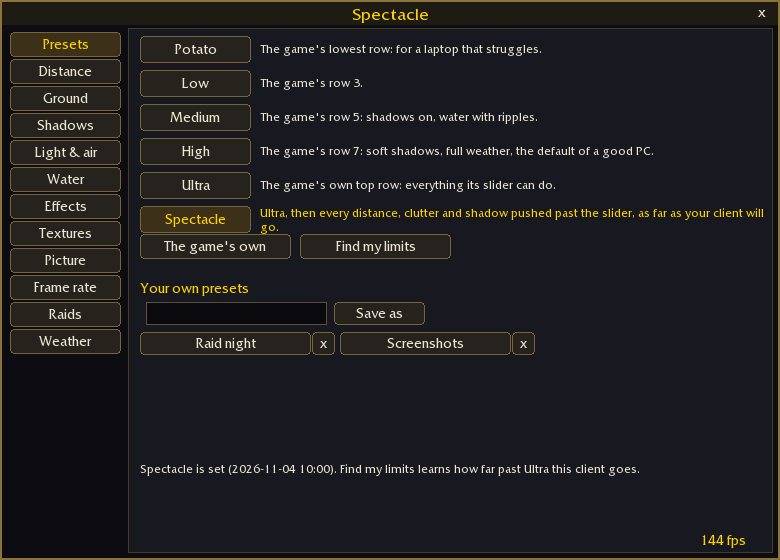
- Potato, Low, Medium, High, Ultra are rows of the game's own Graphics Quality slider, read out of the Forever client itself: 43 settings a row, set along with the panel's own values so the panel reads as the preset, and mirrored into the raid set. Being the game's own rows, they can't ask for anything the game doesn't allow.
- Spectacle is Ultra, then every distance, clutter and shadow pushed past the slider: view distance 15000, horizon 6000, ground clutter 256 to 500 yards, terrain and building detail 1000 and 800, the smallest objects kept, 4K shadow maps, lights to 4096 yards, cloud detail.
- Find my limits asks the client for each value past Ultra, reads back what it kept, and Spectacle then asks for exactly that.
- Your own presets: every setting on the pages, kept under a name, back at login.
- Auto:
/spec auto 60holds a frame rate by stepping the presets down when ten seconds run under the target, and back up when there's room.
Every setting
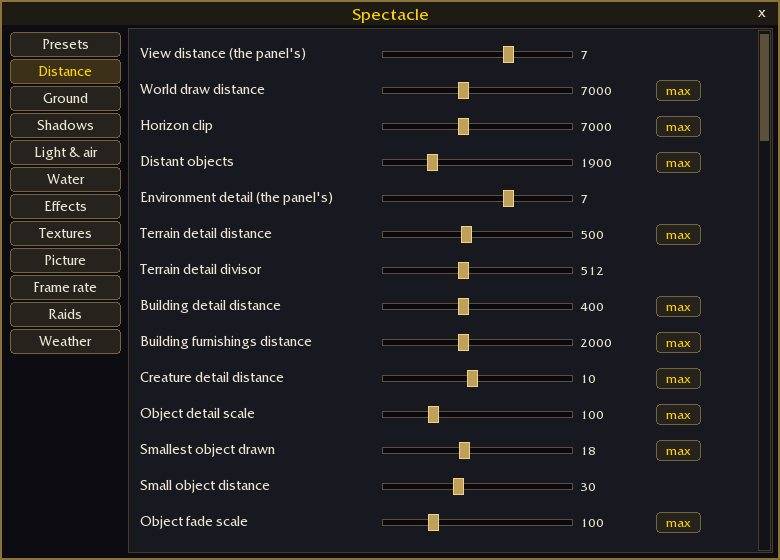
- Pages down the left of the window, Distance to Raids: every graphics setting the client has, one row each. A slider, a choice of named steps, or a switch, read from the client and written back as you move it.
- A max button on the rows that reach past Ultra: it asks the client how far it goes for that one setting and sets that.
- Steps the client says your card can't do are skipped (ray-traced shadows, low-latency modes, the anti-aliasing kinds); multisampling offers what the client lists.
- Raids follow these settings: every setting written into the game's raid set too, so raids look the same. Off, the raid set keeps its own.
- Sharpening without upscaling, and how strong.
/spec cvarslists the client's own graphics CVars and their values, for anything not on a page.
Weather
- The server decides when it rains, snows or blows sand; what the client leaves to you is how heavily it's drawn. Off, light, medium or full, kept over any preset.
- The floating motes (dust, leaves, embers) on or off.
- What the sky is doing where you stand, from the game's own weather report.
Rain and snow of your own
/spec rain, and it rains where you stand, for as long as you like;/spec snowlikewise. Light, medium or heavy.- Drawn from the client's own art: the game's raindrop and snowflake sprites, hundreds of them in three fields that fall across the screen, a wet dim and a drift of the game's own mist under them, and Blizzard's weather ambience loops beneath that, with the odd rumble of thunder (and a flash first) or gust of wind. Nothing of Blizzard's ships with the addon.
- Honestly: it's weather on your screen, not in the world. Under a roof it fades to a wash. When the server sends real rain or snow, Spectacle's stands aside and comes back after.
A button on the minimap
- The client's own spyglass in the game's own ring, on the minimap's rim: click for the window, right-click for the Weather page, drag it round the rim to wherever suits you. Its tooltip says what's set.
/spec button offhides it; the game's addon compartment opens the window too.
Your own settings, kept
- The first time Spectacle changes anything it keeps every setting it touches. The game's own puts them all back.
- Nothing needs a reload. The graphics API needs the renderer restarted: there's a button for that.
Getting started
- Install it, then restart the game fully (a
/reloaddoesn't pick up a new addon). /specopens the window. Pick a preset, or Find my limits first and then Spectacle./spec rainfor the rain;/spec weatherfor what the sky is doing.
Commands
| Command | What it does |
|---|---|
/spec |
The window |
/spec potato · low · medium · high · ultra · spectacle |
A preset |
/spec game |
Your own settings back |
/spec probe |
How far this client goes past Ultra |
/spec save · load · forget <name>, /spec saved |
Your own presets |
/spec auto <fps> · off |
Hold a frame rate |
/spec weather off · light · medium · full · preset |
How heavily the game's weather is drawn |
/spec particulates on · off · preset |
The floating motes |
/spec rain · /spec snow (light · medium · heavy · off) |
Rain or snow of your own |
/spec rain sound on · off · 0-100, thunder, indoors, aside |
The rain's manners |
/spec sharpen on · off · 0-100 |
Sharpening without upscaling |
/spec cvars [text] |
The client's own graphics CVars |
/spec button on · off · reset |
The button on the minimap's rim |
/spec status |
What's set now |
/spec help |
All of the above |
Questions
Will it break my settings? It keeps every setting it changes, the first time, and /spec game puts them all back. The client saves everything to its own Config.wtf as always.
Is Spectacle (the preset) safe? It only asks; the client clamps each value to its own limit and says nothing. Find my limits tells you what it kept. Some systems have had trouble with the top lighting setting: step it down on the Light & air page if the lighting breaks.
Can it make it rain for real? No addon can: the server decides the weather. Spectacle's rain is drawn on your screen, under the UI, from the client's own art and sounds, and it stands aside when the real thing falls.
Does it send anything anywhere? No.
Credits
- Quality rows, art, sounds and fonts © Blizzard Entertainment, read from the game's own files.
Made by Mistius.
Spectacle Team