SlickKeys
- By
SlickKeys is a polished, customizable Mythic+ objective tracker replacement featuring timers, upgrade thresholds, enemy forces, boss progress, death tracking, party ratings, group check, untimed dungeon support, and run history.
![An example of the Appearance [Layout] options page and the Preview HUD.](https://media.forgecdn.net/attachments/1912/600/appearance-layout-new-png.png)
An example of the Appearance [Layout] options page and the Preview HUD.
![An example of the Appearance [Text] options page and the Preview HUD.](https://media.forgecdn.net/attachments/1912/604/appearance-text-new-png.png)
An example of the Appearance [Text] options page and the Preview HUD.
![An example of the Appearance [Colors] options page and the Preview HUD.](https://media.forgecdn.net/attachments/1912/597/appearance-colors-new-png.png)
An example of the Appearance [Colors] options page and the Preview HUD.
![An example of the Appearance [Colors] Bar Style menu and the Preview HUD.](https://media.forgecdn.net/attachments/1912/598/appearance-colors-bar-style-new-png.png)
An example of the Appearance [Colors] Bar Style menu and the Preview HUD.
![An example of the Appearance [Colors] Bar Theme menu and the Preview HUD.](https://media.forgecdn.net/attachments/1912/599/appearance-colors-bar-theme-new-png.png)
An example of the Appearance [Colors] Bar Theme menu and the Preview HUD.
![An example of the Appearance [Animation] options page and the Preview HUD.](https://media.forgecdn.net/attachments/1912/595/appearance-animation-new-png.png)
An example of the Appearance [Animation] options page and the Preview HUD.
![An example of the Appearance [Profiles] options page and the Preview HUD.](https://media.forgecdn.net/attachments/1912/603/appearance-profiles-new-png.png)
An example of the Appearance [Profiles] options page and the Preview HUD.
![An example of the Group Check [General] options page and the Preview HUD.](https://media.forgecdn.net/attachments/1912/607/group-check-general-png.png)
An example of the Group Check [General] options page and the Preview HUD.
![An example of the Chat Output [General] options page and the Preview HUD.](https://media.forgecdn.net/attachments/1912/606/chat-output-general-png.png)
An example of the Chat Output [General] options page and the Preview HUD.
![An example of the Mythic Log [General] options page and the Preview HUD.](https://media.forgecdn.net/attachments/1912/609/mythic-log-general-new-png.png)
An example of the Mythic Log [General] options page and the Preview HUD.
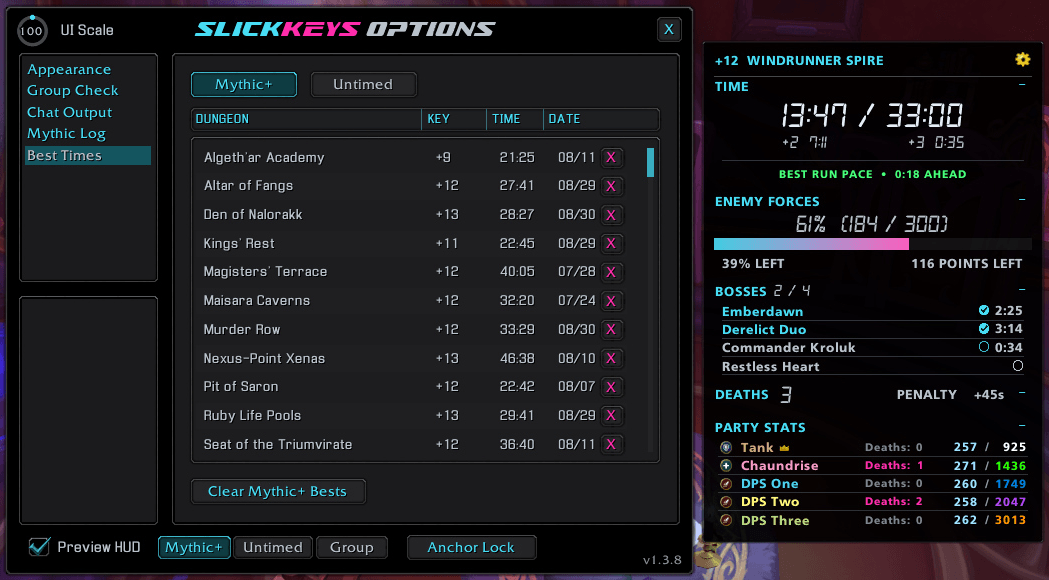
An example of the Best Times options page and the Preview HUD.
![An example of the Appearance [Layout] options page and the Untimed Preview HUD.](https://media.forgecdn.net/attachments/1912/602/appearance-layout-untimed-new-png.png)
An example of the Appearance [Layout] options page and the Untimed Preview HUD.
![An example of the Appearance [Layout] options page and the Recap Preview HUD.](https://media.forgecdn.net/attachments/1912/601/appearance-layout-recap-new-png.png)
An example of the Appearance [Layout] options page and the Recap Preview HUD.
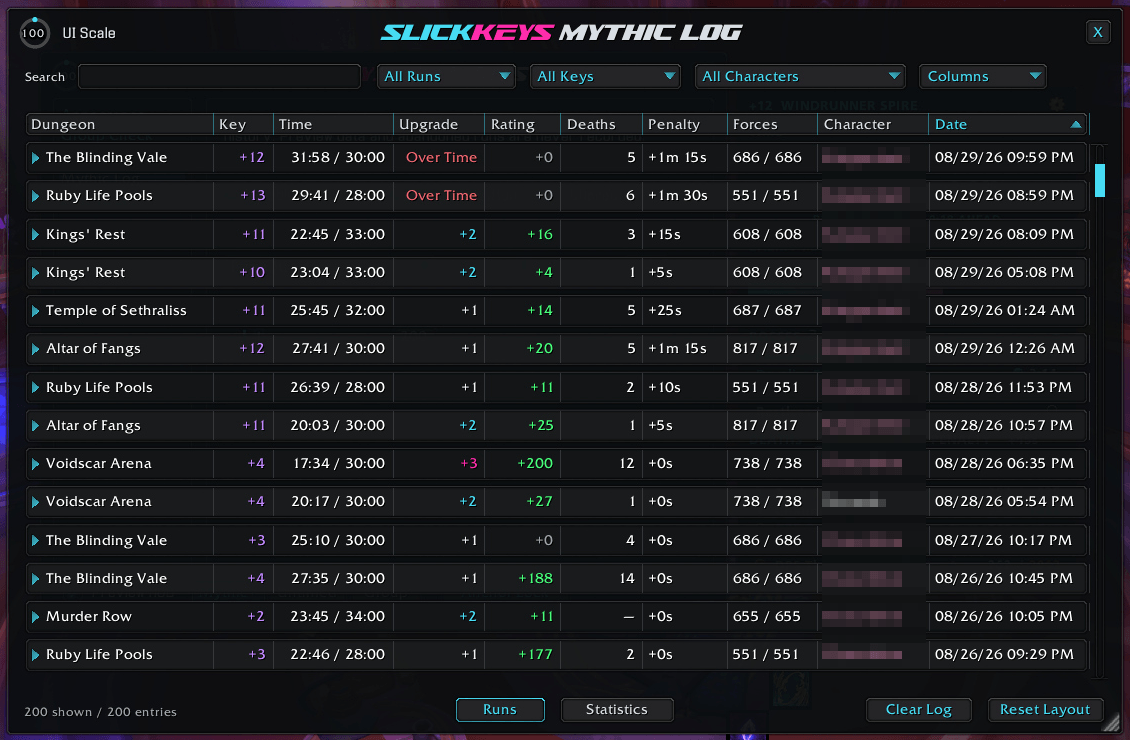
An example of the Mythic+ Log window that tracks all your Mythic+ Key runs.
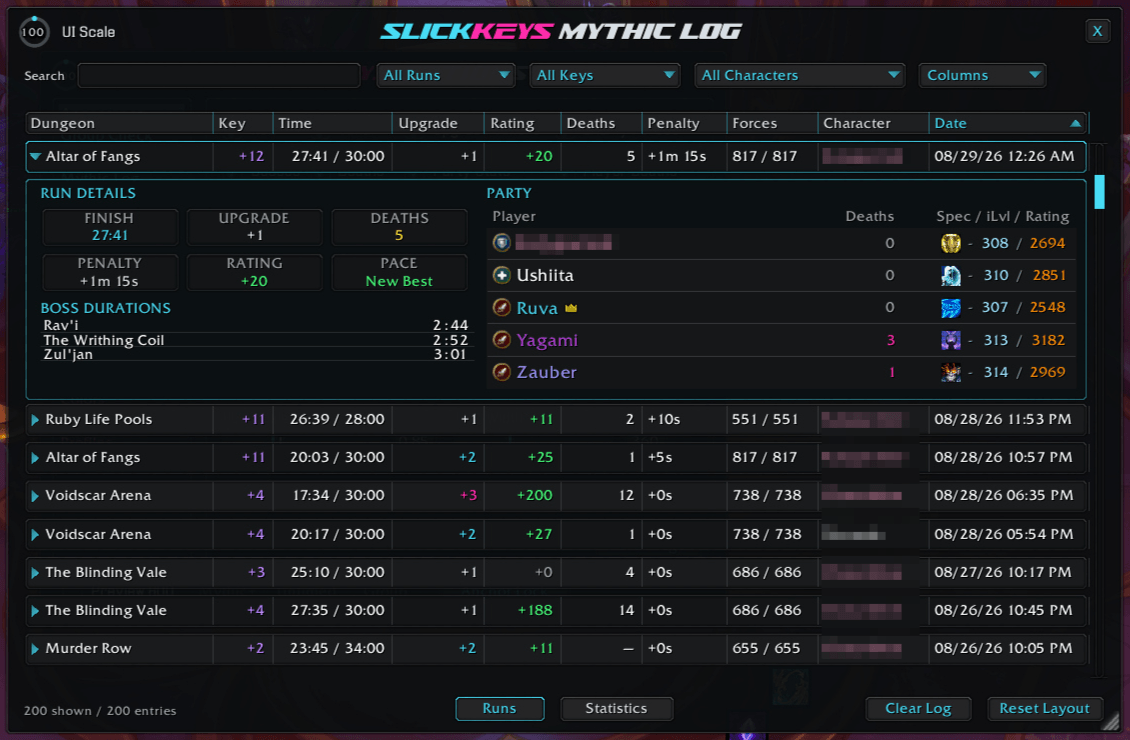
An example of the Mythic+ Run Details Log window that tracks all your Mythic+ Key run details.
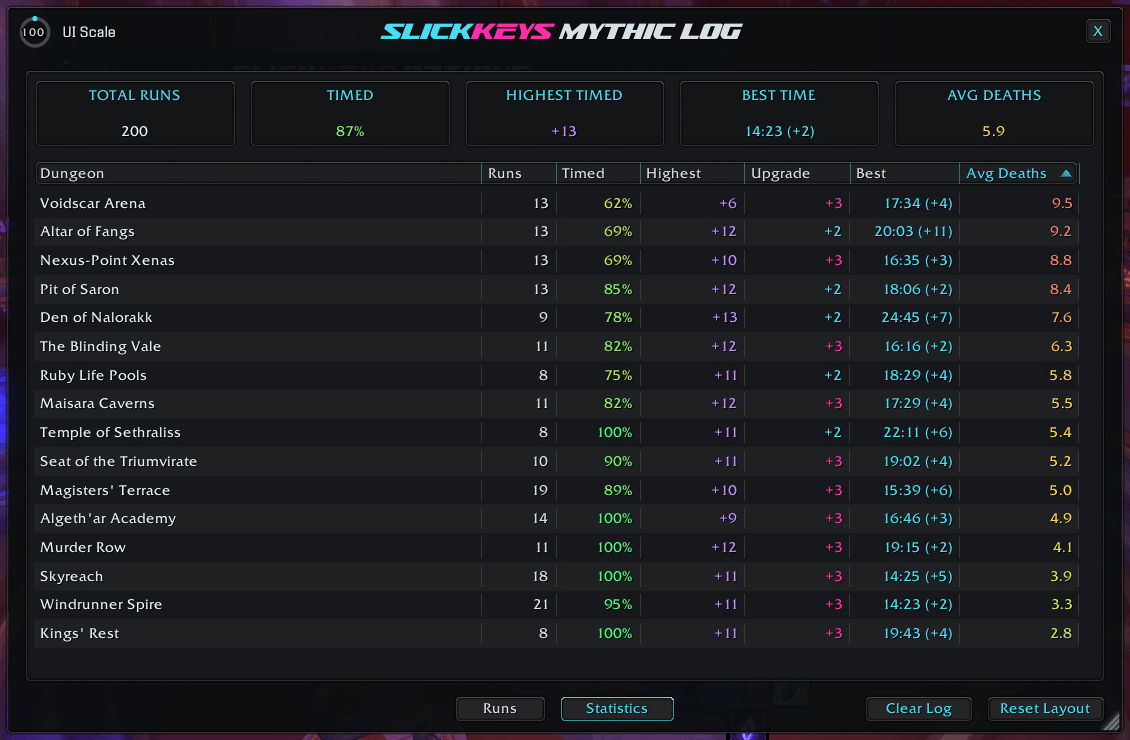
An example of the Mythic+ Statistics Log window that tracks all your Mythic+ Key statistics.
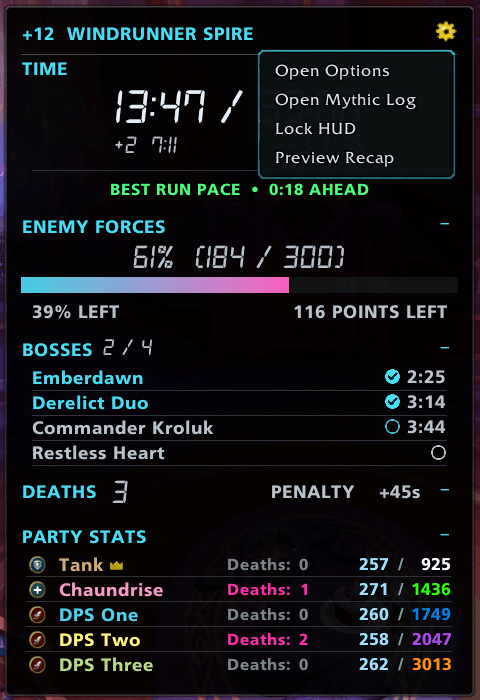
An example of the Preview HUD Options Menu .
Description
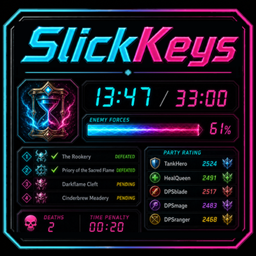
SlickKeys
A polished, customizable dungeon HUD for World of Warcraft
Mythic+ timing, enemy forces, boss progress, party information, Group Check, untimed dungeons, run recaps, and detailed history—without turning your screen into a spreadsheet.


Your dungeon run, at a glance
SlickKeys replaces Blizzard's objective tracker during Mythic+ with a compact HUD built around the information that actually matters in a run. It stays hidden when it is not needed, appears automatically when a supported run begins, and remains fully configurable through a live preview.
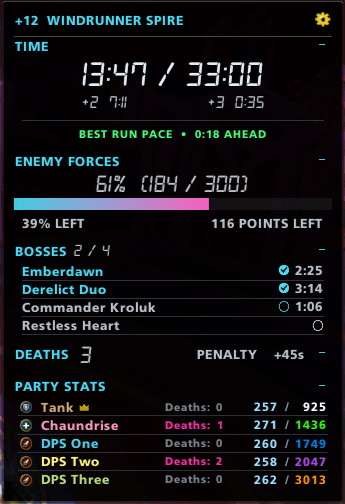
⚡ Live Mythic+ tracking
- Keystone level, dungeon name, elapsed or remaining time, and upgrade thresholds
- Exact enemy forces points, completion percentage, and remaining forces
- Boss progress with live encounter durations and completion effects
- Total deaths, individual player deaths, and Blizzard's current time penalty
- Party roles, class colors, Mythic+ ratings, and item levels
- Pace comparison against your fastest recorded run for the same dungeon and key level
- Automatic replacement of Blizzard's objective tracker while the HUD is active
🏁 A better finish line
When the run ends, SlickKeys keeps the result visible until you leave the instance and provides a focused recap containing:
- Final completion result and upgrade level
- Personal-best comparison
- Death count and accumulated penalty
- Rating gain
- Boss durations
- Retained party statistics
Use the HUD menu to move between the concise recap and complete run details.
Know the group before the key starts
The separate Group Check gives you a quick read on the forming party and automatically hands off when the dungeon begins.
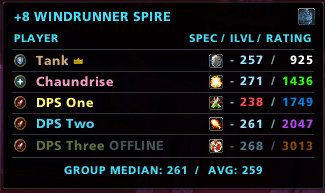
- Current roles and specializations
- Item levels and Mythic+ ratings
- Group median and average item level
- Configurable low-item-level warnings
- Clear offline-member status
- Listed-dungeon teleport with Blizzard's native tooltip and learned status
Not every dungeon needs a keystone
Enable the Untimed Dungeon HUD for Normal, Heroic, Timewalking, and non-keystone Mythic dungeons.
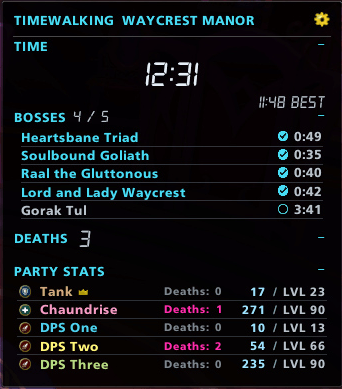
It provides a simplified run display with boss times, party information, saved best times, reload persistence, and support for legacy multi-wing dungeons. Active untimed runs are saved per character and automatically reset after ten minutes outside the dungeon.
Your Mythic+ history, remembered
Every completed Mythic+ run can be recorded in an account-wide, searchable history.
📖 Mythic Log
- Search recorded runs across characters
- Sort, resize, reorder, show, or hide columns
- Review party members, deaths, ratings, timings, and run details
- Filter with class-colored character names and optional realm display
📊 Statistics
- Overall and per-dungeon run totals
- Timed-run percentages
- Highest completed keys and upgrade results
- Best completion times
- Average deaths
- Configurable columns, sorting, and scrolling
Make it yours
SlickKeys includes extensive controls without sacrificing its compact footprint.
- Layout, section visibility, dimensions, and UI scaling
- Elapsed or countdown timer behavior
- Enemy-forces bar styles, themes, and colors
- Fonts, text colors, and character-realm display
- Smooth section collapsing and configurable urgency effects
- Boss-completion and rolling death-number animations
- Minimap access and HUD locking
- Complete appearance profiles with import and export
- Editable Mythic+ and untimed chat-summary templates with live previews, test buttons, and selectable output routing
Use /sk preview at any time to configure the HUD outside a dungeon and see changes live.
Commands
| Command | Action |
|---|---|
/slickkeys or /sk |
Open SlickKeys options |
/sk preview |
Show or hide the preview HUD |
/sk start |
Manually start a supported untimed dungeon run |
/sk lock |
Lock the HUD |
/sk unlock |
Unlock the HUD for positioning |
/sk reset |
Reset the HUD position |
Latest update
1.4.7 - 2026-10-14
- Fixed: Group Check, HUD Party Stats, and Mythic Log Run Details now retain specialization information on WoW 12.1.5.
- Fixed: Mythic+ recap, chat summary, and Mythic Log now use Blizzard's reported keystone upgrade result.
- Fixed: Group Check teleport button now retries spell data when its icon is not yet available.
- Fixed: Mythic+ HUD death total and penalty no longer increase incorrectly when Blizzard temporarily supplies no counter data.
Support and more from WizardsPotion
Like knobs to turn, buttons to push, and pretty lights on things?
Explore the rest of the Slick Family of World of Warcraft addons from WizardsPotion.
If SlickKeys makes your dungeon runs a little smoother, you can help support its continued development by buying me a coffee. Every bit is appreciated, but never expected.

SlickKeys Team