SlickDeath
- By
SlickDeath is a lightweight, customizable death recap HUD that clearly shows what killed you, who dealt it, the damage and overkill, optional danger indicators, and expandable details for the events leading up to your death.
![An example of the Appearance [Layout] options and the HUD preview.](https://media.forgecdn.net/attachments/2011/867/appearance-layout-png.png)
An example of the Appearance [Layout] options and the HUD preview.
![An example of the Appearance [Text] options and the HUD preview.](https://media.forgecdn.net/attachments/2011/869/appearance-text-png.png)
An example of the Appearance [Text] options and the HUD preview.
![An example of the Appearance [Colors] options and the HUD preview.](https://media.forgecdn.net/attachments/2011/866/appearance-colors-png.png)
An example of the Appearance [Colors] options and the HUD preview.
![An example of the Appearance [Profiles] options and the HUD preview.](https://media.forgecdn.net/attachments/2011/868/appearance-profiles-png.png)
An example of the Appearance [Profiles] options and the HUD preview.
![An example of the Chat Output [General] options and the HUD preview.](https://media.forgecdn.net/attachments/2011/870/chatoutput-options-png.png)
An example of the Chat Output [General] options and the HUD preview.
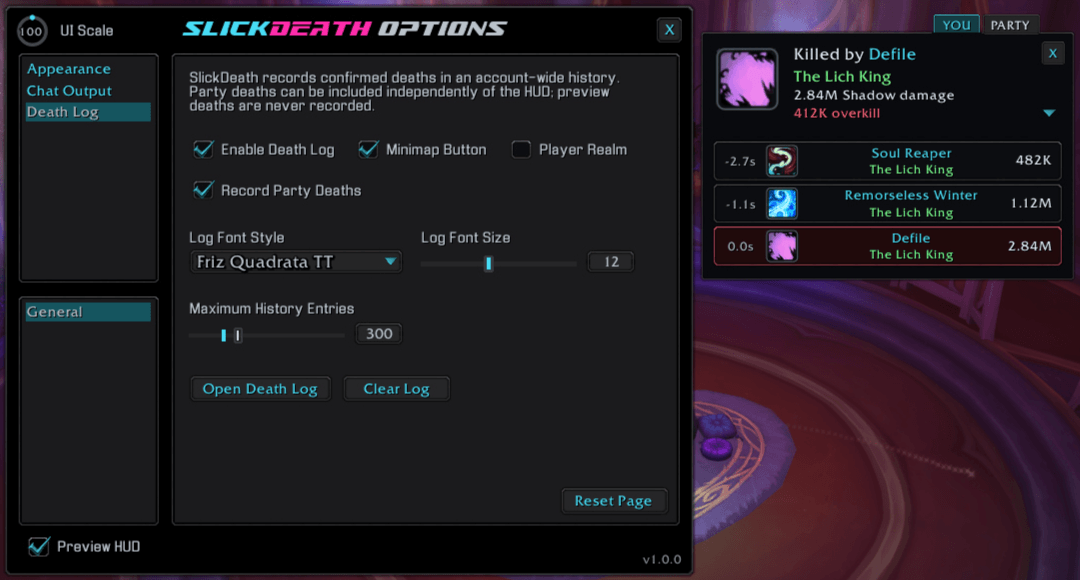
![An example of the Death Log [General] options and the HUD preview.](https://media.forgecdn.net/attachments/2011/872/deathlog-options-png.png)
An example of the Death Log [General] options and the HUD preview.
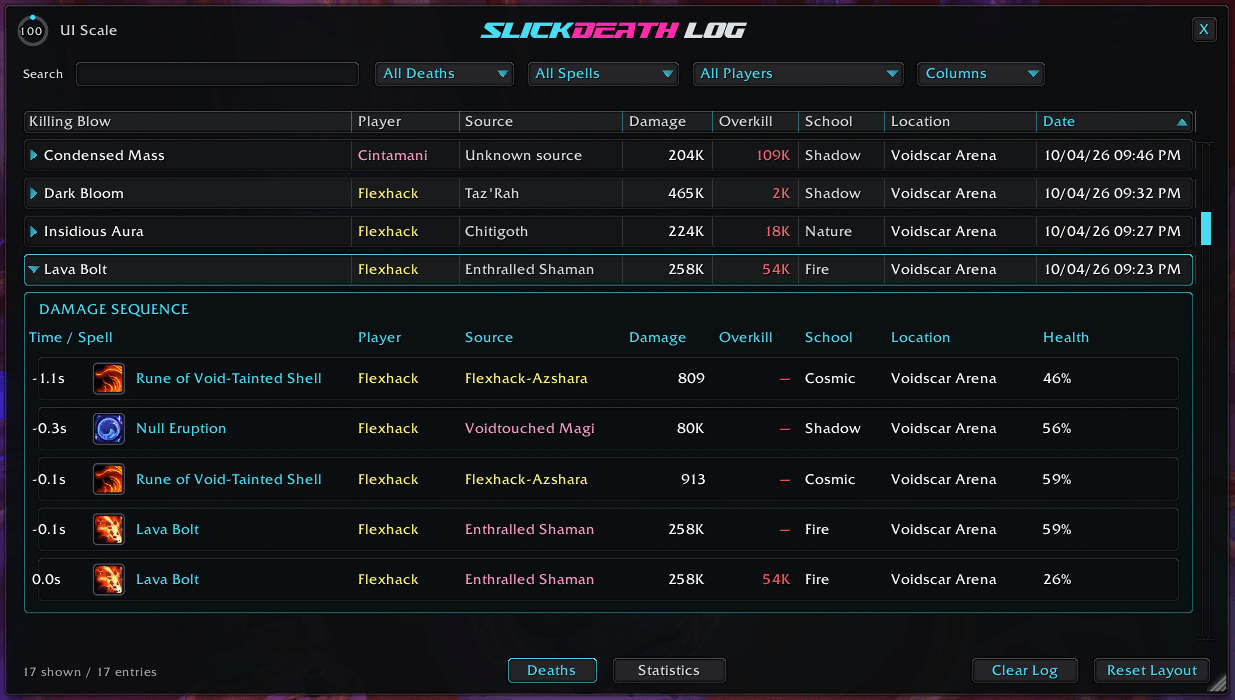
An example of the Death Log's expandable details.
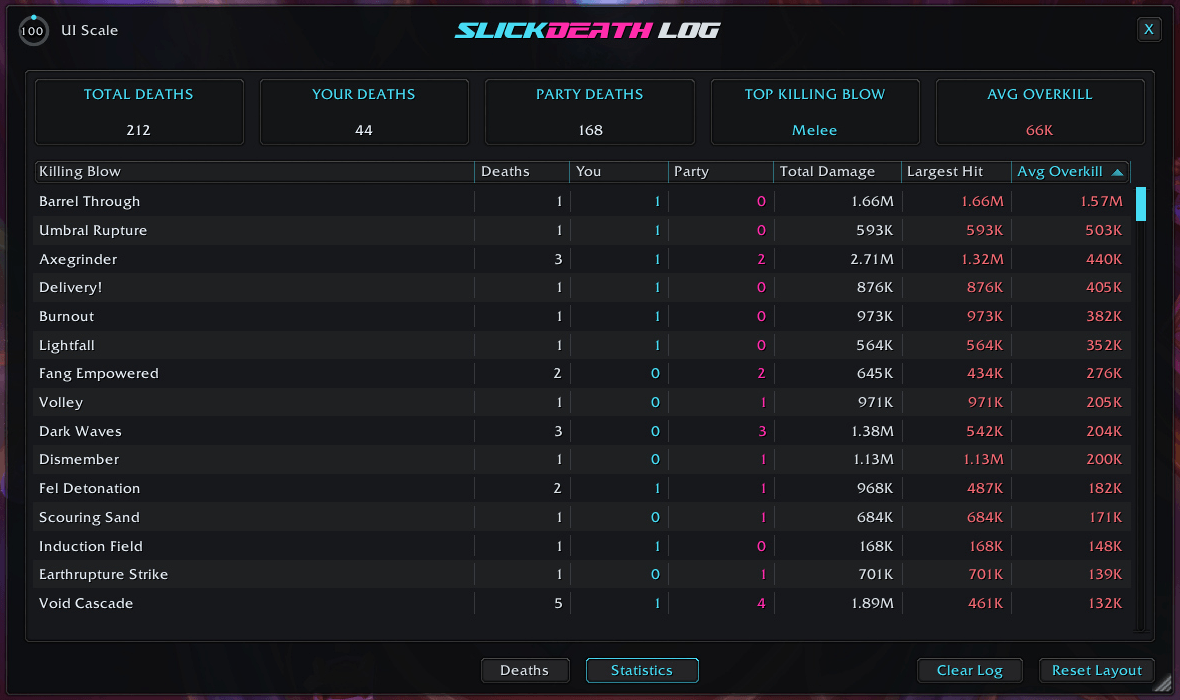
An example of the Death Log's statistics page.
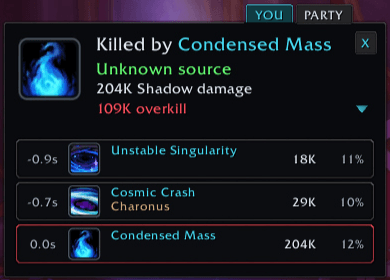
An example of the HUD info when you are killed.
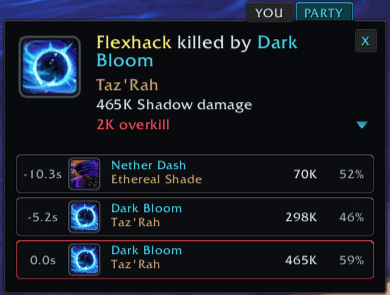
An example of the HUD info when a party member is killed.
Description
SlickDeath
See what killed you without digging through the combat log.
SlickDeath gives you a compact death recap, optional party-member recaps, and a searchable death history. See the killing spell, enemy, damage, and events leading up to a death, with the details Blizzard makes available.
A note about party-member death details: Your own death recap normally appears immediately with the available details. For party members, Blizzard can mark some combat data as “secret” during combat, temporarily hiding the killing spell, enemy, or damage values. These details usually resolve after combat ends, and SlickDeath updates the HUD and log as they become available. SlickDeath never guesses missing information.


Understand your death at a glance
The recap HUD puts the killing blow front and center, with an expandable breakdown of the damage leading up to your death.
⚡ A focused death recap
- Killing spell or damaging effect and its icon
- Enemy responsible, when available
- Killing-hit damage, damage school, and overkill
- One to five expanded detail rows showing time before death, spell, source, and damage
- Spell tooltips when hovering over HUD icons
- Automatic display after death and optional closing when you revive
Keep the HUD collapsed, open it expanded, or let it remember your last chosen state. A built-in preview lets you position and customize it without needing to die first.
See what happened to your party
Enable party death recaps to see who died and what killed them. The YOU and PARTY tabs let you switch between your latest personal recap and the latest party-member recap retained during the session.
Party HUD notifications, party death logging, and party chat output have separate controls, so you can keep the parts you want.
Available details can vary. If a party recap is initially unavailable, SlickDeath can update the HUD and log when readable details arrive. Missing enemy names are shown as unknown rather than guessed.
Your death history, remembered
The account-wide Death Log keeps confirmed personal deaths and, optionally, party-member deaths together in a searchable history.
📖 Death Log
- Search recorded deaths and filter by personal or party deaths, spell, and player
- Review killing blows, enemies, damage, overkill, damage schools, locations, and dates
- Expand a death to inspect its recorded damage sequence
- Hover over killing-blow entries and damage-sequence icons for spell tooltips
- Sort, resize, reorder, show, or hide columns
- Class-colored player names and optional realm display
- Adjustable window scale, fonts, and history limit
- Optional minimap button for quick access
Party deaths can be recorded without enabling party HUD notifications. Preview deaths are never added to your history.
📊 Statistics
See the patterns across your saved death history:
- Total deaths, your deaths, and party deaths
- Most frequent available killing blow and average overkill
- Per-spell death counts split between you and party members
- Total killing-hit damage, largest hit, and average overkill for each spell
- Sortable, configurable statistics columns
Put death summaries where you want them
Choose chat output for your deaths, party-member deaths, both, or neither. Separate message templates let you decide how each summary reads.
- Automatic channel selection, Party, Instance, Say, Yell, or Local Only
- Message placeholders for player, spell, enemy, damage, overkill, school, and zone
- Live message examples and separate personal and party test buttons
Group-chat restrictions still apply. Blocked messages are skipped instead of queued for a flood of announcements after combat or at the end of a dungeon. Details that resolve later can still update the HUD and log without a delayed chat announcement.
Make it yours
SlickDeath uses the familiar Slick Family options layout, with a live HUD preview while you adjust its appearance.
📐 Layout and behavior
- Move the HUD and adjust its scale
- Choose automatic personal and party recap display
- Close your recap automatically when you revive
- Choose Collapsed, Expanded, or Remember for the default detail state
- Display one to five expanded detail rows
- Adjust the options-panel scale
🔤 Text
Choose separate font styles and sizes for label text, enemy names, damage and overkill, and detail rows. Customize label, enemy-name, and overkill colors alongside those controls.
🎨 Colors
Customize spell accents, detail timers, background, and border colors. Background and border opacity controls use clear percentage values.
💾 Profiles
Save and load named settings profiles, create new ones, and import or export profiles to share your setup. Settings pages also include a Reset Page button, excluding Profiles.
Use /slickdeath to open the options panel. Open the Death Log from its minimap button or the Death Log options page.
Commands
| Command | Action |
|---|---|
/slickdeath |
Open or close the SlickDeath options panel |
/slickdeath test |
Show the preview recap with sample damage events |
/slickdeath show |
Retrieve and show your latest available death recap |
/slickdeath recap |
Retrieve and show your latest available death recap |
/slickdeath hide |
Hide the recap HUD |
/slickdeath version |
Print the loaded addon version |
/slickdeath debug |
Toggle local diagnostic messages; resets on reload |
Latest update
1.0.1 - 2026-10-04
- New: Death HUD and Death Log Damage Sequence now show health remaining after each hit, with hover explanations and unavailable values shown as a dash.
- New: Options Appearance Colors adds Row Color and Row Opacity controls for HUD breakdown rows and expanded Death Log details.
- New: Options Appearance Text adds Use Class Colors for HUD and expanded Death Log source names, with Enemy Name Color as the fallback and its swatch dimmed while enabled.
- New: Options Appearance Layout adds HUD Width beside HUD Scale, adjustable from 380 to 1000 pixels, with Death Details Default on the row below.
- Improved: Death HUD breakdown rows now left-align the spell above the source beside its icon, with separate damage and health columns.
- Improved: Death Log Damage Sequence now aligns spell, player, source, damage, overkill, school, and location with the main row columns, adds time and framed spell icons, and replaces date with health remaining.
- Improved: Preview HUD now uses Season 2 boss Lithiel Cinderfury from Murder Row, with Chaos Bolt, Fingers of Gul'dan, Malefic Wave, and Warlock coloring when Use Class Colors is enabled.
- Improved: Options Appearance Text and Death Log Settings now use a shared 9-30 font-size range, with breakdown rows growing to accommodate larger text.
- Improved: Death Log Source column now replaces the Enemy heading to accurately describe mob, player, and other reported damage sources.
- Improved: Death Log Damage Sequence now class-colors player names, retains available enemy class colors for later viewing, and shows 29-pixel icons without increasing row height.
Support and more from WizardsPotion
Like knobs to turn, buttons to push, and pretty lights on things?
Explore the rest of the Slick Family of World of Warcraft addons from WizardsPotion.
If SlickDeath makes understanding your deaths quicker and less frustrating, you can help support its continued development by buying me a coffee. Every bit is appreciated, but never expected.

The SlickDeath Team