Shieldwall
- By
A group and raid addon for every role on WoW: Forever: a buff and debuff board that works in combat, a threat meter, threat-coloured nameplates, a tank’s mitigation window, gear sets, and a raid check of buffs and cooldowns.
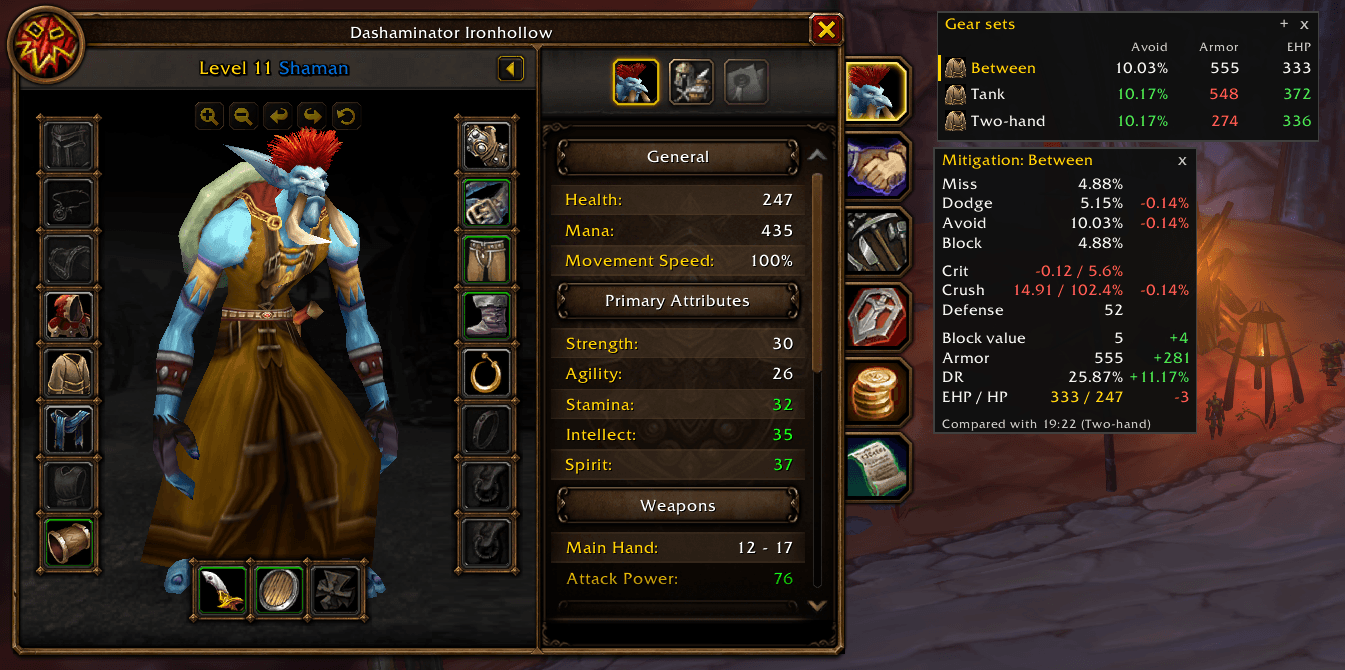
Click a set to put it on, or /gs and its name in a macro; beside each, its numbers from last time, green or red against what you wear. Below, the mitigation window after a swap, each row's gain or loss. Taken at level 11, so crit is short.
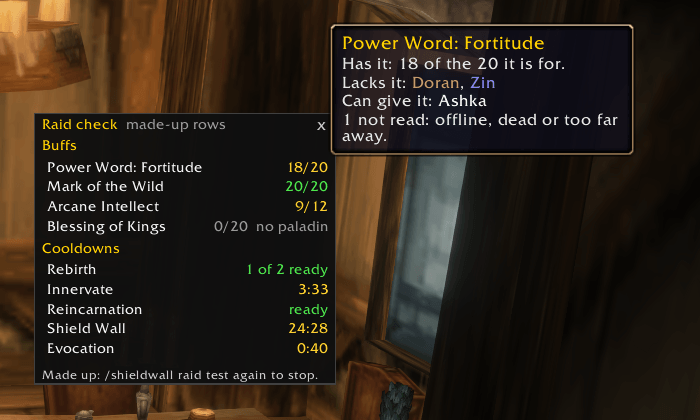
Each buff your group can give, how many who need it have it, and on the tooltip who lacks it and who can cast it. Each key cooldown, how many are ready or when the next one is. Shown with the made-up rows of /shieldwall raid test.
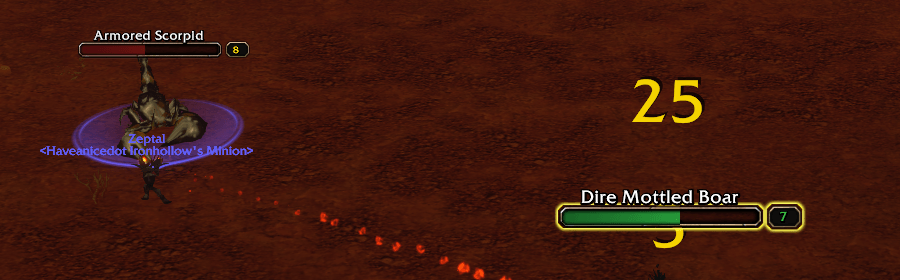
With the tanking colours: green is a mob on you, red one your pet holds with little threat from you. Between them come yellow (on you, but only just) and orange (close to pulling). Every colour can be changed; the rest of the plate is Blizzard's.
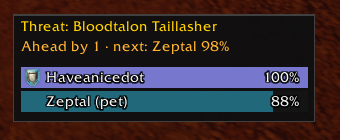
Who is on your target, sorted, with whoever holds it marked. One line says what matters to you: here you hold it, one point ahead of your pet at 98%, so the line has turned amber. Not holding it, it says how close you are to pulling.
Description
On other versions of WoW Classic, a raider's buff tracking, threat meter and tank numbers come from addons that read every aura and the combat log. Forever lets an addon do neither in a fight. Shieldwall is six tools built on what Forever does allow, in one addon for tanks, healers and damage dealers alike.
What it does
- A board of your group's buffs and debuffs that keeps working in combat (
/ga). One row for each member: you alone, a party, or a raid of up to 40. A row has up to four slots of icons, and each slot shows one kind of aura: all debuffs, your own buffs and HoTs, everyone's buffs, the game's raid categories, or a filter you type. As installed, slot 1 is debuffs with the edge coloured by dispel type and slot 2 is everyone's buffs. Icons carry the time left as a swipe, stack counts, and countdown numbers if you want them. The game does the reading and the drawing: Shieldwall builds Blizzard's own aura containers out of combat and decides only where they go and how they look, which is why the board does not go blank when a fight starts. - A threat meter (
/tw). While your target is in combat, a bar for each member of your group, and each pet, that is on its threat list (ten at most), sorted, in class colours, with whoever holds the mob marked. A line above the bars says what matters to you: holding the mob, "Ahead by 137 · next: Bob 11%"; not holding it, "You: 13% of Grom". The line is green, amber from 70% of pulling and red from 90%: your own share when you are not holding the mob, the next person's when you are. - Enemy nameplates coloured by threat (
/shieldwall plates). The health bar of each enemy you are fighting takes one of four colours: it is on you securely, on you but only just, not on you but you are close to pulling, or not on you and you have little threat. There are two sets of colours, one for tanking (green is a mob you hold) and one for everyone else (red is a mob on you). Which set is used follows the role you are assigned in the group, or you set it by hand; alone, or with no role assigned, you get the not-tanking colours until you say otherwise. A change of colour is blended over 0.4 seconds, and the mob you have targeted is shaded by how close you are to pulling it. Shieldwall recolours Blizzard's own plates and draws nothing over them, so it works in combat, and every colour is yours to change. - A tank's mitigation window (
/mit). A small window to read while you change gear: Miss, Dodge, Parry and the three added (Avoid), Block, how far your crit reduction is from what a boss needs (7.16 / 5.6%, green once you cannot be crit), Crush (avoid and block against the 102.4% from which a boss cannot land a crushing blow), Defense, Block value, Armor, what armor takes off a hit (DR), and effective health over health./mit remembersaves the numbers; change your gear and each row shows what it gained or lost. Armor and crits are worked against a boss three levels above you, your own level, or your target's. A row that cannot apply to your character is left out: a bear, which neither parries nor blocks, sees no Parry, Block, Block value or Crush, Block counts only while you carry a shield, and Resilience shows only above 0. Health, spell power, melee hit and spell hit can be switched on, and any row switched off. - Gear sets (
/gs). A small panel with a row for each of your equipment sets: click one and it goes on, or type/gsand its name, which works in a macro. Beside each set are the mitigation numbers it gave you the last time you wore it (Avoid, Armor and EHP to begin with; any of the mitigation window's numbers can be a column), green or red against what you wear now, so you can see what a swap gains or loses before you make it. The sets are the game's own, the ones on the character pane's equipment tab. The + saves everything you are wearing as a new set, shirt and tabard included; right-click a set to save what you are wearing over it, rename it or delete it. A set clicked in a fight goes on the moment the fight ends, and a set with a piece that is not with you is marked in red until the piece is back in your bags. - A raid check (
/shieldwall raid). A small window of your group's buffs and key cooldowns. Each buff the group can give is a row, such as Fortitude 18/20; point at it for who lacks it and who can give it. Arcane Intellect and Blessing of Wisdom are counted on those with mana, Blessing of Might on melee fighters, and a buff nobody in the group can give is left out unless someone has it. Each key cooldown someone in the group has is a row too: Rebirth, Innervate, Tranquility, Challenging Roar, Reincarnation, Mana Tide Totem, Shield Wall, Last Stand, Challenging Shout, Retaliation, Lay on Hands, Divine Intervention, Blessing of Protection, Evocation, Power Infusion and Fear Ward, with how many are ready or when the next one is, and each raider's on the tooltip. Any buff or cooldown can be switched off on its page. - Held to the edge of the screen. Drag the mitigation window, the gear sets panel or the raid check against any edge and it stays there; tick "Fold away" and it tucks off the edge behind a small arrow tab, sliding out when you point at the tab. Each has an x to close it, and its command brings it back. All three are off until you switch them on.
- One settings window (
/shieldwall) with a page for each part, and a "Use global settings" box on each character, on by default: turn it off and that character gets its own copy to change. The board, the meter, the mitigation window and the gear sets panel all move in the edit mode our addons share (/move). - Beside EllesmereUI: with EllesmereUI's Nameplates on, Shieldwall leaves the plates to it and says so once;
/shieldwall plates use ourscolours them anyway.
On first login you will see the board at the left of the screen with your own row, and your nameplates take their
colours in your first fight. The meter appears when your target is in combat. The mitigation window waits for /mit
and the gear sets panel for /gs.
What Forever hides, and what Shieldwall does not do
Auras. Once a fight starts the game refuses every aura read an addon makes, your own buffs included. The board
works because Shieldwall never reads one, and the cost is that it never knows what is on the board. So there are no
missing-buff checks on the board (the raid check does them, out of a fight), no glows or sounds, and no picking a spell by name: a slot shows one of the game's own
categories. One of those, debuffs you can dispel, missed a poison in testing, so the debuff slot shows all debuffs as
installed, and five more presets are marked "unmeasured" in the window until someone has seen what they hold for a
vanilla spell. The icons are the game's own and take their settings when they are made, so icon size, edge, text and
tooltips change at a /reload (the window marks each such setting). The tooltip over an icon is the game's too, and
it shows nothing for some buffs that other players cast on a member.
Threat. Forever gives addons no combat log, so the meter shows what the game reports about your target and
nothing about any other mob. Those numbers were readable in the open world and through a five-man dungeon; a raid has
not been measured, and if they come back hidden there the meter keeps its bars, cannot sort them, and says so. On a
nameplate the game gives an addon the threat state and hides the percentage, so plates have four colours and cannot
be shaded or sorted by how much threat you have; only your target can. A switch draws the hidden percentage as text
beside each bar (off as installed; /shieldwall plates percent on): the number can be drawn but not read, and it is
there as an experiment. Only the colour of the health bar is changed. The rest of the plate is Blizzard's.
A tank's numbers. In combat the game hides your stats from addons. Dodge, parry, block, block value and armor can
still be drawn and go on updating; Miss, Avoid, Crit, Crush, Defense, DR and EHP are worked out, so they keep their
last figure, dimmed, until the fight ends, and /mit remember waits until then too. Miss is an estimate from your
defense, because the game has no call for it, and can be a couple of hundredths off. The window reads no class and no
talents: a talent that lowers crits is not counted. The armor figure has matched the game's formula at levels 7 and
- The crit and crush rows use the classic rules (0.04% a point of defense, 5.6% for a boss, 102.4% for crushes) and have not yet been checked on a tank in raid gear.
Gear sets. In a fight the game will not put an equipment set on at all, not even the set's weapons, which is why a set clicked then waits for the fight to end. You can still change weapons by hand in a fight, as always. A set's numbers are your live stats, which nothing can work out for gear you are not wearing, so they are read each time the set is fully on out of combat, with the buffs and form you had then; a set you have not worn since installing has none yet. A set's icon, and the slots it is to leave alone, are set on the game's own equipment tab.
The raid check. Buffs can be read only out of combat, so the window reads them before a fight and again when it ends, and says so in between. A member out of sight, offline or dead is not counted, and the tooltip says how many. Nobody's cooldowns can be seen from outside, so each raider's own Shieldwall says them to the group on the party's or raid's addon channel, window or not (a box on its page turns that off): a raider without Shieldwall shows as "no Shieldwall". A cooldown used in a fight is counted from the spell's base cooldown and set right when the fight ends, so a talent that shortens it shows only then. Divine Spirit (a talent) and Shadow Protection are off until ticked.
Not in it. Healer frames and click-casting: those are Lifesworn, a separate addon. Raid target marking: Forever forbids an addon to set a marker on its own.
Commands
| Command | |
|---|---|
/shieldwall |
the settings window, a page for each part (also in the addon compartment) |
/shieldwall global on, off |
this character uses the global settings, or its own |
/ga |
the board's own settings: slots, layout, profile |
/ga test [rows] |
fill the board with placeholders to place it; again to stop |
/ga filter <slot> <filter> |
what a slot shows, such as /ga filter 1 HARMFUL |
/ga export, /ga import |
every board setting as one string, to back up or share |
/tw test |
made-up rows, to place the meter; /tw show, /tw hide, /tw resetpos |
/shieldwall plates on, off |
the nameplate colours; /shieldwall plates alone says which role's colours are in use |
/shieldwall plates percent on, off |
the threat percentage as text (an experiment) |
/shieldwall plates use ours, use theirs |
colour the plates beside EllesmereUI's Nameplates, or stand aside for it |
/mit |
show or hide the mitigation window; right-click it for its settings |
/mit remember, /mit forget |
save the numbers to compare with after a gear change, or drop them |
/gs |
show or hide the gear sets panel; right-click its heading for settings |
/gs <name> |
put a set on (or its number in /gs list); works in a macro, with the panel hidden |
/gs new <name>, /gs update <name> |
save what you are wearing as a new set, or over one you have (/gs save <name> does whichever fits) |
/gs rename <old> > <new>, /gs delete <name> |
rename or delete a set; /gs list prints them |
/gs forget, /gs resetpos |
drop the kept numbers; put the panel back where it started |
/shieldwall raid |
show or hide the raid check; right-click it for its settings; /shieldwall raid probe prints what it read |
/shieldwall raid test |
made-up rows, to place the raid check and see each kind of row; again to stop |
/move |
the edit mode: move every piece at once (also /ga unlock, /tw unlock) |
/ga probe, /tw probe, /mit probe and /gs probe print what the game let each part read; a bug report with one
of them is worth ten without. In chat the board answers as GroupAuras and the meter as Threatwise: the two began as
addons of their own.
Requirements
BLib, which the CurseForge app installs with it; keep it updated alongside this addon.
Version support
Built for and used on WoW: Forever. A 0.x: its parts have been seen solo, in a party and in a five-man dungeon, and two guild tanks have run it; nothing in it has been in a raid yet. The beta closed on 24 October and there is no Forever client until launch, so 0.1.3 was tested on retail (12.1.5). Reports are useful, and small ones are the most useful.
Credit
The mitigation window was asked for by a guild tank who missed Tankadin II, a WeakAura he used on another version of WoW Classic. Its rows and their order follow that aura's; none of its code is used. The blended plate colours were a second guild tank's request.
Shieldwall Team