Guildheim
- By
One guild window for WoW: Forever. Officers get the roster's history, a log of who joined, left or changed rank, shared notes, bans, alts and recruitment. Every member gets the raid calendar, sign-ups, reserves, loot rolls and points to manage the guild..
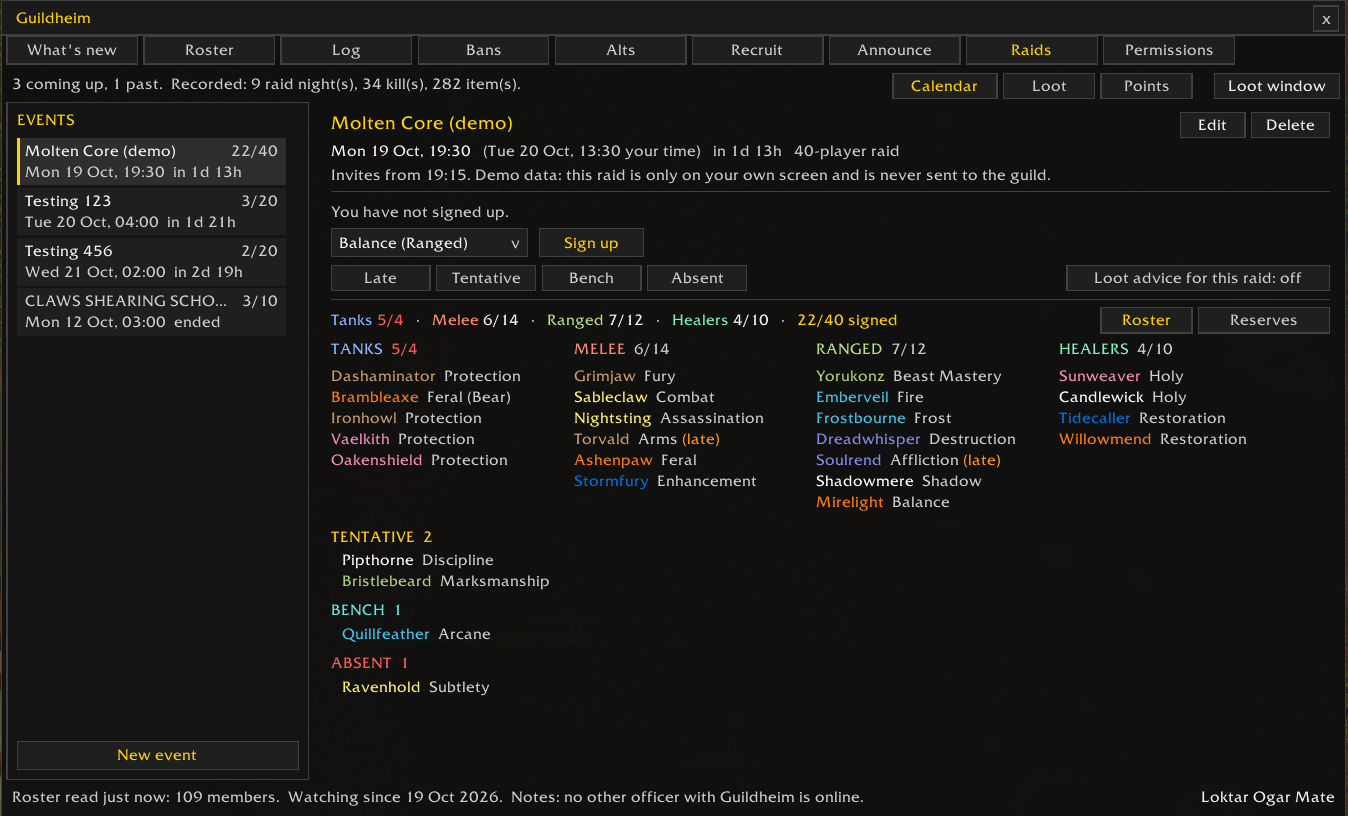
Every raid in one list, and the one you pick laid out by role: tanks, melee, ranged and healers in class colours, counted against the raid’s limits, with tentative, bench and absent below. Times show in realm time with your own beside it.
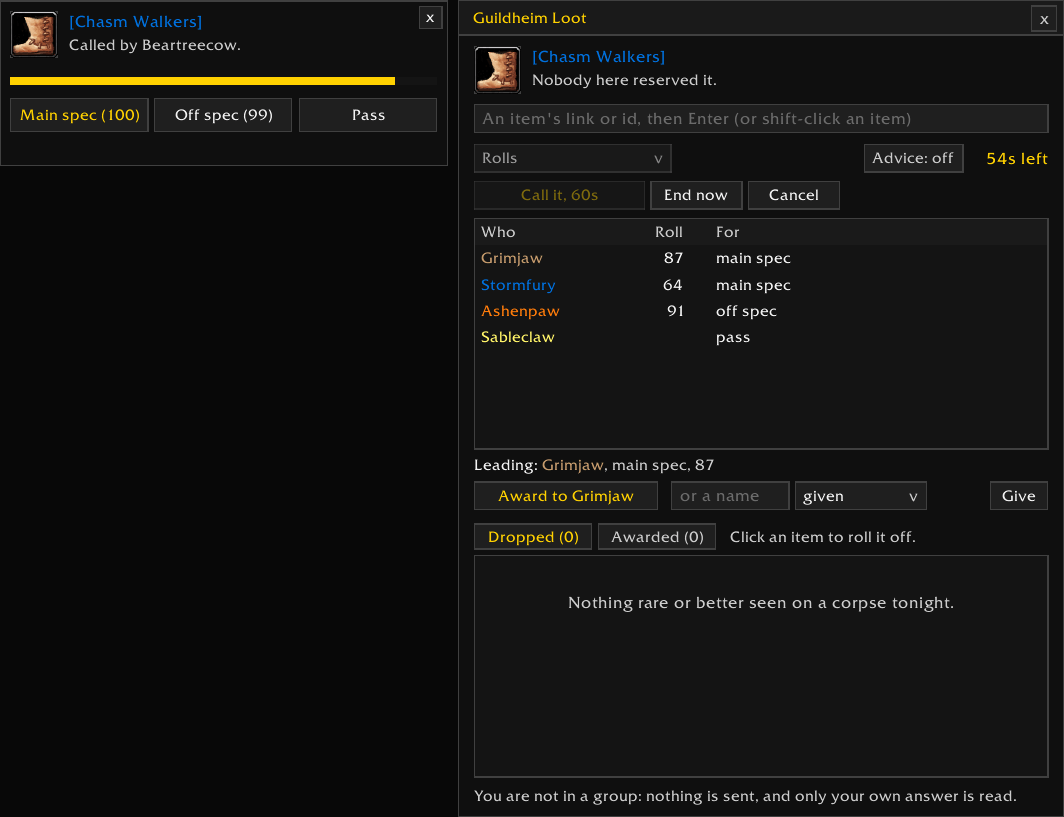
Call a roll on a drop and every raider gets a popup: main spec, off spec or pass. Rolls come into one list in class colours, best first, with the leader named and one click to award it. Your guild picks the way: rolls, rolls with +1, DKP bids, EPGP or LC.
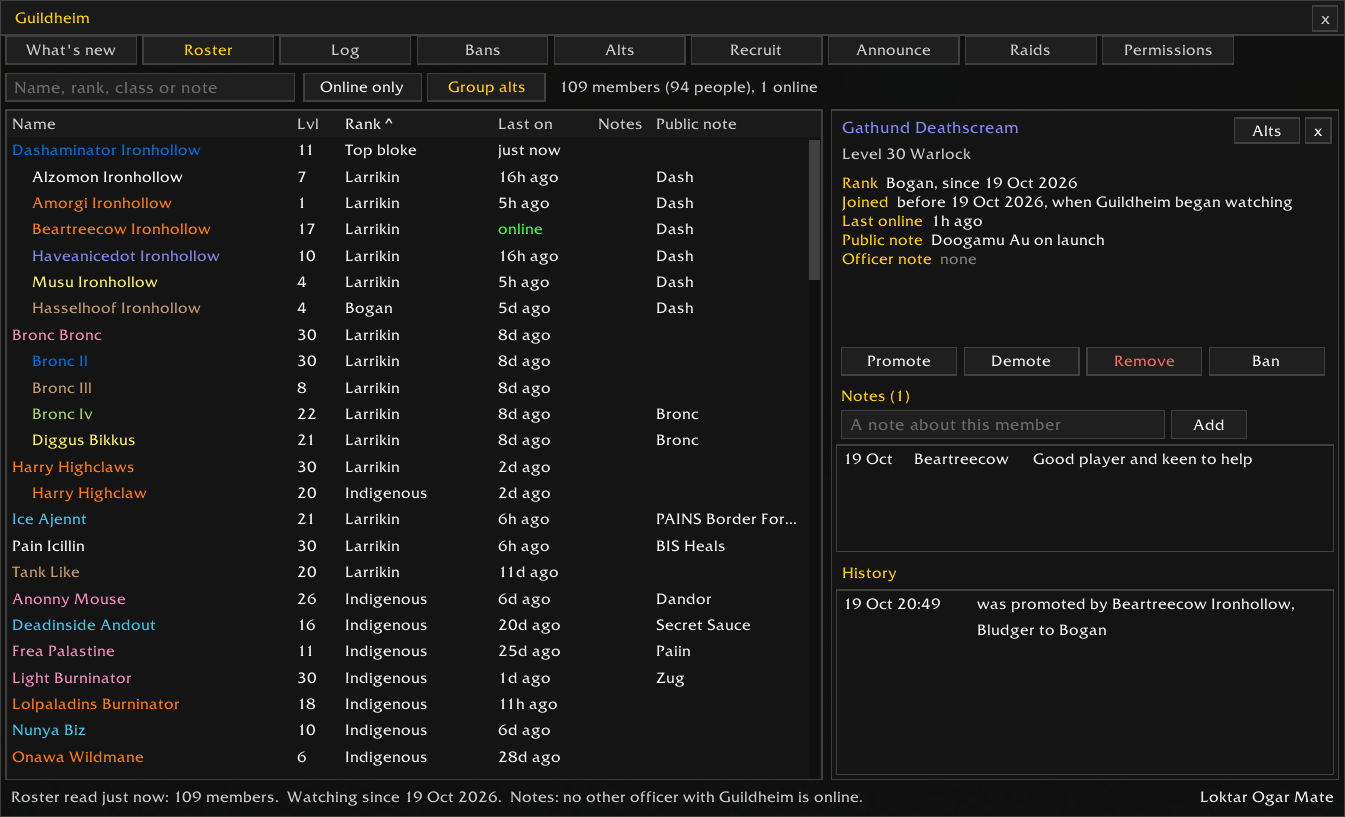
Every member, sorted as you like, with each player's alts grouped under them. Details of their rank and since when, join date, last online, Guildheim's own notes and a history of what changed and who did it, with Promote, Demote, Remove and Ban buttons.
Description
Guildheim is one window for a guild on WoW: Forever, and one addon for the whole guild to install. Which pages you see goes by rank. Officers get the roster written down over time, the guild log, notes, tags, bans, alts, trials, recruiting, announcements and a to-do list. Every member gets the raid calendar and everything that hangs off it: sign-ups, raid teams, groups, reserves, wishlists, the loot popup, points and attendance, and the guild's chat, crafters, gear and attunements.
Each copy keeps its own record and shares it with the guild's other copies over the game's addon channels. There is no website and no server behind it, so it works between the people who have it and nobody else. "Who sees what", below, says what that means for a member without it.
What it does
For officers
- The roster, written down over time. Guildheim reads the roster when the game says it has changed, compares it with the last reading and keeps the difference. Each member has a page: rank and since when, when they joined and who invited them, last online, zone, both of the game's notes, their alts, professions, gear, teams and attendance, and everything recorded about them. A character's page is kept after they leave. The Roster opens on who is online.
- What changed since you last looked. What's new lists who joined, left, changed rank, came back after two weeks away or more, was banned, had a note or a name change, or levelled since you last closed the window, with anything that needs an officer at the top. Guildheim opens there when something is new, and on the Roster otherwise.
- Welcome and congratulate with one click. What's new offers a Welcome button for this week's new members and a Congratulate button for those who reached the level cap (or levels you choose) or a year in the guild: one line of guild chat for all of them, in your guild's own words if you save them. A welcome or "gz" anyone types counts too, so nobody is greeted twice.
- The guild log, searchable, with a switch for each kind of change. Who invited, removed, promoted or demoted someone is read from the game's own guild log, which also fills in up to its last 100 events from before Guildheim was installed. A change found by comparing two readings is dated "between" them, not at a time nobody saw.
- Notes and tags of your own on any member: as many notes as you like, 250 letters each, each with who wrote it and when, kept after the member has gone. A word after a # in a note (#trial, #raider) becomes a tag, and the roster can show only the members with a tag.
- A right-click menu on the roster: their page, a whisper, an invite to your group, their name to copy, a note, a tag, a trial, their alt link, their raid teams and a ban.
- Promote, Demote and Remove on the member's page. Each runs the game's own command from your click, and says why when it is not yours to use. Remove takes two clicks.
- A ban list with reasons. A ban is held against the character where Guildheim has seen them and by name otherwise, so a player who was never in the guild can be banned too. Wherever you meet a banned player, their tooltip says so in red, with the reason. One who turns up on the roster is marked in the log and kept under "Needs an officer" until they are removed or the ban is lifted.
- Mains and alts. Guildheim suggests links from what the guild already shows (the same note on several members, a note that says "alt of X", a shared surname), each with its reason, and an officer accepts or refuses each with a click. The roster can then be grouped by person, alts under their main.
- Trials, or none. A 7, 14 or 30-day trial for a new member, sponsored by whoever invited them; when it is up it waits under "Needs an officer" until someone passes them, gives them longer or ends it. A guild without trials switches them off on the Permissions page.
- Recruiting. One search finds players without a guild in a level range, in your zone or anywhere. A list keeps who was found, whispered, invited, joined or said no, so two officers do not ask the same player. The whisper is in your own words, and a banned player is never offered. Recruiting results shows, for each officer, how many they invited and how many stayed.
- Sweep out the inactive. Away 30+ days lists the members away that long, the longest first, going by the player, so an alt is left out while another of their characters has been on.
- Saved announcements, up to four lines of chat each, said in guild or officer chat with a click. Give one an interval and What's new says when it is due.
- An officers' to-do list, shared between the officers: what needs doing, for whom and by when. Anything due is listed on What's new.
- Rank permissions. The guild leader chooses the lowest rank for the officer pages, recruiting and announcing, making raid events, signing up, seeing raid reports and loot, and trials, and can name a rank that may change them. Every member can read the page, and a page that is not for your rank is not drawn.
- Guildheim in place of the game's guild window, if you want it: the guild key and the guild button can open Guildheim (off until you switch it on; Shift gets the game's own window). For everyone else, the game's guild window has a Guildheim button.
For every member: the guild
- The guild's chat, back through its history. The Chat tab reads guild chat (and officer chat, if you may see it) as the server keeps it, newest first, a hundred older lines at a click, with a search and a box to say something.
- Who can make it. An item's tooltip names the guild members who make it, those online first. The Crafting tab lists each profession with who has it and how high, the professions nobody has, and a search by the item's name.
- Gear and missing enchants. The Gear view lists everyone's average item level and the slots that should be enchanted and are not, the most missing first.
- Attunements and keys. How far each member is along Onyxia's attunement, and who holds the keys to Upper Blackrock Spire, Blackrock Depths, Scholomance, Stratholme, Dire Maul and Maraudon. A raid named for Onyxia says who signed up and is not attuned; a run named for a keyed dungeon says who brings the key.
- Rally the guild. For a world boss or a meeting place: everyone with Guildheim gets a popup with a sound and an On my way button, and the same click says it in guild chat for those without.
- Alliances with other guilds. An officer makes an alliance and gives its code to another guild's officer. Allied members share an alliance chat channel and a bulletin, allied crafters show on tooltips, and a raid can be opened to the alliance for its members to sign up.
For every member: raids
- The raid calendar, in the same window. An event has a name, a date and time picked from a month grid, a size (40, 20, 10 or 5, with a limit for each role), a lowest level and a note. Times are shown in realm time, with your own beside it when the two differ. Whoever may make raid events can change one after it is made without losing its sign-ups.
- Asked once, on your main. A new raid pops up for each member with Sign up, Tentative and Can't come, once per player, not once per character. An hour before it starts, and when it starts, everyone signed up gets a raid warning.
- Sign-ups by spec: Sign up, Late, Tentative, Bench or Absent. The roster is drawn in four columns (tanks, melee, ranged, healers) in class colours, with each role counted against its limit.
- Raid teams. A guild can run several teams, each with its own colour, members, raids, points, loot system and attendance rules. A team's raid asks only its members. A team's leaders run it without being officers: its members, its raids and its points.
- Groups for the night. Lay out the raid's groups before it: drag names in, or Place the rest to fill them tanks first. On the night, Invite next invites one raider a click, and Put them in their groups moves the whole raid to match.
- Reserves. An event can allow each raider a number of reserved items, picked from what raids have seen drop or by link or item id, or imported from softres.it's export. Reserves close when the raid begins, and an item's tooltip says who reserved it.
- Wishlists. Keep a list of the items you want. An item's tooltip says who in the guild wishlisted it, and the loot window marks them.
- The loot window, for the group's leader, a raid assistant or the master looter. Put an item in, press Call it, and the answers arrive in one list with whoever should have it at the top. Award writes it down and says it in group chat. Every raider with Guildheim answers in a small popup. A reserved item goes to its reservers first, and two raiders level on the loot system's own terms are settled in your guild's order: reserved, wishlisted, fewest items this week, best attendance.
- Handed over. When an awarded item is traded to its winner, Guildheim marks it handed over, and whoever holds an item that is someone else's is told so. A disenchanter can be picked once for the night.
- Five loot systems, in the table below, or Off for a guild that hands out loot with another addon: Guildheim then calls no rolls but still records what dropped and who got it.
- Loot advice, switched on for an event: the loot master sees what each raider wears in the item's slot, whether the item suits them and what they would gain. It is off unless turned on, and raiders are told when it is on.
- Points. DKP and EPGP are kept as a ledger: every change with who made it and why, and a balance is what the lines add up to. Points can be given for each boss killed in a calendar raid, and new raiders can start with a set amount.
- Attendance. Each calendar raid scores every raider in the group, less a penalty for arriving late or leaving early, by rules your guild sets. It counts the player, not the character, and holds nobody to a raid from before they joined or reached its level. The Points view shows each raider's attendance beside the items they have had this month.
- Who got what. The Loot view lists every item somebody received, night by night, with the boss and how it was decided. A recorder that runs by itself in dungeons and raids fills it in.
- Posts for Discord. A raid's sign-ups, a night's loot, a night's attendance or the guild's week as text ready to paste into your Discord, with the raid's time shown in each reader's own time zone. Nothing is sent anywhere: you paste it yourself.
The five loot systems
| System | A raider answers | Who is first |
|---|---|---|
| Rolls | Main spec, Off spec or Pass; the button makes the game's own /roll, so the number is the server's |
main spec before off spec, then the higher roll |
| Rolls with +1 | the same | among main spec rolls, whoever has won least main spec tonight, then the roll |
| DKP | a bid in points, which can be raised while the roll is open, or Pass | the highest bid the bidder can pay; the winner pays it |
| EPGP | Main spec, Off spec or Pass | by priority, effort points over gear points; the item's gear points go onto the winner |
| Loot council | Main spec, Off spec or Pass | by the votes of the leader, the assistants and the master looter, who are shown what each raider was given this month and how many kills they were at |
Who sees what
Guildheim talks only to other copies of Guildheim.
- Between officers: notes and their tags, bans, alt links, trials, the recruit list, saved announcements and the to-do list travel on the officers' addon channel, which the game gives only to ranks with officer chat. The guild log and the roster's history do not travel: each officer's copy has watched since the day it was installed.
- To the whole guild: rank permissions, the calendar, sign-ups, teams, groups, reserves, wishlists, points, attendance rules and recorded raid nights, and each member's own professions, gear and attunements, travel on the guild's addon channel to every member who has Guildheim.
- Within an alliance: alliance chat, the bulletin, crafters and raids opened to it, on the alliance's own chat channel.
- Within a group: a roll's call, the answers, the council's votes and the award travel on the party or raid channel.
- Only between copies that are online together. A copy asks the guild for what it is missing when it logs in, gets it from whoever is on, and offers what it holds in return.
- Nobody is inspected. Gear, professions, attunements and wishlists come from each member's own copy, so only members running Guildheim are listed.
- A member without Guildheim sees none of that: no calendar, no popups, no points. What reaches them is ordinary chat: an announcement, a welcome or a rally in guild chat, and in a group the line that calls a roll and the line that names who got the item. Under Rolls and Rolls with +1 they take part by typing
/roll 100for main spec or/roll 99for off spec, as the call tells them. The loot master can give them an item by name and enter a reserve for them. They cannot sign up for a raid. What they were at and what they looted is still written down by the recorders of those who have it. - Outside a guild only the Raids tab is drawn, and the calendar is your own.
What it does not do, and what Forever does not allow
- Nothing happens by itself. On Forever a /who, a whisper, a guild invite and a line of chat each need a key press or a click behind them. So there is no search running in the background, no whisper to everyone found, no invite queue and no announcement on a schedule: each is one click, for one player or one message. Invite next is one click per raider.
- It cannot write the game's public or officer notes. It shows them and logs their changes. The notes you write in Guildheim are its own.
- It cannot change a rank or remove a member itself. The buttons run the game's own commands under your click, and are off during a fight.
- It cannot stop a banned player being invited. It warns on their tooltip, and tells the officers when one is on the roster.
- It does not hand the item over. An award is a record and a line in chat; the item changes hands by master loot or a trade, which Guildheim notices.
- The list of things to reserve is short at first. Forever has no dungeon journal for an addon to read, so the list is what raids have seen drop: a starter list from the author's own raids, then whatever your guild's raids see. Anything else is reserved by link or id, or imported from softres.it.
- In a boss fight the game locks chat and addon messages. A roll cannot be called until the fight ends, and an award made during one is kept and sent afterwards.
- Permissions are a courtesy between copies of the addon, not a lock. What the server holds a rank to is the game's own guild control. The officers' channel is the exception: the game itself keeps it to ranks with officer chat.
- Points belong to a character. An alt's points are not counted with its main's. Attendance and teams go by the player.
- Nothing leaves the game. Posts for Discord are text you paste yourself, and softres.it's export is pasted in.
Commands
| Command | |
|---|---|
/heim (or /guildheim) |
open or close the window |
/heim raid (or /rm) |
the window on its Raids page |
/heim chat |
the Chat page |
/heim crafters |
the Crafting page; /heim crafters off takes the line off tooltips |
/heim wish <item> |
put an item on your wishlist; /heim wishes lists the guild's |
/heim wishtip always, shift or never |
when tooltips say who wishlisted an item |
/heim alliance |
the alliance window |
/heim rally <what for> |
rally the guild; /heim rallies off stops the popups for you |
/heim todo [what] |
the officers' to-do list, or a new to-do |
/heim congrats <levels> |
the levels the Congratulate button is for; /heim congrats cap for the level cap |
/heim guildkey on or off |
the guild key and the guild button open Guildheim (officers) |
/heim log [n] |
the last guild log lines, in chat |
/heim inactive [days] |
members away that long or longer |
/heim ranks |
who may do what in this guild, and whether the settings have reached you |
/heim sync |
who your notes are in step with |
/heim scan |
read the roster now |
/rm new <date> <time> <title> |
add an event from chat |
/rm teams |
the Raid teams window |
/rm main |
this character is your main, for raid popups; /rm main auto lets Guildheim choose |
/rm asks off, /rm reminders off |
no popup for new raids, no raid warning before them |
/rm discord |
the picked raid's post for Discord; /rm discord loot, attendance or week |
/rm roll |
the loot window; /rm roll <item> opens it with that item in it |
/rm roll mode |
the loot system for tonight's rolls |
/rm roll set |
how long a roll runs, the two roll ranges, the popup, the lines in group chat |
/rm roll sr <name> <item> |
a reserve entered by hand for tonight |
/rm points |
the Points view; /rm points <name> for one character |
/rm loot, /rm raids, /rm who <name> |
recorded loot, raid nights, and one character's raids and loot, in chat |
/rm time realm or local |
which clock leads |
/rm names full, first or initial |
how much of a surname to show |
/rm export, /rm import |
the calendar as text, out and in |
/rm demo |
a made-up raid with 26 sign-ups on your own calendar, to see the window filled; other copies refuse it |
/rm demo loot |
a made-up roll with four answers, to see the loot window without a raid; nothing is sent or written down |
/rm record |
turn the recorder off, or change what it keeps |
Requirements
BLib 1.11.4 or later, which CurseForge installs with it.
Guildheim is as useful as the number of guild members who install it: each member who wants the calendar needs a copy. The guild leader does not have to do anything for it to work. Until the leader sets the Permissions page, the officer pages and raid events belong to the ranks with officer chat, and sign-ups and raid reports to everyone.
Version support
Built for and used on WoW: Forever. Not tested on retail. Everything in 0.2 was seen working on the Forever beta. The officers' pages have been used in a guild of about a hundred members. Seen working between players' copies: the calendar, sign-ups, reserves, permissions and the points ledger; rolls called by an assistant and answered on three screens, and a DKP award; wishlists, gear, crafters, an awarded item handed over in a trade, and the to-do list; a team's raid asking only its members, groups and Invite next; alliance chat both ways, the bulletin, a raid opened to an alliance, and leaving it. The beta closed before these could be tried with other players: the loot council and loot advice on other screens, boss points in a full raid, a tie settled by the guild's order, a rally on other screens, a team leader who is not an officer, and crafters and raids between two allied guilds. Reports are welcome on the Discord.
Guildheim Team